Gallery Home
Visual Modeling
UML 2 Diagrams
General UML Notations
Use Case Modeling
Requirements Capturing
Data Modeling
Object Relational Mapping
EJB Support
Documentation Generation
Code Engineering
IDE Integration
Interoperability
Plug-in
User Interface
Cross-Platform
SDE for Visual Studio
SDE for Eclipse
SDE for NetBeans
SDE for JBuilder
 
Visual Modeling
Diagram Layout
  Your diagram will be laid out base on its characteristic. Different types of diagram will have its own layout heuristics. Furthermore, even the same type of diagram with different amount of models will have different layout effect when applying automatic diagram layout.  


Automatic Diagram Layout Sample
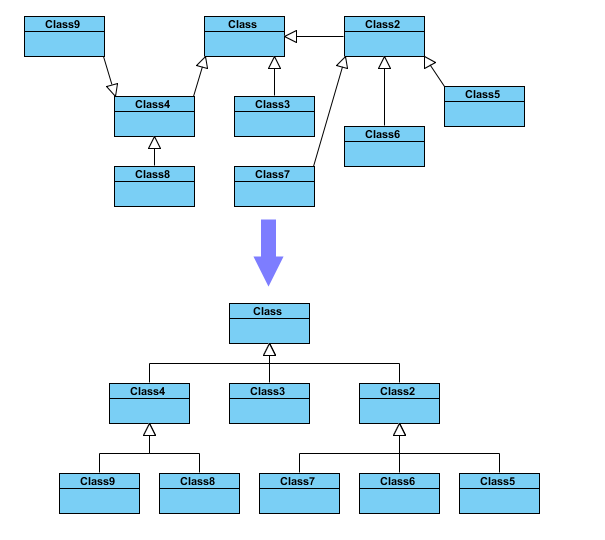
Complicated class or collaboration diagrams can be rearranged by applying Automatic diagram Layout. VP-UML will re-design the layout for your diagrams. For class diagrams, VP-UML will analyse your class relations and show the class hierarchy in a new layout.

Automatic Diagram Layout Sample
 
Diagram Layout Menu
To apply the Automatic Diagram Layout, right-click the diagram then select "Layout" on the popup menu.
Diagram Layout Menu
 
  Top
Home | Products | Shop | Download | Product Support | Resources | Company | Contact Us | Site Map
Patents pending. All rights reserved.
Legal Privacy Statement