Installing plugin
Once you have finished implementing a plugin, you can install the plugin in Visual Paradigm.
Installing from a zip of plugin
If you want to share a plugin with your teammates, you may zip it first, and then give the teammates the zip file for installation. To install a plugin from a zip, make sure the zip file stores the plugin with the following file structure:
|_ ${plugin-folder}
|_ classes
|_ ...
|_ plugin.xml
|_ lib (The external jars required to compile and run the plugin. Do NOT place the openapi.jar there or else your plugin will not be able to function)
|_ ...
To install a plugin from a zip:
- In Visual Paradigm, select Help > Install Plugin from the application toolbar.
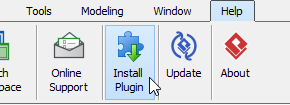
Install Plugin - In the Install Plugin window, select Install from a zip of plugin.
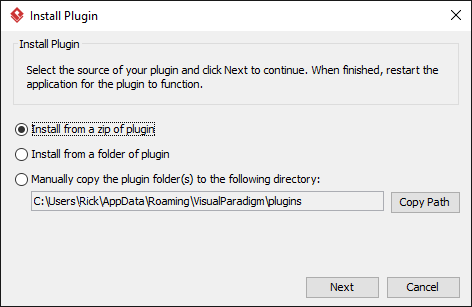
The Install Plugin window - Click OK.
- Select the zip file in the file chooser and click Open.
- Restart Visual Paradigm for the plugin to take effect.
Installing from a folder of plugin
A folder of plugin is one that conforms the following file structure:
|_ ${plugin-folder}
|_ classes
|_ ...
|_ plugin.xml
|_ lib (The external jars required to compile and run the plugin. Do NOT place the openapi.jar there or else your plugin will not be able to function)
|_ ...
To install a plugin from a folder of plugin:
- In Visual Paradigm, select Help > Install Plugin from the application toolbar.
- In the Install Plugin window, select Install from a folder of plugin.
- Click OK.
- Select the folder in the directory chooser and click Open.
- Restart Visual Paradigm for the plugin to take effect.
Manual files copying
Advanced users may copy the plugin (folder) manually to the directory where the plugins are stored. You can also visit that directory to remove plugins that you do not need anymore. To copy a plugin manually:
- In Visual Paradigm, select Help > Install Plugin from the application toolbar.
- In the Install Plugin window, select Manually copy the plugin folder(s) to the following directory.
- Click Copy Path.
- Click OK.
- Now, visit the copied path and paste your plugin folders to that folder.
- Restart Visual Paradigm for the plugin to take effect.
| Chapter 3. Installing Plug-in | Table of Contents |
