Exporting license key from server
If you are a laptop user who needs to work at different places, it may be impossible to gain access to the VP Server for acquiring key at certain work places. The export license key function enables you to check out the key from server so that you can work "offline" temporarily. The license key exported will remain occupied by the user until the moment the key is returned to the server. In this page, we will see how to export license. Return of license will be covered in the next page.
To export floating license key:
- Select Window > License Manager from the application toolbar of Visual Paradigm.
- Click Export License....
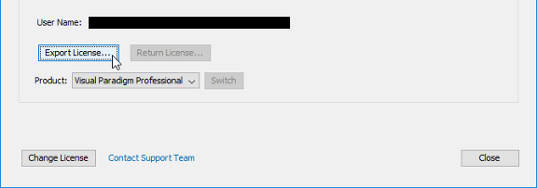
Export floating license
Related Resources
The following resources may help you learn more about the topic discussed in this page.
| Chapter 2. Working offline | Table of Contents | 2. Returning license key to server |
