Installing Teamwork Server
In order to install Teamwork Server, you need both the server program and a valid license key. If you have purchased Teamwork Server, you can download both of them from your customer account. If you are going to evaluate Teamwork Server, you can download the product from our official website and receive the evaluation key through E-mail. Get them ready, and read through this page to install the Teamwork Server. Before you start, make sure you have a machine ready for the installation of Teamwork Server. The minimum requirement of such machine is that it must be accessible by client machines through network, either Intranet or Internet.
- Having downloaded the zipped Visual Paradigm Server to the server machine, extract it to the folder where you want the Teamwork Server to install to. When finish, you obtain a folder VPServer.
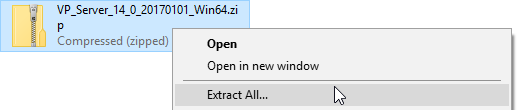
Extracting the zipped VP Server - Start up the server by running VPServer\scripts\startup.bat file (startup.sh for Linux and Mac OS X). You may see a command console appear. Do NOT close it or else the server will be stopped.
- Open your Web browser and visit: http://127.0.0.1:1999/
- The server installation page appears. Enter your organization's name and a new administrator password. Enter the same password again for confirmation.
- Enter the server base URL. Click Next to proceed.
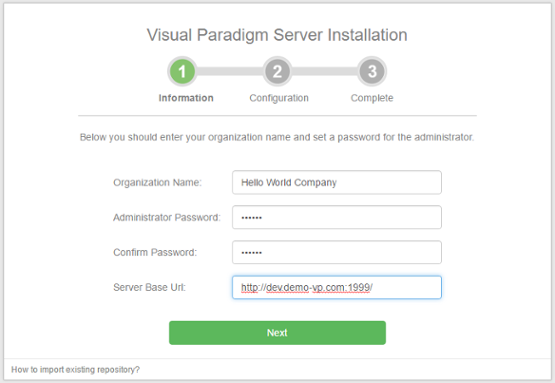
Organization name and password are entered - To install Teamwork Server, keep Install Teamwork Module checked. Then, confirm the repository folder.
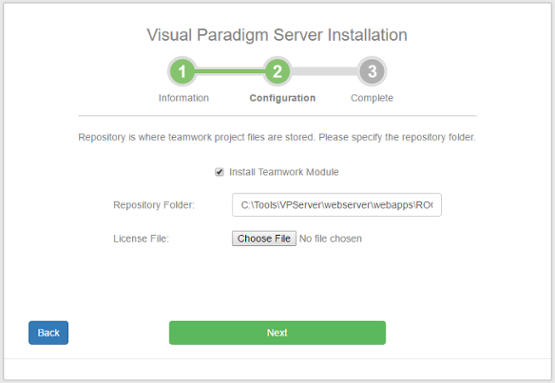
Keep Install Teamwork Module selected - Click the Choose File button next to License File to import the Teamwork Server license file.
- Click Next.
- There is data that VP Server need to make persistent, such as your login name, password, server repository path, etc. All these have to be stored in a database. Now, setup a new database for this purpose. Then, fill in the connection information of the database. If you are unable to setup a database for this purpose, select Embedded as the database. The Embedded database is a ready-to-use database management system built into the server. In other words, no additional database setup has to be made by choosing Embedded database.
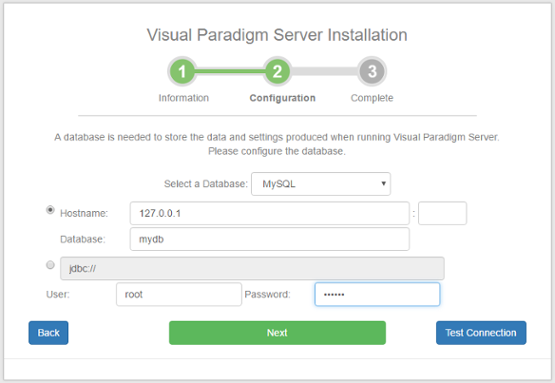
Configuring database - Click Next.
- Wait until the installation is finished. After that, you can click the Go to Login Page button, login and start adding new members and projects. For detailed instruction, read the next section for server administration.
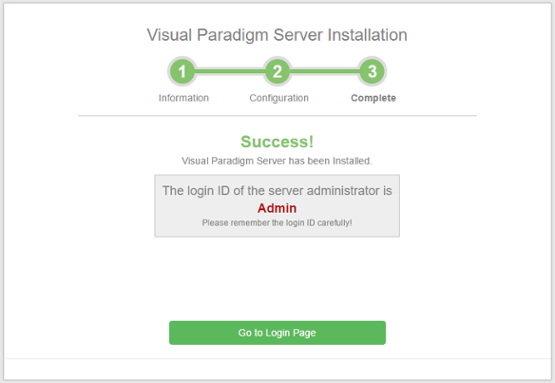
Installation complete
Related Resources
The following resources may help you learn more about the topic discussed in this page.
| Chapter 2. Installation and Uninstallation | Table of Contents | 2. Uninstalling Teamwork Server |
