Export revision
You can export revision(s) from server to your machine for checking the project content of certain phase of development. You can export specific revision, or all revisions.
Export the selected revision
- Select Team > Utilities > Open Teamwork Client... from the toolbar.
- In the Teamwork Client window, open the Revisions tab.
- Select the revisions(s) you want to export under Project revisions. Click Export and choose Export selected revisions... from the pop-up menu.
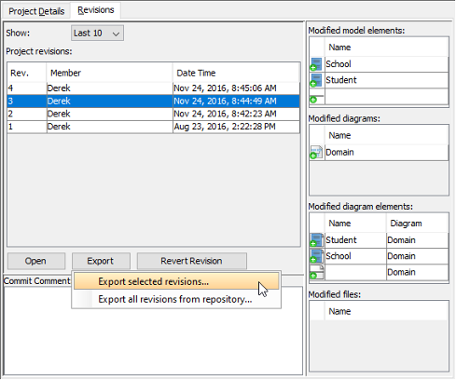
Export selected revision - In Select Directory window, select an existing folder or make a new folder for storing the selected revision(s). Click OK to proceed.
Export all revisions from repository
- Select Team > Utilities > Open Teamwork Client... from the toolbar.
- In the Teamwork Client window, open the Revisions tab.
- Click Export and choose Export all revisions from repository... from the pop-up menu.
- In Select Directory window, select an existing folder or make a new folder for storing all revisions. Click OK to proceed.
Related Resources
The following resources may help you to learn more about the topic discussed in this page.
| 7. Roll back past revision changes | Table of Contents | 9. Managing Teamwork Files |
