Custom AI Endpoint Support
Bring your own LLM provider, API key, and model settings. Empower your enterprise with total control over AI security, compliance, performance, and cost management across Visual Paradigm features.
Why Use a Custom AI Endpoint?
While Visual Paradigm provides standard out-of-the-box AI defaults, modern enterprise workloads often require specific controls, security boundaries, and infrastructure tailored to corporate policies.
Security & Data Governance
Keep data processing strictly within your enterprise's approved cloud boundaries and vendor contracts to meet HIPAA, GDPR, or internal compliance rules.
Tailored Model Selection
Pick specialized high-speed models for rapid generation or switch to extended-reasoning models when tackling complex architecture and code fixes.
Direct Billing & Quota Control
Use your company’s direct API keys to leverage existing enterprise volume discounts, apply custom token limits, and track usage directly in your vendor dashboard.
Regional Speed & Latency
Select local endpoints or region-specific models (such as China-hosted options) to eliminate cross-border network latency for global development teams.
Key Benefits for Your Workspace
Designed to give IT managers, architects, and compliance officers seamless governance over team-wide AI usage.
Security & Governance
Route all requests through AI providers and accounts that strictly meet your corporate IT and compliance security standards.
Infrastructure Control
Manage direct relationships with AI vendors, utilize internal API keys, and enforce custom quotas and usage policies.
Model Choice & Flexibility
Select the exact model that balances output quality, reasoning depth, speed, cost, or specialized language support.
Operational Consistency
Workspace managers set the custom endpoint once, delivering a standardized AI experience to every team member.
Performance Optimization
Optimize response latency and overall availability by selecting models hosted near your geographic region.
Cost & Budget Management
Consolidate billing through your direct provider accounts and leverage existing corporate enterprise API tier discounts.
Supported Applications & Features
Configure your endpoint once to power core agentic and generative AI capabilities across Visual Paradigm tools.
AI Diagramming Chatbot
Generates precise visual modeling diagrams from natural language prompts.
VPasCode
Powers AI diagram creation, modifications, C4 model importing, code error fixes, and code translation.
Vpp Chatbot
Conversational AI assistance tailored for project management and model navigation.
Desktop AI Generation
Direct AI-driven diagram generation native to Visual Paradigm Desktop.
* Features not explicitly listed will continue to utilize Visual Paradigm's system-default AI configurations.
How to Configure Your Custom Endpoint
Simple workspace-level setup managed directly by your Workspace Manager.
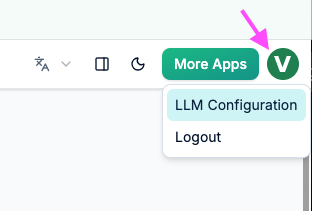
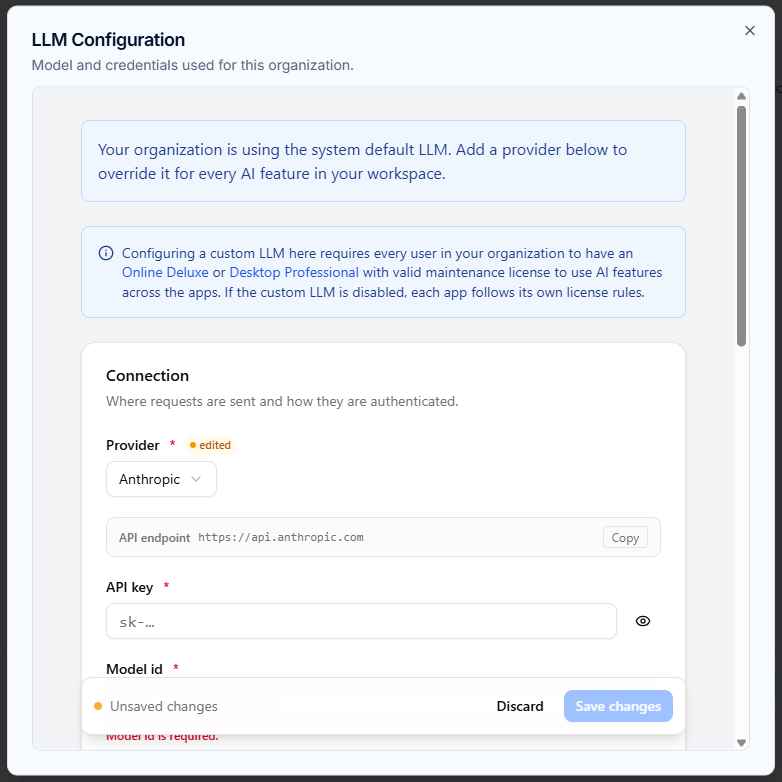
Select Provider & Credentials
Access the LLM configuration page, pick your target AI Provider, enter your organization's API Key, and set the Model ID.
Fine-Tune Model Behavior
Fine-tune operational parameters to meet your requirements. Set Max output tokens for larger responses or adjust Reasoning effort / Thinking mode where supported by the provider.
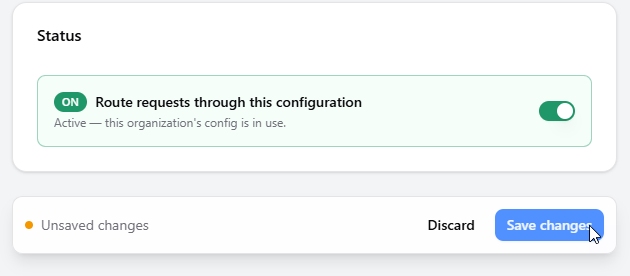
Enable & Save
Toggle on Route requests through this configuration and click Save changes. Your new endpoint takes effect instantly for all authorized users across the workspace.
Internal Model Benchmarking
We conducted internal benchmarking to test model performance for day-to-day operations. Use these insights as general guidance when selecting your workspace model.
Rapid Response Models
Demonstrated swift response generation with ideal output quality during testing:
Extended Processing Models
Required longer generation times due to complex reasoning or model architecture:
Trusted by Leading Teams Worldwide
Visual Paradigm's modeling platform empowers enterprise teams in the world's most demanding organizations.







Licensing & Administration
Custom AI endpoint support is a workspace-level feature available for organizations running eligible software editions:
- VP Online: Deluxe Edition or higher
- VP Desktop: Professional Edition or higher
- Configuration permissions are granted exclusively to the Workspace Manager.
- All users within the workspace must hold a qualifying license to utilize custom endpoint capabilities.
Need Self-Hosted Models or Dedicated Integrations?
If your organization requires an internally hosted model, specialized private LLM endpoints, or custom model support for features not listed above, our enterprise solutions team is ready to assist.
Frequently Asked Questions
Who can configure the custom AI endpoint?
Only the Workspace Manager has administrative permission to create, update, or remove the custom AI endpoint configuration for the workspace.
What happens if a user in the workspace lacks a qualifying license?
Users must have a valid qualifying license (VP Online Deluxe Edition+ or VP Desktop Professional Edition+) to access custom AI features. Users without a qualifying license will not be able to execute requests through the custom endpoint.
What happens if we delete our custom configuration?
Deleting the configuration from the Danger Zone immediately removes the endpoint workspace-wide. All AI feature requests will instantly revert back to Visual Paradigm's default AI model.
Are unlisted AI features automatically routed through the custom endpoint?
No. The custom endpoint applies strictly to supported features (AI Diagramming Chatbot, VPasCode toolset, VPP Chatbot, and Desktop AI Diagram Generation). Other AI features continue using their default setup unless updated.
Take Control of Your Workspace AI Today
Empower your team with flexible model options, enhanced data governance, and complete infrastructure flexibility.