AI Diagramming for Solutions & Enterprise Architects
Model complex systems using ArchiMate and C4 frameworks, drill down into sub-diagrams, and sync visual assets directly with Visual Paradigm Desktop projects — all through a single conversational interface.
Purpose-built for Enterprise Architects, Solutions Architects, and Infrastructure Leads who need production-grade architecture software without the overhead.
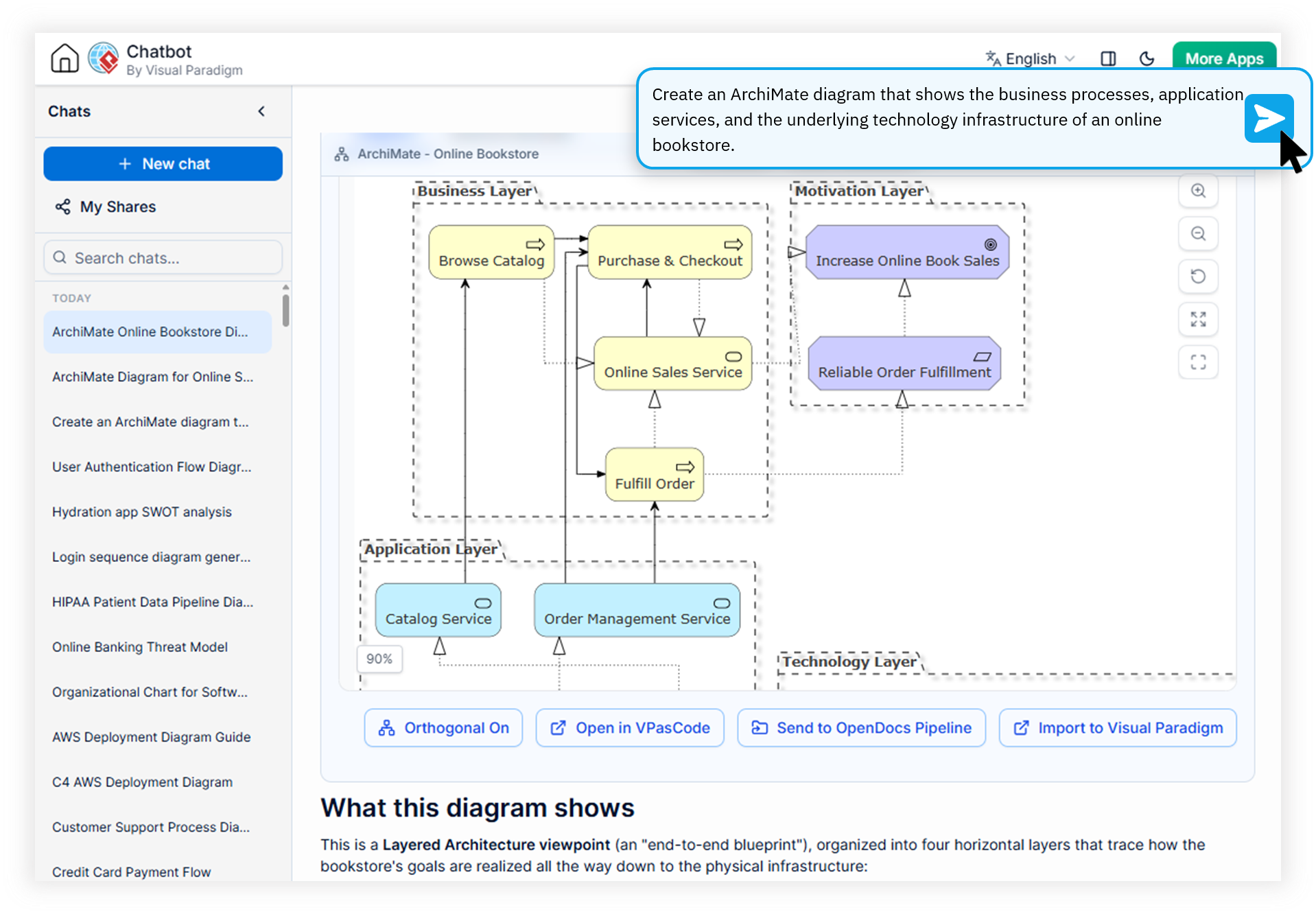
Built for the Realities of Architecture Leadership
Enterprise and solution architects spend too much time wrestling with tools instead of shaping systems. Here are the friction points we eliminate.
Slow Diagram Iteration Cycles
Refining a single ArchiMate or C4 diagram often takes hours across multiple stakeholder reviews, delaying alignment on critical design decisions.
Disconnected Architecture Artifacts
Diagrams live in slides, wikis, and local files — creating drift between what was designed and what was actually deployed across the enterprise.
Generic AI Outputs That Miss the Mark
Generic LLMs routinely generate architecture diagrams that violate framework rules, mix notation styles, and require heavy manual correction.
Watch How Visual Paradigm AI Chatbot Works
Why Architects Choose Visual Paradigm as Their Online Enterprise Modeling Software
Summary: The Visual Paradigm AI Diagramming Chatbot combines domain-trained AI models with native support for ArchiMate, C4, and 40+ other architecture diagram types. It lets architects generate, refine, document, and drill down into system models through natural conversation — then sync the results directly into enterprise desktop projects.
Native ArchiMate & C4 Framework Support
Generate syntactically and semantically accurate ArchiMate diagrams and C4 Model views (System Context, Container, Component, Deployment) without memorizing notation. Our ai archimate diagram generator and c4 model architecture tool are trained on framework-specific rules, so outputs respect layer boundaries, relationships, and viewpoints from the first prompt.
Conversational Iteration & Sub-Diagram Drill-Down
Refine any diagram through plain-language conversation: adjust shapes, rename components, restructure relationships, or ask the AI to expand a single service into a detailed sub-diagram. The interactive artifacts pane gives you a live table of contents for every deliverable produced in the session.
Seamless Desktop & Ecosystem Sync
Open the chatbot directly inside Visual Paradigm Desktop and import generated models into enterprise-grade projects. Push diagrams to OpenDocs for knowledge sharing, bridge into VPasCode for precision editing, or export to VP Online for drag-and-drop refinement — all without leaving your architecture workflow.
Open, Portable Text-Based Outputs
Every diagram is generated on top of industry-standard text formats — PlantUML, Mermaid, Graphviz, JSON, DBML — so you can copy, edit, and integrate outputs into custom AI workflows, CI pipelines, or documentation repos. Export as high-resolution PNG, vector SVG, or Markdown transcripts of the full conversation.
Traditional Architecture Tooling vs. the AI Diagramming Chatbot
See how a dedicated ai solution architecture diagram tool compares to the mix of generic LLMs and legacy modeling software that most architecture teams still depend on.
| Focus Area | Traditional Process | With Visual Paradigm AI |
|---|---|---|
| Initial Diagram Creation | Hours of manual drag-and-drop | Minutes via natural language |
| Framework Compliance | Requires deep notation expertise | Domain-trained AI enforces rules |
| Iterative Refinement | Manual edits per stakeholder round | Conversational modification in plain text |
| Documentation Overhead | Separate write-ups per diagram | Auto-generated structured reports |
| Sub-Diagram Granularity | Rebuilt from scratch | Drill-down into any shape via prompt |
| Tooling Lock-in | Proprietary file formats | Open PlantUML, Mermaid, Graphviz exports |
From System Description to Deployable Architecture in Four Steps
The end-to-end workflow is designed to feel natural to architects who think in systems, not in menu bars.
Describe Your System in Plain Language
Open the chatbot and describe your solution in a few sentences: the domain, key actors, services, and integration points. The ai solution architecture diagram tool parses your intent and generates an initial C4 or ArchiMate diagram in seconds.
Refine Through Conversation
Ask follow-up questions: "Add a message broker between Service A and Service B", "Split the database into read and write replicas", "Switch this view to a C4 Deployment diagram". Every change preserves context and updates the artifacts pane instantly.
Drill Down Into Sub-Diagrams
Click any shape to expand it into a detailed sub-diagram — a container into its internal components, an application into its sequence flow, or a business actor into its supporting process. Each sub-diagram is fully editable through conversation.
Sync Into Enterprise Projects
Open the session inside Visual Paradigm Desktop and import the model into your enterprise repository. Share a session URL with stakeholders, export to OpenDocs, or bridge the diagram-as-code output into VPasCode for fine-tuning.
Every Diagram Type Your Architecture Team Needs
A single enterprise architecture software that handles structural, behavioral, process, and strategic views — so you never need to context-switch between tools.
Enterprise Architecture
ArchiMate, Viewpoint-based ArchiMate (2x), and full C4 Model: System Context, Container, Component, Deployment.
UML & SysML
Class, Sequence, Use Case, Activity, Component, Deployment, State, Package, plus SysML Requirement and Block Definition.
Flows & Process Maps
DFD, BPD, Flowchart, Stepwise Flowchart, WBS, PERT, Git Graph — ideal for infrastructure leads mapping operational runbooks.
Strategic & Analysis
SWOT, PEST, PESTLE, SOAR, Eisenhower, Ansoff, McKinsey 7S — bridge architecture work with business strategy.
Data & Structure
ERD, Chen ERD, MarkMap, Org Chart, ECharts, Solution Selection Matrix, JSON, DBML — model data and organization together.
Open Text Formats
Every diagram is built on PlantUML, Mermaid, or Graphviz, making outputs version-controllable and CI-friendly.
What Architects Ask Before Getting Started
Which architecture frameworks does the AI Diagramming Chatbot support?
The chatbot natively supports ArchiMate (including viewpoint-based variants) and the full C4 Model framework — System Context, Container, Component, and Deployment diagrams. It also handles UML, SysML, flowcharts, and more than 40 other diagram types commonly used in enterprise and solution architecture, making it a genuinely comprehensive online enterprise modeling software.
Can I refine and drill down into sub-diagrams with AI?
Yes. The conversational interface allows you to iteratively modify specific elements within any diagram and drill down into individual shapes or components to generate detailed sub-diagrams. You can ask the AI to adjust, expand, or restructure any part of your architecture model in plain language — whether you are unpacking a C4 Container or decomposing an ArchiMate application component.
How does Visual Paradigm AI differ from generic LLMs for architecture diagrams?
Visual Paradigm AI is powered by domain-trained models specifically tuned for architecture frameworks like ArchiMate and C4. This produces syntactically and semantically accurate diagrams with near-zero error rates compared to generic LLMs, and outputs follow industry-standard text formats such as PlantUML and Mermaid. The result is an ai archimate diagram generator you can actually trust in stakeholder-facing work.
Can I sync generated diagrams to Visual Paradigm Desktop projects?
Yes. The AI Diagramming Chatbot integrates directly with Visual Paradigm Desktop Sync, allowing you to open the chatbot inside VP Desktop and import generated visual models straight into your enterprise-grade desktop projects for further refinement, versioning, and team collaboration. You can also push outputs to OpenDocs or export them to VP Online for drag-and-drop editing.
Is there a free trial, and what subscriptions include full access?
A free trial is available for testing and evaluation. Full access to the AI Diagramming Chatbot is included with subscriptions to VP Online (Deluxe Edition) and VP Desktop (Professional Edition), giving architecture teams the full power of the ecosystem without additional licensing complexity.
Bring AI-Powered Precision to Your Architecture Practice
Join Enterprise and Solutions Architects who use the Visual Paradigm AI Diagramming Chatbot to move from idea to production-ready architecture model in a single conversation.