AI UML Diagram Generator
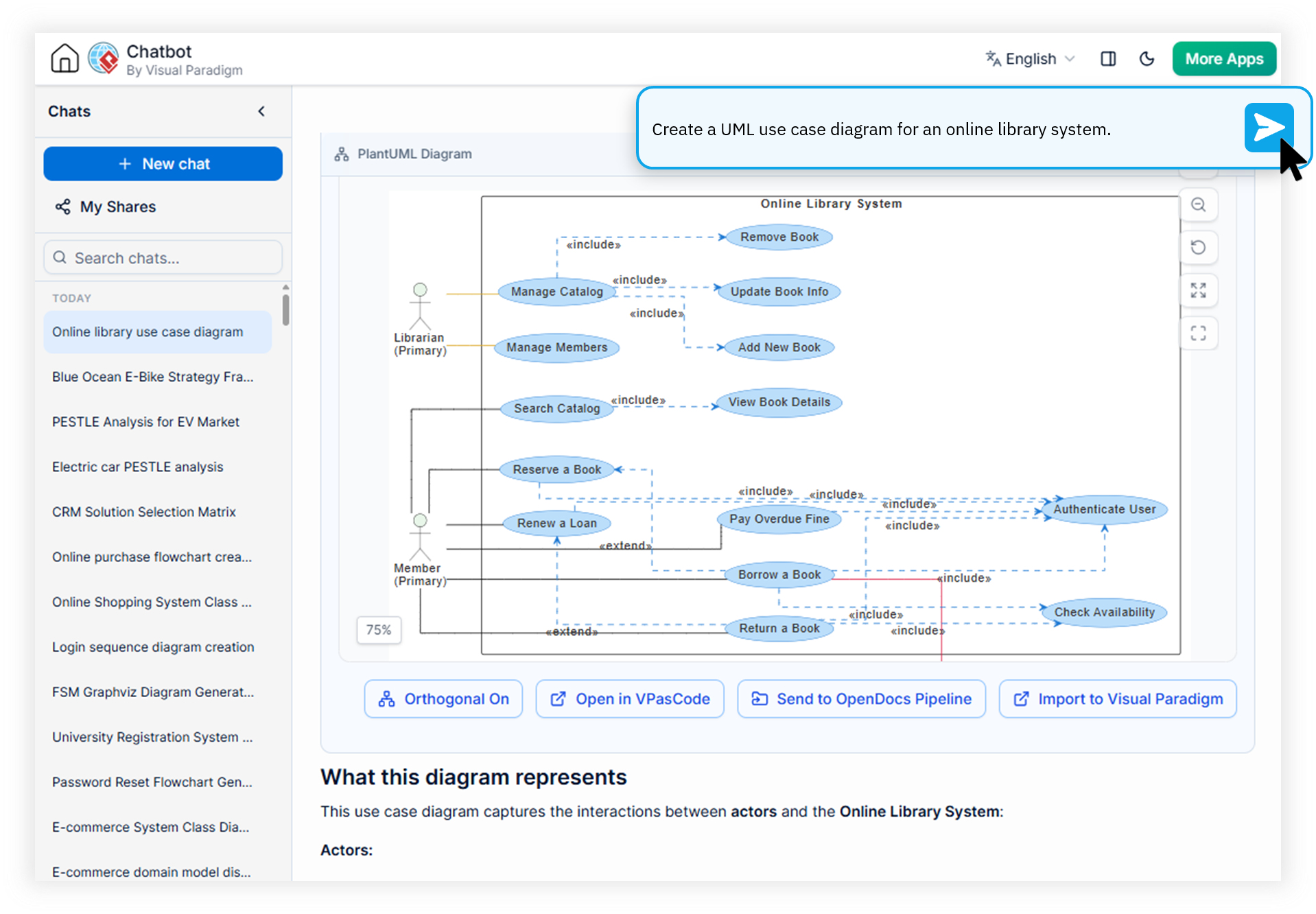
Instantly create domain-accurate UML models, including Class, Sequence, Activity, Use Case, State, and Deployment diagrams via natural language text prompts. Built for software engineers, system analysts, and computer science educators.
Watch How Visual Paradigm AI Chatbot Works
How the AI UML Diagram Generator Eliminates Modeling Bottlenecks
Summary: The Visual Paradigm AI UML diagram generator transforms plain-text descriptions into syntactically accurate Class, Sequence, Use Case, Activity, State, and Deployment diagrams through domain-trained AI. Unlike generic chatbots, it produces standards-compliant UML output that integrates natively with enterprise modeling workflows, cutting diagram creation time by up to 90%.
Conversational Diagramming
Describe your system in plain English and the chatbot generates a complete, standards-compliant UML diagram. Ask follow-up questions to adjust class names, refine relationships, or expand lifelines without redrawing from scratch.
Automatic UML Class Diagram Generation
Paste a problem statement or API spec and the automatic UML class diagram generator derives classes, attributes, inheritance hierarchies, and association multiplicities with semantic precision.
Diagram-as-Code Foundation
Every diagram is built on open text-based formats including PlantUML, Mermaid, and Graphviz. Copy the underlying code, edit it in your preferred editor, or integrate it directly into CI/CD pipelines.
Flexible Multi-Format Export
Export diagrams as high-resolution PNG, vector SVG, or copy direct image outputs to your clipboard. Print conversations to PDF or export the full chat session as markdown for structured documentation.
Traditional UML Tools vs. AI-Powered Generation
| Modeling Workflow | Generic LLM / Legacy Tool | AI UML Diagram Generator |
|---|---|---|
| Diagram Creation Time | 30 minutes to several hours | Seconds from a prompt |
| Syntactic Accuracy | Frequent notation errors | Domain-trained UML precision |
| Iterative Refinement | Restart from scratch | Conversational edits |
| Export Formats | Proprietary / image-only | PNG, SVG, PlantUML, Mermaid |
| Enterprise Integration | Isolated output | Syncs with VP Desktop & OpenDocs |
From Prompt to Production-Ready UML in Four Steps
Describe Your System
Open the chatbot and describe the domain, actors, or codebase in natural language. Paste API specs, user stories, or requirements as-is.
Refine via Conversation
Use the interactive artifacts pane to navigate generated diagrams. Ask the AI to rename classes, adjust multiplicities, or drill down into specific shapes.
Edit in VP Online or Desktop
Push the diagram to Visual Paradigm Online's drag-and-drop editor or sync it directly into VP Desktop for enterprise-grade project integration.
Document with OpenDocs
Send finalized models to OpenDocs for extended documentation, generate structured reports, and share versioned deliverables across teams.
More Than an Online UML Diagram Maker
Every diagram produced by the AI UML diagram generator plugs seamlessly into the broader Visual Paradigm AI ecosystem for long-term modeling workflows.
VPasCode Bridge
Transfer diagram-as-code scripts into VPasCode for precision code-level editing and fine-tuning, preserving the live connection between model and implementation.
Visual Paradigm Desktop Sync
Open the AI chatbot directly within VP Desktop and import generated visual models into enterprise-grade projects for cross-team collaboration.
OpenDocs Knowledge Sharing
Publish finalized UML models to Visual Paradigm OpenDocs for centralized knowledge management, versioning, and stakeholder review.
Session Management & Sharing
Save full chat sessions and generate shareable URLs via the My Shares page, letting collaborators review the full modeling history in a single link.
Answers for Modelers and Educators
Which UML diagram types can the AI generator create?
+
The AI UML diagram generator supports the full Unified Modeling Language family including Class, Sequence, Use Case, Activity, State, Component, Deployment, Package, Object, Composite Structure, and Timing diagrams. Each diagram is generated from natural language prompts with syntactic precision, reducing the error rates common with generic LLMs.
Can I refine generated UML diagrams through conversation?
+
Yes. The chatbot supports iterative refinement, allowing you to ask the AI to adjust specific elements, expand relationships, rename actors, or drill down into individual shapes to generate detailed sub-diagrams without starting over. This conversational approach is what distinguishes the AI diagram generator from static code-generation tools.
What output formats are supported for export?
+
Generated UML diagrams can be exported as high-resolution PNG, vector SVG, or copied directly to the clipboard. The underlying diagram-as-code is generated in industry-standard formats like PlantUML, Mermaid, and Graphviz, so you can easily integrate outputs into custom AI workflows, documentation pipelines, or version-control systems.
Is there a free version of the AI UML diagram generator?
+
Yes. Visual Paradigm offers a free trial for testing and evaluation, making it one of the most capable free UML software options available today. Full access to the AI UML diagram generator is included with VP Online (Deluxe Edition) and VP Desktop (Professional Edition) subscriptions.
Turn Natural Language Into Domain-Accurate UML
Join software engineers, system analysts, and computer science educators using the AI UML diagram generator to ship better models, faster.