Conversational AI Diagramming vs. Generic LLMs
Experience domain-trained AI built specifically for modeling, delivering near-zero syntax errors compared to generic LLMs. Built for developers and architects who refuse to compromise on diagram accuracy.
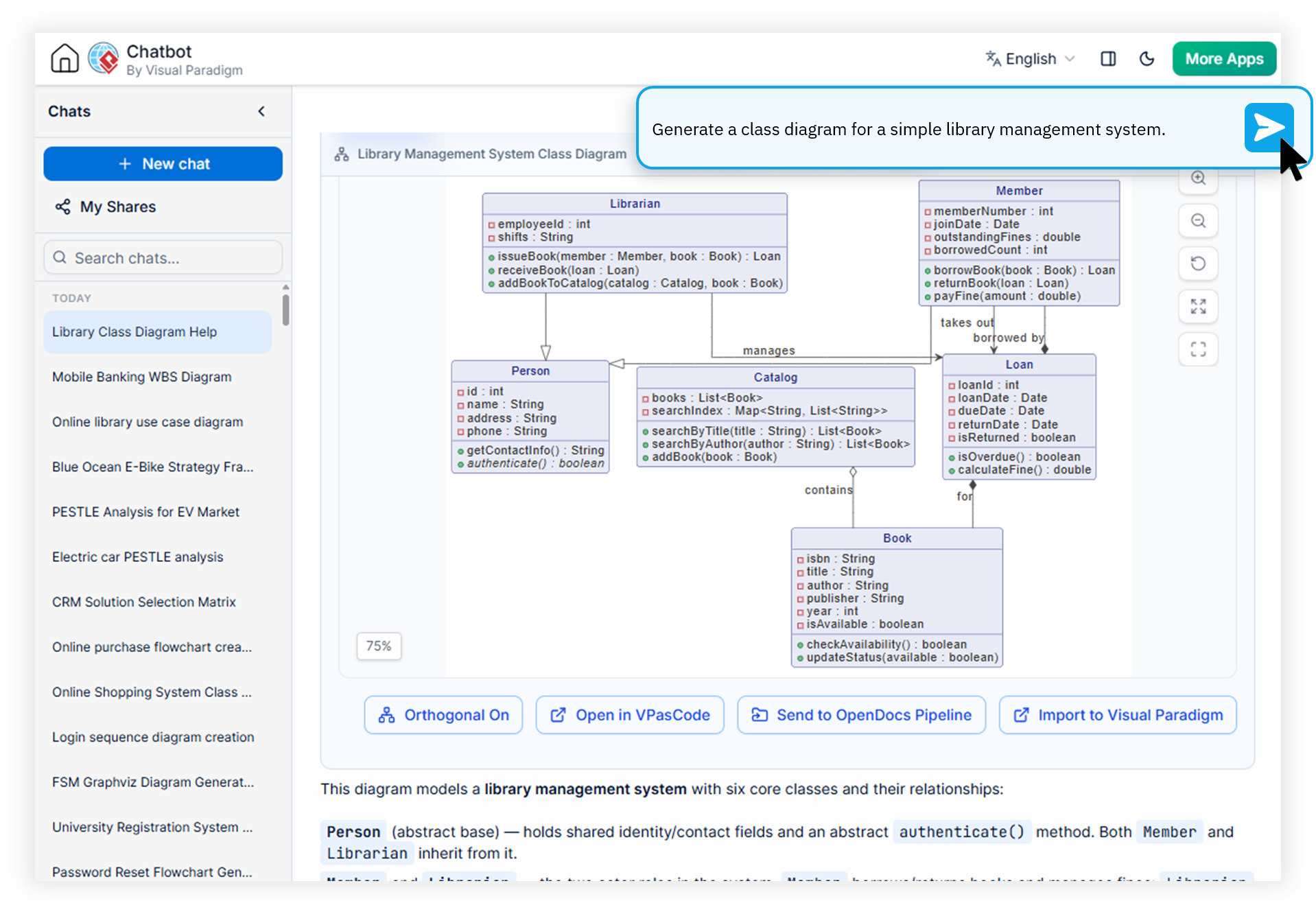
Engineered for Developers & Architects Tired of Hallucinations
If you have ever pasted a ChatGPT-generated PlantUML snippet only to watch it fail compilation, you already know the cost. Generic LLMs guess at syntax. Our domain-trained diagramming AI does not.
Hallucinated Syntax Errors
Generic LLMs invent PlantUML and Mermaid syntax that compiles nowhere, forcing engineers to spend hours debugging output that should have been correct on the first pass.
Broken Modeling Standards
ChatGPT frequently mixes UML, ArchiMate, and C4 semantics into one incoherent diagram, violating the enterprise modeling standards your architecture review board requires.
No Iterative Refinement
When you ask a generic LLM to "adjust the microservice boundary," it regenerates from scratch—losing context, names, and relationships from the previous revision.
Watch How Visual Paradigm AI Chatbot Works
Why a Domain-Trained AI Delivers Production-Ready Diagrams
Summary: Visual Paradigm's AI Diagramming Chatbot is purpose-built on modeling corpora, not web text. This makes it the most accurate AI diagram generator for developers who need an error-free PlantUML generator and reliable AI architecture modeling software that respects strict semantic standards.
Domain-Trained Modeling Accuracy
Unlike a generic ChatGPT diagram alternative, our AI is trained on real UML, SysML, ArchiMate, and C4 specifications. It understands the difference between a Component and a Node, a Composition and an Aggregation, and produces output that compiles and renders on the first attempt.
Conversational Iterative Refinement
Treat the chatbot like a senior modeling peer. Ask it to expand a single component into a sub-diagram, add a new actor to a Sequence, or reorganize the entire deployment topology—without losing the context of your previous prompts.
Open Text-Based Formats You Already Use
Every output is built on industry-standard text formats including PlantUML, Mermaid, Graphviz, and DBML. Copy the source directly into your repository, CI pipeline, or custom AI workflows without vendor lock-in.
Flexible Export & Ecosystem Integration
Export diagrams as high-resolution PNG or vector SVG, copy images to clipboard, export conversations as Markdown, or push directly into OpenDocs, VPasCode, VP Online, and Visual Paradigm Desktop for enterprise-grade workflows.
Generic LLMs vs. Visual Paradigm AI Diagramming Chatbot
See exactly where a domain-trained diagramming AI outperforms general-purpose language models in real-world modeling tasks.
| Metric / Focus Area | Generic LLMs (ChatGPT, etc.) | Visual Paradigm AI Chatbot |
|---|---|---|
| PlantUML Syntax Accuracy | Frequent hallucinations and invalid operators | Near-zero errors, validated output |
| Mermaid Diagram Rendering | Inconsistent arrow and subgraph syntax | Standards-compliant first try |
| UML & SysML Semantics | Conflates relationship types | Domain-trained semantic accuracy |
| Iterative Refinement | Loses context, regenerates from scratch | Persistent session-aware editing |
| Supported Diagram Types | Limited to common UML basics | 40+ types incl. ArchiMate, C4, SysML |
| Ecosystem Integration | Standalone chat with no downstream tools | OpenDocs, VPasCode, VP Online, Desktop |
| Architecture Review Readiness | Requires manual cleanup before review | Enterprise-ready from first output |
From Prompt to Production-Ready Diagram in Four Steps
The AI Diagramming Chatbot integrates into the Visual Paradigm ecosystem so your conversational output flows directly into enterprise-grade modeling workflows.
Describe Your System in Natural Language
Start a conversation by describing your problem, architecture, or prompt instructions in plain English. No need to memorize PlantUML syntax or draw boxes manually—the chatbot listens like a modeling partner.
Generate & Preview in the Artifacts Pane
Instantly receive a complete diagram rendered in the Interactive Artifacts Pane, which serves as a dynamic table of contents for every deliverable generated during the session. Use the Advanced Diagram Viewer to zoom, fit-to-screen, or enter full-screen mode.
Refine Through Ongoing Conversation
Ask the AI to modify, adjust, or expand specific elements. Drill down into a single shape to generate a detailed sub-diagram. Generate structured technical documentation for the entire diagram or specific components.
Export & Integrate Across the Ecosystem
Export diagrams as PNG, SVG, or copy to clipboard. Send output to OpenDocs, hand off diagram-as-code to VPasCode, continue editing in VP Online, or import directly into VP Desktop enterprise projects.
40+ Diagram Types Trained for Accuracy
A true domain-trained diagramming AI must understand more than just basic flowcharts. Our chatbot is trained across the full spectrum of modeling standards used by enterprise architects and development teams.
UML Diagrams
Class, Sequence, Use Case, Activity, Component, Deployment, State, Package, Object, Composite Structure, and Timing diagrams.
Enterprise Architecture
ArchiMate, Viewpoint-based ArchiMate (2x), and the full C4 family—System Context, Container, Component, and Deployment.
SysML & Systems Engineering
Requirement, Block Definition, and Internal Block diagrams with proper SysML semantics trained into the model.
Strategic & Analysis
SWOT, PEST, PESTLE, SOAR, Eisenhower Matrix, Ansoff Matrix, Blue Ocean, 4C Marketing Mix, and McKinsey 7S Model.
Flows & Process Maps
DFD, BPD, Flowchart, Stepwise Flowchart, WBS, PERT, and Git Graph diagrams for operational and development workflows.
Data & Structure
ERD, Chen ERD, MarkMap, Org Chart, ECharts, Solution Selection Matrix, JSON, and DBML for data-driven modeling.
Answers for Architects & Engineering Leaders
How does Visual Paradigm's AI differ from ChatGPT for diagram generation?
+
Unlike generic LLMs that produce hallucinated or syntactically broken diagram code, Visual Paradigm's AI is domain-trained specifically on modeling standards such as UML, SysML, ArchiMate, PlantUML, and Mermaid. This delivers near-zero syntax errors and semantically accurate diagrams ready for production use—making it a true ChatGPT diagram alternative for serious modeling work.
What diagram types can I generate with the AI Diagramming Chatbot?
+
The chatbot supports a comprehensive library of over 40 diagram types including UML (Class, Sequence, Use Case, Activity, Deployment, State), SysML, ArchiMate, C4 models, SWOT/PEST/PESTLE analysis, flowcharts, DFD, BPMN, ERD, DBML, JSON, and many more—each built on industry-standard text formats and trained for semantic accuracy.
Can I iterate and refine diagrams through conversation?
+
Yes. The chatbot supports iterative refinement where you can ask the AI to modify specific elements, expand shapes into sub-diagrams, or adjust the overall architecture through natural language prompts. Full sessions can be saved, shared via URL, and revisited for continuous refinement—unlike generic LLMs that regenerate from scratch and lose prior context.
Is there a free trial available for the AI Diagramming Chatbot?
+
Yes. A free trial is available for testing and evaluation directly in your browser. Full access to the AI Diagramming Chatbot is included with VP Online (Deluxe Edition) and VP Desktop (Professional Edition) subscriptions, with seamless integration across OpenDocs, VPasCode, VP Online, and Visual Paradigm Desktop.
Stop Debugging Hallucinated Diagrams
Join architects and developers who trust Visual Paradigm's domain-trained AI for accurate PlantUML, Mermaid, and UML generation. Try the chatbot free—no credit card required.