Conversational Diagram Refinement & Editing
Modify, expand, or adjust diagram elements using simple chat prompts. Iterate on UML, architecture, and process diagrams without ever manually aligning a single shape on a canvas.
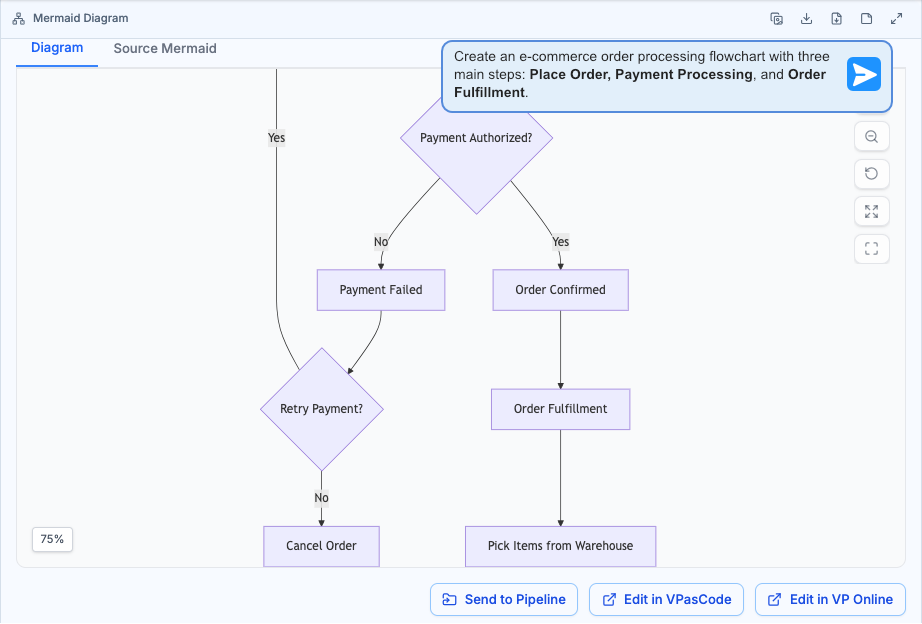
Generate Initial Flowchart
Start with a clear, plain-language instruction. The AI generates a clean, well-aligned baseline process diagram instantly.
Solving the Real Pain Points of Diagram Maintenance
Static diagrams rot the moment your architecture evolves. Our conversational ai diagramming tool keeps visual models synchronized with reality across every role in your organization.
For System Designers
Architecture diagrams drift out of sync within weeks of publication. Conversational refinement lets you update a single C4 container, relationship, or boundary layer with a typed instruction instead of redrawing the entire model.
For Software Engineers
Maintaining sequence and class diagrams is a thankless chore that delays pull requests. The chat based diagram editor interprets refactors directly, updating method names, dependencies, and state transitions in plain English.
For Product Owners
Stakeholder calls for "one quick diagram update" eat entire sprints. The interactive ai diagram maker turns a Slack-style message into an updated flowchart, user journey, or SWOT analysis in seconds.
Watch How Visual Paradigm AI Chatbot Works
How the Chatbot Eliminates Diagram Drift
Summary: The Visual Paradigm AI Diagramming Chatbot turns a conversational prompt into a precise diagram modification. Trained on domain-specific syntax, it delivers accurate UML, architecture, and flow updates with near-zero error rates, so teams spend time on decisions instead of drag-and-drop layout.
Iterative Refinement Through Conversation
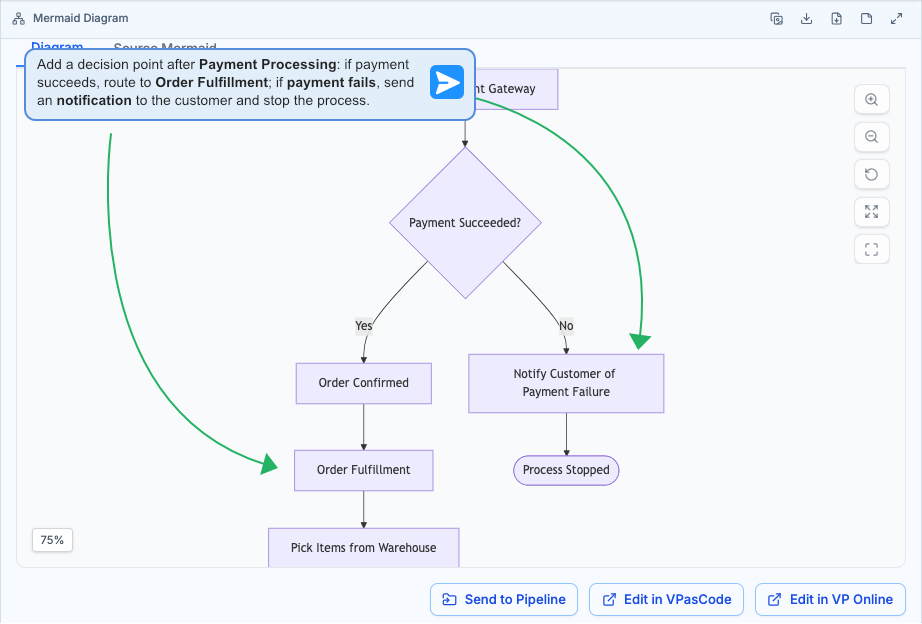
Treat the chatbot like a collaborative design partner. Ask it to rename a class, insert a new swimlane, reorganize a sequence, or split a monolithic component into granular sub-diagrams. Every prompt builds on the previous state, so your diagram evolves naturally without loss of context.
Semantic Shape-Level Editing
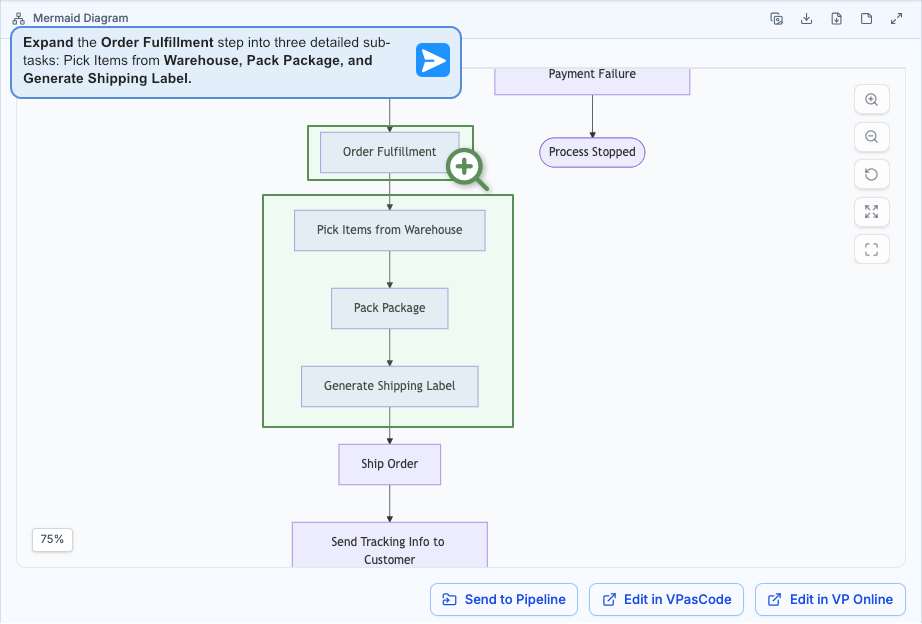
Point at a specific node by name and ask the natural language diagram tool to expand it. A single "OrderProcessing" class can be drilled down into a full state machine, or a high-level C4 container can be unfolded into its internal components and connectors automatically.
Automatic Layout & Alignment
Forget pixel-precise nudging. The ai diagram editing software computes optimal node placement, connector routing, and spacing after every modification, so every iteration stays publication-ready regardless of how complex the underlying model becomes.
Automated Documentation From Changes
As you refine the diagram, the chatbot can regenerate structured documentation for any shape or the entire model. Technical reports, component descriptions, and interface summaries stay in lockstep with the visual artifact.
From Prompt to Polished Diagram in Four Steps
The entire Visual Paradigm AI ecosystem is designed to make conversational diagramming the fastest path from idea to documentation.
Start With Any Diagram
Generate a fresh diagram from a natural language prompt, import an existing PlantUML or Mermaid script, or paste a current architecture sketch into the chatbot session. The conversational ai diagramming tool ingests any of 40+ supported formats instantly.
Describe Your Refinement
Type a plain English instruction like "add authentication middleware between the gateway and service layer" or "break the PaymentProcessor into three sub-states." The interactive ai diagram maker understands context, intent, and diagram conventions.
Review & Navigate the Artifact Pane
Every version is logged in the Interactive Artifacts Pane, giving you a dynamic table of contents. Zoom in, fit-to-screen, or launch full-screen mode to inspect fine-grained updates across your entire conversational history.
Export, Bridge, or Keep Iterating
Export as high-resolution PNG or vector SVG, copy the source code, send the diagram to OpenDocs for extended documentation, bridge it to VPasCode for code-level editing, or sync it directly into Visual Paradigm Desktop for enterprise projects.
Traditional Canvas vs. Chat-Based Refinement
A side-by-side look at how a typical diagram update cycle plays out with legacy tools versus the Visual Paradigm conversational approach.
| Metric | Traditional Canvas | Chat-Based Refinement |
|---|---|---|
| Time to Update | 30–60 minutes of drag-and-drop work | Under 60 seconds |
| Layout Consistency | Degrades after every manual edit | Automatically preserved |
| Learning Curve | Requires tool-specific expertise | Plain English only |
| Version History | Scattered across file copies | Full conversational audit |
| Diagram Drift | Common after weeks of neglect | Near-zero with prompt updates |
Prefer code-based refinement? Meet VPasCode.
If you work with diagram-as-code scripts, VPasCode features a built-in Modify capability. You can prompt AI to refactor PlantUML, Mermaid, or Graphviz source code directly, complete with side-by-side visual diff comparisons.
Everything You Need to Know About Conversational Editing
Can I refine an existing diagram through chat instead of rebuilding it?
Yes. The Visual Paradigm AI Diagramming Chatbot is built around iterative refinement. You can load an existing UML, architecture, or flow diagram into the conversation and use natural language prompts to add elements, adjust relationships, rename nodes, or expand specific shapes into detailed sub-diagrams without starting from scratch.
What types of diagrams can be edited using natural language?
The chatbot supports refinement across more than 40 diagram types, including UML class, sequence, activity, and state diagrams, C4 architecture models, ArchiMate views, entity-relationship diagrams, flowcharts, DFDs, BPMN, organizational charts, and strategic frameworks such as SWOT, PESTLE, and the Eisenhower Matrix.
Do I need diagramming expertise to use the conversational editor?
No. The natural language diagram tool interprets plain English instructions and handles all layout, alignment, and syntactic generation automatically. Product owners, business analysts, and domain experts can produce publication-ready diagrams without learning PlantUML, Mermaid, or drag-and-drop canvas tools.
How does version control work for refined diagrams?
Every refinement is stored as part of the full conversational session, giving you a complete chronological history of how a diagram evolved. Sessions can be saved, shared via URL through the My Shares page, and exported as PlantUML or Mermaid source code for integration with your existing development and documentation workflows.
Stop Redrawing. Start Refining.
Join system designers, software engineers, and product owners who rely on the Visual Paradigm conversational ai diagramming tool to keep their visual models accurate, current, and continuously evolving.
Included with VP Online Deluxe and VP Desktop Professional subscriptions.