Diagram-as-Code (DaC) Editing & Engineering
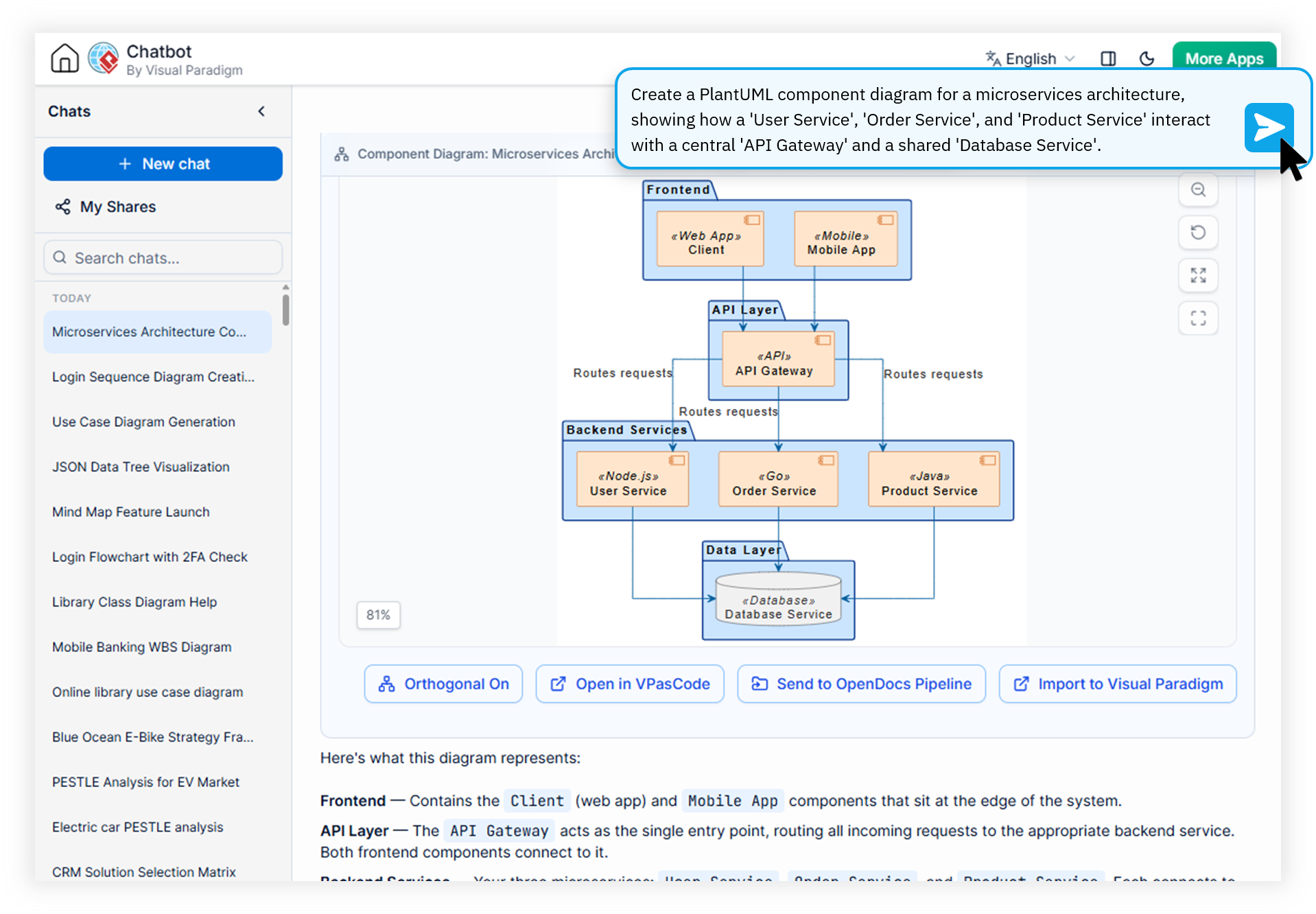
Generate text-based diagram scripts in PlantUML, Mermaid, and Graphviz through natural conversation. Fine-tune syntax with VPasCode integration for precision code-level diagram engineering.
Built for DevOps Engineers, Software Architects, and Developers who treat diagrams like source code.
Engineered for Modern Engineering Teams
Drag-and-drop diagram tools create friction in code-first workflows. Our diagram as code tool eliminates this gap.
DevOps Engineers
Maintaining diagrams in visual-only tools is slow and creates artifacts that are disconnected from your codebase. You need a way to generate and refine diagrams as quickly as you write code.
Software Architects
Rapid prototyping of complex systems requires iteration at the speed of thought. Mouse-driven editors slow you down when you need to sketch multiple architectural alternatives in minutes.
Developers
Documenting microservices, APIs, and database schemas shouldn't require switching to a different tool. You need text based diagramming software that integrates with your existing IDE and workflow.
Watch How Visual Paradigm AI Chatbot Works
How Our DaC Solution Accelerates Diagram Engineering
Summary: The Visual Paradigm AI Diagramming Chatbot acts as a comprehensive diagram as code tool, transforming natural language into production-ready PlantUML, Mermaid, and Graphviz scripts. Through VPasCode Bridge integration, engineers gain precision-level syntax editing, and seamless ecosystem sync capabilities.
AI PlantUML Generator with High-Precision Output
Describe your system architecture in plain English and receive syntactically accurate PlantUML scripts. Our domain-trained AI produces near-zero error rates compared to generic LLMs, delivering production-ready code on the first pass.
Online Mermaid Diagram Editor with Live Preview
Generate Mermaid-compatible sequences, flowcharts, and state diagrams directly from conversation prompts. The interactive artifacts pane provides instant live rendering, letting you validate structure without switching tools.
VPasCode Bridge for Precision Syntax Fine-Tuning
Transfer any generated script into Visual Paradigm's dedicated code editor. VPasCode Bridge provides syntax highlighting, real-time error detection, and auto-completion specifically tuned for diagram-as-code languages.
Open Text Formats for Full Workflow Integration
Every output is a standard text-based format (like PlantUML and Mermaid) that you can copy into VPasCode for precision editing, embed in documentation, or export as an image.
From Conversation to Diagrams
A streamlined 4-step process that turns natural language into engineering-grade diagram artifacts.
Describe Your System
Start a chat and describe your architecture, microservices, or workflow in natural language. The AI understands domain-specific terminology and relationships.
Generate DaC Scripts
The AI instantly produces complete PlantUML, Mermaid, or Graphviz scripts. Request multiple diagram types for the same system with conversational refinement.
Fine-Tune in VPasCode
Use VPasCode Bridge to transfer scripts into a precision code editor. Refine syntax, fix edge cases, and add domain-specific customizations with full tooling support.
Export & Integrate
Export as PNG or SVG, copy the code for editing in VPasCode, sync with VP Desktop, or publish directly to OpenDocs for team sharing.
Traditional Diagramming vs. Diagram-as-Code
| Focus Area | Traditional Drag-and-Drop | With DaC + AI Chatbot |
|---|---|---|
| Version Control | Binary files, hard to diff | Plain text, easily stored & shared |
| Creation Speed | Minutes per element | Seconds for full diagrams |
| Iteration Cycle | Manual repositioning | Conversational refinement |
| Team Collaboration | File-sharing friction | Share via URL, VP Online, or OpenDocs |
| CI/CD Integration | Not automatable | Pipeline-ready artifacts |
| Consistency | Depends on individual skill | Standardized output |
Common Questions About Diagram-as-Code
What is Diagram-as-Code (DaC) and why should I use it?
"text": "Diagram-as-Code (DaC) is an approach where diagrams are defined using text-based scripts like PlantUML or Mermaid. This allows teams to work with diagrams as text, which can be easily shared, edited, and stored."
Which diagram formats does the AI Chatbot support?
The Visual Paradigm AI Diagramming Chatbot supports industry-standard text formats including PlantUML, Mermaid, Graphviz, DBML, and JSON. These open formats are widely supported across GitHub, GitLab, Jira, Confluence, and modern documentation platforms. Because outputs follow standard syntax, you can copy them into any compatible renderer or integrate them into custom AI workflows.
How does VPasCode Bridge improve DaC editing?
VPasCode Bridge transfers generated diagram-as-code scripts directly into Visual Paradigm's precision code editor, providing syntax highlighting, real-time error detection, and advanced fine-tuning capabilities that go beyond basic text editors. This makes it the ideal tool for engineers who want AI-generated first drafts with the precision of professional-grade editing.
Transform How Your Team Creates Technical Diagrams
Join DevOps teams, software architects, and developers using AI-powered diagram-as-code engineering to ship better documentation faster. Free trial available.