Text-Based AI Modeling vs. Static Whiteboarding
Move beyond static, unstructured whiteboards to code-backed, maintainable, and enterprise-integrated diagram models. The structured diagramming solution built for engineering teams who think in systems, not sketches.
Why Static Whiteboards Fail Engineering Teams
Engineering teams transitioning from informal whiteboards to structured visual assets hit the same wall: pixels don't scale, sketches don't sync, and screenshots don't search.
Dead Diagrams, No History
Whiteboard screenshots sit buried in Confluence pages with no version history. When architecture evolves, the old diagrams rot and mislead new team members.
Zero Code Integration
Online whiteboard outputs cannot be stored in version control systems, diffed in pull requests, or regenerated automatically when microservices change. They break documentation pipelines.
No Semantic Accuracy
Generic drag-and-drop tools produce diagrams that look right but mean nothing to machines. They cannot be parsed, validated, or reused in CI/CD pipelines.
Watch How Visual Paradigm AI Chatbot Works
How Text-Based AI Modeling Replaces Static Whiteboards
Bottom Line: The Visual Paradigm AI Diagramming Chatbot converts natural language prompts into industry-standard text formats (PlantUML, Mermaid, Graphviz, DBML). This makes every diagram version-controllable, machine-readable, and enterprise-integrated—something no static online whiteboard can offer.
Conversational Diagram Generation
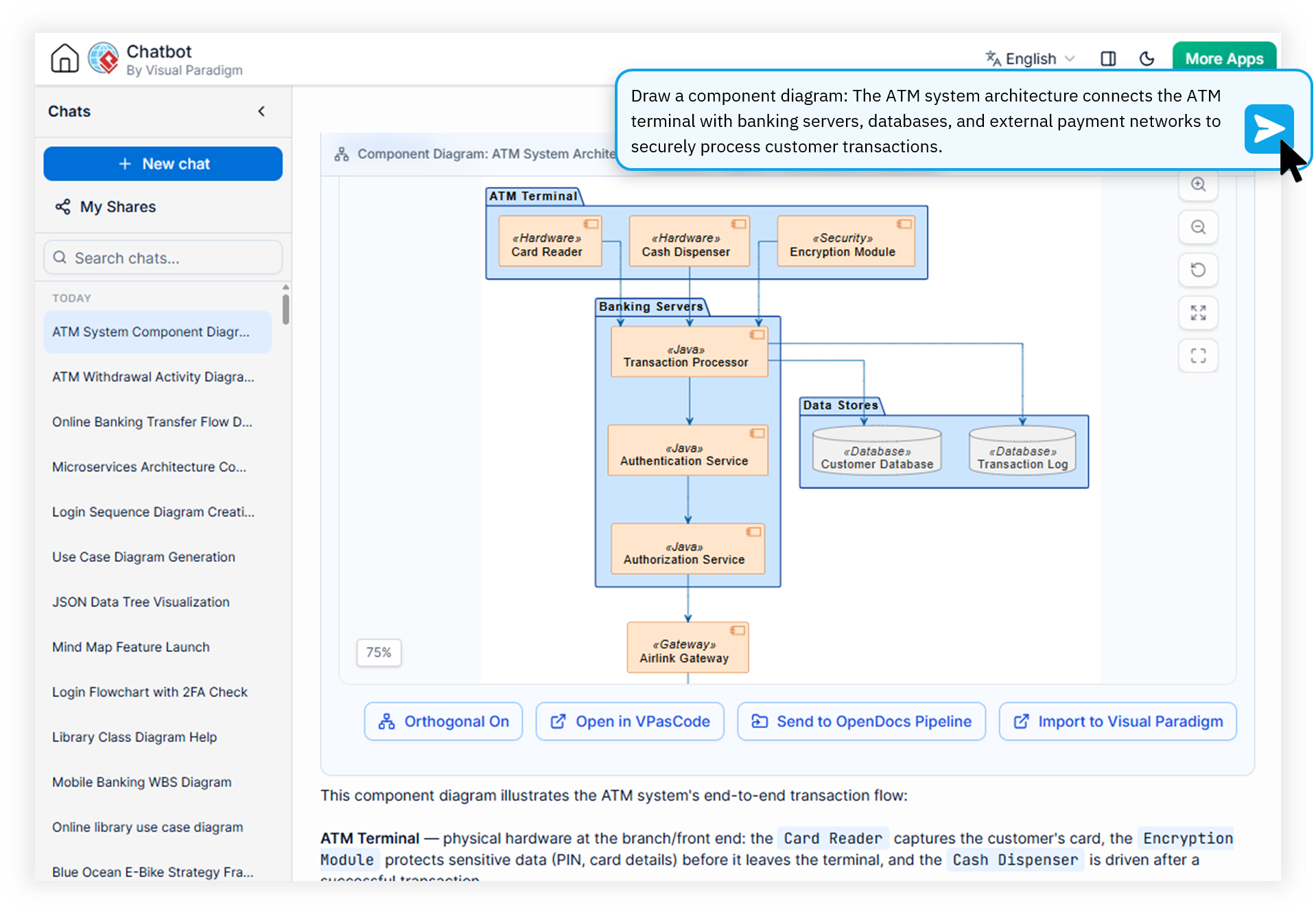
Describe your system architecture in plain English and receive a fully rendered UML, C4, or ArchiMate diagram in seconds. Refine elements iteratively through natural conversation rather than pixel-by-pixel dragging.
Open Text-Based Formats
Every output is produced as structured code that engineers already know. Copy the source, integrate it into your repositories, or feed it into custom AI workflows without proprietary lock-in.
Domain-Trained Precision
Unlike generic LLMs that produce syntactically broken diagrams, our AI is trained specifically on diagram semantics. Expect near-zero error rates on class relationships, sequence flows, and architectural dependencies.
Full Ecosystem Integration
Push generated diagrams directly into Visual Paradigm OpenDocs for knowledge sharing, bridge scripts to VPasCode for precision editing, export to VP Online for visual refinement, or sync with VP Desktop for enterprise-grade modeling.
Structured Diagramming vs. Online Whiteboard
A side-by-side comparison of how text-based AI modeling and traditional online whiteboards serve engineering teams differently across critical workflow dimensions.
| Focus Area | Static Online Whiteboard | AI Text-Based Modeling |
|---|---|---|
| Output Format | Flat pixels / PNG screenshots | PlantUML, Mermaid, Graphviz code |
| Version Control | Manual re-export required | Version control friendly |
| AI Accuracy | Generic LLMs, frequent syntax errors | Domain-trained, near-zero errors |
| Enterprise Integration | Manual export to docs | OpenDocs, VP Desktop, CI/CD sync |
| Iteration Speed | Minutes per shape adjustment | Seconds via natural language |
| Long-Term Maintainability | Stale screenshots, no traceability | Living code-backed source of truth |
From Whiteboard Sketch to Enterprise Diagram in Four Steps
Replace your team's static whiteboard rituals with a maintainable code backed diagram software workflow that scales from brainstorm to production documentation.
Prompt in Plain Language
Describe your system architecture, workflow, or strategic framework in natural English. The AI chatbot understands complex engineering contexts and domain-specific terminology.
Receive Code-Backed Diagram
The AI generates a complete diagram in PlantUML, Mermaid, Graphviz, or DBML. View it instantly in the built-in advanced viewer with zoom, fit-to-screen, and full-screen modes.
Iterate Through Conversation
Refine specific elements, expand sub-components, or drill down into shapes to generate detailed sub-diagrams. Every iteration stays in the conversational artifact pane for quick navigation.
Export & Integrate
Export as PNG, SVG, Markdown, or print to PDF. Push to OpenDocs for documentation, sync to VP Desktop for enterprise projects, or bridge to VPasCode for precision code-level editing.
The Enterprise Diagramming Software Online That Engineers Actually Adopt
Software Architects
Generate C4 model diagrams, system context views, and container architectures directly from design discussions. Version-control outputs alongside application code.
DevOps & Platform Engineers
Document infrastructure as sequence diagrams, deployment flows, and data pipelines. Share URLs of full chat sessions across teams without exporting flat images.
Technical Product Managers
Convert user stories into user journey flows and SWOT/PESTLE analysis diagrams. Generate structured reports and technical documentation automatically from conversation artifacts.
Enterprise Architects
Produce ArchiMate views, strategic frameworks, and cross-domain models that sync directly with VP Desktop and OpenDocs for enterprise-wide governance and knowledge sharing.
Common Questions About Text-Based AI Diagramming
How is text-based AI modeling different from traditional online whiteboarding?
+
Unlike static online whiteboards where diagrams are drawn as pixels and saved as flat images, text-based AI modeling generates diagrams from structured code formats like PlantUML, Mermaid, and Graphviz. This produces diagrams that are version-controlled, searchable, and machine-readable, making them far more maintainable for enterprise engineering teams.
Can engineering teams replace Miro or Lucidchart with this AI whiteboard alternative?
+
Yes, specifically for architecture and technical diagramming workflows. Visual Paradigm's AI Diagramming Chatbot replaces casual whiteboarding with code-backed models that integrate directly into engineering documentation pipelines, code repositories, and enterprise architecture governance frameworks. For purely freeform brainstorm, whiteboards still have a place—but for any diagram that needs to survive past the meeting, text-based AI modeling wins.
What diagram types does the AI Chatbot support for software architects?
+
The AI Diagramming Chatbot supports the full UML suite (class, sequence, use case, activity, component, deployment, state, package, object, composite structure, timing), SysML, ArchiMate, C4 Model, ERD, DFD, BPMN, flowcharts, and strategic frameworks like SWOT and PESTLE. All are generated as editable text-based code that can be exported to PNG, SVG, Markdown, or directly to Visual Paradigm Desktop and OpenDocs.
How does text-based diagramming improve maintainability over whiteboard sessions?
+
Text-based diagrams can be stored in version control systems, tracked for changes, diffed in code reviews, and regenerated automatically when system architecture evolves. Whiteboard screenshots cannot be searched, versioned, or integrated into CI/CD documentation pipelines. With text-based AI modeling, your diagrams live alongside your code and evolve with your system.
Replace Your Whiteboard With Maintainable Diagrams
Join engineering teams worldwide using the text based architecture modeling tool that converts conversations into version-controlled, enterprise-grade visual assets.