Text-to-Diagram Generation
Transform plain text descriptions, requirements, and prompts into complete, accurate, and ready-to-share architectural and process diagrams. A true prompt to diagram generator built for developers, analysts, and technical writers.
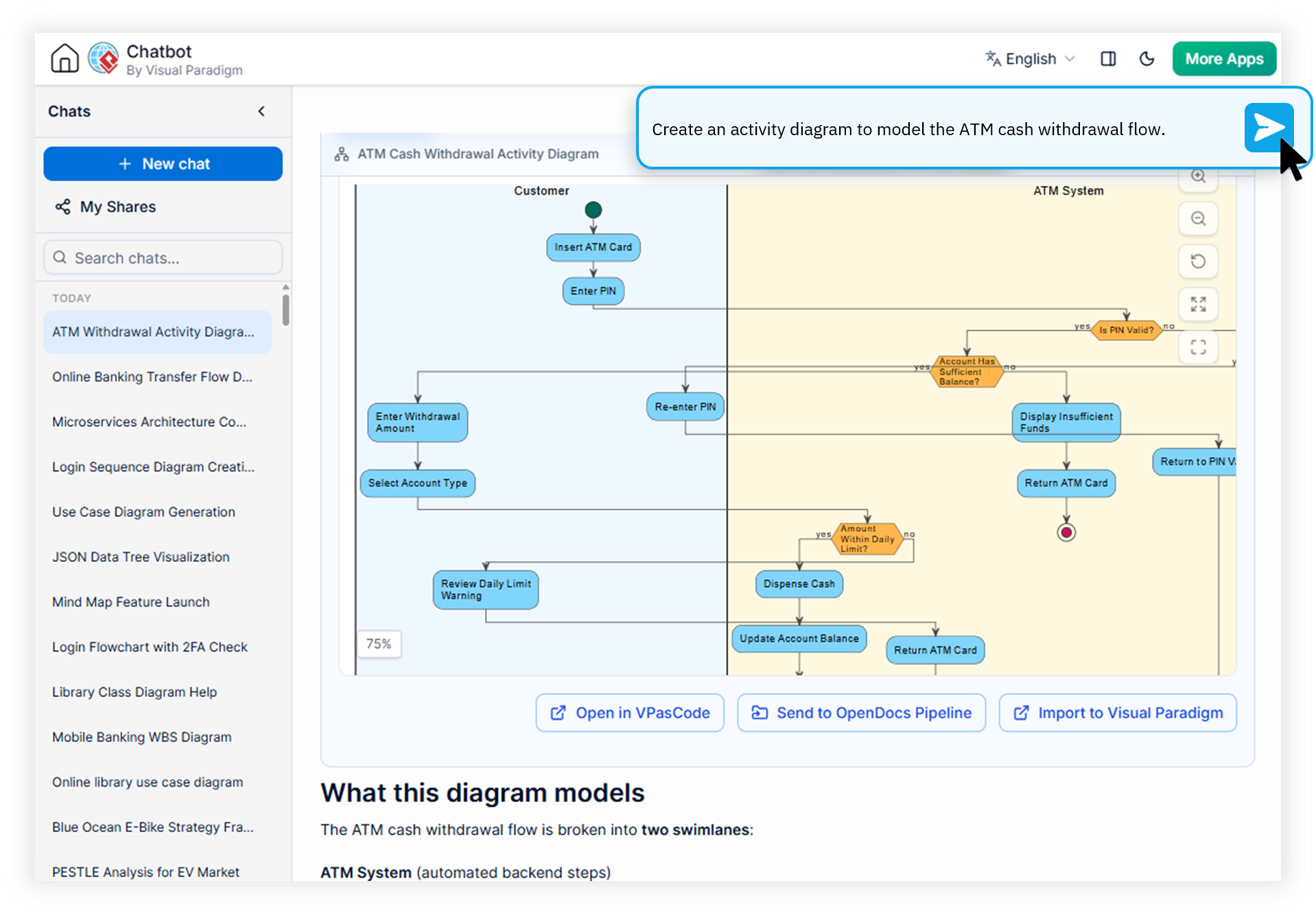
Engineered for Developers, Analysts, and Technical Writers
Every persona that documents systems, models processes, or communicates complex ideas faces the same friction: turning written intent into visual clarity. Our text to diagram ai tool removes that friction.
For Developers
Stop wrestling with PlantUML and Mermaid syntax. Describe your microservice interactions in plain English and generate accurate sequence, class, and component diagrams that drop straight into your READMEs and PRs.
For Business Analysts
Convert stakeholder requirements and user stories into BPMN, flowcharts, and ArchiMate diagrams during the same meeting. Validate scope visually without firing up a heavyweight modeling tool.
For Technical Writers
Accelerate documentation pipelines by generating diagrams inline with your prose. Export high-resolution PNG or vector SVG, or embed diagram-as-code directly in Markdown and DocBook output.
Watch How Visual Paradigm AI Chatbot Works
How Our AI Diagram Generator from Prompt Works
Bottom line: The Visual Paradigm AI Diagramming Chatbot is a conversational text to diagram ai that converts natural language prompts into production-ready UML, ERD, ArchiMate, and flowchart diagrams, with iterative refinement, open format export, and seamless integration into the Visual Paradigm ecosystem.
Conversational Text-to-Diagram Generation
Describe your system, process, or idea in plain English. The AI interprets intent, selects the appropriate notation, and renders a clean, syntactically correct diagram in seconds — no drag-and-drop required.
Iterative Refinement Through Conversation
Ask the chatbot to add an actor, rename a class, expand a subprocess, or restructure a flow. Every turn builds on the previous diagram, letting you evolve architecture and process models in real time.
Open, Portable Text-Based Formats
Every diagram is generated on top of industry-standard formats — PlantUML, Mermaid, Graphviz, and JSON. Copy the source, paste it into your repo, or feed it into custom AI pipelines with zero lock-in.
Export Anywhere: PNG, SVG, Markdown, PDF
Export diagrams as crisp PNG, scalable vector SVG, or copy the image directly to your clipboard. Export the full conversation as Markdown, print it to PDF, or push the model into Visual Paradigm OpenDocs for long-lived documentation.
From Prompt to Production Diagram in Four Steps
Convert text to flowchart online — or any other diagram — using a workflow that feels as natural as writing a chat message.
Describe What You Want
Type a plain-language prompt into the chatbot — e.g., "Draw a sequence diagram of a user logging into a microservice architecture with OAuth." No notation expertise required.
Review the Generated Diagram
The chatbot renders the result in the interactive Artifacts pane with built-in zoom, fit-to-screen, and full-screen modes. Every artifact is automatically indexed for quick navigation.
Refine With Follow-Up Prompts
Ask the AI to add a new component, rename elements, drill into a shape to generate a sub-diagram, or regenerate the output in a different notation. Every edit is conversational.
Export & Integrate
Export to PNG, SVG, Markdown, or PlantUML. Send it to Visual Paradigm OpenDocs, bridge it into VPasCode for fine-tuning, or open it in VP Online or VP Desktop for enterprise-grade editing.
Manual Diagramming vs. AI Text-to-Diagram Generation
A side-by-side look at what changes when teams adopt an AI diagram generator from prompt instead of traditional visual editors or generic LLMs.
| Metric / Focus Area | Traditional Process | With Visual Paradigm AI |
|---|---|---|
| Time to First Diagram | Hours to days of manual layout | Seconds from a single prompt |
| Notation Learning Curve | Weeks to master UML / ArchiMate | None — describe in plain text |
| Generic LLM Output Quality | Frequent syntax errors, broken code | Domain-trained, near-zero errors |
| Iterative Changes | Manual re-layout and re-numbering | Conversational, instant updates |
| Documentation Hand-Off | Screenshots pasted into Word | OpenDocs, Markdown, PDF, SVG |
One Free Text to Architecture Diagram Tool — Every Notation You Need
From enterprise architecture to software modeling and business analysis, a single conversational prompt can produce any of the following diagram families.
UML
Class, Sequence, Use Case, Activity, Component, Deployment, State, Package, Object, Composite Structure, Timing.
Enterprise Architecture
ArchiMate, Viewpoint-based ArchiMate (2x), C4 System Context, Container, Component, and Deployment.
SysML
Requirement, Block Definition, and Internal Block diagrams for systems engineering teams.
Flows & Process Maps
DFD, BPMN, Flowchart, Stepwise Flowchart, WBS, PERT, and Git Graph — perfect to convert text to flowchart online.
Data & Structure
ERD, Chen ERD, MarkMap, Org Chart, ECharts, JSON, DBML, and Solution Selection Matrix.
Strategic & Analysis
SWOT, PEST, PESTLE, SOAR, Eisenhower Matrix, Ansoff Matrix, Blue Ocean Four Actions, 4C Marketing Mix, McKinsey 7S.
Common Questions About Text-to-Diagram Generation
What types of diagrams can the AI Diagramming Chatbot generate from text?
The chatbot generates a wide range of diagrams from natural language prompts, including UML (Class, Sequence, Use Case, Activity, Deployment, State), SysML, ArchiMate, C4, ERD, flowcharts, DFD, BPMN, PERT, WBS, SWOT, and organizational charts. It also supports code-based formats such as PlantUML, Mermaid, and Graphviz, making it an extremely flexible prompt to diagram generator.
Is the text-to-diagram generator free to use?
Yes. Visual Paradigm offers a free trial of the AI Diagramming Chatbot so you can evaluate text-to-diagram generation before committing. Full, unrestricted access is included with VP Online (Deluxe Edition) and VP Desktop (Professional Edition) subscriptions, making it a genuinely accessible free text to architecture diagram tool for teams already in the ecosystem.
How accurate is the AI prompt to diagram generator compared to generic LLMs?
The Visual Paradigm AI Diagramming Chatbot is powered by domain-trained models specialized in modeling syntax and semantics. It delivers significantly higher syntactic accuracy and near-zero error rates compared to generic LLMs that often produce malformed PlantUML, Mermaid, or ArchiMate output. This is what separates a real text to diagram ai from a general-purpose chatbot.
Can I refine or expand a generated diagram after it is created?
Yes. The conversational diagramming experience allows you to ask the AI to adjust, add, or expand specific elements of an existing diagram. You can also drill down into individual shapes to generate detailed sub-diagrams, all within the same chat session. Every session can be saved, shared via URL, or pushed into OpenDocs for long-lived documentation.
Your Next Diagram Is One Prompt Away
Turn text, requirements, and ideas into accurate UML, ERD, ArchiMate, and flowchart diagrams with the Visual Paradigm AI Diagramming Chatbot. No setup. No syntax memorization. Just conversation.