AI Chatbot for UML Composite Structure Diagrams

Describe the internal parts of a class or component. Get a clear composite structure diagram in seconds. The premier AI tool for detailed 'white-box' architectural and design views.

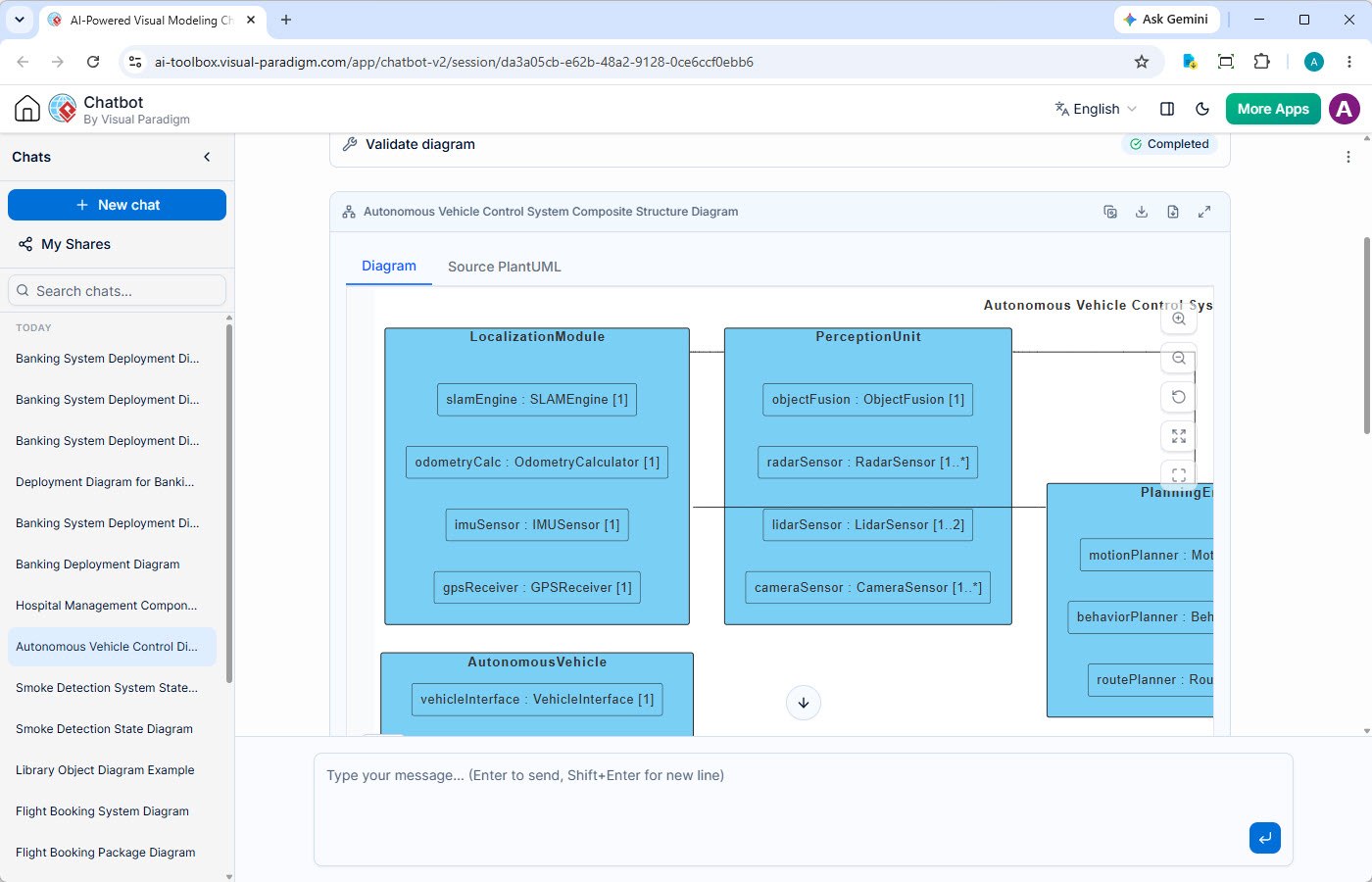
AI Chatbot generating a UML Composite Structure Diagram

Detail Internal Component Structure with Conversational AI

Visual Paradigm's AI Diagramming Chatbot is a versatile tool for visual modeling. This page highlights its powerful capability as an AI composite structure diagram generator. Describe the internal parts, ports, and connectors of a class or component, and this AI tool will instantly produce a formal UML Composite Structure Diagram, helping you design and document the detailed 'white-box' view of your architecture.

From Black Boxes to White-Box Clarity

High-level diagrams are useful, but they often hide the critical internal details of how complex components actually work, making detailed design and communication difficult.

Obscured Internal Wiring

It is hard to understand how the internal parts of a complex classifier are 'wired' together. This ambiguity makes it difficult to reason about the component's integrity and behavior.

Undocumented Collaborations

The way a set of runtime instances collaborate to produce a result is often left undocumented, making it hard for new developers to understand key mechanisms in the codebase.

Complex Design Patterns

Explaining how a design pattern like Facade, Adapter, or Composite is implemented is difficult without a diagram that shows the roles and connectors between the participating parts.

Key Features for Internal Structure Modeling

Beyond simple generation, the AI Chatbot offers a complete set of features designed to enhance your detailed design and documentation workflow.

Persistent Chat Sessions

Preserve every structural refinement. Your modeling conversations are saved, allowing you to iterate on the internal parts, ports, and connectors of your components.

Shareable Sessions

Streamline design reviews. Easily share a direct link to your diagramming session to get feedback on the internal wiring and collaborations within your components.

Artifacts Pane

Navigate your internal views. Instantly jump to any generated composite structure diagram within the conversation, making it easy to review different parts of your design.

Powerful Diagram Viewer

Analyze complex compositions. Utilize zoom, pan, and full-screen modes to meticulously examine the parts, ports, and connectors that make up your components.

Multiple Export Options

Flexible design documentation. Export your final composite structure diagrams as high-fidelity SVG or PNG for detailed design documents and architectural guides.

Transparent Diagram Code

Edit internal structure with code. Access the underlying text-based diagram code for your models, enabling direct editing and integration into version-controlled design documents.

From AI-Generated Structure to Detailed Design

Your AI-generated composite structure diagram is a detailed blueprint that links the internal design of a component to your overall class architecture.

DOCUMENT DESIGN PATTERNS

Document with OpenDocs

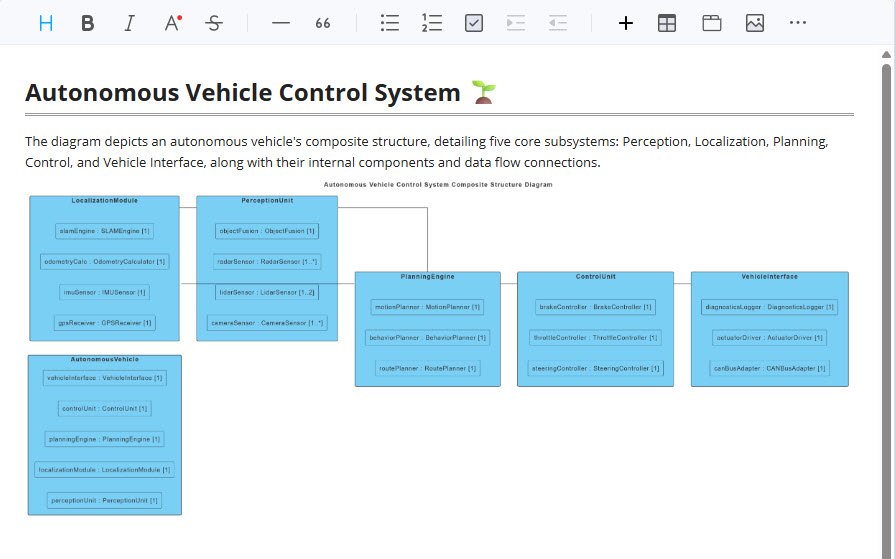
Use your AI-generated composite structure diagram to create crystal-clear documentation of how design patterns are implemented. Embed the diagram in OpenDocs to visually explain the roles, parts, and connectors of patterns like Facade, Adapter, or Composite.

A composite structure diagram in OpenDocs visually explaining a design pattern.
VERSION-CONTROLLED BLUEPRINTS

Refine with VPasCode

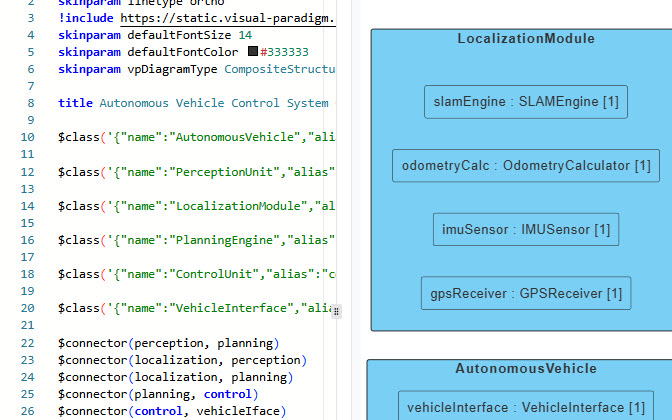
Treat your component's internal design as code. Open the diagram in VPasCode to manage the structure textually. This allows architects to version control the detailed design blueprints in Git and track internal changes over time.

VPasCode editor showing a composite structure diagram's textual representation for version control.

Your AI Structural Modeler, Available Anywhere

Whether you're quickly sketching the internal wiring of a component or performing a detailed design review, your AI assistant is always ready.

Illustration of the AI Composite Structure Diagram chatbot running in a web browser.

Instant Access on the Web

Launch the AI Chatbot in any browser for immediate diagram generation. It's perfect for quickly visualizing internal component structures and sharing detailed design ideas without any software installation.

Try on Web Now
Illustration of the AI Composite Structure Diagram chatbot integrated within the VP Desktop application.

Integrated Desktop Experience

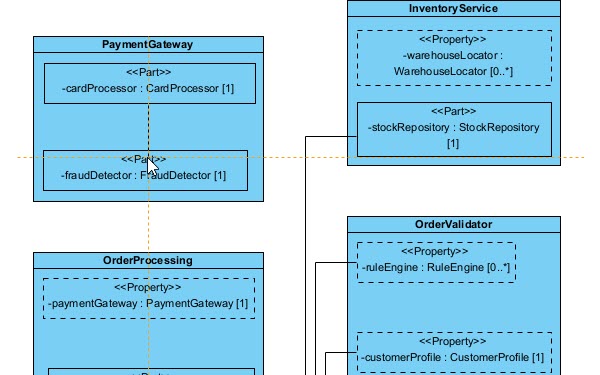
For deep design work, run the AI Chatbot from within VP Desktop. While direct import of generated diagrams into your formal model is not yet supported, you can still leverage the chatbot for design exploration and then manually integrate the insights into your desktop projects.

Download VP Desktop

Trusted by Leading Teams Worldwide

Visual Paradigm's modeling platform is used by professionals in the world's most successful and demanding organizations.

Adobe logo
Apple logo
AT&T logo
Caterpillar logo
Intel logo
NASA logo
Nokia logo
Toyota logo

A Vast Library of Supported Diagram Types

The AI Composite Structure Diagram Generator excels at detailed structural modeling, but also supports a wide array of notations to visualize system architecture, business processes, and strategic plans.

UML

SysML & ArchiMate

  • Requirement Diagram
  • Block Definition Diagram
  • Internal Block Diagram
  • ArchiMate Diagram
  • Viewpoint-based Diagrams

C4 Model

  • System Context Diagram
  • Container Diagram
  • Component Diagram
  • Deployment Diagram

Business & Strategic

  • SWOT & PEST Analysis
  • BPMN & DFD
  • Flowcharts
  • Org Charts
  • Mind Maps

Frequently Asked Questions

How does the AI create parts, ports, and connectors?

You can describe the internal structure like: 'A Car class has four parts of type Wheel and one part of type Engine. The Engine has a port that connects to the Wheels.' The AI interprets this to create a composite structure diagram showing the 'Car' as the containing class with the 'Wheel' and 'Engine' parts inside, connected appropriately.

Can this AI tool model collaborations?

Yes. You can describe a collaboration, which is a set of roles that work together. For example: 'The Authentication collaboration involves a 'user' role and a 'validator' role.' The AI will generate a collaboration symbol with the corresponding role representations.

How is a Composite Structure Diagram different from a Class Diagram?

A Class Diagram shows the 'blueprint' of all possible classes and their relationships. A Composite Structure Diagram provides a 'white-box' view, looking inside a specific class or component to show its internal parts and how they are 'wired' together at runtime. It's about composition and collaboration, not just classification.

Do I need a separate subscription for the AI Composite Structure Diagram Generator?

No. The AI Diagramming Chatbot is an integral part of Visual Paradigm. Full access to its composite structure diagram generation capabilities is included with a license for VP Desktop Professional Edition or VP Online Deluxe Edition.

From Black Box to White Box in Minutes

Stop guessing, start seeing. Experience the fastest way to visualize and document the internal workings of your components with our AI Composite Structure Diagram Tool.