BPMN Tutorial: Writing Working Procedures
Business Process Diagram is a very good tool to model the workflow for your company or department because it gives a clear picture about who is responsible for a particular task as well as the flow of the process. However, the Business Process Diagram does not tell us how a particular task should be performed. In Visual Paradigm, you can define working procedures for the tasks in your business process. This allows you to clearly document how a particular task should be performed. Furthermore, you can generate the working procedures into a document, so that all your team member can have a complete understanding on how to perform their work. In this tutorial, you will learn how to define working procedures for your business process and how to generate it into a working procedures report.
Define Working Procedures
To define working procedures for your business tasks:
- Right-click on the blank area of your Business Process Diagram and select Show Procedure Editor.

- Select a task in your process diagram.

- Start entering the working procedures in the Procedure Editor.

- You can use the Increase Indent button (or the tab shortcut key) to create sub-steps for your working procedures.

- Once you finish entering the procedures, simply click on the blank area of the diagram to end editing, or you can directly click on another task to define its procedures.
Create Multiple Procedures for a Task
In some cases, a single procedure is insufficient to describe all possibilities for a task. In this case, you can define multiple procedures for it. To define multiple procedures for a task:
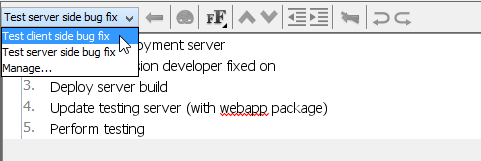
- Click on the combo box in the Procedure Editor and select Manage... to open the Procedures dialog.

- Click the New Procedure button to create a new procedure and name the procedure as you desire.

- Once the new procedure is created, you can then follow the steps above to fill in the details.

- You may also rename your existing procedures by clicking Rename Procedure.

For tasks with multiple procedures defined, you can click on the combo box in the Procedure Editor to switch between the working procedures.
Generate Working Procedure Document
The working procedures are not just defined in the tool; you can also output them as a document and distribute it to your team. To generate a working procedure document:
- Select Tools > Doc. Composer... from the application toolbar.

- Click on Build Doc from Scratch.

- Select your Business Process Diagram in the Diagram Navigator and then drag it onto the document editor. You should see the BPD appear in the document.

- Expand the diagram node in Diagram Navigator to select the task or tasks that have working procedures defined.

- Select the Details template and drag it onto the document editor, below the BPD. You should see the procedures of your tasks listed in the document.

- Click on the Export button at the top right corner of Doc. Composer and pick the format you like to export, i.e., PDF Document this time.

- Enter the location where you would like to output your working procedure document.

- Optionally enter the cover page details for your document.

- Click Export to generate a document once you have finished entering the details for the document. The working procedure document is now being generated at the location you specified. Then, you can distribute it to your teammates.

Watch This Tutorial on YouTube
Here is the video version of this tutorial.