How to Merge Actors in Use Case Diagram?
Sometimes we accidentally make duplicate master model elements. For example, we meant to have one actor named manager. But inadvertently we ended up with two that are identically named. Perhaps you might have created one from a use case diagram and another in a different use case diagram.
To fix it, we could merge the duplications into a single existing master actor. This tutorial will show you how.
Note: The example below is demonstrated using Visual Paradigm.
Background Information
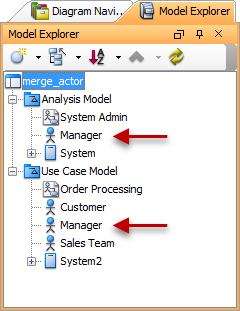
Let's say that we are going to begin with a project file that contains two use case diagrams, System Admin and Order Processing. Between them, there are two actors, both named Manager. We will merge one into another to remove duplicates.
 Download sample project
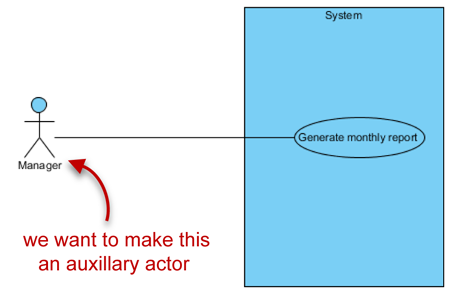
More specifically, we want to keep the actor (in the Order Processing diagram) as a master model element and make the other one (in the System Admin diagram) a copy of that.
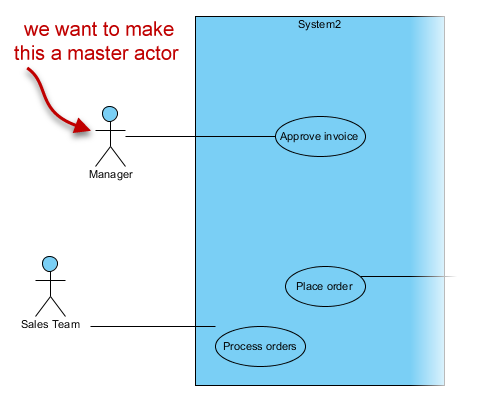
Steps to Merge Actors
- We'll begin with the actor from which we want to make an auxiliary actor. In the System Admin use case diagram, right-click on the actor named Manager and select Related Elements > Merge to Model Element...

-
In the dialog box that opens, we are going to select the actor (which will become the master model element) for the currently selected actor (which will become the auxiliary model element) to merge into.

Tips: In case the target list is very long, you may want to apply a filter to make it shorter.
- Select the master model element. Click Merge.

- When prompted, click Yes to confirm the merge. Then you are done.

What Will You See After the Merge?
There are a few things that you might want to take notice of after the merge. They are:
- You'll see the letter 'a' if you place your mouse over or select an auxiliary model element.

- You'll see the letter 'M' if you place your mouse over or select a master model element.

- If you go to the Model Explorer, you'll see that the duplicate actor "Manager" has been removed after the merge.
_removed_in_Model_Explorer.png)
What Does It Mean When You Are an Auxiliary Model Element?
If you change the name of an auxiliary model element (e.g., from "Manager" to "Sales Manager"), you are actually updating the master model element too, or vice versa.
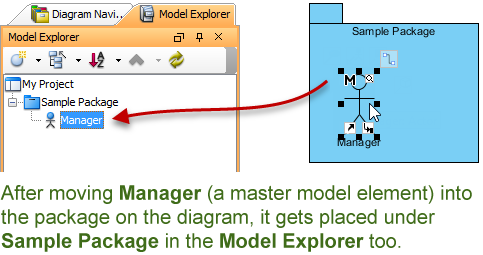
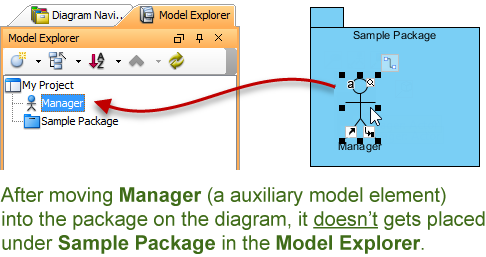
The master model element controls the placement. For example, if you drag a master model element (e.g., actor) into a package on a diagram, you will see it in the Model Explorer under the package. But if you drag an auxiliary into a package instead, the model element won't be placed under the package.
The master model element controls the 'life' of a model element. When you delete a master model element, you will be asked to confirm the deletion. If you delete an auxiliary, you won't be prompted.