OpenDocs
OpenDocs is a powerful knowledge base and documentation hub. It provides an intuitive platform to create, organize, and share text and diagrams, perfect for individuals and teams to structure information effectively.
Rich Markdown Editor
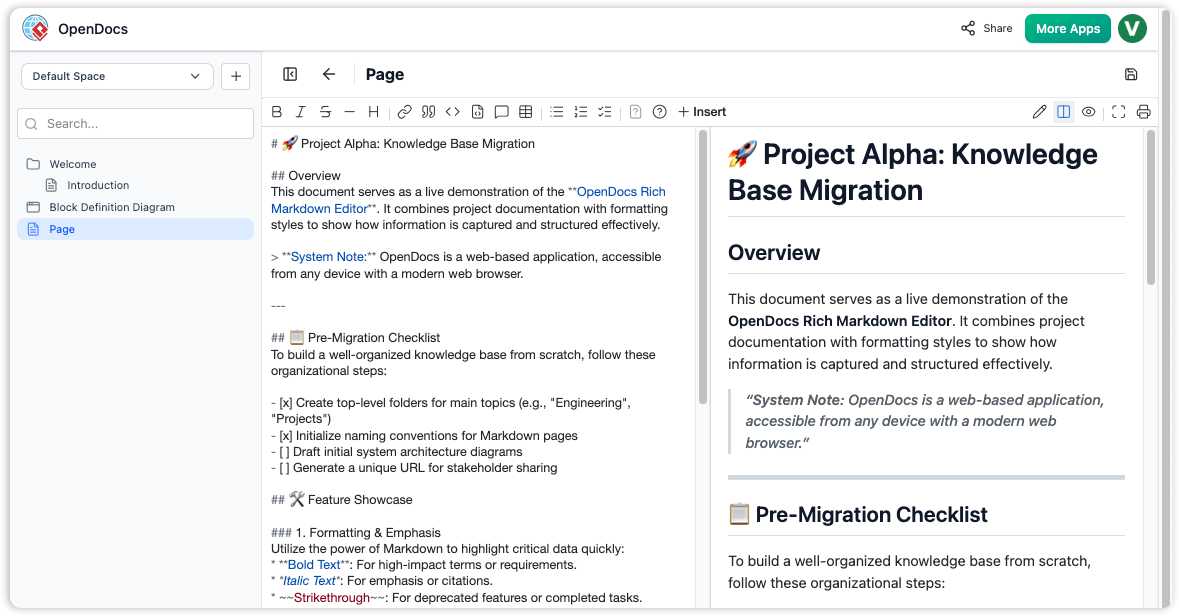
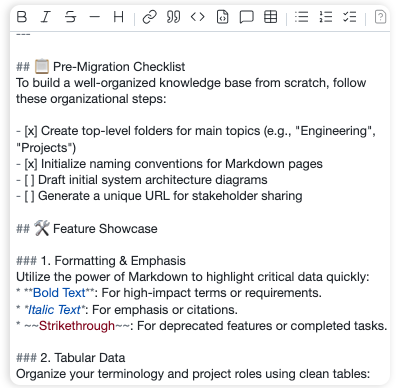
OpenDocs Markdown editor interface showing a split-pane view with a technical document in raw Markdown on the left and a live formatted preview on the right.
Diagram Editor
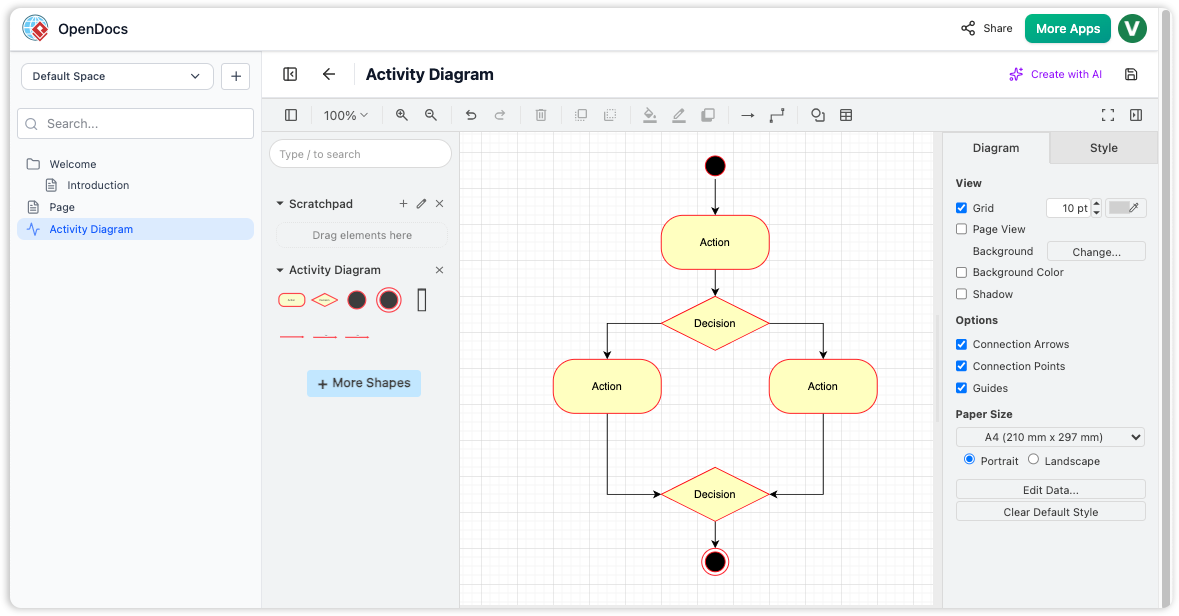
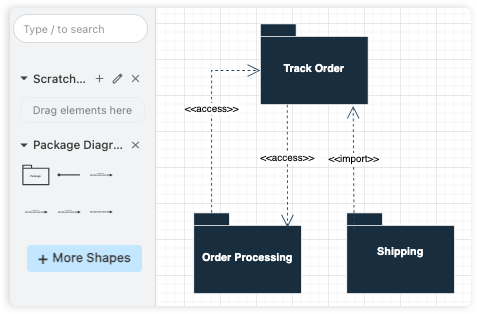
OpenDocs interface showing the integrated diagram editor with a sample Activity Diagram featuring actions, decisions, and flow connectors.
Experience the Power of OpenDocs
Your personal knowledge base and documentation hub.
Why Visual Paradigm
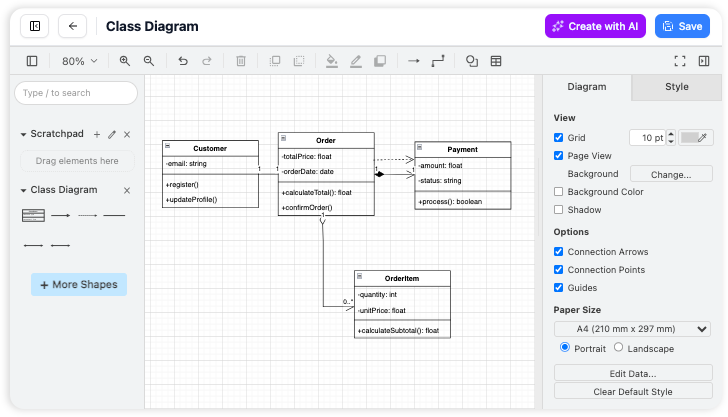
Create diagrams directly on your page
We’ve built a better way. We put a powerful drawing tool right inside your workspace so you can create pictures and write your text in the same spot. It’s one single home for all your work, keeping you focused and organized without the hassle of jumping between different tabs.

AI-Powered Diagram Generation
From a sentence to a diagram instantly. You shouldn't have to fight with your mouse to create a flowchart. Just tell the AI what you need in plain English, and it draws the entire process for you. It’s the fastest way to get your ideas on paper without the manual work.
OpenDocs is your personal knowledge base and documentation hub. It provides an intuitive and flexible platform to create, organize, and share rich content, including text documents and diagrams. Whether you're building a personal knowledge repository, creating project documentation, or collaborating with a team, OpenDocs offers the tools you need to capture and structure information effectively.
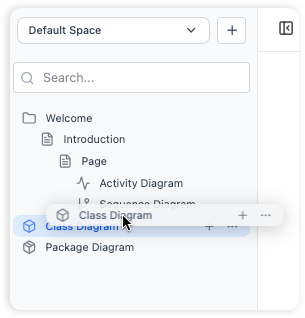
Hierarchical Folder Structure
Organize your documents and diagrams in a familiar tree-like structure with nested folders.
-
Logical and scalable organization of your knowledge base
-
Drag and drop files and folders to rearrange your hierarchy
Rich Markdown Editor
A full-featured editor for creating and formatting text documents using Markdown syntax.
-
Beautifully structured documents with headings, lists, tables, code blocks, and more.
-
A split-pane view provides a live preview as you type
Integrated Diagram Editor
Create a wide variety of diagrams directly within OpenDocs.
-
Create visual documentation, such as flowcharts, UML diagrams, and mind maps,
-
Vast library of shapes and stencils, making it easy to create professional-looking diagrams.
How to Use OpenDocs – Core Workflows
Master the essentials of building, documenting, and sharing your knowledge base.
Structure Knowledge
Build a robust hierarchy using top-level folders and sub-folders. Easily drag and drop to restructure as your projects grow.
Markdown Writing
Create rich documents with headers, code blocks, and lists. See your formatting instantly with our real-time live preview.
Visual Diagrams
Complement your notes with visual models. Use professional shape libraries and connectors to illustrate complex relationships.
Ready to collaborate? Generate a unique URL to share your entire knowledge base instantly.
Key Benefits
- All-in-One Knowledge Hub: Combine text and diagrams in a single platform, eliminating the need to switch between multiple tools.
- Structure Your Thoughts: Organize knowledge hierarchically with nested folders, making it easy to navigate even large repositories.
- Effortless Collaboration: Share your entire knowledge base with a single click via a secure, read-only link.
- Visually Rich Documentation: Go beyond plain text by creating professional diagrams to illustrate complex processes and systems.
- Markdown for Power Users: Leverage the simplicity and power of Markdown to format your documents quickly and efficiently.
- Accessible Anywhere: Access your documentation from any device using a modern web browser—no desktop installation required.
Getting Started
Follow these steps to set up your workspace and begin documenting your ideas.
Launch & Initialize
Open the OpenDocs application. You will be greeted by a welcome screen where you can manage your recent projects.
Create and Name Your First Page
Click the "New Page" button in the sidebar to create a Markdown document, then give it a descriptive name to stay organized.
Write and Format Content
Use the Markdown editor to start writing. You can use standard Markdown syntax to add structure and emphasis to your notes.
Generate Visual Diagrams
Click the "New Diagram" button to open the visual editor, allowing you to create flowcharts or models to complement your text.
Organize with Folders
Create new folders via the sidebar and simply drag and drop your pages or diagrams into them to build a structured knowledge base.
Frequently Asked Questions
Everything you need to know about getting the most out of OpenDocs.
Can I import existing documents into OpenDocs?
OpenDocs is designed for creating content within the application. Currently, there is no direct import feature for existing files.
What types of diagrams can I create?
The integrated diagram editor supports a wide variety of diagrams, including flowcharts, UML diagrams, network diagrams, mind maps, and more.
Can I export my documents to other formats?
The application is focused on sharing within the platform. At this time, there is no direct export functionality to other file formats like PDF or Word.
Is there a version history for my documents?
OpenDocs does not currently have a built-in version history feature. We recommend maintaining regular backups of your key documentation.
Can I share a single page?
The sharing feature is designed to share the entire knowledge base to provide full context. There is no option to share individual pages or folders.
Is OpenDocs available as a desktop app?
OpenDocs is a web-based application, which means you can access it from any modern web browser without any installation required.
Who develops OpenDocs?
OpenDocs is developed and offered by Visual Paradigm, a leading provider of professional modeling and diagramming software tools.