
For decades, the Unified Modeling Language (UML) has been the gold standard for visualizing software architecture. However, traditional UML modeling has always come with a steep price: time. Manually dragging, dropping, and aligning shapes to translate complex business requirements into visual diagrams is a tedious process that often leads to outdated documentation and frustrated teams.
Enter the era of AI-Powered UML. By combining natural language processing with robust modeling engines, modern tools can now instantly transform plain-text requirements into professional, standardized diagrams.
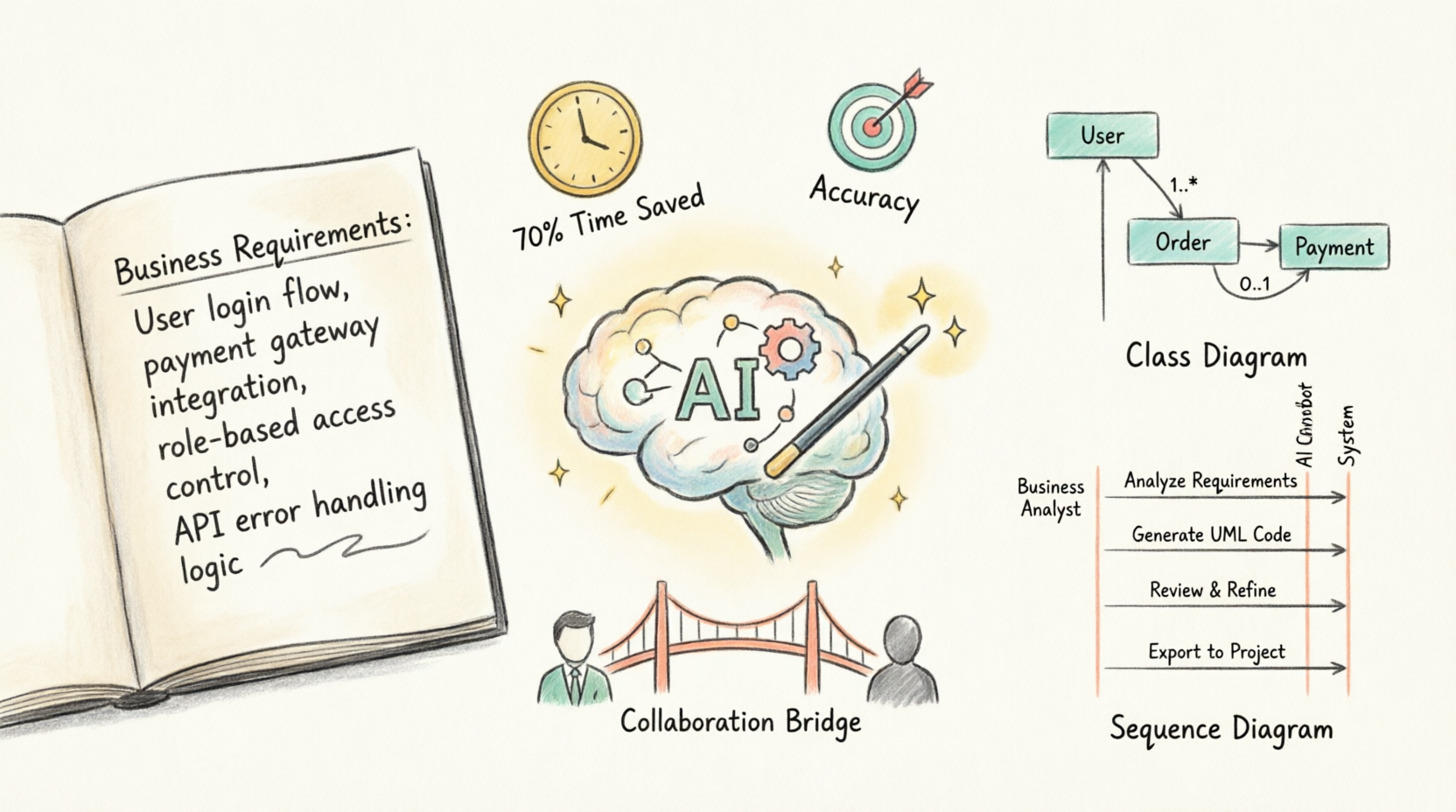
In this comprehensive, beginner-friendly tutorial, we will explore how Visual Paradigm—a leading enterprise modeling tool—leverages its advanced AI features to revolutionize the design process. You will learn how to use the AI Chatbot, Diagram Generator, and Textual Analysis features to achieve massive time savings, bridge the gap between business and development, and create flawless architecture diagrams in minutes rather than days.
Before diving into the "how," let’s understand the "why." Integrating AI into your UML workflow with Visual Paradigm delivers transformative impacts:
70%+ Time Savings: By eliminating manual drawing, teams can generate complex diagrams in seconds. What used to take hours of formatting now takes a single text prompt.
Improved Accuracy & Error Reduction: Human error in manual modeling (like missing a relationship or misaligning a cardinality) is drastically reduced. The AI enforces UML standards and ensures logical consistency.
Better Stakeholder Communication: Business analysts can write requirements in plain English, and the AI instantly visualizes them. This creates a single source of truth that both non-technical stakeholders and developers can understand.
Seamless Iteration: Need to add a new feature? Simply tell the AI chatbot to "add a discount module to the class diagram," and it updates the visual model instantly without breaking existing layouts.
Bridging Requirements to Code: AI-powered textual analysis extracts entities and relationships directly from requirement documents, creating a direct, traceable pipeline from initial business text to final UML diagrams, and eventually to code generation.
Let’s walk through a realistic scenario. Imagine you are a systems analyst tasked with designing the backend for a new E-Commerce Checkout System. You have a paragraph of raw text requirements, and you need to produce professional UML diagrams.
Open Visual Paradigm and create a new project.
Ensure the Visual Paradigm AI plugin/feature is enabled in your workspace settings.
Open the AI Chatbot panel, usually located on the right side of the screen. This will be your primary interface for textual analysis and diagram generation.
Instead of reading through the text and manually picking out classes, let the AI do the heavy lifting.
Your Raw Text Requirement:
"The system must allow a Customer to browse Products and add them to a ShoppingCart. When the Customer checks out, the system creates an Order. The Order must be linked to a PaymentMethod. If the Payment is successful, the Order status changes to 'Confirmed' and an Inventory system is updated."
Action:
Paste this text into the Visual Paradigm AI Chatbot and use the prompt:
“Analyze this text and extract the core entities, attributes, and relationships for a software system.”
Result:
The AI’s Textual Analysis feature instantly parses the text, identifying Customer, Product, ShoppingCart, Order, PaymentMethod, and Inventory as core classes, along with their relationships (e.g., Customer creates Order).
Now that the AI understands the domain, it’s time to visualize it.
Action:
In the AI Chatbot, type:
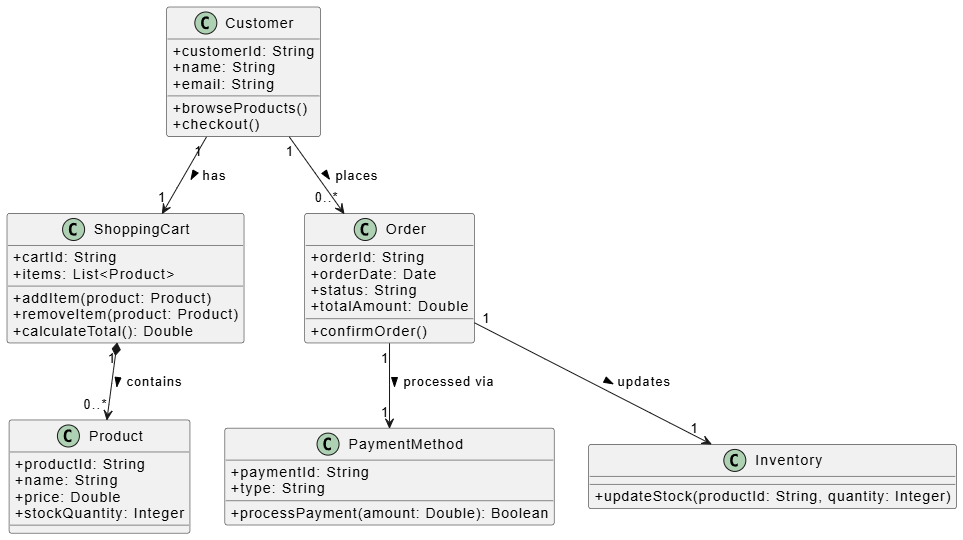
“Generate a UML Class Diagram based on the analyzed e-commerce requirements.”
Visual Paradigm’s Diagram Generator will instantly draw the class diagram on your canvas, applying proper UML notation, cardinalities, and clean layout algorithms.
The Underlying Logic (PlantUML Equivalent):
While Visual Paradigm renders this as a beautiful, interactive graphical diagram, here is the exact PlantUML code that represents the AI's logical output. (You can use this code in any PlantUML renderer to see the same structure).
@startuml
skinparam classAttributeIconSize 0

class Customer {
  + customerId: String
  + name: String
  + email: String
  + browseProducts()
  + checkout()
}

class Product {
  + productId: String
  + name: String
  + price: Double
  + stockQuantity: Integer
}

class ShoppingCart {
  + cartId: String
  + items: List<Product>
  + addItem(product: Product)
  + removeItem(product: Product)
  + calculateTotal(): Double
}

class Order {
  + orderId: String
  + orderDate: Date
  + status: String
  + totalAmount: Double
  + confirmOrder()
}

class PaymentMethod {
  + paymentId: String
  + type: String
  + processPayment(amount: Double): Boolean
}

class Inventory {
  + updateStock(productId: String, quantity: Integer)
}

Customer "1" --> "1" ShoppingCart : has >
Customer "1" --> "0..*" Order : places >
ShoppingCart "1" *--> "0..*" Product : contains >
Order "1" --> "1" PaymentMethod : processed via >
Order "1" --> "1" Inventory : updates >

@enduml
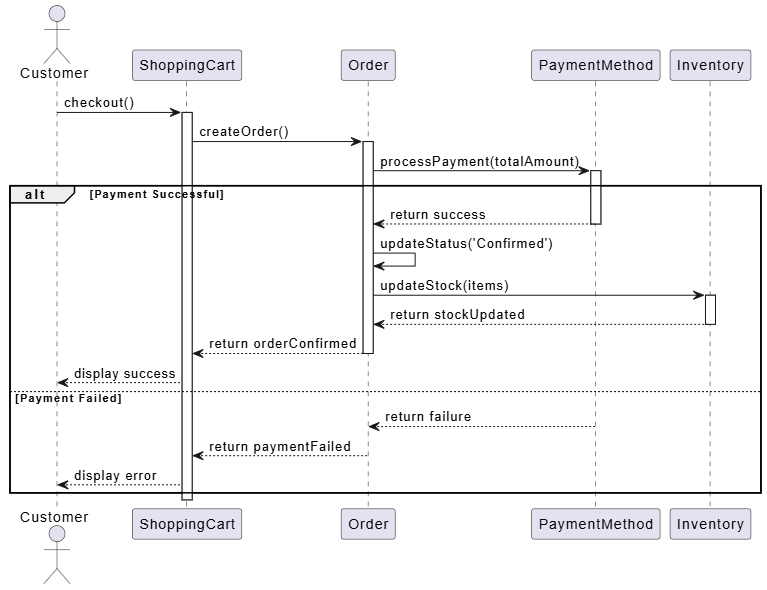
Class diagrams show structure, but Sequence diagrams show behavior. Let's map the checkout flow.
Action:
Prompt the AI Chatbot:
“Generate a UML Sequence Diagram for the 'checkout' process, starting from the Customer to the Inventory update.”
Visual Paradigm generates the sequence diagram, showing the lifelines and message flows.
The Underlying Logic (PlantUML Equivalent):
@startuml
actor Customer
participant "ShoppingCart" as Cart
participant "Order" as Order
participant "PaymentMethod" as Payment
participant "Inventory" as Inv

Customer -> Cart: checkout()
activate Cart

Cart -> Order: createOrder()
activate Order

Order -> Payment: processPayment(totalAmount)
activate Payment

alt Payment Successful
    Payment --> Order: return success
    deactivate Payment

    Order -> Order: updateStatus('Confirmed')
    Order -> Inv: updateStock(items)
    activate Inv
    Inv --> Order: return stockUpdated
    deactivate Inv

    Order --> Cart: return orderConfirmed
    deactivate Order
    Cart --> Customer: display success
else Payment Failed
    Payment --> Order: return failure
    deactivate Payment
    Order --> Cart: return paymentFailed
    deactivate Order
    Cart --> Customer: display error
end

deactivate Cart
@enduml
In traditional modeling, adding a new requirement means redrawing lines and shifting boxes. With Visual Paradigm's AI, iteration is conversational.
Action:
You realize you forgot a crucial business rule. You type into the AI Chatbot:
“Add a 'DiscountCoupon' class. A Customer can apply it to an Order, and it should reduce the totalAmount.”
Result:
The AI instantly adds the DiscountCoupon class, creates the association with Customer and Order, and even updates the Order class to include a applyDiscount() method. The diagram rearranges itself automatically to maintain a clean, professional layout.
To truly understand the value of this workflow, let’s look at how it impacts real-world software development:
The Problem: A fintech startup needs to design a complex loan approval system. The manual UML design phase is estimated to take 3 weeks, delaying the coding phase.
The AI Solution: The product manager inputs the business rules into Visual Paradigm's AI Chatbot. Within hours, the AI generates comprehensive Use Case, Class, and Activity diagrams.
The Result: The design phase is reduced from 3 weeks to 3 days (a massive time saving). Developers receive clear, standardized diagrams and begin coding immediately, accelerating the overall time-to-market.
The Problem: An enterprise is migrating a 15-year-old legacy system. The original documentation is just thousands of pages of plain text. Developers are making errors because they misunderstand the legacy text requirements.
The AI Solution: The team uses Visual Paradigm’s Textual Analysis to feed the legacy text documents into the AI. The AI generates "As-Is" UML diagrams, highlighting missing links and logical inconsistencies in the old text.
The Result: Error reduction in the migration phase by over 40%. The visual diagrams bridge the communication gap, allowing the new dev team to clearly see the legacy architecture before writing a single line of new code.
The transition from manual, drag-and-drop modeling to AI-powered UML is not just a minor convenience; it is a fundamental shift in how we design software. By leveraging Visual Paradigm’s AI Chatbot, Diagram Generator, and Textual Analysis, teams can reclaim the 70%+ time traditionally lost to diagram formatting.
More importantly, AI-powered UML bridges the critical gap between business requirements and technical execution. It ensures that the diagrams are not just pretty pictures, but accurate, standardized, and living representations of your software architecture.
Your Next Steps:
Don't just take our word for it. Open Visual Paradigm, launch the AI Chatbot, paste in a paragraph of your current project requirements, and watch as your text transforms into a professional UML diagram in seconds. The future of software design is conversational, and it is available to you right now.

