1. Introduction to Use Case Modeling
In the rush to build software, it's tempting to start coding immediately. Yet the most successful systems are not those written fastest, but those that deliver genuine value to their users. Use case modeling is the compass that guides development toward meaningful outcomes, ensuring that what you build aligns with what people actually need.
At its heart, this approach asks two deceptively simple questions: Who will use the system? and What do they want to accomplish? The answers—actors and use cases—form the foundation upon which great software is constructed. They transform vague requirements into clear narratives, bridge the communication gap between business stakeholders and technical teams, and create a shared understanding that prevents costly misunderstandings.
This tutorial will equip you with a systematic methodology for identifying actors and use cases, moving from abstract concepts to practical application. Whether you're a business analyst mapping requirements, a product owner defining features, or a developer seeking clarity before writing the first line of code, you'll find actionable guidance here. We'll explore not just the theory, but the common traps that derail even experienced practitioners—and how to avoid them.
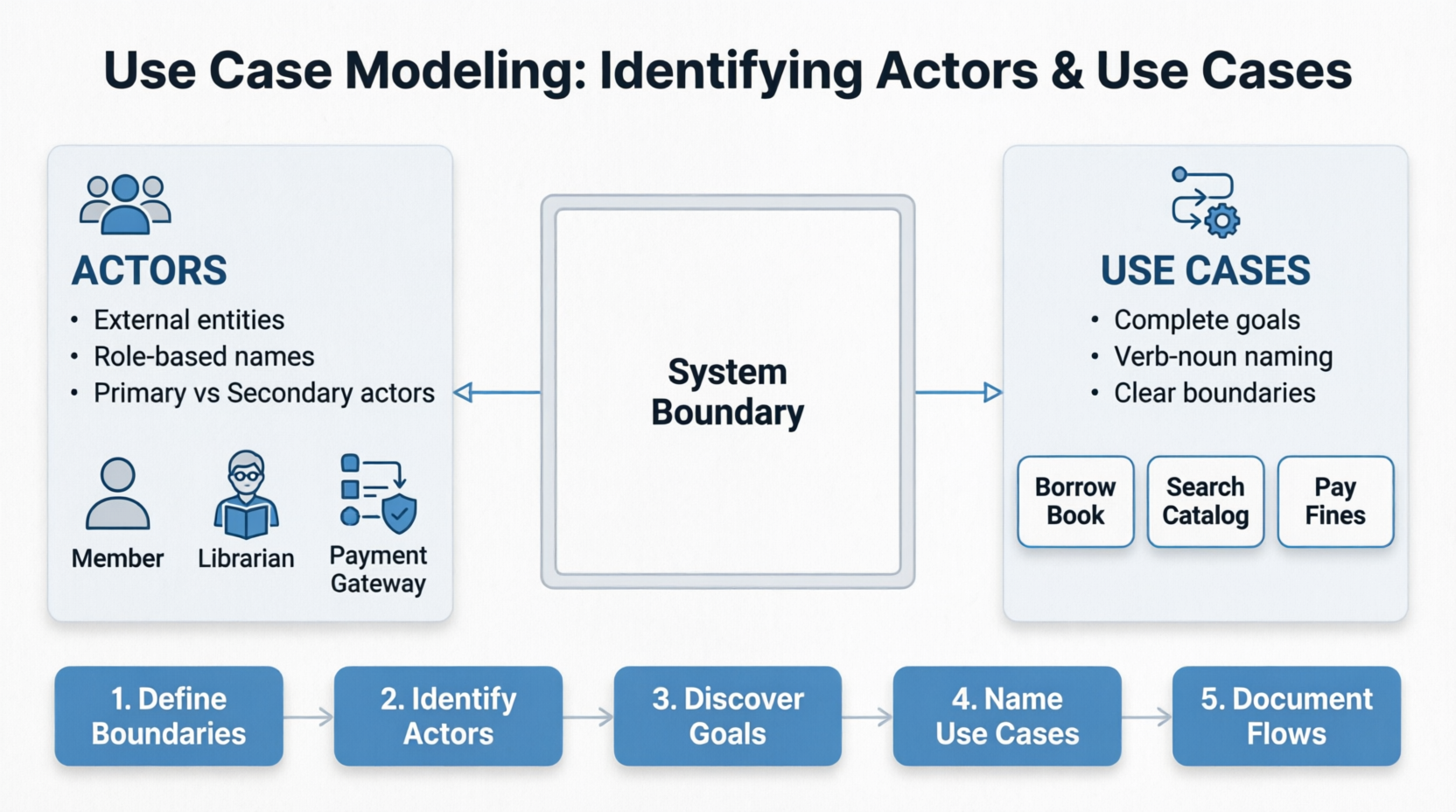
Mastering use case modeling isn't just about following a process; it's about developing a mindset that always puts user goals first. When you understand who your actors are and what they truly need, you move beyond feature-checking to creating systems that make a difference.
Why Use Case Modeling Matters:
- Bridges the gap between stakeholders and developers
- Provides a clear, understandable view of system functionality
- Serves as a foundation for testing, estimation, and project planning
- Helps identify system boundaries and scope
2. Key Concepts and Terminology
2.1 What is an Actor?
An Actor is an external entity (person, organization, or system) that interacts with the system to achieve a goal. Actors are outside the system boundary and initiate or participate in use cases.
Key Characteristics:
- External to the system
- Interacts directly with the system
- Has goals the system helps achieve
- Can be human or non-human
Types of Actors:
- Primary Actors: Initiate use cases (the "drivers")
- Secondary Actors: Support or respond to the system (often external systems or services)
2.2 What is a Use Case?
A Use Case is a sequence of actions the system performs to produce a result of value to an actor. It represents a complete, meaningful goal that an actor wants to achieve.
Key Characteristics:
- Represents a discrete, measurable goal
- Has a clear start and end
- Provides value to the actor
- Is initiated by an actor
2.3 Supporting Concepts:
- System Boundary: The line separating the system from its environment
- Preconditions: What must be true before the use case starts
- Postconditions: What will be true after the use case completes
- Main Success Scenario: The "happy path" or typical flow
- Alternative Flows: Variations or exceptions to the main scenario
3. Step-by-Step Process for Identifying Actors
Step 1: Identify System Boundaries
Clearly define what is inside and outside your system. Ask:
- What is the system we're building?
- What are its boundaries?
- What interfaces does it have?
Step 2: Identify Who or What Uses the System
Ask these questions to discover actors:
For Human Actors:
- Who will use the system to perform their work?
- Who will maintain or administer the system?
- Who provides information to the system?
- Who receives information from the system?
- Who has an interest in the system's behavior?
For System Actors:
- What external systems interact with our system?
- What hardware devices interface with our system?
- What databases or services does our system depend on?
Step 3: Categorize and Name Actors
- Use role-based names (not specific individuals): "Customer," not "John"
- Use meaningful, descriptive names
- Identify actor stereotypes (primary vs. secondary)
Step 4: Define Actor Descriptions
Document each actor with:
- Name
- Brief description
- Goals
- Frequency of interaction
- Technical skill level (if relevant)
Step 5: Identify Actor Relationships
- Generalization: One actor inherits characteristics of another
- Example: "Registered User" generalizes "Administrator" and "Customer"
- Association: Direct connection between an actor and a use case
4. Step-by-Step Process for Identifying Use Cases
Step 1: Identify System Goals
For each actor, ask:
- What goals does this actor want to achieve?
- Why does this actor interact with the system?
- What tasks does this actor need to complete?
Step 2: Identify Use Cases from Actor Goals
For each goal, determine:
- Is this a discrete, complete task?
- Does it start and end with clear boundaries?
- Does it produce a measurable result?
- Is it the actor's responsibility to initiate?
Step 3: Name Use Cases
Use verb-noun naming convention:
- "Place Order" (not "Order Processing")
- "Update Customer Details"
- "Generate Report"
- "View Account Balance"
Step 4: Determine Scope and Level
Classify use cases by level:
- Summary: High-level business goals (Strategic)
- User Goal: What users accomplish (Tactical)
- Subfunction: Detailed system functions (Operational)
Step 5: Create Use Case Descriptions
Document each use case with:
- Unique identifier
- Name
- Brief description
- Actors involved
- Preconditions
- Basic flow (main success scenario)
- Alternative flows
- Postconditions
Step 6: Identify Relationships Between Use Cases
- Include: One use case always calls another (mandatory)
- Extend: Optional behavior added to a use case
- Generalization: One use case inherits behavior from another
5. Common Pitfalls and How to Avoid Them
Pitfall 1: Actors as System Components
Problem: Confusing system internals with actors.
Solution: Actors are always outside the system boundary.
Pitfall 2: Use Cases That Are Too Granular
Problem: Breaking down tasks into too many small use cases (e.g., "Enter Username," "Enter Password").
Solution: Combine into meaningful goals (e.g., "Login to System").
Pitfall 3: Use Cases That Are Too Broad
Problem: Creating monolithic use cases that cover too much.
Solution: Split into discrete, complete goals.
Pitfall 4: Missing System Actors
Problem: Overlooking external systems that interact with yours.
Solution: Consider all integration points and dependencies.
Pitfall 5: Technology-Specific Use Cases
Problem: Focusing on implementation rather than user goals.
Solution: Keep use cases technology-agnostic; focus on "what" not "how."
Pitfall 6: Not Identifying Preconditions
Problem: Assuming the system starts in the right state.
Solution: Always specify what must be true before each use case.
6. Detailed Example: Library Management System
Let's apply our steps to a real example: Library Management System (LMS).
Step 1: System Boundary
System: Library Management System
Boundary:
- Manages books, users, loans, and reservations
- Interfaces with payment system (external)
- Interfaces with email notification service (external)
Step 2: Identify Actors
Human Actors:
| Actor |
Description |
Goals |
| Librarian |
Library staff member |
Manage inventory, handle special requests, assist patrons |
| Member |
Registered library patron |
Borrow, reserve, and return books |
| Guest User |
Unregistered visitor |
Search catalog, view library information |
| System Administrator |
IT staff |
Manage users, system configuration, backups |
System Actors:
| Actor |
Description |
Goal |
| Payment Gateway |
External payment processing system |
Process fines and membership fees |
| Email Service |
External notification system |
Send due dates, hold notifications |
| External Catalog |
Third-party book database |
Provide book metadata and availability |
Step 3: Actor Relationships
- "User" generalizes "Member" and "Librarian" (common attributes)
- "Guest User" has no relationship with registered users
Step 4: Use Case Identification
For Member Actor:
- Search for Books
- View Book Details
- Borrow a Book
- Return a Book
- Reserve a Book
- View Borrowing History
- Pay Fines
- Update Personal Information
- View Account Status
For Librarian Actor:
- Add New Book
- Update Book Information
- Remove Book from Catalog
- Manage Member Accounts
- Process Special Loans
- Handle Returns (including overdue)
- Generate Reports
- Manage Reservations
- Issue Library Cards
For System Administrator:
- Manage User Roles and Permissions
- Configure System Settings
- Perform System Backups
- Monitor System Performance
For Payment Gateway (System Actor):
- Process Payment (called by Pay Fines)
For Email Service (System Actor):
- Send Notifications (called by various use cases)
Step 5: Sample Detailed Use Case
Use Case ID: UC-101
Name: Borrow a Book
Actors: Member (Primary), Email Service (Secondary)
Preconditions:
- Member is logged in
- Member has valid membership
- Selected book is available
Basic Flow:
- Member searches for a book (or selects from catalog)
- System displays book availability
- Member selects "Borrow" option
- System checks member's borrowing eligibility:
- No outstanding overdue books
- Borrowing limit not exceeded
- System records the loan:
- Creates loan record
- Updates book status to "Borrowed"
- Sets due date (14 days from today)
- System confirms successful borrowing
- System sends email confirmation to member
Alternative Flows:
- A1: Book Not Available
- System displays "Book not available" message
- Member may reserve the book instead
- A2: Member Has Overdue Books
- System displays warning message
- Member must pay fines before borrowing
- A3: Member Exceeds Borrowing Limit
- System shows current borrowed count
- Member must return books to borrow more
Postconditions:
- Book marked as "Borrowed"
- Member's borrowing count incremented
- Due date recorded in system
Step 6: Use Case Diagram
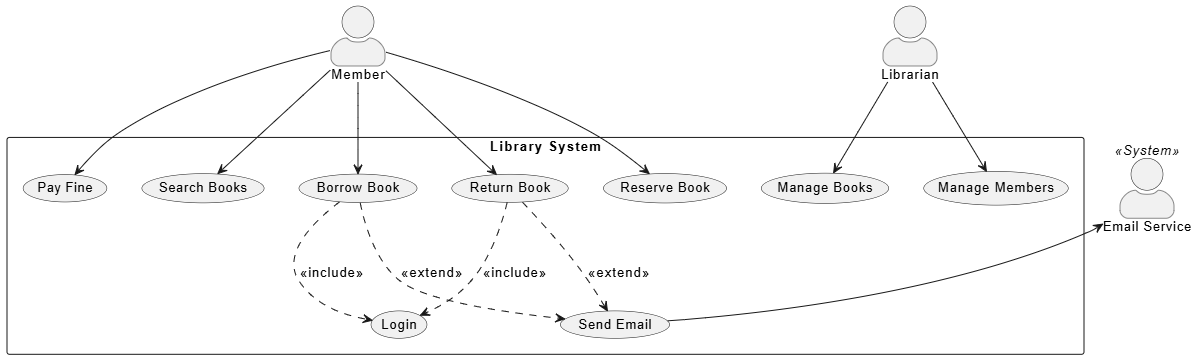
@startuml Library System - Minimal

' ============================================

' Minimal Styling

' ============================================

skinparam actorStyle awesome

skinparam defaultFontSize 13

' ============================================

' System

' ============================================

rectangle "Library System" {


    usecase"Search Books"

    usecase"Borrow Book"

    usecase"Return Book"

    usecase"Reserve Book"

    usecase "Pay Fine"

    usecase "Manage Books"

    usecase "Manage Members"


    usecase "Login" as Login

    "Borrow Book" ..> Login : <<include>>

    "Return Book" ..> Login : <<include>>


    usecase "Send Email" as Email

    "Borrow Book" ..> Email : <<extend>>

    "Return Book" ..> Email : <<extend>>

}

' ============================================

' Actors

' ============================================

actor"Member"

actor "Librarian"

actor "Email Service" as EmailSvc <<System>>

' ============================================

' Connections

' ============================================

Member --> "Search Books"

Member --> "Borrow Book"

Member --> "Return Book"

Member --> "Reserve Book"

Member --> "Pay Fine"

Librarian --> "Manage Books"

Librarian --> "Manage Members"

EmailSvc <-- Email

@enduml
7. Best Practices and Tips
7.1 Interviewing Stakeholders
- Talk to actual users, not just managers
- Ask "What do you need to accomplish?" not "What should the system do?"
- Watch users perform their current tasks
- Ask about exceptional situations (errors, edge cases)
7.2 Documenting Use Cases
- Keep descriptions concise (2-3 paragraphs)
- Use active voice (Member borrows a book)
- Number steps clearly
- Cross-reference use cases (UC-101: includes UC-201)
- Maintain a glossary of terms
7.3 Validating Use Cases
- Walk through each use case with stakeholders
- Verify preconditions and postconditions
- Test "happy path" and all alternatives
- Ensure each use case can be tested independently
- Check for completeness (all requirements covered)
7.4 Use Case vs. User Story
- Use Cases: More formal, detailed, describe all flows
- User Stories: More agile, lightweight, focus on value
- Both can complement each other in your process
7.5 Tips for Large Systems
- Start with a high-level list of use cases (20-30)
- Create detailed descriptions for priority use cases
- Consider creating use case packages (modules)
- Use a use case diagram to show relationships
- Maintain a traceability matrix to requirements
8. Conclusion
Identifying actors and use cases is a critical skill in systems analysis that requires:
- Systematic thinking: Understanding boundaries and perspectives
- User empathy: Understanding what users truly need
- Analytical skills: Breaking down goals into discrete tasks
- Communication: Working with diverse stakeholders
Key Takeaways:
- Actors are external entities with goals
- Use Cases are complete goals the system helps actors achieve
- Always start with system boundaries
- Identify actors first, then their goals
- Use verb-noun naming for use cases
- Document both main flows and alternatives
- Validate with stakeholders early and often
Next Steps:
After identifying actors and use cases:
- Create use case diagrams
- Write detailed use case specifications
- Derive system requirements
- Plan testing strategies
- Estimate development effort
Remember: Good use cases tell a story about how users interact with the system to get value. They should be understandable to both business stakeholders and technical teams, serving as the foundation for successful system development.
Quick Reference Checklist
Actor Identification Checklist:
- All user roles identified
- External systems identified
- System boundaries clearly defined
- Actor names are role-based
- Actor descriptions documented
- Relationships between actors mapped
Use Case Identification Checklist:
Conclusion: From Models to Meaningful Systems
We've journeyed through the essential practice of identifying actors and use cases, from foundational concepts to practical application with the Library Management System. But this tutorial is not an endpoint—it's a starting point for a more thoughtful approach to system development.
The true power of use case modeling lies not in the diagrams or documentation themselves, but in the conversations they enable. When stakeholders see a use case diagram, they recognize their roles and goals reflected clearly. When developers read a well-crafted use case specification, they understand not just what to build, but why it matters. This shared understanding is the single most valuable outcome of the modeling process.
Remember that use case modeling is inherently iterative. Your first attempt will rarely be perfect, and that's by design. As you discuss use cases with stakeholders, test assumptions, and uncover edge cases, your model will evolve to become more accurate and complete. Embrace this refinement as a natural part of discovery, not a sign of failure.
Consider also how use cases fit into the broader development landscape. They complement user stories in agile environments, inform test case design, guide system architecture decisions, and provide a foundation for accurate estimation and project planning. The effort you invest in thorough use case modeling pays dividends throughout the entire software lifecycle.
As you apply these principles to your own projects, carry forward three guiding principles:
-
Focus on goals, not features—ask what users want to achieve, not what the system should do
-
Think from the outside in—always view the system from the actor's perspective
-
Validate with real users—your assumptions are only as good as the feedback they withstand
The systems we build shape how people work, learn, and connect. By starting with a clear understanding of actors and their goals, you honor the human element at the center of every software endeavor. When users interact with your system and find that it intuitively supports their needs, you'll know that your use case modeling succeeded.
Now go forth and model—with curiosity, empathy, and the confidence that understanding your users is the first and most essential step toward building software that truly serves them.


