
In today's fast-paced e-commerce landscape, delivering a seamless customer experience hinges on robust, scalable backend systems. When order processing falters during peak traffic—resulting in duplicate charges, lost tracking, or unresponsive interfaces—the business impact is immediate and severe. Modern retail organizations need more than just code; they need a clear, communicable architecture that aligns technical execution with business outcomes.
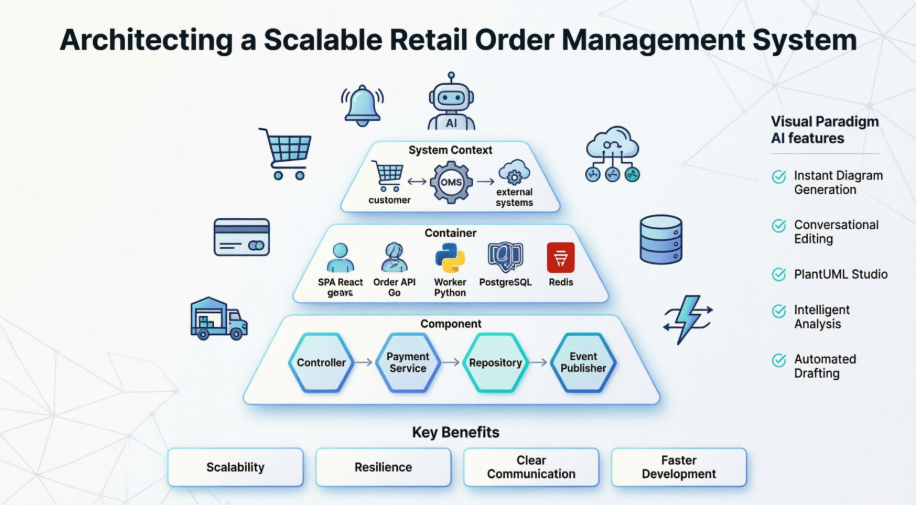
This guide walks through the design of a high-performance Order Management System (OMS) for "GlobalMart," a rapidly growing e-commerce retailer. Using the C4 model—a hierarchical approach to visualizing software architecture—and leveraging Visual Paradigm's AI-powered diagramming tools, teams can transform complex requirements into actionable, maintainable system designs. Whether you're an architect, developer, or product leader, this resource provides a practical framework for building resilient, microservices-inspired order platforms that scale with demand.
Problem Statement
GlobalMart's legacy monolithic order processor struggles under peak traffic, causing system hangs, duplicate charges, and lost order tracking. The business requires a modern Order Management System that:
Technical Direction
The engineering team has chosen a microservices-inspired container architecture featuring:
The C4 model provides a structured way to visualize software architecture at four levels of granularity. Below are the PlantUML diagrams designed for GlobalMart's OMS.
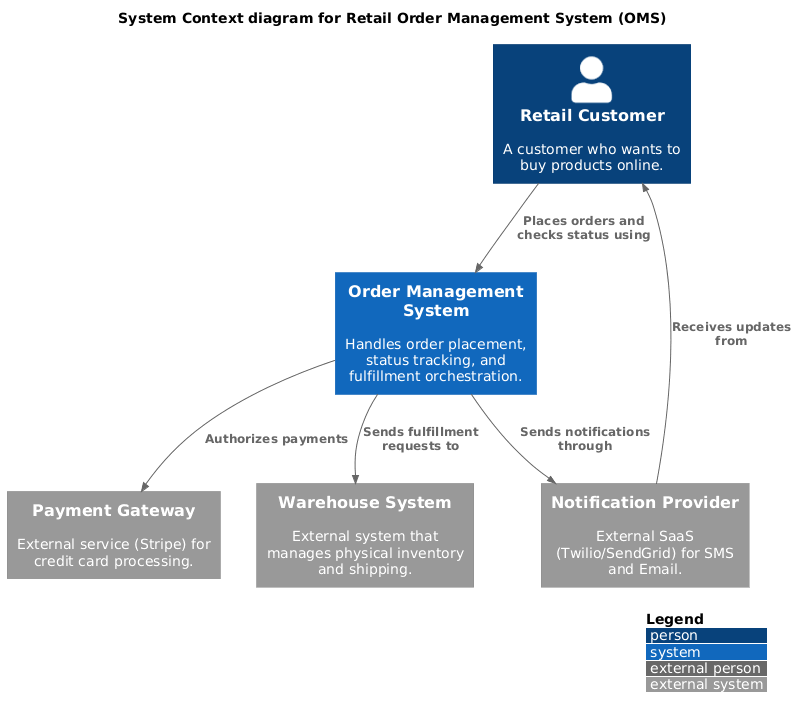
This diagram positions the OMS within its ecosystem, showing interactions with users and external systems.
PlantUML Code
@startuml
!include https://raw.githubusercontent.com/plantuml-stdlib/C4-PlantUML/master/C4_Context.puml

LAYOUT_WITH_LEGEND()

title System Context diagram for Retail Order Management System (OMS)

Person(customer, "Retail Customer", "A customer who wants to buy products online.")
System(oms, "Order Management System", "Handles order placement, status tracking, and fulfillment orchestration.")

System_Ext(payment_gateway, "Payment Gateway", "External service (Stripe) for credit card processing.")
System_Ext(wms, "Warehouse System", "External system that manages physical inventory and shipping.")
System_Ext(notification_service, "Notification Provider", "External SaaS (Twilio/SendGrid) for SMS and Email.")

Rel(customer, oms, "Places orders and checks status using")
Rel(oms, payment_gateway, "Authorizes payments")
Rel(oms, wms, "Sends fulfillment requests to")
Rel(oms, notification_service, "Sends notifications through")
Rel_Back(customer, notification_service, "Receives updates from")
@enduml
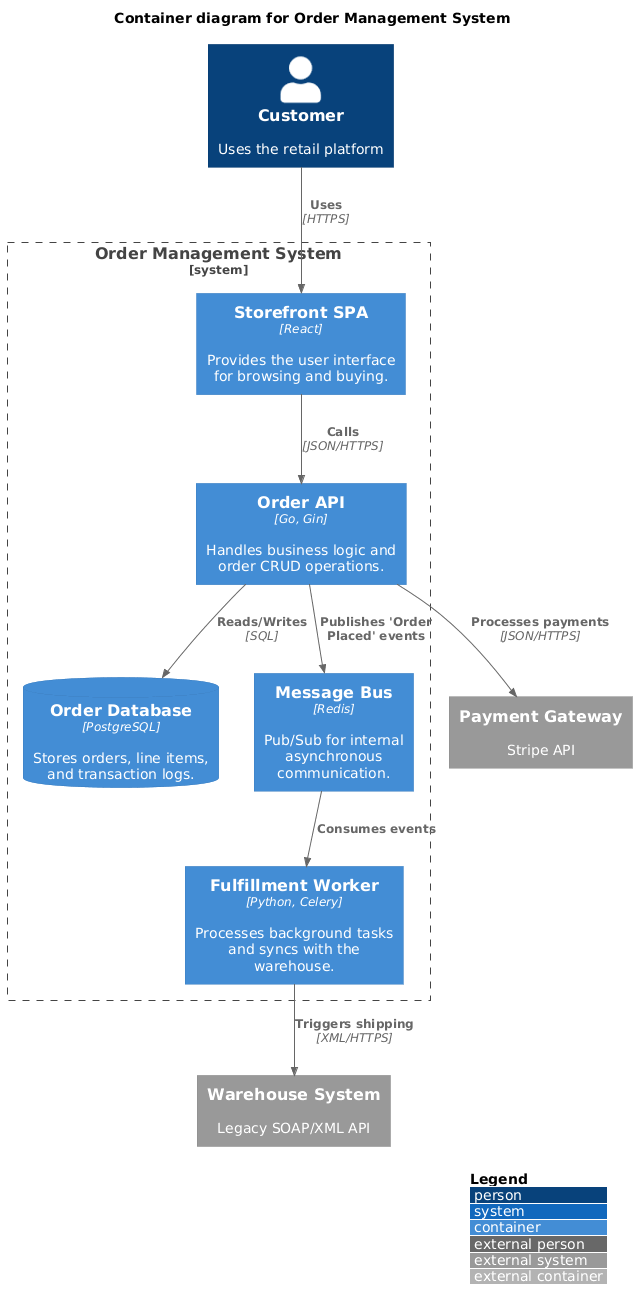
This view breaks the OMS into high-level technical building blocks, clarifying technology choices and communication patterns.
PlantUML Code
@startuml
!include https://raw.githubusercontent.com/plantuml-stdlib/C4-PlantUML/master/C4_Container.puml

LAYOUT_WITH_LEGEND()

title Container diagram for Order Management System

Person(customer, "Customer", "Uses the retail platform")

System_Boundary(oms_boundary, "Order Management System") {
    Container(spa, "Storefront SPA", "React", "Provides the user interface for browsing and buying.")
    Container(api_app, "Order API", "Go, Gin", "Handles business logic and order CRUD operations.")
    Container(worker, "Fulfillment Worker", "Python, Celery", "Processes background tasks and syncs with the warehouse.")
    ContainerDb(db, "Order Database", "PostgreSQL", "Stores orders, line items, and transaction logs.")
    Container(message_bus, "Message Bus", "Redis", "Pub/Sub for internal asynchronous communication.")
}

System_Ext(payment_gateway, "Payment Gateway", "Stripe API")
System_Ext(wms, "Warehouse System", "Legacy SOAP/XML API")

Rel(customer, spa, "Uses", "HTTPS")
Rel(spa, api_app, "Calls", "JSON/HTTPS")
Rel(api_app, db, "Reads/Writes", "SQL")
Rel(api_app, message_bus, "Publishes 'Order Placed' events")
Rel(message_bus, worker, "Consumes events")
Rel(worker, wms, "Triggers shipping", "XML/HTTPS")
Rel(api_app, payment_gateway, "Processes payments", "JSON/HTTPS")
@enduml
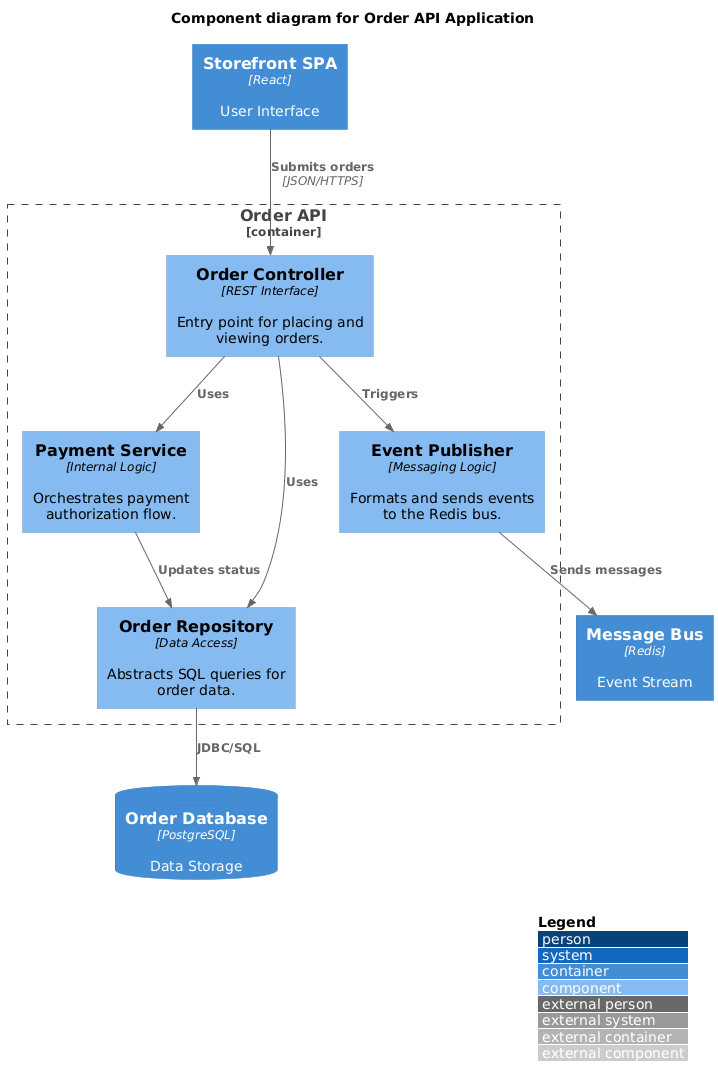
Zooming into the Order API container, this diagram reveals internal logical components and their responsibilities.
PlantUML Code
@startuml
!include https://raw.githubusercontent.com/plantuml-stdlib/C4-PlantUML/master/C4_Component.puml

LAYOUT_WITH_LEGEND()

title Component diagram for Order API Application

Container(spa, "Storefront SPA", "React", "User Interface")
ContainerDb(db, "Order Database", "PostgreSQL", "Data Storage")
Container(bus, "Message Bus", "Redis", "Event Stream")

Container_Boundary(api_logic, "Order API") {
    Component(order_ctrl, "Order Controller", "REST Interface", "Entry point for placing and viewing orders.")
    Component(pay_svc, "Payment Service", "Internal Logic", "Orchestrates payment authorization flow.")
    Component(repo, "Order Repository", "Data Access", "Abstracts SQL queries for order data.")
    Component(event_pub, "Event Publisher", "Messaging Logic", "Formats and sends events to the Redis bus.")

    Rel(order_ctrl, pay_svc, "Uses")
    Rel(order_ctrl, repo, "Uses")
    Rel(pay_svc, repo, "Updates status")
    Rel(order_ctrl, event_pub, "Triggers")
}

Rel(spa, order_ctrl, "Submits orders", "JSON/HTTPS")
Rel(repo, db, "JDBC/SQL")
Rel(event_pub, bus, "Sends messages")
@enduml
Visual Paradigm enhances C4 modeling with intelligent automation that accelerates design, documentation, and collaboration. Key capabilities include:
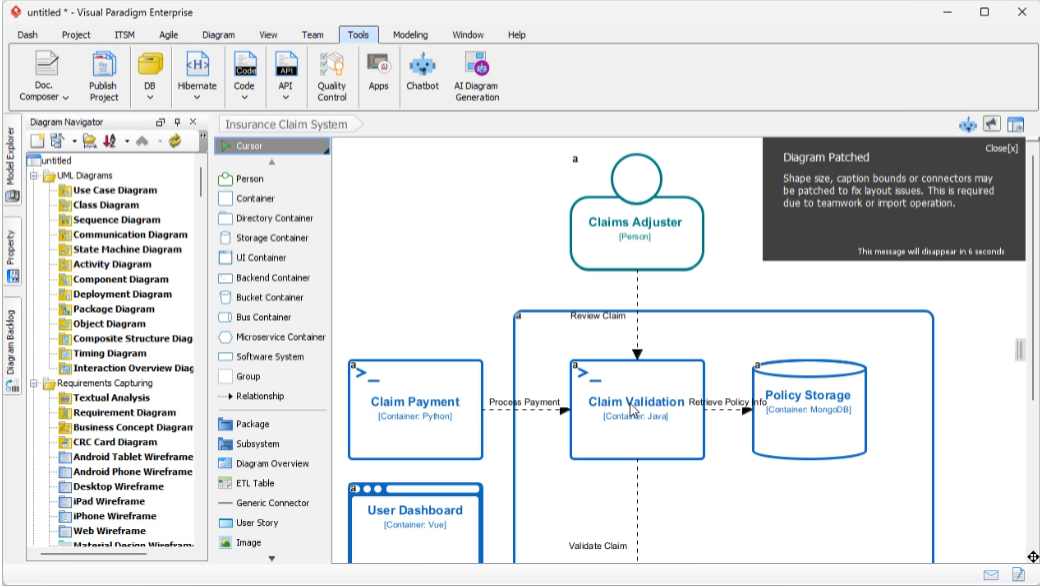
Instant Diagram Generation
Describe your system in plain English, and the AI instantly generates diagrams across all C4 levels—Context, Container, Component, and Code—reducing manual setup time.
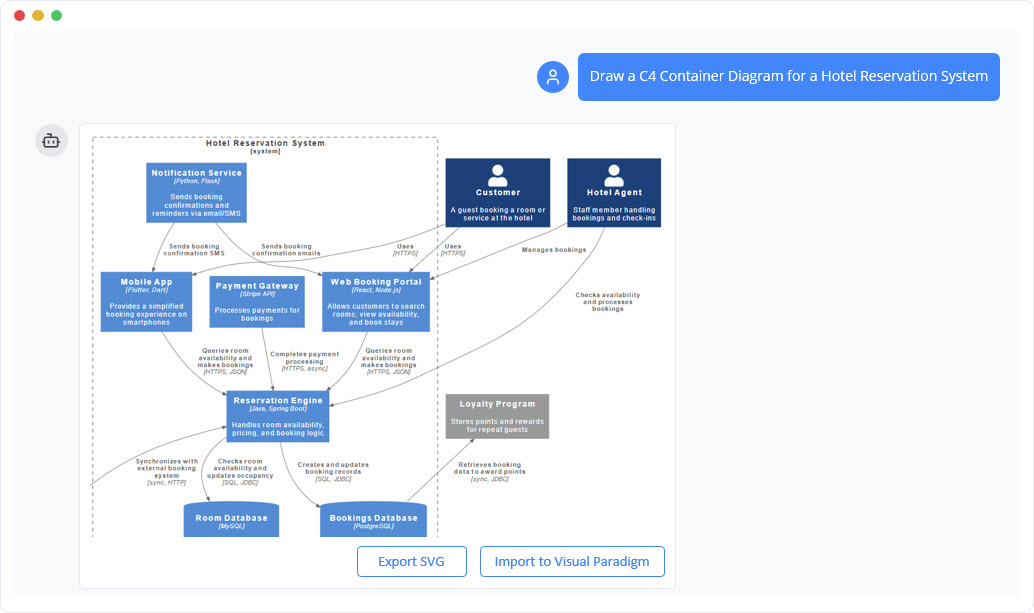
Conversational Editing
Refine diagrams through a chatbot interface. Simple commands like "Add payment gateway" or "Rename Customer to Buyer" update the visual model in real time.
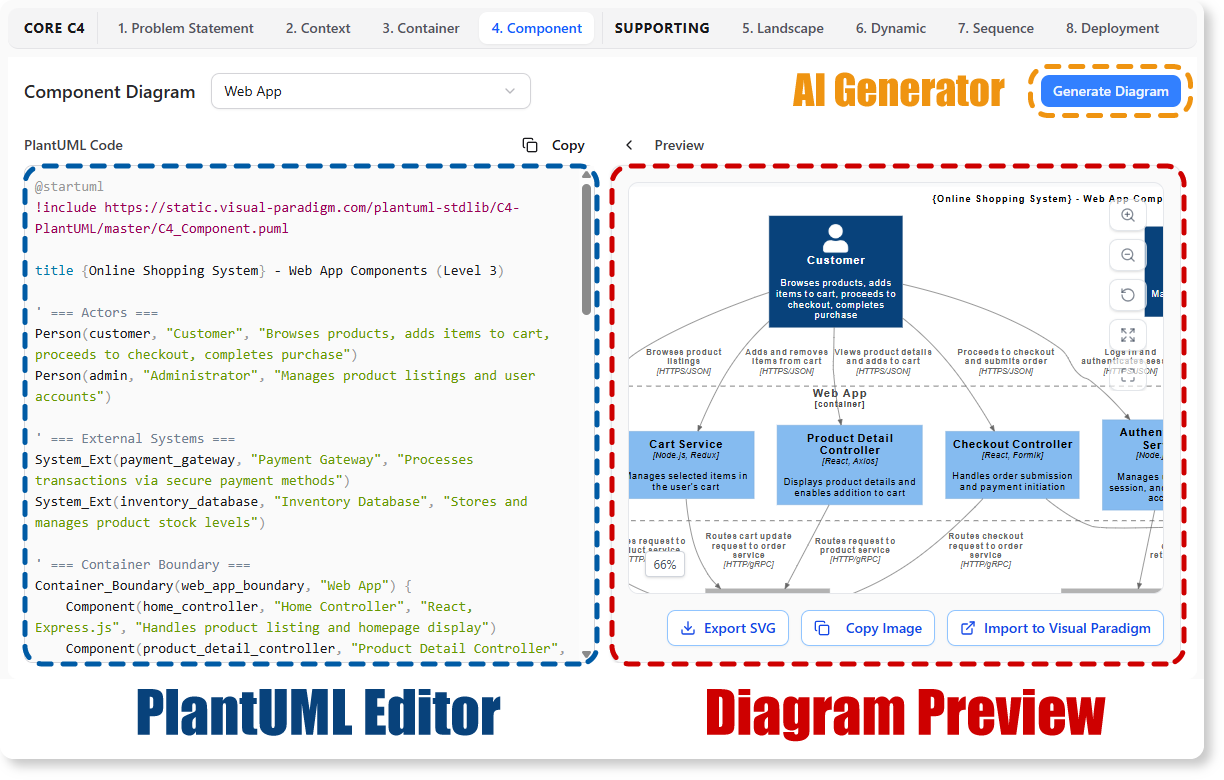
AI-Powered C4 PlantUML Studio
Convert natural language descriptions directly into version-controllable PlantUML code, ensuring precision and reproducibility across teams.
Intelligent Analysis
The AI detects architectural gaps, suggests design improvements, and validates logical flow to strengthen system resilience before implementation begins.
Automated Content Drafting
Beyond visuals, the AI engine drafts initial problem statements, system context descriptions, and technical specifications based on minimal input—jumpstarting documentation efforts.
Visual Paradigm fully supports the six essential views of the C4 methodology, enabling comprehensive architectural communication:
Visual Paradigm offers flexible deployment options to suit team workflows:
Visual Paradigm Online
A browser-based C4 modeling tool featuring real-time collaboration, a library of C4 symbols, and integrated AI chatbot access. Ideal for distributed teams needing quick setup and shared workspaces.
Visual Paradigm Desktop
A powerful desktop application with deep modeling capabilities, custom attributes, and an integrated AI Diagram Generator accessible via Tools > AI Diagram Generation. Best for architects requiring advanced customization and offline access.
Both platforms support importing/exporting PlantUML, enabling seamless integration with existing documentation pipelines and version control systems.
Building a high-performance Order Management System demands more than technical prowess—it requires clear communication, strategic decomposition, and iterative validation. By adopting the C4 model, teams can articulate architecture at the right level of detail for each stakeholder, from executives to developers. When combined with Visual Paradigm's AI-powered tooling, this approach transforms architectural design from a documentation burden into a collaborative, intelligent process.
For GlobalMart and organizations like it, the path forward is clear: start with context, decompose with intention, automate with AI, and validate continuously. The result is not just a scalable OMS, but a living architectural artifact that evolves with your business. Whether you're modernizing a legacy system or greenfielding a new platform, the C4 model—supercharged by AI—provides the clarity and agility needed to thrive in competitive digital markets.

