
In today’s fast-paced software development landscape, Agile teams face a persistent paradox: the need to move incredibly fast without sacrificing architectural quality. Traditionally, software design and documentation have been the bottlenecks. Creating visual models in drag-and-drop tools is slow, and keeping those visual diagrams in sync with the actual codebase is a manual, error-prone nightmare. By the time the code is shipped, the documentation is already obsolete.
Enter the Agile Power Trio: the strategic combination of UML Modeling, Diagram-as-Code (DaC), and Artificial Intelligence (AI).
This hybrid approach is revolutionizing how we design software. UML provides the structured, universal language; Diagram-as-Code brings version control and rapid iteration; and AI acts as the ultimate accelerator, handling instant generation and refinement. Together, they create a seamless, bidirectional workflow where models, code, and requirements are always in perfect harmony.
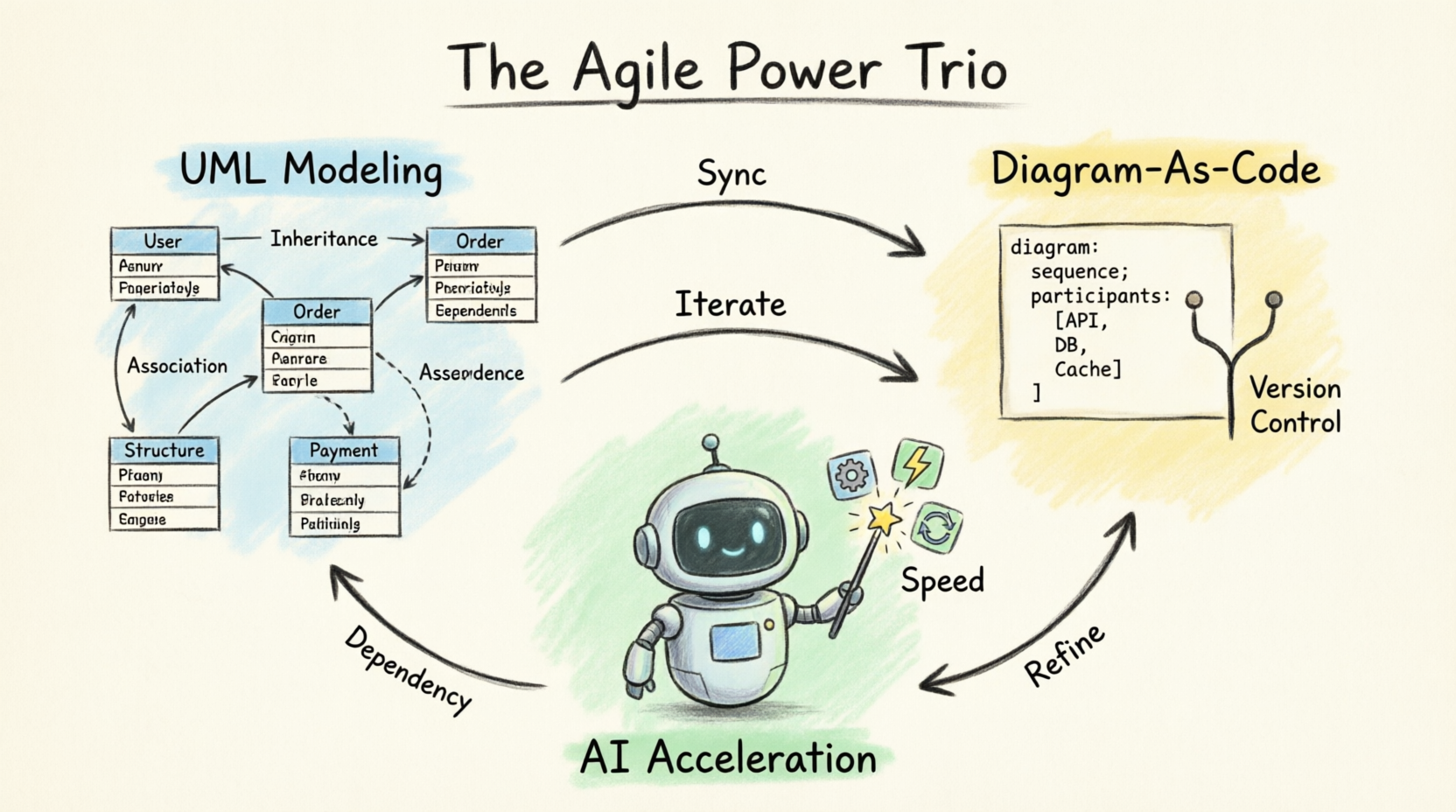
This comprehensive tutorial will guide beginners through this powerful methodology, using realistic examples and highlighting Visual Paradigm and its advanced AI features as the ultimate toolset for this journey.
Before diving into the tools, let’s break down the three pillars of this methodology.
Unified Modeling Language (UML) is the industry standard for visualizing software design. It provides a standardized vocabulary (Class diagrams, Sequence diagrams, Use Case diagrams) that ensures developers, architects, and stakeholders are all speaking the same language. It brings structure and clarity to complex systems.
Instead of drawing diagrams with a mouse, Diagram-as-Code (using tools like PlantUML or Mermaid) allows you to write diagrams using plain text.
Version Control: Text files can be tracked in Git, allowing you to see exactly what changed in a diagram via pull requests.
Rapid Iteration: Typing is faster than dragging and dropping.
Consistency: The rendering engine ensures perfect alignment and styling every time.
AI bridges the gap between human thought and machine execution. In modern design, AI can read natural language requirements and instantly generate UML structures. It can also refactor messy code, suggest architectural improvements, and translate UML models directly into executable code.
To truly leverage the Agile Power Trio, you need a tool that doesn't force you to choose between a visual GUI and text-based code.
Visual Paradigm (VP) is an enterprise-grade modeling tool that perfectly unifies these concepts.
Native PlantUML Support: You can write PlantUML code, and VP instantly renders it into beautiful, standard-compliant UML diagrams.
Bidirectional Sync: If you change the visual diagram, the underlying PlantUML code updates. If you edit the PlantUML code, the visual diagram updates.
Visual Paradigm AI (VP AI): VP integrates powerful AI features that allow you to generate diagrams from text prompts, auto-complete UML syntax, and generate source code (Java, C#, Python, etc.) directly from your models.
Let’s put this into practice. We will design the backend architecture for an E-Commerce Order Processing Microservice.
Imagine you are in a sprint planning meeting. The product owner says: "We need an Order service that talks to a Payment Gateway and an Inventory system. When a user checks out, we need to reserve inventory, charge the card, and confirm the order."
Instead of drawing this manually, you open Visual Paradigm AI and input a natural language prompt:
"Generate a UML Sequence diagram for an e-commerce checkout flow involving a User, OrderService, InventoryService, and PaymentGateway."
The AI Magic: Within seconds, VP AI generates the foundational PlantUML code and renders the visual Sequence diagram. You now have a baseline to work from, saving 30 minutes of manual drawing.
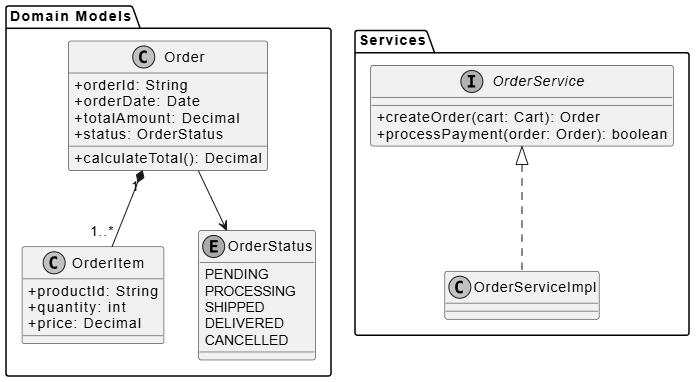
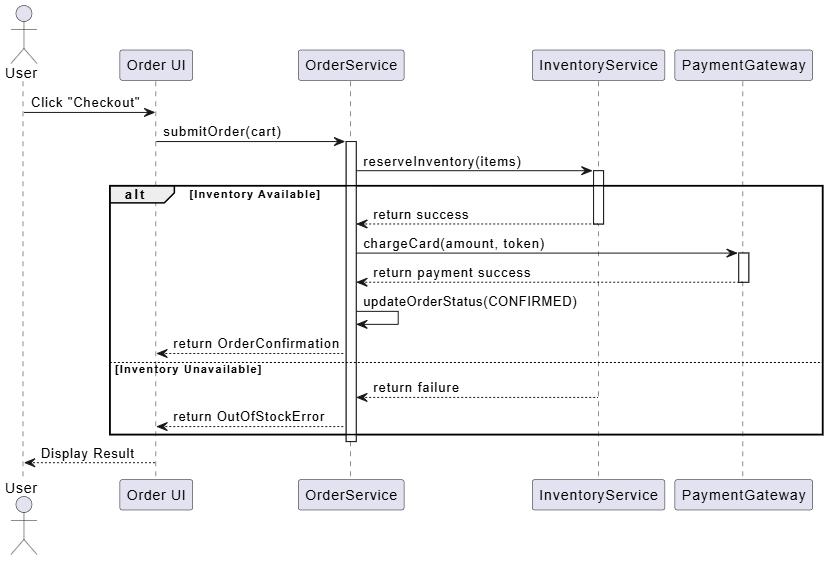
Now, let’s look at the underlying PlantUML code generated and refined for our architecture. We will look at two core diagrams: the Class Diagram (structure) and the Sequence Diagram (behavior).
This defines our data models and service interfaces. In Visual Paradigm, you can open the PlantUML editor and write/tweak this code:
@startuml E-Commerce Class Diagram
skinparam classAttributeIconSize 0
skinparam monochrome true

package "Domain Models" {
    class Order {
        + orderId: String
        + orderDate: Date
        + totalAmount: Decimal
        + status: OrderStatus
        + calculateTotal(): Decimal
    }

    class OrderItem {
        + productId: String
        + quantity: int
        + price: Decimal
    }

    enum OrderStatus {
        PENDING
        PROCESSING
        SHIPPED
        DELIVERED
        CANCELLED
    }
}

package "Services" {
    interface OrderService {
        + createOrder(cart: Cart): Order
        + processPayment(order: Order): boolean
    }

    class OrderServiceImpl implements OrderService
}

Order "1" *-- "1..*" OrderItem
Order --> OrderStatus
@enduml
Beginner Tip: Notice how clean the code is. We define packages, classes, attributes, and relationships using simple text syntax. Visual Paradigm instantly renders this into a crisp, professional visual diagram.
This maps out the exact flow of the checkout process.
@startuml Checkout Sequence Diagram
actor User
participant "Order UI" as UI
participant "OrderService" as OS
participant "InventoryService" as IS
participant "PaymentGateway" as PG

User -> UI: Click "Checkout"
UI -> OS: submitOrder(cart)

activate OS
OS -> IS: reserveInventory(items)
activate IS

alt Inventory Available
    IS --> OS: return success
    deactivate IS

    OS -> PG: chargeCard(amount, token)
    activate PG
    PG --> OS: return payment success
    deactivate PG

    OS -> OS: updateOrderStatus(CONFIRMED)
    OS --> UI: return OrderConfirmation
else Inventory Unavailable
    IS --> OS: return failure
    deactivate IS
    OS --> UI: return OutOfStockError
end
deactivate OS

UI --> User: Display Result
@enduml
Notice the alt/else block? PlantUML makes adding complex logic flows incredibly easy compared to manually drawing "alt" fragments in traditional drag-and-drop tools.
Here is where Visual Paradigm shines. Suppose your team decides to add a NotificationService to email the user after payment.
Code-First Approach: You simply type participant "NotificationService" as NS and OS -> NS: sendConfirmationEmail() into the PlantUML text editor. The visual diagram updates instantly.
GUI-First Approach: Alternatively, you can drag and drop a new NotificationService lifeline directly onto the visual canvas in Visual Paradigm. The underlying PlantUML text code will automatically update in the background to reflect your visual changes.
This bidirectional sync ensures that developers who prefer code and architects who prefer visuals can collaborate on the exact same model without breaking it.
The final step in our agile workflow is moving from design to implementation. Because our UML model is highly structured and synced with Visual Paradigm, we can use VP AI / Code Engineering features to generate boilerplate code.
By selecting our Order and OrderServiceImpl classes in the visual diagram, we can instruct Visual Paradigm to generate Java Spring Boot code.
The tool will automatically generate:
Order.java (Entity class with JPA annotations)
OrderItem.java (Entity class)
OrderService.java (Interface)
OrderServiceImpl.java (Implementation class with basic method stubs)
This eliminates hours of tedious typing and ensures the code perfectly matches the architectural design.
To get the most out of the Agile Power Trio, keep these best practices in mind:
Embrace "Just Enough" Modeling: Agile doesn't mean "no design." It means designing just enough to move forward safely. Use AI to quickly draft the big picture, and use PlantUML to detail only the complex, high-risk components.
Treat Diagrams as Code: Commit your .puml (PlantUML) files to your Git repository alongside your source code. Review diagram changes in Pull Requests just like you review code changes.
Establish a Single Source of Truth: Never maintain a separate Word document or Visio file for architecture. Let Visual Paradigm (synced with PlantUML) be the single source of truth for your system design.
Use AI as a Co-Pilot, Not an Autopilot: AI is fantastic for generating the first draft, suggesting standard patterns, and writing boilerplate code. However, human architects must always review the AI's output to ensure it aligns with specific business constraints and security requirements.
The days of spending days drawing boxes and arrows, only to throw them away when the code changes, are over. By combining the structured clarity of UML, the version-control-friendly agility of Diagram-as-Code, and the sheer speed of AI, software teams can achieve a state of flow previously thought impossible in system design.
Tools like Visual Paradigm act as the perfect crucible for this methodology, seamlessly blending visual intuition with text-based precision and supercharging the process with intelligent AI features.
For beginners and seasoned architects alike, adopting the Agile Power Trio is not about adding more overhead to your process; it is about removing the friction. It allows you to spend less time formatting diagrams and more time solving complex business problems.
Your Next Step: Download Visual Paradigm, open a new PlantUML file, and try writing your first Class diagram today. Experience the magic of seeing your text instantly transform into a beautiful, actionable software blueprint. Welcome to the future of agile software design!

