
We have all been there: a team spends days crafting a beautiful, complex architecture diagram in a drag-and-drop tool. It looks stunning in the kickoff meeting. But six months later, after three major refactors and a shift to microservices, that diagram is completely obsolete. Nobody trusts it, nobody updates it, and it becomes "shelf-ware."
Traditional architecture documentation is often slow, disconnected from the codebase, and hostile to version control. But what if your architecture diagrams were treated exactly like your software code?
Enter the Agile Power Trio: the C4 Model for structured thinking, Diagram-as-Code for version-controlled execution, and AI Assistants for rapid generation and maintenance. When combined within a robust environment like Visual Paradigm, this trio transforms architecture documentation from a dreaded chore into a fast, collaborative, and living asset.
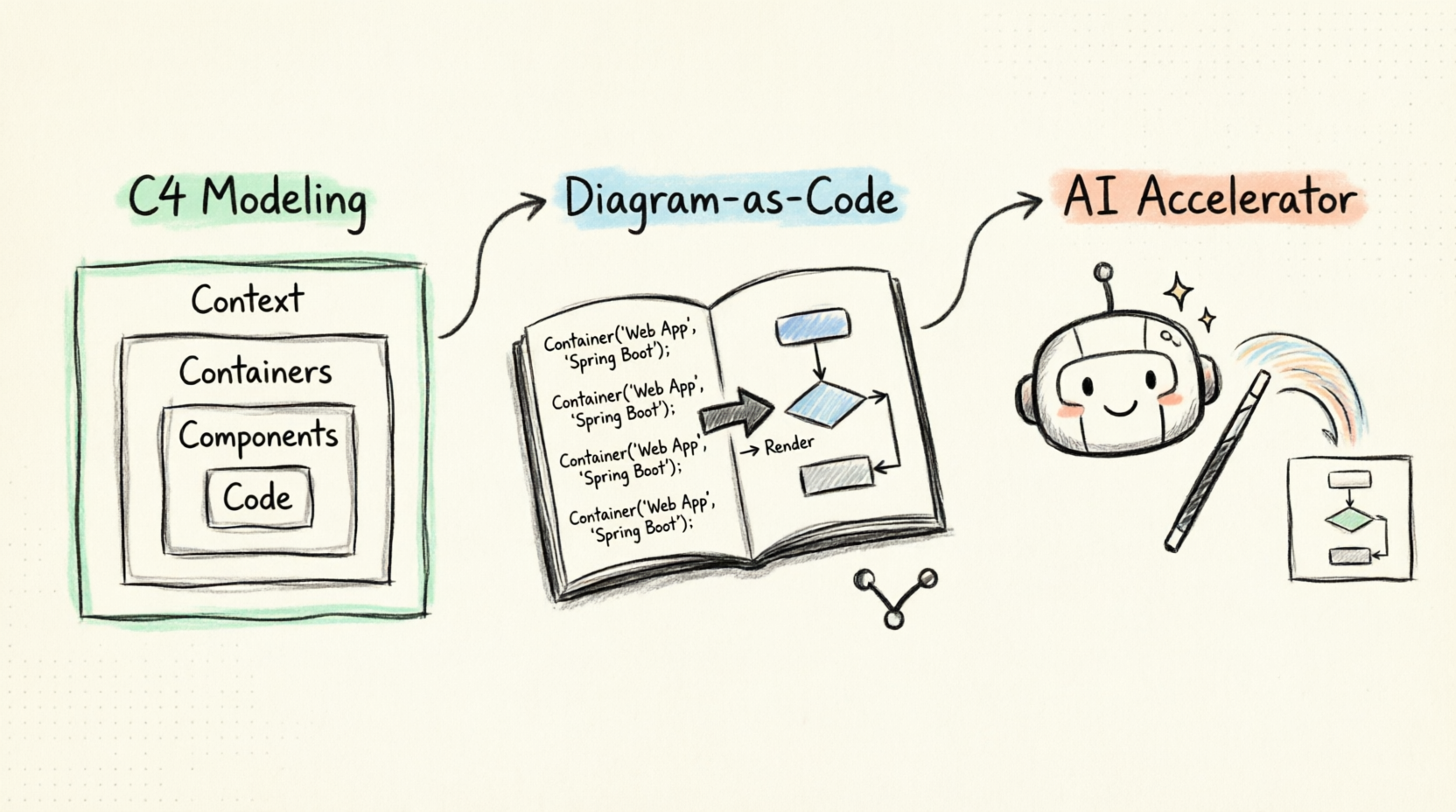
This comprehensive tutorial will walk you through the fundamentals of this stack, show you how to leverage AI to accelerate your workflow, and guide you through building your first living architecture model.
Before we draw anything, we need a common language. The C4 model, created by Simon Brown, is a hierarchical approach to software architecture. Think of it like zooming in on a map: you start with the globe, then the country, then the city, and finally the street.
Instead of drawing boxes with a mouse, Diagram-as-Code uses plain text scripts to generate diagrams.
Why is this a game-changer for Agile?
While tools like Mermaid and Structurizr are excellent, PlantUML remains a powerhouse, especially when integrated into enterprise IDEs.
In the modern development landscape, AI is the glue that makes Diagram-as-Code truly agile. AI assistants can:
To bring this all together, we recommend Visual Paradigm (VP). It is a comprehensive modeling environment that natively supports the C4 model and PlantUML, but its true superpower lies in its integrated Visual Paradigm AI features.
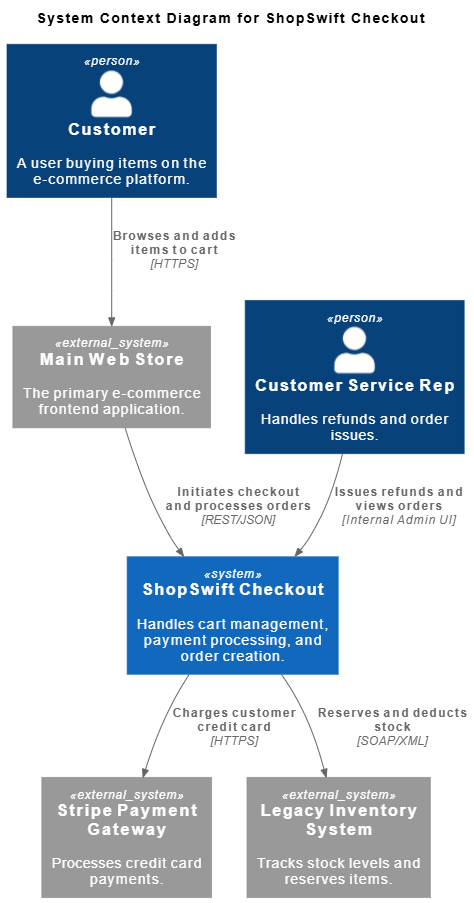
Let’s build a realistic example. We are designing "ShopSwift", a new checkout microservice for an e-commerce platform. We will use PlantUML with the C4 extension inside Visual Paradigm.
First, we define the boundaries. Who uses ShopSwift, and what external systems does it talk to?
The PlantUML Code:
@startuml
!include https://raw.githubusercontent.com/plantuml-stdlib/C4-PlantUML/master/C4_Context.puml

title System Context Diagram for ShopSwift Checkout

Person(customer, "Customer", "A user buying items on the e-commerce platform.")
Person(csr, "Customer Service Rep", "Handles refunds and order issues.")

System(shopswift, "ShopSwift Checkout", "Handles cart management, payment processing, and order creation.")

System_Ext(webstore, "Main Web Store", "The primary e-commerce frontend application.")
System_Ext(payment, "Stripe Payment Gateway", "Processes credit card payments.")
System_Ext(inventory, "Legacy Inventory System", "Tracks stock levels and reserves items.")

Rel(customer, webstore, "Browses and adds items to cart", "HTTPS")
Rel(webstore, shopswift, "Initiates checkout and processes orders", "REST/JSON")
Rel(shopswift, payment, "Charges customer credit card", "HTTPS")
Rel(shopswift, inventory, "Reserves and deducts stock", "SOAP/XML")
Rel(csr, shopswift, "Issues refunds and views orders", "Internal Admin UI")

@enduml
Visual Paradigm AI Workflow:
Instead of typing this from scratch, you could open Visual Paradigm's AI Assistant and prompt:
"Generate a C4 Context PlantUML script for an e-commerce checkout system. Include a Customer, a Main Web Store, the Checkout System, a Stripe Payment Gateway, and a Legacy Inventory System. Define the relationships."
VP AI will output the exact PlantUML code above, which you can then tweak and render.
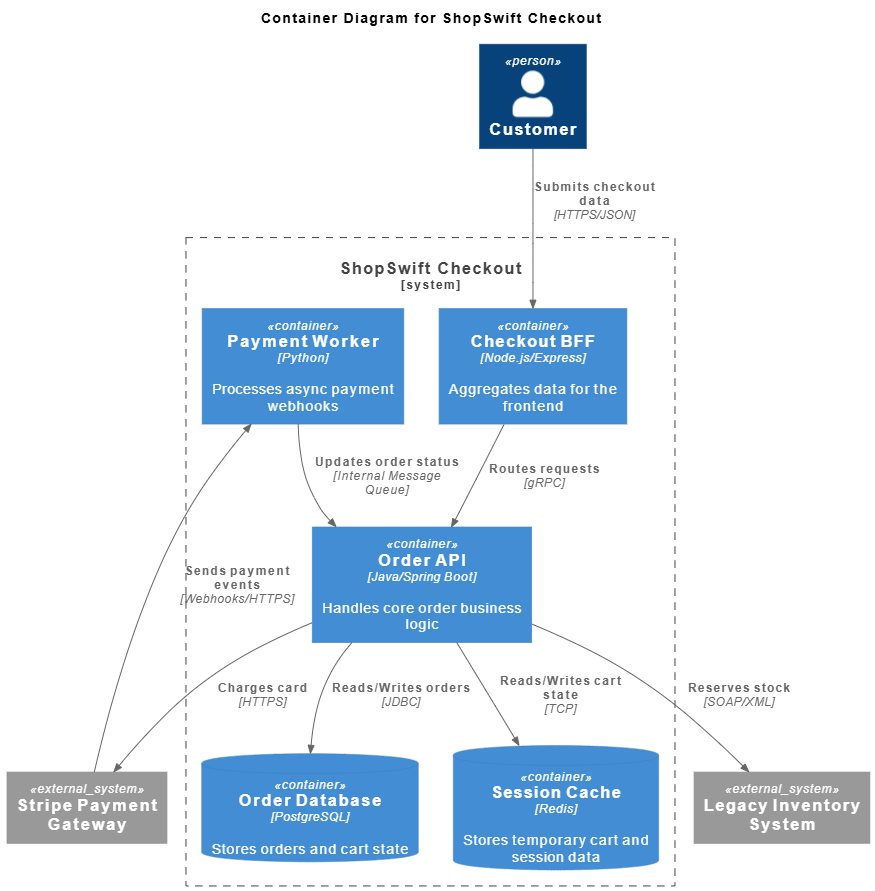
Now, we zoom into the ShopSwift Checkout system. What are the actual applications and databases inside it?
The PlantUML Code:
@startuml
!include https://raw.githubusercontent.com/plantuml-stdlib/C4-PlantUML/master/C4_Container.puml

title Container Diagram for ShopSwift Checkout

Person(customer, "Customer")
System_Ext(payment, "Stripe Payment Gateway")
System_Ext(inventory, "Legacy Inventory System")

System_Boundary(shopswift_boundary, "ShopSwift Checkout") {
    Container(web_bff, "Checkout BFF", "Node.js/Express", "Aggregates data for the frontend")
    Container(api, "Order API", "Java/Spring Boot", "Handles core order business logic")
    ContainerDb(db, "Order Database", "PostgreSQL", "Stores orders and cart state")
    ContainerDb(cache, "Session Cache", "Redis", "Stores temporary cart and session data")
    Container(worker, "Payment Worker", "Python", "Processes async payment webhooks")
}

Rel(customer, web_bff, "Submits checkout data", "HTTPS/JSON")
Rel(web_bff, api, "Routes requests", "gRPC")
Rel(api, db, "Reads/Writes orders", "JDBC")
Rel(api, cache, "Reads/Writes cart state", "TCP")
Rel(api, payment, "Charges card", "HTTPS")
Rel(payment, worker, "Sends payment events", "Webhooks/HTTPS")
Rel(worker, api, "Updates order status", "Internal Message Queue")
Rel(api, inventory, "Reserves stock", "SOAP/XML")

@enduml
Looking for a powerful, free diagram-as-code tool? Effortlessly render PlantUML, Mermaid, Graphviz, and 20+ programming languages in real time—powered by instant AI error fixing and automatic format detection.
To truly reap the benefits of the Agile Power Trio, adopt these habits:
.puml or .c4 source files. Let the CI/CD pipeline generate the PNG/SVG artifacts.The days of spending weekends updating Visio diagrams to match a codebase that changed three weeks ago are over. By embracing the Agile Power Trio, you shift architecture documentation from a static, burdensome artifact into a dynamic, version-controlled, and AI-accelerated practice.
The C4 Model gives you the mental framework to communicate clearly at any level of abstraction. Diagram-as-Code (PlantUML) gives you the agility to version, diff, and automate your models. AI and Visual Paradigm give you the speed to generate, maintain, and validate your architecture without slowing down development.
Start small. Pick one existing microservice, write a Level 1 Context diagram in PlantUML, and commit it to your Git repository. Let Visual Paradigm's AI help you expand it to a Container diagram. Before you know it, you will have built a living, breathing map of your software architecture that your entire team can trust, update, and rely on.

