
In the realms of business analysis, software engineering, and enterprise architecture, visual diagrams are essential for communicating complex ideas. However, professionals frequently fall into a common trap: using basic drawing tools for tasks that require rigorous structural modeling.
The primary difference between a drawing tool and a modeling tool does not lie in the shapes they can produce, but in the tool's ability to "understand" the notation of the diagrams being created. While a drawing tool focuses purely on visual representation, a modeling tool comprehends the underlying logic, relationships, and connection rules between elements.
This guide explores the fundamental distinctions between these two categories of software, helping you understand when to sketch a quick visual and when to build a robust, traceable model.
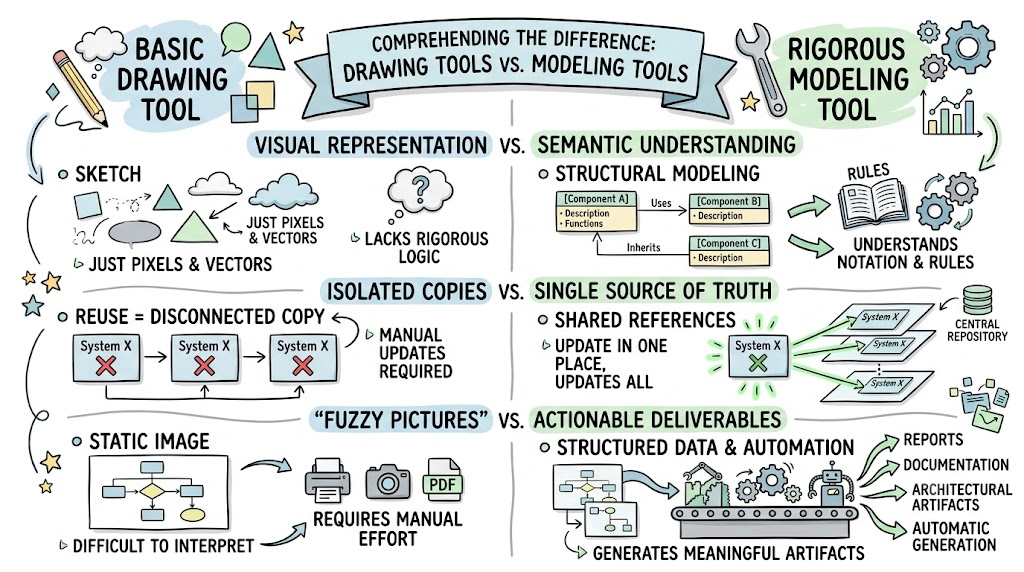
Before diving into the detailed comparisons, it is crucial to understand the core conceptual differences between the two paradigms:
Visual Representation vs. Semantic Understanding: Drawing tools treat shapes as mere pixels or vectors. Modeling tools treat shapes as data objects with specific definitions, rules, and relationships (semantics).
Isolated Copies vs. Single Source of Truth: In a drawing tool, reusing an element means creating a disconnected copy. In a modeling tool, elements are shared references; updating the core element updates it everywhere.
"Fuzzy Pictures" vs. Actionable Deliverables: Drawing tools produce static images that require manual interpretation. Modeling tools generate structured data that can be automatically transformed into reports, documentation, and architectural artifacts.
The most critical differentiator is how the software handles the syntax and semantics of your chosen framework.
Drawing Tools: Offer excellent speed and momentum for basic tasks like printing, undo/redo, and dragging shapes from a palette. However, they are "dumb" canvases; they do not understand the syntax or semantics of the diagram. You can draw an invalid relationship, and the tool will not warn you.
Modeling Tools: Act as intelligent assistants that enforce connection rules between shapes and model elements. For example, a tool like Visual Paradigm is certified in ArchiMate 3.1. It inherently understands the specific vocabulary, notation, and semantics of that language, preventing you from making logical errors (e.g., connecting a Business Actor directly to a Technology Interface if the framework forbids it).
How the tool handles the reuse of elements dictates the long-term viability of your documentation.
Drawing Tools: Elements are typically local to the specific drawing. If you need the same application component on three different diagrams, you create three separate shapes. They are just copies without a live link.
Modeling Tools: Allow for shared elements across different diagrams or even entirely different projects. This ensures model consistency and traceability. A change to an element's properties in one place is instantly reflected everywhere it is used, eliminating the nightmare of updating multiple disconnected copies.
As projects scale, the limitations of basic drawing software become glaringly apparent. Modeling tools provide a suite of advanced features designed for enterprise-scale complexity:
Sub-diagrams: The ability to create hierarchical layers, allowing users to drill down from high-level overviews into granular technical details.
Report Generation: The automatic creation of documentation, glossaries, and matrices based directly on the underlying model data.
Model Linkage: The ability to establish and maintain linkages between different models (e.g., linking a business capability to an IT application) and link glossary terms directly to model elements.
Team Collaboration: Built-in support for collaborative editing, version control, and formal change management, which is vital for large teams.
Ultimately, the output of the tool dictates its value to the organization.
Drawing Tools: Often result in what experts call "fuzzy pictures"—visual representations that may look highly professional and colorful but lack technical precision and structured data. They require "excessive management and juggling of information" to keep updated.
Modeling Tools: Move away from vague images by providing well-founded concepts and models. Because the tool understands the data entered, it allows for the automatic generation of deliverables (such as TOGAF ADM artifacts). The tool can transcribe, analyze, and format the data without manual intervention.
To truly understand the architectural differences between these tools, we can model their capabilities and workflows using PlantUML.
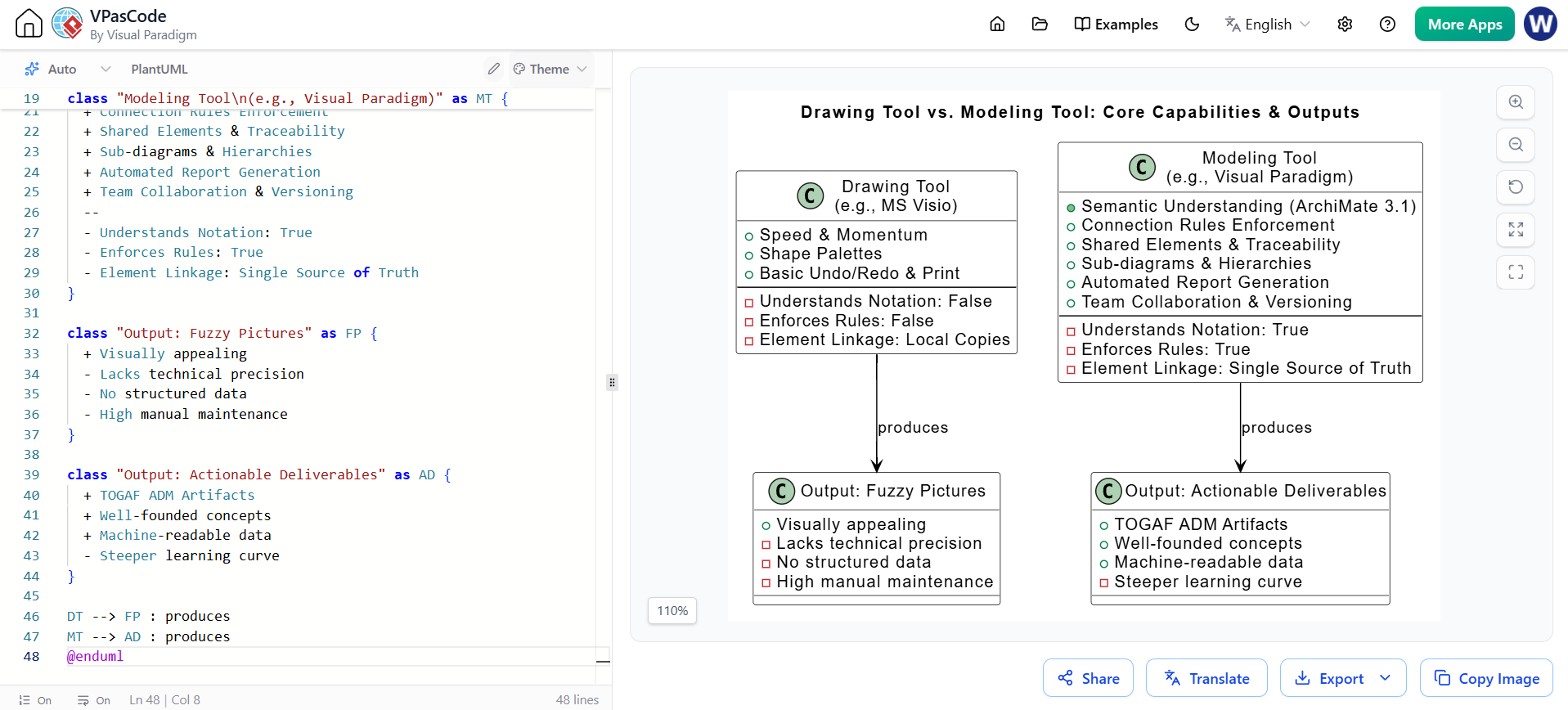
This diagram illustrates the internal capabilities of both tools and the nature of the outputs they produce.
@startuml
title Drawing Tool vs. Modeling Tool: Core Capabilities & Outputs
skinparam class {
  BackgroundColor White
  BorderColor Black
  ArrowColor Black
}

class "Drawing Tool\n(e.g., MS Visio)" as DT {
  + Speed & Momentum
  + Shape Palettes
  + Basic Undo/Redo & Print
  --
  - Understands Notation: False
  - Enforces Rules: False
  - Element Linkage: Local Copies
}

class "Modeling Tool\n(e.g., Visual Paradigm)" as MT {
  + Semantic Understanding (ArchiMate 3.1)
  + Connection Rules Enforcement
  + Shared Elements & Traceability
  + Sub-diagrams & Hierarchies
  + Automated Report Generation
  + Team Collaboration & Versioning
  --
  - Understands Notation: True
  - Enforces Rules: True
  - Element Linkage: Single Source of Truth
}

class "Output: Fuzzy Pictures" as FP {
  + Visually appealing
  - Lacks technical precision
  - No structured data
  - High manual maintenance
}

class "Output: Actionable Deliverables" as AD {
  + TOGAF ADM Artifacts
  + Well-founded concepts
  + Machine-readable data
  - Steeper learning curve
}

DT --> FP : produces
MT --> AD : produces
@enduml
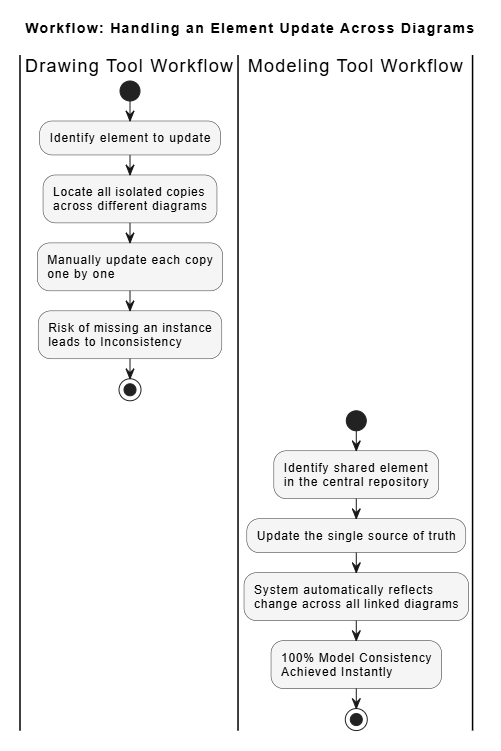
This diagram highlights the practical difference in workflow when an enterprise needs to update a shared element (like a core database) across multiple architectural views.
@startuml
title Workflow: Handling an Element Update Across Diagrams
skinparam ActivityBackgroundColor #F5F5F5
skinparam ActivityBorderColor #333333

|Drawing Tool Workflow|
start
:Identify element to update;
:Locate all isolated copies\nacross different diagrams;
:Manually update each copy\none by one;
:Risk of missing an instance\nleads to Inconsistency;
stop

|Modeling Tool Workflow|
start
:Identify shared element\nin the central repository;
:Update the single source of truth;
:System automatically reflects\nchange across all linked diagrams;
:100% Model Consistency\nAchieved Instantly;
stop
@enduml
The choice between a drawing tool and a modeling tool ultimately comes down to the purpose of your work and the complexity of your environment.
Drawing tools (like Visio) are fantastic for their intended purpose: they are easy to learn, offer great momentum, and are perfect for simple, one-off diagrams, quick brainstorming sessions, or basic flowcharts. However, when applied to complex enterprise architecture, they devolve into a juggling act of disconnected information.
Modeling tools require more time and effort to master, but they are essential for handling complex diagrams, ensuring architectural integrity, and maintaining a single source of truth. By understanding the underlying logic and enforcing connection rules, modeling tools transform your work from "fuzzy pictures" into well-founded, actionable models that can automatically generate the deliverables your organization needs to succeed.

