
The Unified Modeling Language (UML) has long served as the industry standard for visualizing, specifying, constructing, and documenting software systems. However, one size rarely fits all in the complex landscape of modern software development. While UML provides a robust foundation of building blocks—classes, interfaces, components, and relationships—real-world projects often demand more than what the standard specification offers out of the box.
This case study explores how organizations can extend UML through stereotypes, constraints, and tagged values to create domain-specific modeling languages that speak the vocabulary of their particular industry. By examining these extensibility mechanisms, we demonstrate how teams can "color outside the lines" in a controlled manner, adapting UML to meet specific project needs, accommodate new technologies, and bridge the gap between abstract design and concrete implementation. The key lies not in abandoning standards, but in thoughtfully extending them through Profiles—tailored versions of UML that maintain interoperability while enabling precision.

Consider MediTrack Solutions, a healthcare technology company developing an integrated patient management system. Their development team faced a common challenge: standard UML diagrams couldn't adequately express the specialized concepts critical to their domain. Terms like "HIPAA-compliant data flow," "clinical decision support rule," or "EHR integration point" had no direct representation in vanilla UML.
The team needed to:
Their solution? Create a Healthcare Systems Profile using UML's extensibility mechanisms.
Stereotypes allow modelers to create new kinds of building blocks derived from existing UML elements. They represent a usage distinction, giving an element different meaning and intent without altering its underlying structure.
At MediTrack, the team defined several stereotypes:
Each stereotype included custom icons that replaced or supplemented standard UML symbols:

Figure 1: Stereotyped components with domain-specific icons make the model immediately recognizable to healthcare professionals.
For instance, a «HIPAAEndpoint» component displayed a lock icon, instantly signaling security requirements to both developers and compliance officers. This visual shorthand reduced ambiguity and accelerated stakeholder reviews.
By using stereotypes, MediTrack could map generic UML concepts to domain-specific terminology:
This mapping made models accessible to non-technical stakeholders while preserving formal semantics for engineers.
Each stereotype carried tagged values—custom properties that applied to all instances:
«HIPAAEndpoint»
  - encryptionLevel: AES-256 | AES-128 | None
  - auditLogging: true | false
  - dataRetentionDays: integer

@startuml
skinparam class {
BackgroundColor white
BorderColor #2C3E50
FontName Arial
FontSize 12
}

skinparam stereotype {
FontColor #2980B9
FontSize 14
}

class "«HIPAAEndpoint»" as hipaa {
+ encryptionLevel: AES-256 | AES-128 | None
+ auditLogging: true | false
+ dataRetentionDays: integer
}

note right of hipaa
<<Stereotype>>
Custom properties applied to all instances
representing HIPAA-compliant endpoints.
end note

@endumlThese tagged values became part of the model's metadata, serving dual purposes: documentation and input for code generators.
While stereotypes extend vocabulary, constraints extend semantics by adding rules that must hold true for the model to be valid. Constraints address restrictions or relationships that standard UML graphical notation cannot directly express.
MediTrack applied constraints to enforce critical business and regulatory rules:
Example 1: Event Ordering
context EventQueue::addEvent(e: ClinicalEvent)
inv: e.timestamp >= self.lastEvent.timestamp

@startuml
skinparam class {
BackgroundColor white
BorderColor #2C3E50
FontName Arial
}

class EventQueue {
+ lastEvent: ClinicalEvent
+ addEvent(e: ClinicalEvent)
}

class ClinicalEvent {
+ timestamp: DateTime
+ eventType: String
}

EventQueue --> "0..*" ClinicalEvent : contains >

note right of EventQueue::addEvent
<b>Constraint: Event Ordering</b>
context EventQueue::addEvent(e: ClinicalEvent)
inv: e.timestamp >= self.lastEvent.timestamp

<i>Ensures clinical events are processed
in strict chronological order.</i>
end note

@endumlThis constraint, written in Object Constraint Language (OCL), ensures that clinical events are processed in chronological order—a critical requirement for accurate patient records.
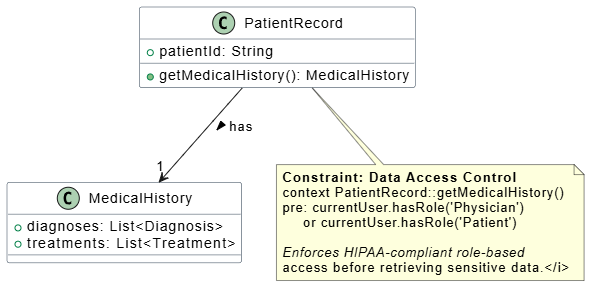
Example 2: Data Access Control
context PatientRecord::getMedicalHistory()
pre: currentUser.hasRole('Physician') or currentUser.hasRole('Patient')
@startuml
skinparam class {
BackgroundColor white
BorderColor #2C3E50
FontName Arial
}

class PatientRecord {
+ patientId: String
+ getMedicalHistory(): MedicalHistory
}

class MedicalHistory {
+ diagnoses: List
+ treatments: List
}

PatientRecord --> "1" MedicalHistory : has

note bottom of PatientRecord
Constraint: Data Access Control
context PatientRecord::getMedicalHistory()
pre: currentUser.hasRole('Physician')
or currentUser.hasRole('Patient')

Enforces HIPAA-compliant role-based
access before retrieving sensitive data.
end note

@endumlThis precondition constraint enforces role-based access control at the model level, catching violations before implementation.
Constraints define conditions that keep the model well-formed. For MediTrack, this meant:
encryptionLevel ≠ NoneThese constraints acted as automated validation rules during model reviews, reducing errors that would otherwise surface only during testing or deployment.
Constraints could be expressed in multiple formats depending on audience and precision needs:
| Format | Use Case | Example |
|---|---|---|
| Natural Language | Stakeholder communication | "All patient data must be encrypted at rest" |
| OCL | Precise technical specification | self.encryptionStatus = 'encrypted' |
| Mathematical Notation | Complex algorithmic constraints | ∀x ∈ Patients: x.consentDate ≤ x.treatmentDate |

Figure 2: Constraints expressed in natural language for business stakeholders and OCL for technical implementation.
A Profile packages stereotypes, constraints, and tagged values into a cohesive extension tailored for a specific domain, platform, or methodology. Think of it as a customized dialect of UML that remains compatible with the standard.
MediTrack's Healthcare Systems Profile included:
1. Domain-Specific Terminology
The profile adapted UML to healthcare, real-time processing, and regulatory compliance contexts. New team members learned one consistent vocabulary rather than translating between generic UML and internal jargon.
2. Syntax for Invisible Constructs
Standard UML doesn't graphically represent certain healthcare-specific actions like "consent verification" or "audit trail generation." The profile provided notation for these constructs through stereotyped action nodes.
3. Transformation Guidance
Tagged values within the profile served as hints for code generators:
«RESTService»
  - generateController: true
  - authenticationType: OAuth2
  - rateLimit: 100 requests/minute
When transforming models to code, the generator used these tagged values to scaffold Spring Boot controllers with appropriate security configurations automatically.
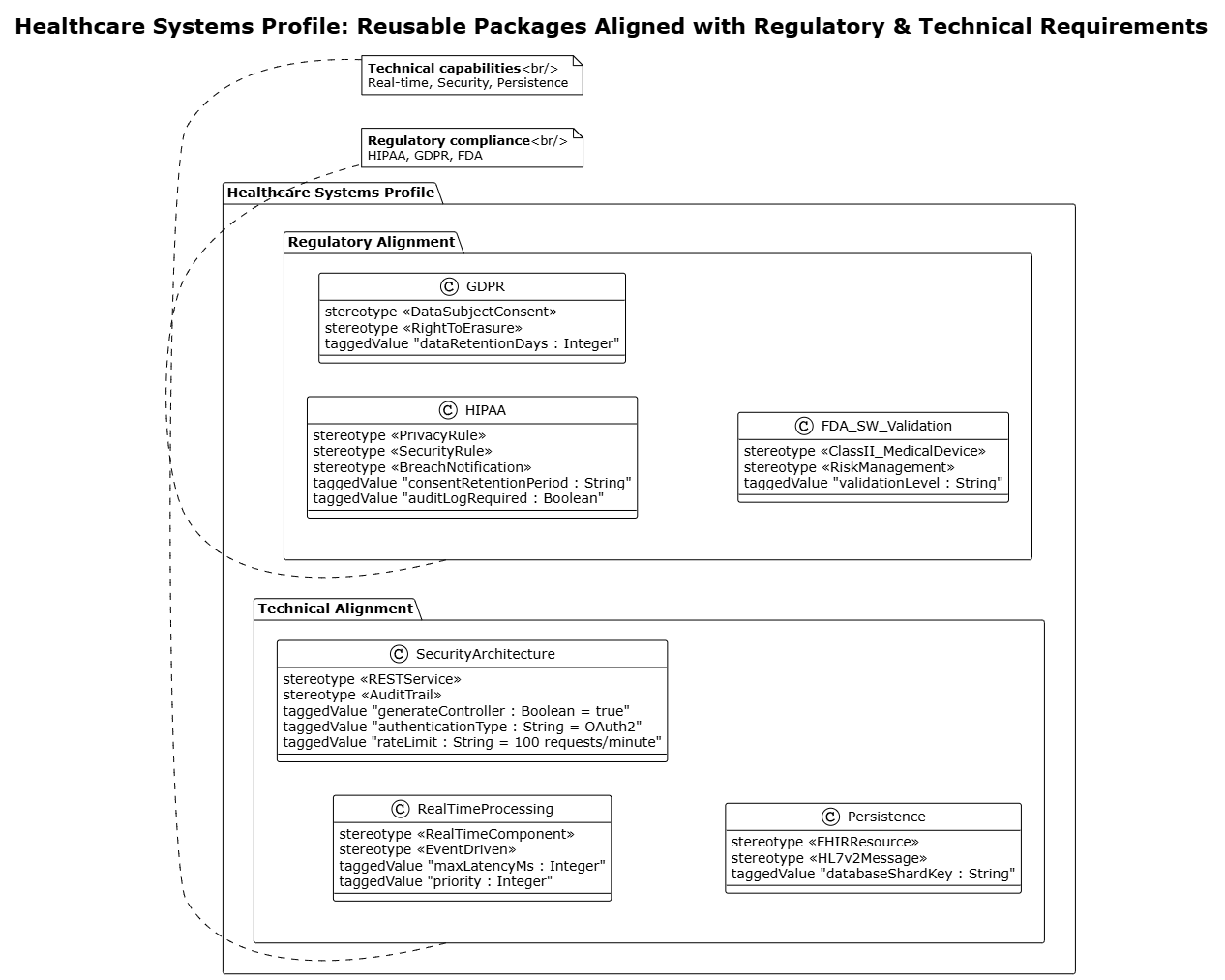
Figure 3: The Healthcare Systems Profile organizes extensions into reusable packages aligned with regulatory and technical requirements.
✅ Start Small: Begin with a few high-value stereotypes rather than attempting comprehensive coverage
✅ Involve Domain Experts: Ensure stereotypes reflect actual domain terminology, not just developer preferences
✅ Document Rationale: Explain why each stereotype and constraint exists to prevent misuse
✅ Maintain Compatibility: Keep extensions backward-compatible with standard UML tools
✅ Govern Evolution: Establish a review process for adding or modifying profile elements
❌ Over-Extend: Avoid creating a "private dialect" that only your team understands
❌ Ignore Tool Support: Verify that your modeling tools properly support chosen extensions
❌ Neglect Training: Invest in educating team members on profile usage and rationale
❌ Forget Maintenance: Regularly review and prune unused or obsolete stereotypes
❌ Sacrifice Clarity: Never sacrifice understandability for cleverness
UML's extensibility mechanisms—stereotypes, constraints, and tagged values—offer powerful tools for adapting standardized modeling to domain-specific needs. When packaged into Profiles, these extensions create tailored modeling languages that bridge the gap between generic notation and specialized requirements.
The MediTrack case study demonstrates that thoughtful extension of UML can yield significant benefits: improved communication with stakeholders, enhanced regulatory compliance, accelerated development through code generation, and better knowledge retention. However, these benefits come with responsibility. Teams must balance customization with clarity, ensuring that extensions enhance rather than obscure understanding.
As software systems grow increasingly complex and domain-specific, the ability to "color outside the lines" while maintaining structural integrity becomes not just advantageous, but essential. Profiles provide the framework for doing so systematically, enabling organizations to speak their domain's language without losing the interoperability and rigor that make UML valuable in the first place.
The future of modeling lies not in choosing between standardization and customization, but in mastering the art of controlled extension. By leveraging stereotypes, constraints, and profiles wisely, teams can create modeling practices that are both precise and accessible—truly unified in purpose if not always in notation.
This case study is based on composite experiences from healthcare technology implementations and represents best practices in UML extension. Specific organizational details have been generalized for illustrative purposes.

