
A Case Study on Integrating UML with Iterative Development Practices
In today's fast-paced software development landscape, teams often invest significant effort in mastering modeling languages like UML—only to find their diagrams gathering dust in repositories, disconnected from actual development work. This case study explores a critical insight from software engineering practice: UML is not a process; it's a language. Its effectiveness depends entirely on how it's embedded within your development workflow.
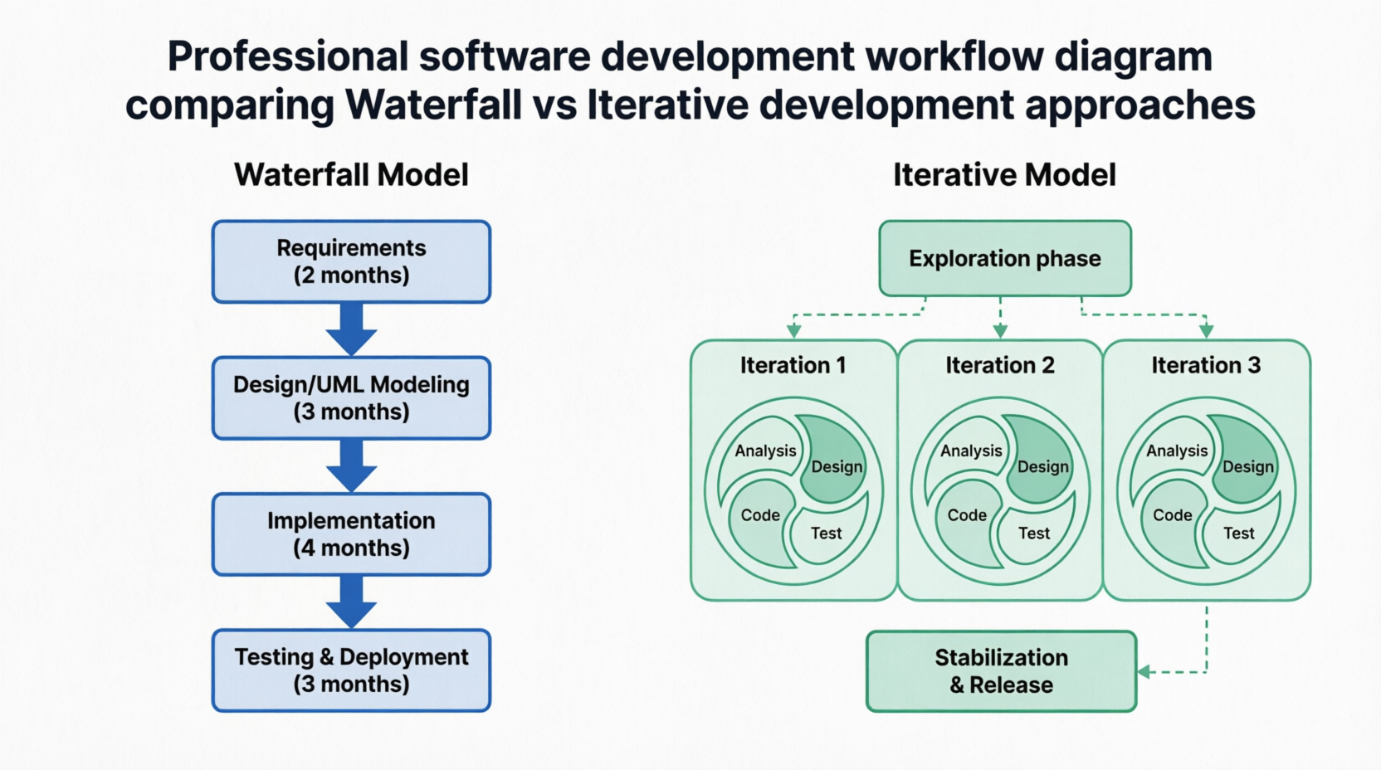
Drawing from foundational principles in iterative development, this article examines how process architecture—whether waterfall, iterative, or hybrid—fundamentally shapes the way teams use UML diagrams, communicate design decisions, and deliver value. We'll walk through a realistic project scenario, analyze process trade-offs, and provide actionable guidance for aligning modeling practices with modern development rhythms.
Central Thesis: The most elegant UML model is useless without a process that enables its evolution, validation, and integration into working software.
Organization: FinTech Innovations Inc.
Team: 12-person cross-functional team (developers, analysts, QA, UX)
Goal: Build a real-time financial analytics dashboard with predictive modeling capabilities
Timeline: 12-month delivery window
Challenge: Requirements evolved frequently due to regulatory changes and market feedback
Early in planning, leadership proposed a traditional waterfall structure:
[Phase 1] Requirements (2 months) → [Phase 2] Design/UML Modeling (3 months)
→ [Phase 3] Implementation (4 months) → [Phase 4] Testing & Deployment (3 months)
UML Usage Plan:
Use Case Diagrams to capture stakeholder needs (Requirements phase)
Class & Sequence Diagrams for system architecture (Design phase)
Activity Diagrams for business logic validation (Design phase)
Component Diagrams for deployment planning (Design phase)
Early Warning Signs:
Business stakeholders struggled to validate static diagrams without working prototypes
Regulatory requirement changes after "Requirements sign-off" created rework pressure
Design decisions made in isolation led to integration surprises during coding
"We had beautiful UML models, but they became obsolete the moment we started coding because the process didn't allow for feedback loops." — Project Lead, Project Aurora
After three months of waterfall-style work, the team shifted to an iterative approach with 6-week cycles:
[Exploration] → [Iteration 1: Core Analytics] → [Iteration 2: Predictive Engine]
→ [Iteration 3: User Experience] → [Stabilization & Release]
Key Process Changes:
Time-Boxing: Fixed 6-week iterations with non-negotiable end dates
Functionality Slippage: When scope threatened deadlines, features were deferred—not dates extended
Production-Quality Increments: Each iteration delivered tested, integrated code ready for potential release
Continuous UML Evolution: Models were treated as living artifacts, updated alongside code
| Waterfall Approach | Iterative Approach |
|---|---|
| UML created upfront as "complete specification" | UML created just-in-time for current iteration's scope |
| Diagrams archived after design phase | Diagrams version-controlled alongside code |
| Focus on comprehensive documentation | Focus on communication and shared understanding |
| Changes required formal change requests | Changes incorporated through backlog refinement |
| Testing happened after "design complete" | Testing integrated into each iteration's workflow |
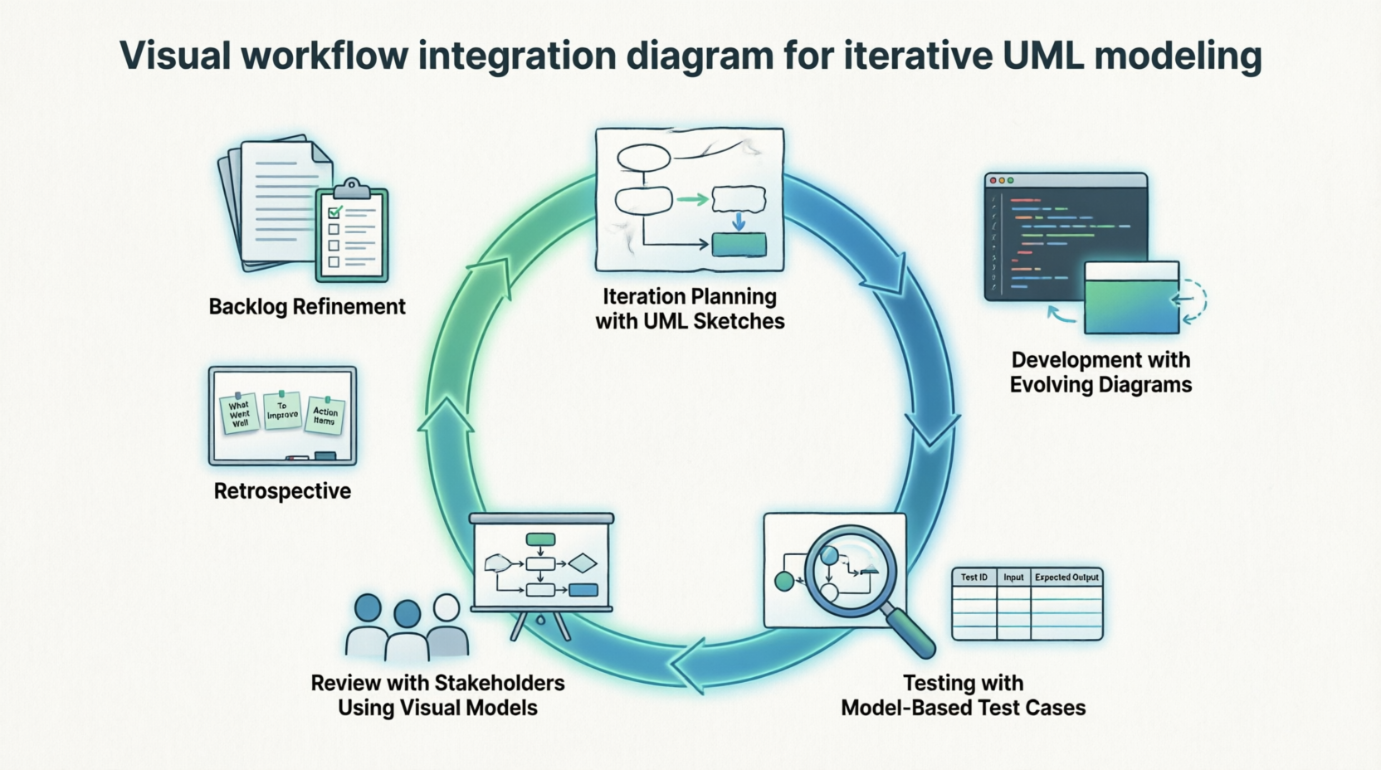
Visual Workflow Integration:
[Backlog Refinement] → [Iteration Planning with UML Sketches]
→ [Development with Evolving Diagrams] → [Testing with Model-Based Test Cases]
→ [Review with Stakeholders Using Visual Models] → [Retrospective: Update Modeling Practices]
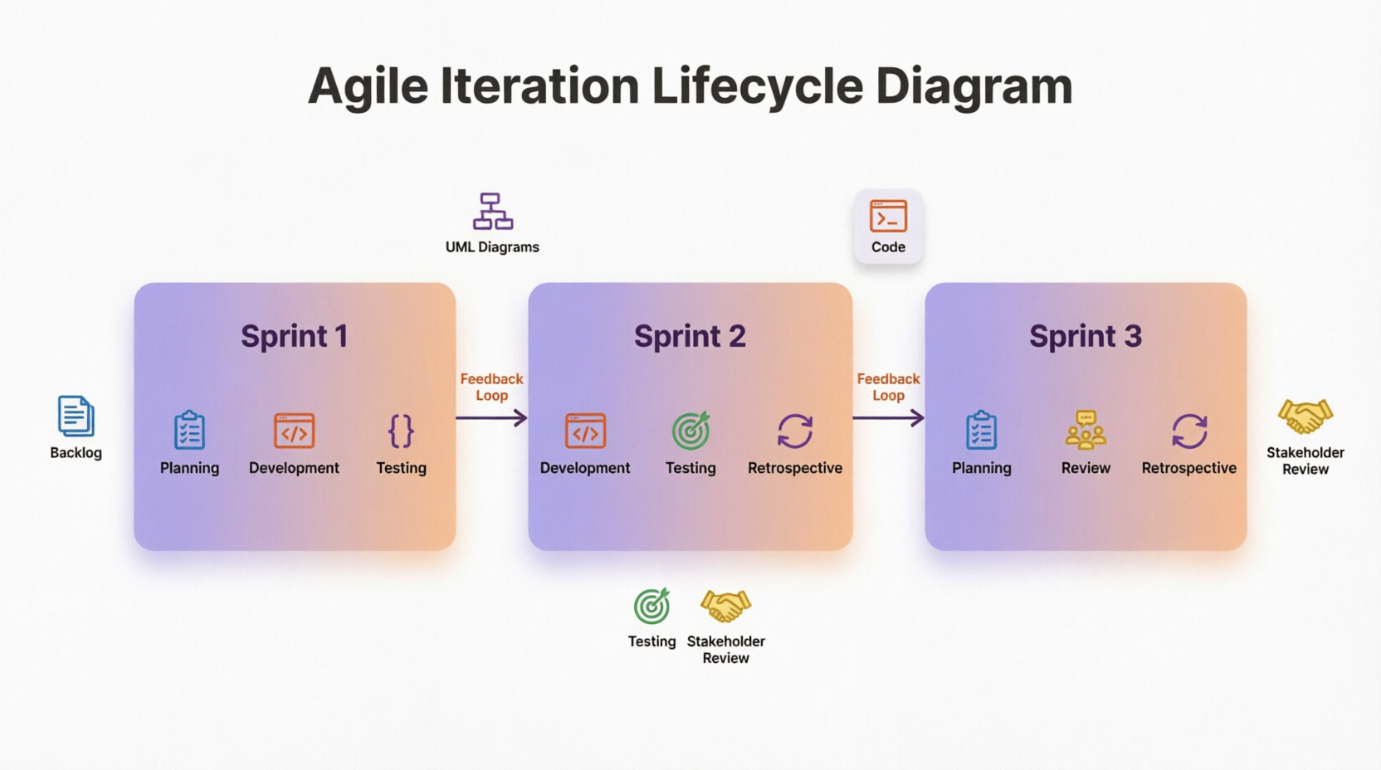
Iterative development cycle showing how UML artifacts evolve across sprints. Source: Agile lifecycle visualization concepts
The team adopted three foundational practices to make iterative UML modeling sustainable:
Unit tests written alongside UML behavioral diagrams (State Machines, Activity Diagrams)
Test code volume maintained at ~1:1 ratio with production code
JUnit/TestNG frameworks enabled rapid validation of model-derived logic
UML Class Diagrams updated after code refactoring to reflect improved design
Small, behavior-preserving transformations kept models synchronized with implementation
Tooling: Enterprise Architect with round-trip engineering capabilities
Automated builds triggered on code check-ins included model consistency checks
UML model exports integrated into documentation pipelines
Daily integration prevented "model drift" from codebase
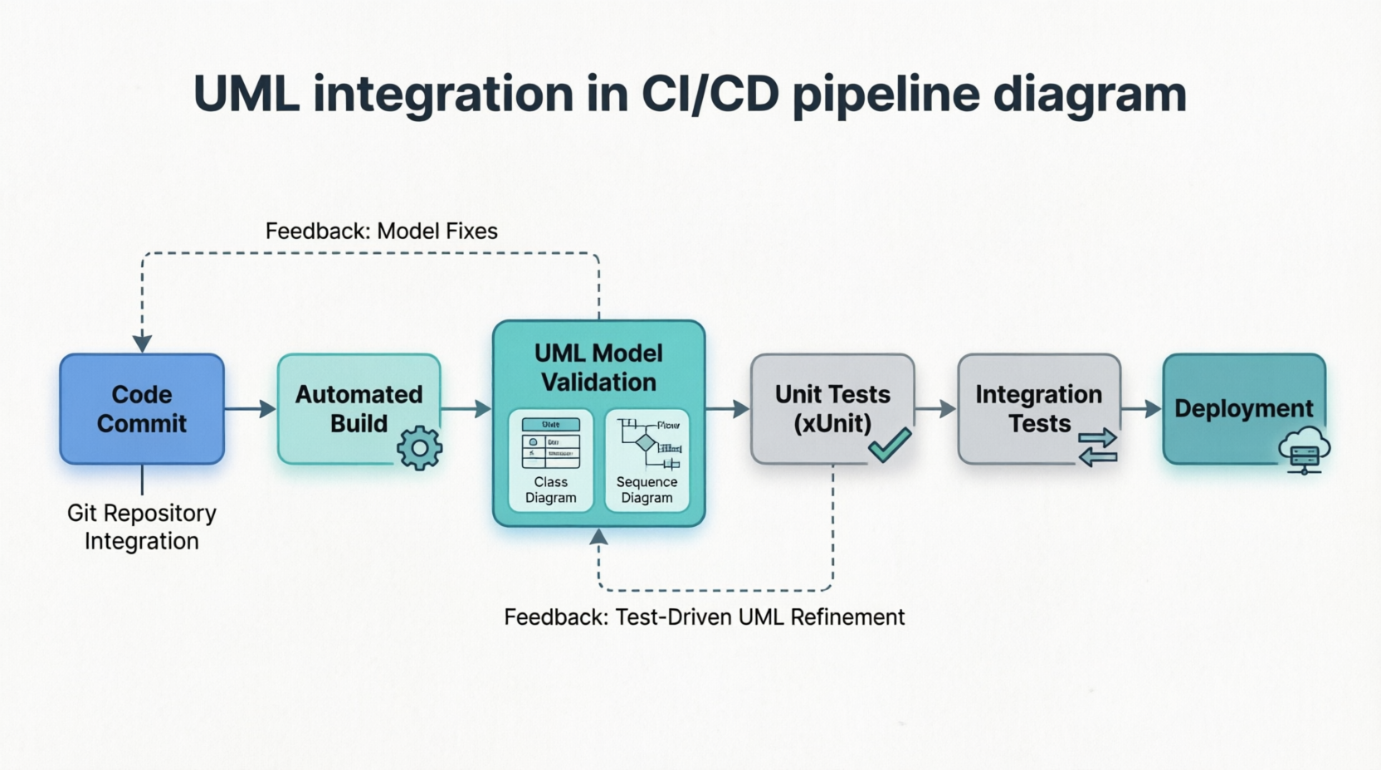
How UML artifacts integrate into modern CI/CD workflows. Source: UML process independence principles
For regulatory compliance components, the team adopted McConnell's staged delivery approach:
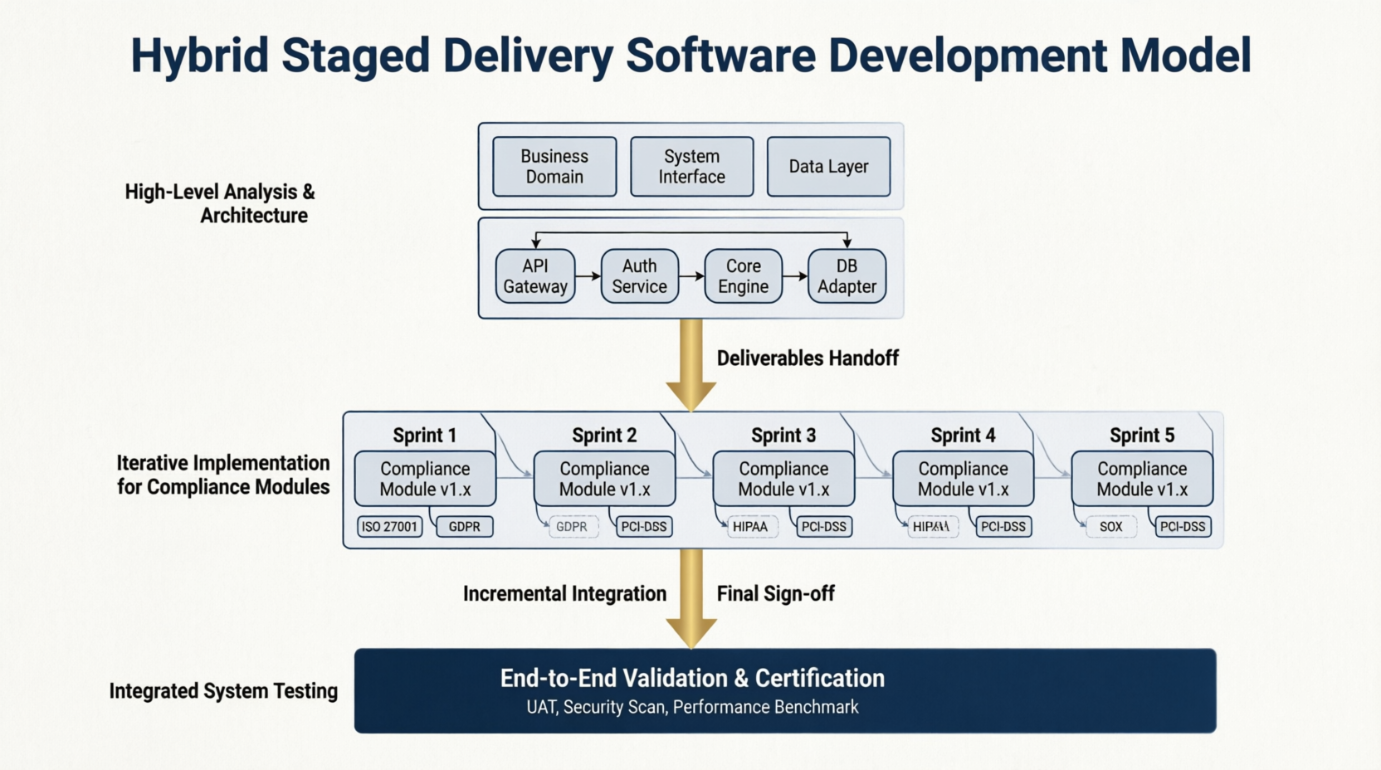
[High-Level Analysis & Architecture (Waterfall-style)]
→ [Iterative Implementation of Compliance Modules]
→ [Integrated System Testing]
UML Strategy for Hybrid Model:
Early Phase: Package Diagrams and Component Diagrams for architectural boundaries
Iterative Phase: Sequence Diagrams and State Machines for module behavior
Integration Phase: Deployment Diagrams and Profile Diagrams for compliance validation
This balanced upfront architectural thinking with iterative flexibility—proving that process purity is less important than intentional design.
| Metric | Waterfall Projection | Iterative Reality |
|---|---|---|
| Requirement Volatility Handling | High risk of rework | Changes absorbed in next iteration |
| Stakeholder Confidence | Low until final demo | High after each iteration review |
| Defect Detection Timing | Late (testing phase) | Early (continuous testing) |
| Team Morale | Declined during "coding marathon" | Sustained through regular wins |
| UML Model Relevance | Degraded over time | Maintained through continuous updates |
Process Before Notation: Establishing iterative rhythms before deep UML investment prevented wasted modeling effort
Just-Enough Modeling: Creating diagrams only when they solved immediate communication problems increased adoption
Living Artifacts: Treating UML models as version-controlled, evolving assets (not one-time deliverables) sustained their value
Time-Boxing Discipline: Fixed iteration dates forced pragmatic scope decisions that waterfall's "perfect plan" approach avoided
Pseudo-Iterative Traps: Teams claiming "iterative" while doing waterfall-in-disguise (e.g., "one analysis iteration followed by two design iterations")
Testing Debt: Deferring integration testing to a "final stabilization phase" recreated waterfall risks
Model Maintenance Overhead: Without automated tooling, keeping UML synchronized with code became burdensome
Start with Exploration: Use lightweight UML sketches (whiteboard photos, simple diagrams) during initial discovery before investing in formal models
Embed Models in Workflow: Store UML files in the same repository as code; reference diagrams in user stories and pull requests
Train for Adaptability: Teach teams that UML is a communication tool, not a contractual specification—models should evolve as understanding deepens
Measure Model Utility: Track how often diagrams are referenced in discussions, not just how many were created
Core differences between waterfall and iterative approaches. Source: SDLC model comparison
Project Aurora's journey illustrates a fundamental truth: UML's value is unlocked not by diagramming skill alone, but by intentional process design. When modeling practices are embedded within iterative, feedback-rich workflows, UML transforms from a documentation exercise into a dynamic collaboration tool that accelerates learning, reduces risk, and delivers tangible business value.
The choice isn't "UML vs. no UML" or "waterfall vs. agile." It's about designing a coherent system where:
Modeling activities serve immediate team needs
Process rhythms enable continuous validation of designs
Technical practices (testing, refactoring, CI) keep models relevant
Stakeholders engage with visual artifacts throughout development
As the UML specification itself states: "UML is intentionally process independent". This isn't a limitation—it's an invitation. Teams that thoughtfully integrate UML into their chosen development process—whether iterative, hybrid, or context-adaptive—gain a powerful advantage: the ability to think visually, communicate precisely, and adapt confidently in complex software endeavors.
Final Takeaway: Don't ask "Which UML diagrams should we use?" First ask "How does our process enable models to evolve alongside working software?" Answer that, and the diagrams will follow—with purpose.

