
When mapping out business processes using Business Process Model and Notation (BPMN), it is easy to focus entirely on the sequence of tasks, events, and gateways. However, real-world business processes do not exist in a vacuum. They require documentation, rely on specific data inputs and outputs, and involve complex categorizations.
To capture this essential context, BPMN provides a suite of graphical elements that exist outside the primary execution flow: Artifacts, Data Objects, and Associations.
While these elements are non-executable—meaning they do not dictate the sequence or logic of the process—they are absolutely critical. They enhance the readability of your diagrams, provide vital context for business users, and enable deep process analysis. In this comprehensive guide, we will explore how to effectively use these elements to elevate your BPMN models from simple flowcharts to rich, informative business blueprints.
Artifacts provide a mechanism for adding descriptive, supplementary information about a process. In BPMN 2.0, the two primary Artifacts are the Group and the Text Annotation (Note: In the older BPMN 1.2 specification, Data Objects were classified as Artifacts, but they were moved to their own dedicated category in 2.0). BPM system developers can also extend this category with custom artifacts as needed.
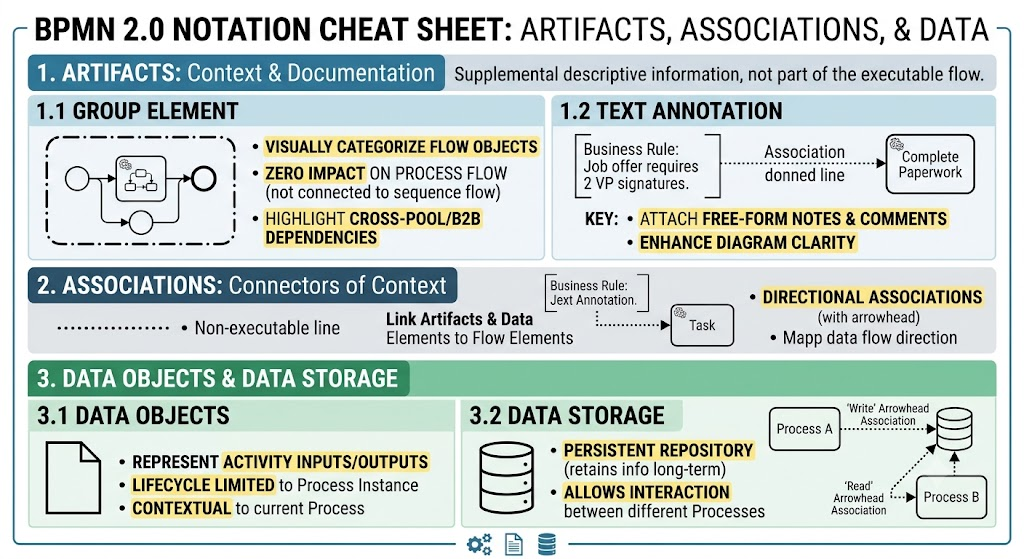
The Group element is used to visually categorize or highlight specific flow objects without influencing the actual execution of the process.
📊 Visual Reference: The Group Element
Graphically, a Group is represented by a rounded rectangle with a distinct dot-and-dash (long-short) line border. It is designed to visually enclose a set of flow objects.
Key Characteristics & Use Cases:
Categorization: Groups highlight that certain activities are related. For example, in a "Complete paperwork" process, a Group can visually unite multiple tasks aimed at preparing and signing a job offer.
Zero Impact on Flow: Because a Group is not an activity (like a Task) or a routing element (like a Gateway), it cannot be connected to sequence flows or message flows. It purely serves as a visual boundary.
Cross-Boundary Highlighting: Unlike standard flow objects, Groups are not constrained by pools and swimlanes. They can span across different participants, making them highly effective for illustrating B2B (Business-to-Business) relationships and cross-departmental dependencies.
Text Annotations allow modelers to attach free-form descriptive information, notes, or comments directly to the diagram.
📊 Visual Reference: Text Annotation
Graphically, a Text Annotation is depicted as an open, borderless box (or a bracket-like shape) containing text. It sits detached from the main flow.
Key Characteristics & Use Cases:
Enhancing Clarity: You can use annotations to explain how a specific element is used, add business rules, or provide instructions for the end-user.
Process Connection: Annotations are linked to specific process elements (like a Task or Event) using an Association (detailed in Section 2).
Example: In an "Open account" task, a Text Annotation can be attached to specify the exact, step-by-step actions the accountant must perform, ensuring the model is easily understood by business stakeholders.
If a piece of text or a data element does not belong to the executable process flow, how do you link it to the flow? The answer is the Association.
📊 Visual Reference: The Association
Graphically, an Association is a simple dotted line. It connects a flow element (Task, Event, Gateway) to an Artifact (Text Annotation) or a Data element (Data Object).
Key Characteristics & Use Cases:
Non-Executable Link: Associations create a relationship between information and the process flow without altering the sequence logic.
Showing Direction: By default, an Association is a simple dotted line. However, if you need to indicate the direction of a flow (such as data being created, consumed, or moved), you can add an arrowhead to one end of the dotted line. This is particularly useful when mapping data inputs and outputs.
A business process is only as good as the data it manages. BPMN offers specialized elements to ensure that the data used, created, and stored during a process is accurately represented.
Data Objects represent the inputs and outputs of Activities. They show what data is required to perform a task and what data is produced as a result.
📊 Visual Reference: Data Object
Graphically, a Data Object looks like a standard document icon: a rectangle with the top-right corner folded down.
Key Characteristics & Use Cases:
Process Context: Data Objects are tied to the context of a specific process or sub-process.
Lifecycle Limitations: They only exist between the start and end of a process instance. If a process instance is cancelled or completed, its Data Object instances become inactive and inaccessible to external processes.
Scope: Because of their lifecycle limitations, simple Data Objects cannot be used to share data between different, separate processes.
To solve the limitations of Data Objects, BPMN 2.0 introduced the Data Storage element. This represents a persistent repository that retains information long after a specific process instance has finished.
📊 Visual Reference: Data Storage
Graphically, Data Storage is represented by a cylinder, which is the universal standard notation for a database or persistent data store.
Key Characteristics & Use Cases:
Persistence: Unlike Data Objects, Data Storage survives the lifecycle of a single process.
Cross-Process Interaction: Data Storage allows for interaction between different processes. For example, Process A can write data to a Data Storage element, and Process B can later read from it.
To see how these elements work in harmony, let’s look at a practical example: an Employee Recruitment process.
In this scenario, we utilize a combination of Data Objects, Data Storage, and Associations to clarify data movement without cluttering the main sequence flow:
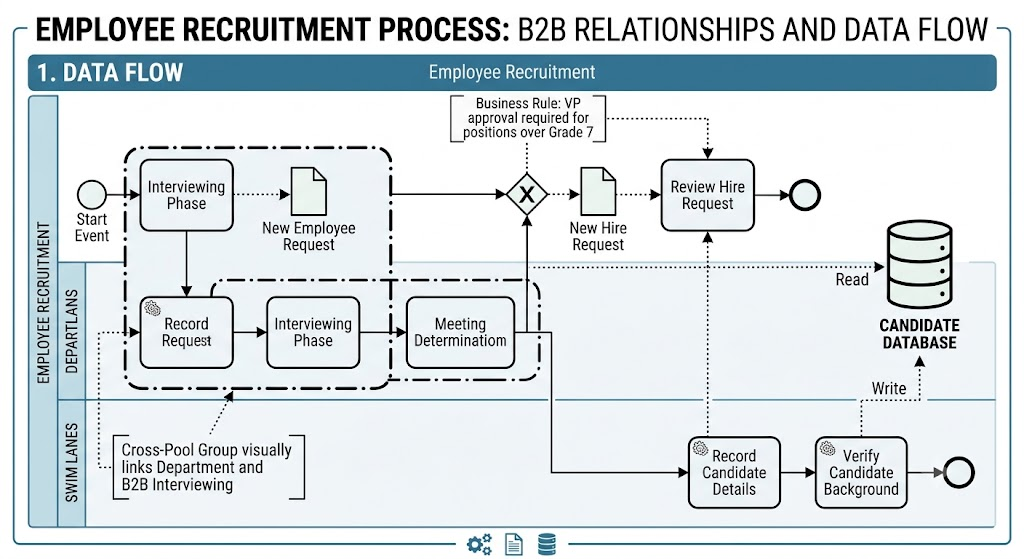
Data Object (The Request): A simple document icon represents the "request for a new employee". This is the output of an initial activity. Another Data Object represents the "request for a new hire", which is consumed by a subsequent task.
Data Storage (The Database): A cylinder icon represents the "candidate database". This acts as a persistent store that outlives individual recruitment cycles.
Associations (The Links): Dotted association lines (some with arrowheads to show direction) connect these data elements to their respective Tasks and Events.
The Result: The diagram clearly demonstrates how data is produced, consumed, and stored. The main sequence flow remains clean and focused on the order of execution, while the Associations and Data elements provide a complete picture of the information architecture.
Mastering BPMN requires looking beyond the simple sequence of tasks. By effectively utilizing Artifacts, Data Objects, and Associations, you transform a basic process map into a comprehensive, analytically rich business model.
Artifacts (Groups and Text Annotations) provide the necessary documentation and visual categorization to make your models understandable to all stakeholders.
Associations act as the vital bridge, linking this contextual information directly to the executable flow.
Data Objects and Data Storage ensure that the lifecycle, scope, and movement of critical business information are accurately tracked and managed.
While these elements do not execute the process, they are indispensable for process analysis, system implementation, and clear business communication.
Next Steps: To deepen your understanding and explore advanced configurations of these elements, we highly recommend reviewing the official BPMN 2.0 specification documents.
Happy modeling!

