
Imagine spending six months and hundreds of thousands of dollars building a software application, only to hand it to the client and hear, "This isn't what we asked for."
Historically, this has been the nightmare scenario for software projects. The root cause is rarely a lack of coding skill; it is almost always a failure in communication and design. Business stakeholders speak in terms of revenue, user journeys, and market value. Developers speak in terms of APIs, databases, and microservices. Without a translator, projects derail.
Enter the Unified Modeling Language (UML). Far from being a relic of the past, UML is the universal visual language that bridges the gap between business vision and technical execution. This tutorial will guide beginners through the business value of UML, demonstrating how modeling your way to better software saves time, reduces risk, and ultimately drives business success.
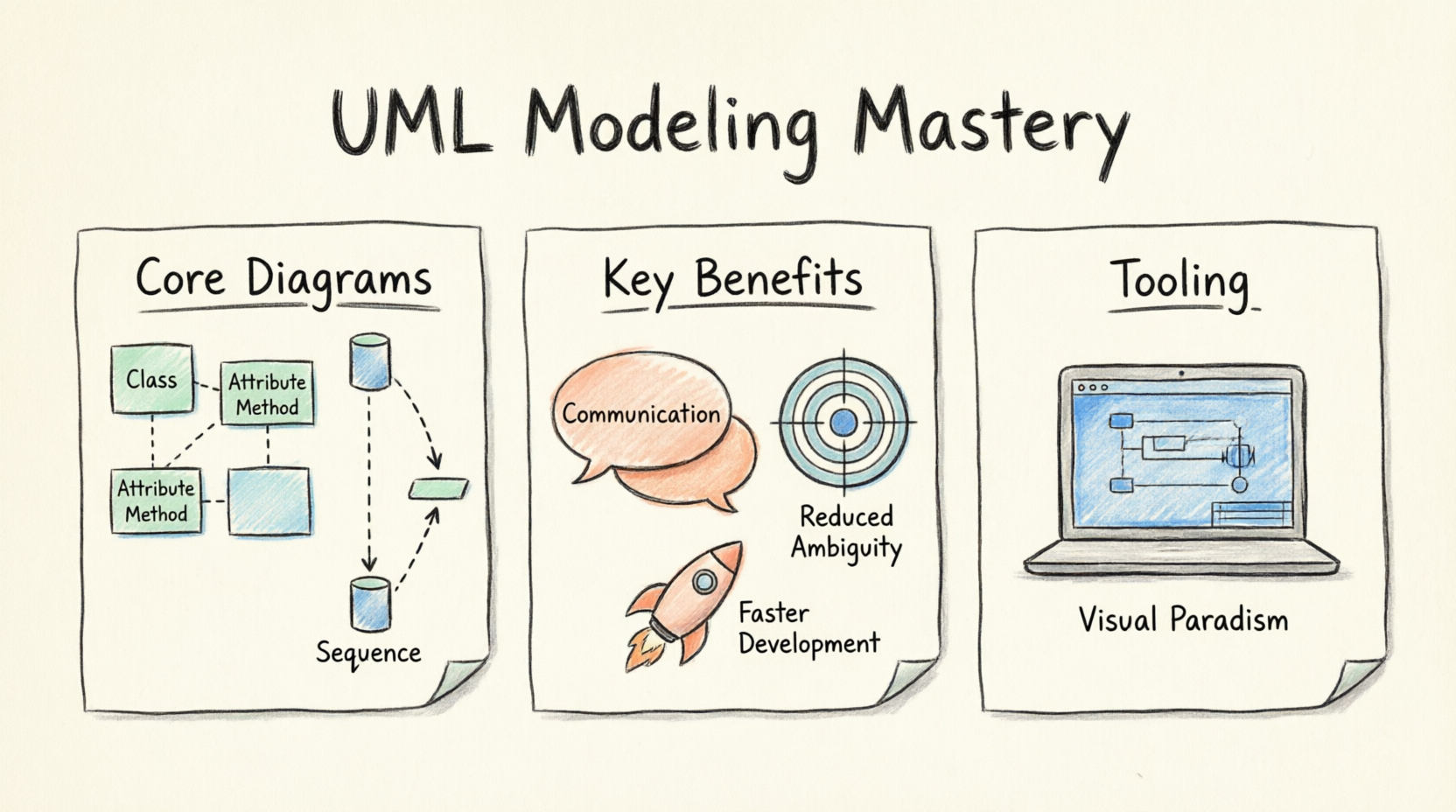
UML (Unified Modeling Language) is a standardized, general-purpose modeling language used in software engineering. It provides a set of graphical notation techniques to create visual models of software-intensive systems.
For years, critics claimed UML was dead, killed by Agile methodologies and rapid coding. However, in 2026, UML is more relevant than ever, but its application has evolved:
Taming Modern Complexity: Today’s systems rely on cloud-native architectures, microservices, and distributed AI models. You cannot hold this complexity in your head. UML provides the necessary abstraction.
Agile UML: Modern teams don't spend months drawing diagrams before writing code. They use "just enough" UML for complex components, treating diagrams as living documentation.
AI Integration: In 2026, AI doesn't replace UML; it supercharges it. AI tools can now generate UML diagrams from plain text prompts or reverse-engineer diagrams from existing code, making UML faster and more accessible than ever.
Before diving into the diagrams, it is crucial to understand why a business should invest time in UML.
Clarity in Requirements: UML forces vague business ideas into precise, logical structures. It exposes edge cases and missing requirements before a single line of code is written.
Better Stakeholder Alignment: Visuals are universal. A non-technical project manager can look at a Use Case diagram and immediately understand the system's scope, ensuring everyone is on the same page.
Risk Reduction: The cost of fixing a software defect increases exponentially the later it is found in the development lifecycle. Fixing a design flaw on a UML diagram costs minutes; fixing it in production costs thousands.
Structural diagrams show the static, physical, or conceptual makeup of a system. Think of them as the architectural blueprints of a building.
What it is: The most common UML diagram. It shows the system's classes, their attributes, methods, and the relationships between objects.
Business Benefit: Ensures the database and core data models are logically sound, preventing costly database restructuring later.
Example: An e-commerce data model.
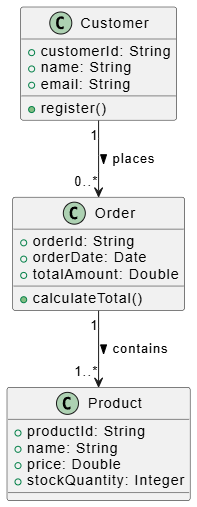
@startuml
class Customer {
  +customerId: String
  +name: String
  +email: String
  +register()
}

class Order {
  +orderId: String
  +orderDate: Date
  +totalAmount: Double
  +calculateTotal()
}

class Product {
  +productId: String
  +name: String
  +price: Double
  +stockQuantity: Integer
}

Customer "1" --> "0..*" Order : places >
Order "1" --> "1..*" Product : contains >
@enduml
What it is: Shows how high-level system parts (components) are wired together, focusing on interfaces and dependencies.
Business Benefit: Crucial for microservices architecture. It helps teams understand dependencies, ensuring that updating one service doesn't accidentally break another.
Example: E-commerce system components.
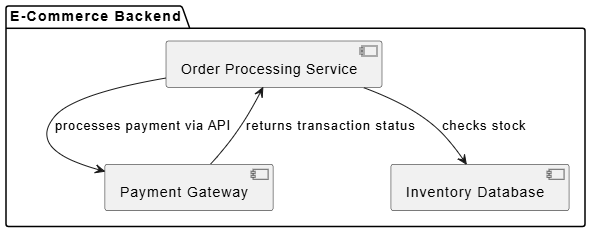
@startuml
package "E-Commerce Backend" {
  [Order Processing Service] as OPS
  [Payment Gateway] as PG
  [Inventory Database] as IDB
}

OPS --> PG : processes payment via API
OPS --> IDB : checks stock
PG --> OPS : returns transaction status
@enduml
What it is: Maps the software components to the physical or cloud hardware (nodes) where they will run.
Business Benefit: Aligns DevOps and IT infrastructure teams. It ensures the cloud hosting costs and hardware capabilities match the software's actual deployment needs.
Example: Cloud deployment architecture.
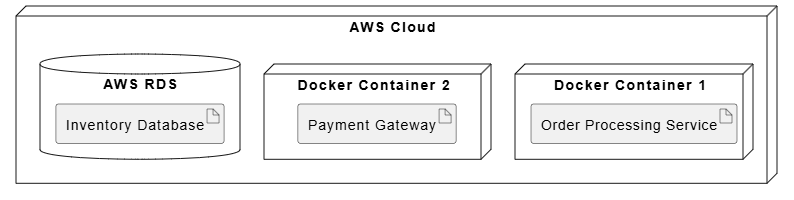
@startuml
node "AWS Cloud" {
  node "Docker Container 1" {
    artifact "Order Processing Service"
  }
  node "Docker Container 2" {
    artifact "Payment Gateway"
  }
  database "AWS RDS" {
    artifact "Inventory Database"
  }
}
@enduml
If structural diagrams are the blueprint, behavioral diagrams are the electrical and plumbing schematics—they show how the system actually behaves and flows.
What it is: A high-level view of who uses the system (Actors) and what they can do (Use Cases).
Business Benefit: Defines the exact scope of the project. It prevents "scope creep" by clearly documenting what is—and isn't—included in the release.
Example: Customer interactions.
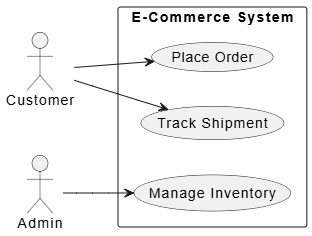
@startuml
left to right direction
actor "Customer" as cust
actor "Admin" as admin

rectangle "E-Commerce System" {
  usecase "Place Order" as UC1
  usecase "Track Shipment" as UC2
  usecase "Manage Inventory" as UC3
}

cust --> UC1
cust --> UC2
admin --> UC3
@enduml
What it is: Shows how objects interact with each other in a specific time sequence. It reads from left to right and top to bottom.
Business Benefit: Invaluable for API design and debugging. It helps developers understand complex, multi-step integrations (like third-party payment processing) before they start coding.
Example: The checkout API flow.
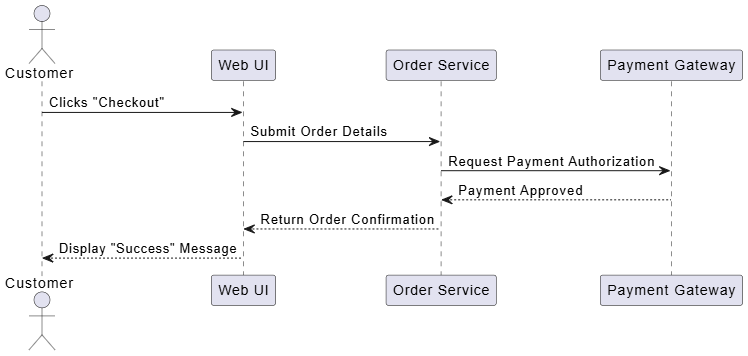
@startuml
actor Customer
participant "Web UI" as UI
participant "Order Service" as OS
participant "Payment Gateway" as PG

Customer -> UI: Clicks "Checkout"
UI -> OS: Submit Order Details
OS -> PG: Request Payment Authorization
PG --> OS: Payment Approved
OS --> UI: Return Order Confirmation
UI --> Customer: Display "Success" Message
@enduml
What it is: Similar to a flowchart, it models the workflow or business process, highlighting the sequence of activities and conditional logic.
Business Benefit: Perfect for mapping out business logic and user journeys. It helps identify bottlenecks in a process and ensures all logical branches (e.g., "What if the payment fails?") are handled.
Example: The checkout business process.
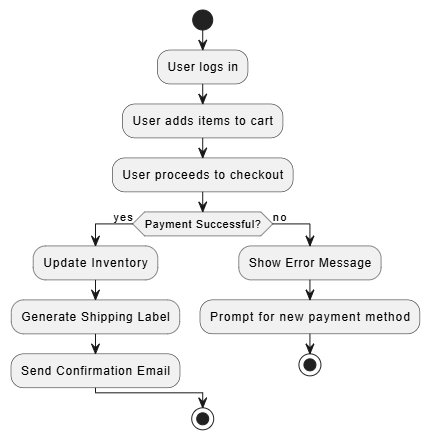
@startuml
start
:User logs in;
:User adds items to cart;
:User proceeds to checkout;

if (Payment Successful?) then (yes)
  :Update Inventory;
  :Generate Shipping Label;
  :Send Confirmation Email;
else (no)
  :Show Error Message;
  :Prompt for new payment method;
  stop
endif

stop
@enduml
To create these diagrams efficiently, you need the right tools. While there are many options, Visual Paradigm stands out as a premier, enterprise-grade tool that is highly accessible for beginners and professionals alike.
Visual Paradigm offers comprehensive support for all UML diagram types, ensuring your models adhere to official standards. It features an intuitive drag-and-drop interface, making it easy for beginners to start modeling immediately without a steep learning curve.
In 2026, Visual Paradigm integrates powerful AI features that revolutionize the modeling process:
AI Text-to-Diagram: You can simply type a prompt like, "Create a sequence diagram for a user logging in via OAuth2," and the AI will instantly generate the foundational UML diagram for you.
Smart Diagram Completion: As you draw, the AI suggests logical next steps, relationships, or missing components based on industry best practices.
AI Code Generation: Visual Paradigm can translate your Class and Component diagrams directly into boilerplate code (Java, C#, Python, etc.), bridging the gap between design and development.
Automated Reverse Engineering: If you have legacy code, the AI can analyze it and automatically generate accurate UML diagrams, helping you understand and document existing systems instantly.
How does a business measure the return on investment (ROI) of using UML? By tracking specific project metrics before and after adopting modeling practices:
Improved Quality (Fewer Bugs): By mapping out logic with Activity and Sequence diagrams, edge cases are caught early. Success is measured by a decrease in defect density (bugs per 1,000 lines of code) during QA testing.
Enhanced Maintainability: When developers leave a company, they take institutional knowledge with them. UML diagrams serve as living documentation. Success is measured by a reduction in onboarding time for new developers and faster resolution of technical debt.
Increased Team Productivity: Clear Use Case and Class diagrams eliminate the "guesswork" in development. Success is measured by a reduction in rework cycles and a higher velocity in delivering features, because developers spend less time figuring out what to build and more time actually building it.
The transition from a beginner to a master software professional isn't just about learning new programming languages; it's about learning how to think systematically about complex problems.
UML is not about creating beautiful art or generating heavy, unreadable documentation. It is a strategic business tool. It is the difference between building a house by just nailing boards together and building a house from a carefully engineered architectural blueprint. By leveraging UML—and modern tools like Visual Paradigm enhanced by AI—you ensure that your software is built right the first time.
Start small. Next time you are tasked with a new feature, don't open your code editor right away. Open a diagramming tool, sketch out a quick Sequence or Class diagram, and watch how it transforms your clarity, your team's alignment, and your final product. Model your way to better software, and the business value will naturally follow.

