
Business Process Model and Notation (BPMN) is the industry-standard language for visualizing and documenting business workflows. It provides a common visual language that bridges the gap between business analysts, technical developers, and managers. This guide will walk you through everything you need to know to start creating effective BPMN diagrams.

BPMN stands for Business Process Model and Notation. It is a standardized graphical notation developed by the Object Management Group (OMG) and formally recognized as an ISO standard (ISO/IEC 19510). Originally published by the Business Process Management Initiative (BPMI) in 2004, BPMN is now maintained by the OMG following their merger in 2005. Version 2.0 was introduced in 2011 to establish a unified specification for creating process diagrams.
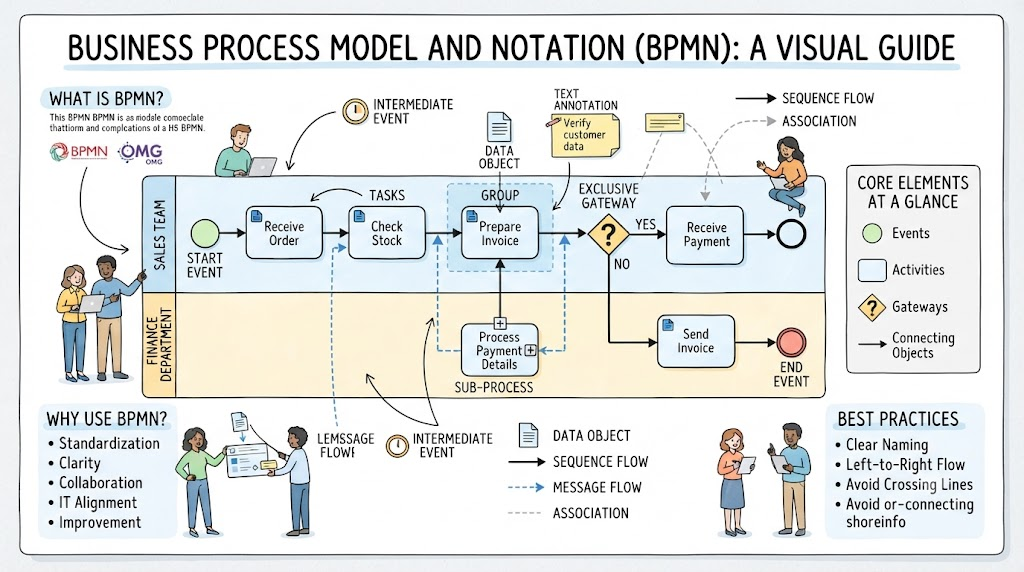
Standardization: BPMN provides a common language for modeling business processes. Its standardized symbols make it easier for different stakeholders to understand and collaborate on process documentation.
Clarity and Visualization: BPMN diagrams offer a clear visual representation using intuitive symbols and flowcharts, making it easy to understand the sequence of activities, decisions, and interactions within a process.
Accessibility: BPMN diagrams are designed to be accessible to both technical and non-technical users, promoting better collaboration between business and IT teams.
Alignment with IT Systems: BPMN models can be integrated with IT systems to implement automated workflows, ensuring processes are executed consistently and efficiently.
Continuous Improvement: By using BPMN, organizations can monitor, analyze, and iteratively refine their processes to meet changing business needs.
BPMN diagrams are built from four primary categories of elements:
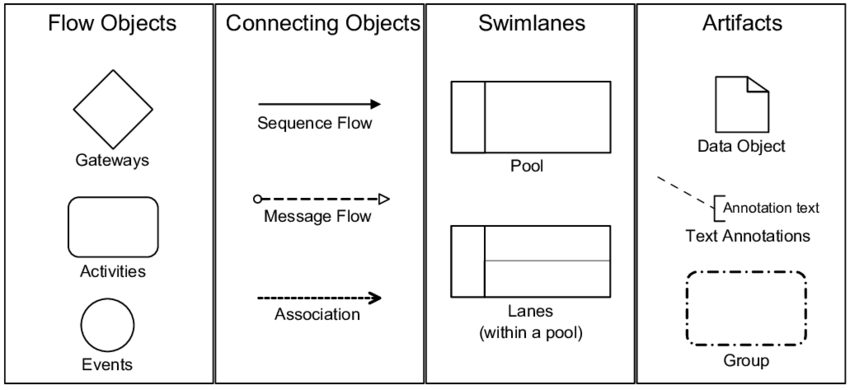
Flow objects are the main elements that define the behavior of a process:
Events (Circles): Events trigger or interrupt the flow of the process.
Start Event (plain circle): Initiates the process
Intermediate Event (double border circle): Occurs during the process
End Event (thick border circle): Terminates the process
Common triggers include: Message (email/text sent/received), Timer (scheduled time), Error (issue occurs), Escalation (higher-up involvement needed)
Activities (Rounded rectangles): Represent work or tasks performed.
Task: An atomic work unit that cannot be broken down further (e.g., "Review Contract")
Sub-Process: A group of related tasks collapsed into one element
Transaction: A sub-process involving payment
Call Activity: References a reusable global process
Gateways (Diamonds): Decision points that control the flow direction.
Exclusive Gateway: Only one path can be taken (binary decision)
Parallel Gateway: Multiple paths execute simultaneously (no conditions checked)
Inclusive Gateway: One or more paths can be taken based on evaluated conditions
Event-Based Gateway: Path is determined by which event occurs first
Connecting objects show how flow objects interact and the process flows from one activity to another:
| Connector | Symbol | Purpose |
|---|---|---|
| Sequence Flow | Solid line with arrowhead | Shows the order activities are executed |
| Message Flow | Dashed line with arrowhead | Represents message exchange between participants |
| Association | Dashed line (no arrowhead) | Links artifacts (annotations, data objects) to flow objects |
Swimlanes organize activities by roles or responsibilities:
Pools represent high-level participants in the process (e.g., "Customer Department," "Supplier"). A pool may be a "blackbox" with no internal details if external to the process being modeled.
Lanes are subdivisions within a pool that represent specific roles or individuals (e.g., within the "Customer Service" pool, lanes could be "Pre-sales Team" and "After-sales Team").
Artifacts provide context or supplementary information:
Data Objects: Represent data used or produced in the process
Text Annotations: Add explanatory notes or comments
Groups: Visually group related elements without affecting flow
Clearly articulate why you're modeling this process and what you hope to achieve. Define the start and end points of the process.
Involve process owners, subject matter experts, and anyone with a role in the process. Their input is essential for accurate modeling.
Break down the process into individual activities. Document what tasks are performed, who performs them, and in what sequence.
Start by adding pools and lanes to define participants. Use at least one pool in every process model. Place each element clearly within a lane boundary.
Add start events, activities (tasks/sub-processes), gateways, and end events. Connect them using sequence flows from left to right.
Use gateways wherever business decisions are required. Name gateways descriptively using interrogative statements (e.g., "Application Approved?").
Walk through the process from start to finish to ensure no dead loops or missed nodes. Use validation tools in BPMN software if available.
Use descriptive names that define purpose (e.g., "Residential Loan Application" not "MyBank Loan Process")
For tasks, use a verb and noun: "Review Contract," "Send Booking Details"
For gateways, use an interrogative statement: "Is Start Date > 30 days?"
Maintain consistent left-to-right workflow direction
Avoid crossing lines wherever possible
Use sub-processes to manage complexity instead of overloading one diagram
Use different colors to distinguish roles if beneficial
Every process must have at least one Start and one End Event
Use separate gateways for splitting and joining workflows (don't divert back to the splitting gateway)
Place every element clearly within a lane boundary
Mixing different types of events (e.g., using both message events and tasks for communication) creates ambiguity. Always consult BPMN specifications and use consistent notation.
Cluttered diagrams with excessive details overwhelm viewers. Simplify by focusing on key activities and using sub-processes for complex sections.
Neglecting stakeholders results in models that don't meet their needs. Engage relevant parties early and conduct regular reviews.
Unvalidated models may contain logical errors. Perform walkthroughs with stakeholders and use validation tools to check for errors.
Without proper documentation, models become difficult to understand. Include text annotations for complex elements and maintain version control.
Camunda: Includes BPMN cheat sheets and reference materials
The most effective way to learn is through practice. Choose existing processes in your organization and model them. Collaborate with stakeholders to gather input and refine your models.
Official BPMN specification documents from the Object Management Group (OMG)
Online courses on platforms like Coursera or Udemy
Community forums for BPMN practitioners
By following this guide, you're well on your way to creating professional-grade BPMN diagrams that clearly communicate business processes to all stakeholders involved. Remember—effective process modeling is an iterative skill that improves with practice and stakeholder feedback.
Comprehensive BPMN Diagram Tutorial: A step-by-step tutorial covering BPMN purpose, key concepts, elements, and practical examples using Visual Paradigm Online templates .
Understanding BPMN: A Comprehensive Overview: An in-depth overview of BPMN as the widely adopted standard for modeling and documenting business processes, developed by the Object Management Group (OMG) .
Introduction to BPMN Part I: Foundational tutorial covering what BPMN is and its basic constructs .
Introduction to BPMN Part II - Swimlanes: Tutorial focused on Pools and Lanes with a case study on the True Aqua Distilled Water Company .
Introduction to BPMN Part III - Flow and Connecting Objects: Covers Activities, Events, Gateways, Sequence Flows, and Message Flows .
Introduction to BPMN Part IV - Data and Artifacts: Explains Data objects, Groups, and Text Annotations in BPMN diagrams .
How to Draw BPMN Diagram?: A guide on creating BPMN diagrams from scratch .
Drawing BPMN Business Process Diagram: Technical guide on creating BPMN diagrams in Visual Paradigm, including assigning IDs to model elements and showing process statistics .
How to Create BPMN Diagram?: Covers what a BPMN diagram is, its purpose, and step-by-step creation instructions .
Business Process Modeling (BPM) Tutorial: Introduction to business process modeling and using BPD in process modeling .
Business Process Mapping (BPM) Tutorial: Introduction to business process mapping and using BPD in process mapping .
Mastering Business Process Modeling: A Complete Guide to BPMN and AI-Powered Diagram Generation: Comprehensive guide on BPMN fundamentals combined with AI-powered features, including text-to-diagram generation and intelligent BPM analysis .
Chapter 6: Elevate Your BPMN Diagrams with Visual Paradigm: Detailed coverage of comprehensive BPMN 2.0 support, process drill-down functionality, animation and simulation tools, and integration with UML and ERD .
How to Develop As-Is and To-Be Business Process?: Guide on creating "As-is Process" models and transitioning to "To-be Process" models .
BPMN Tutorial: Writing Working Procedures: Step-by-step guide on defining working procedures for BPMN tasks and generating comprehensive documents .
How to Animate a BPMN Business Process?: Explains animating business processes and exporting animations to web content .
How to Use Business Process Simulation?: Covers quantifying process performance, identifying bottlenecks, and comparing process designs .
BPMN Process Simulation Example: Practical example demonstrating recording resource consumption, activities' duration, and simulation chart analysis .
BPMN Tutorial: How to Use BPMN Data Object?: Explains creating BPMN data objects with state and reusing data objects .
How to Link BPMN Data Object with ERD Entity?: Guide on understanding BPMN data objects and adding references from data objects to ERD .
How to Create Use Cases from BPMN Tasks?: Demonstrates transiting BPMN tasks and sub-processes to use case diagrams using Model Transitor .
Visual Paradigm Online BPMN Diagram Tool: Web-based tool that simplifies BPMN diagram creation with drag-and-drop functionality .
BPMN Tutorial with Example - The Leave Application Process: Practical tutorial using a leave application process as a case study .

