
In the insurance sector, digital transformation is rarely a "greenfield" opportunity; it is almost always an exercise in architectural archaeology. Organizations must overlay modern customer expectations onto decades-old transactional foundations. This case study examines InsuCare, a traditional insurance provider currently navigating this exact challenge.
The focal point of this analysis is the Claims Management and Settlement Capability. By utilizing the ArchiMate modeling language, we can visualize the intricate dependencies between InsuCare’s strategic business goals, its modular application landscape, and its monolithic mainframe infrastructure. This article serves as both a technical walkthrough and a strategic advisory document. It demonstrates how to render this architecture using PlantUML and interprets the resulting diagram to uncover critical risks—specifically database bottlenecks, asynchronous integration patterns, and latent technical debt within legacy CICS environments.
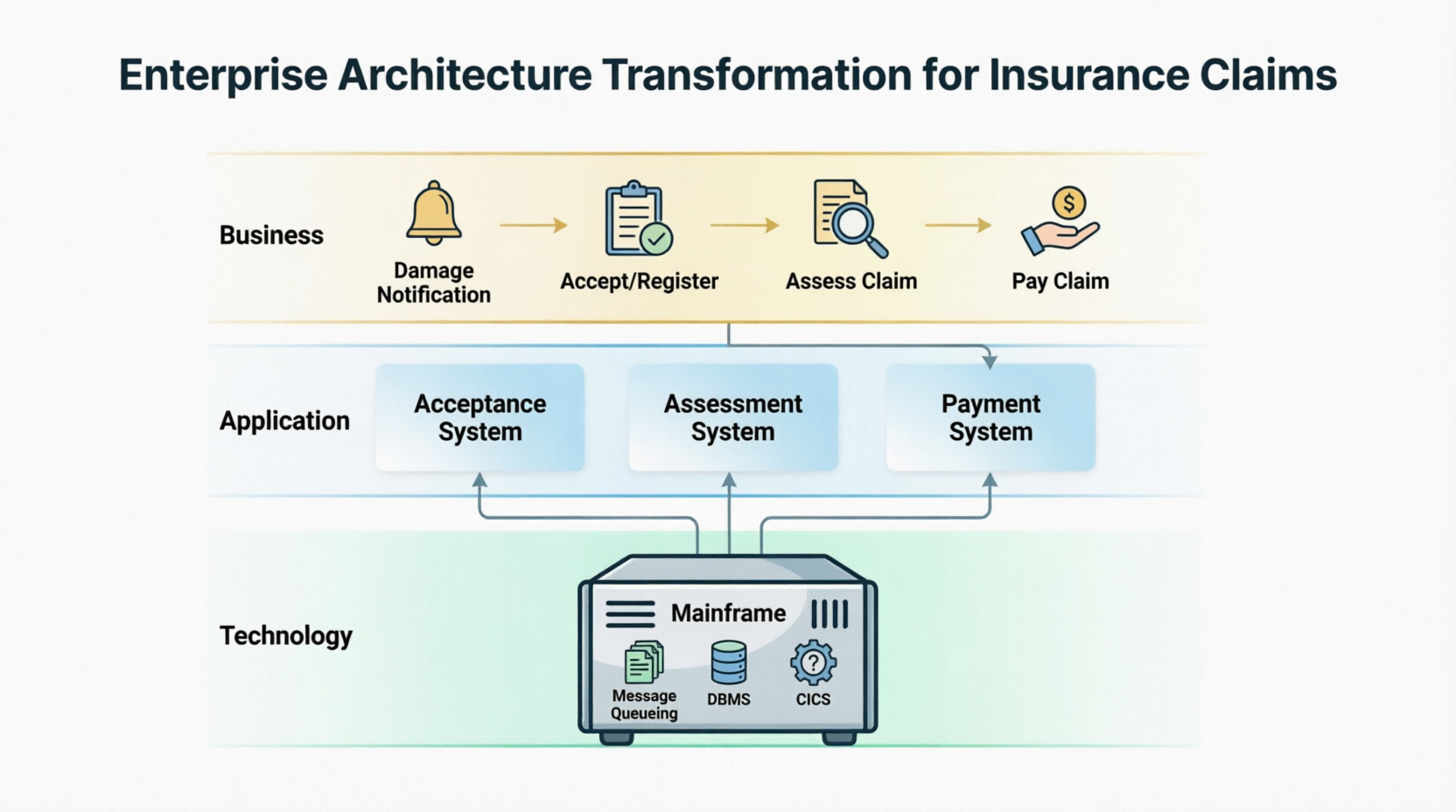
InsuCare operates on a hybrid architecture where decentralized, customer-facing applications rely on a centralized Mainframe for core transaction processing. The architecture spans three core domains of the ArchiMate framework:
Business Layer: The strategic insurance workflow triggered by a customer distress event.
Application Layer: The software systems and modular services that support claims staff.
Technology Layer: The underlying computational hardware, middleware, and database instances.
This blueprint represents the current state ("As-Is") architecture, serving as the baseline for identifying modernization opportunities and operational risks.
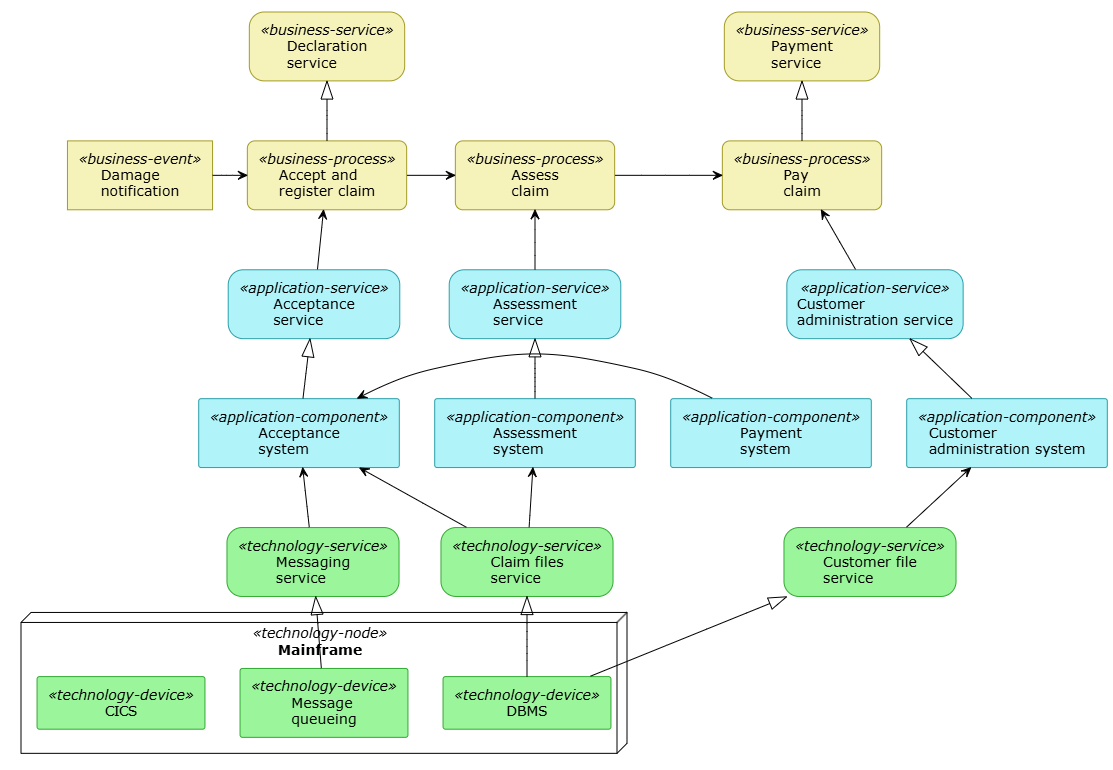
To effectively communicate the complexity of InsuCare's environment, we utilize PlantUML to generate a standards-compliant ArchiMate diagram. The code below enforces strict color-coding (Yellow for Business, Blue for Application, Green for Technology) and accurate relationship notation.
@startuml
!theme plain
skinparam backgroundColor white
skinparam shadowing false

' Define ArchiMate custom colors and styles
skinparam Rectangle<<business-process>> {
    BackgroundColor #F6F3BA
    BorderColor #A39B25
    RoundCorner 15
}
skinparam Rectangle<<business-service>> {
    BackgroundColor #F6F3BA
    BorderColor #A39B25
    RoundCorner 30
}
skinparam Rectangle<<business-event>> {
    BackgroundColor #F6F3BA
    BorderColor #A39B25
    RoundCorner 0
}
skinparam Rectangle<<application-service>> {
    BackgroundColor #B0F4FA
    BorderColor #2D9EA8
    RoundCorner 30
}
skinparam Rectangle<<application-component>> {
    BackgroundColor #B0F4FA
    BorderColor #2D9EA8
}
skinparam Rectangle<<technology-service>> {
    BackgroundColor #9BF59B
    BorderColor #32A832
    RoundCorner 30
}
skinparam Rectangle<<technology-node>> {
    BackgroundColor #D0F7D0
    BorderColor #32A832
}
skinparam Rectangle<<technology-device>> {
    BackgroundColor #9BF59B
    BorderColor #32A832
}

' --- Business Layer ---
rectangle "Damage\nnotification" as damage_notif <<business-event>>
rectangle "Declaration\nservice" as decl_srv <<business-service>>
rectangle "Payment\nservice" as pay_srv <<business-service>>
rectangle "Accept and\nregister claim" as accept_claim <<business-process>>
rectangle "Assess\nclaim" as assess_claim <<business-process>>
rectangle "Pay\nclaim" as pay_claim <<business-process>>

' --- Application Layer ---
rectangle "Acceptance\nservice" as accept_app_srv <<application-service>>
rectangle "Assessment\nservice" as assess_app_srv <<application-service>>
rectangle "Customer\nadministration service" as cust_admin_srv <<application-service>>
rectangle "Payment\nsystem" as pay_sys <<application-component>>
rectangle "Acceptance\nsystem" as accept_sys <<application-component>>
rectangle "Assessment\nsystem" as assess_sys <<application-component>>
rectangle "Customer\nadministration system" as cust_admin_sys <<application-component>>

' --- Technology Layer ---
rectangle "Messaging\nservice" as msg_srv <<technology-service>>
rectangle "Claim files\nservice" as claim_files_srv <<technology-service>>
rectangle "Customer file\nservice" as cust_file_srv <<technology-service>>
node "Mainframe" as mainframe <<technology-node>> {
    rectangle "Message\nqueueing" as msg_queue <<technology-device>>
    rectangle "DBMS" as dbms <<technology-device>>
    rectangle "CICS" as cics <<technology-device>>
}

' Relationships
damage_notif -> accept_claim
accept_claim -> assess_claim
assess_claim -> pay_claim
accept_claim -up-^ decl_srv
pay_claim -up-^ pay_srv
accept_app_srv -up-> accept_claim
assess_app_srv -up-> assess_claim
cust_admin_srv -up-> pay_claim
accept_sys -up-^ accept_app_srv
assess_sys -up-^ assess_app_srv
cust_admin_sys -up-^ cust_admin_srv
pay_sys -> accept_sys
msg_srv -up-> accept_sys
claim_files_srv -up-> accept_sys
claim_files_srv -up-> assess_sys
cust_file_srv -up-> cust_admin_sys
msg_queue -up-^ msg_srv
dbms -up-^ claim_files_srv
dbms -up-^ cust_file_srv

@enduml
Yellow Elements (Business): Events (Damage notification), Processes (Accept, Assess, Pay), and Services (Declaration, Payment). These represent what value is delivered.
Blue Elements (Application): Systems (Acceptance, Assessment, Payment) and Application Services. These represent how the business is automated.
Green Elements (Technology): Infrastructure Services (Claim files, Messaging) and Mainframe Devices (DBMS, CICS, Message queueing). These represent where the execution occurs.
Arrows: Solid arrows (->) denote flow/triggering; open arrows (-up->) denote serving; dashed triangular arrows (-up-^) denote realization.
The Business Layer models the value chain initiated when a policyholder experiences a loss.
Accept and Register Claim: Triggered by the Damage notification event. This phase authenticates the report and generates a unique claim ID. It realizes the Declaration service for regulatory compliance.
Assess Claim: Adjusters evaluate validity, coverage limits, and liability. This is the analytical core of the process.
Pay Claim: Approved funds are disbursed via the Payment service, which interfaces with external banking networks.
The architecture ensures that every business process is directly supported by a corresponding Application Service (e.g., Assessment service serves Assess claim), maintaining traceability from strategic intent to software implementation.
The lower layers reveal the structural realities and constraints of InsuCare’s IT landscape.
Staff interact with three primary systems: Acceptance, Assessment, and Customer Administration. Notably, the Payment system is structurally decoupled from the settlement process. Instead, it feeds verification data directly into the Acceptance system. This enforces a "Validate-at-Entry" pattern: no claim is registered unless premiums are confirmed current.
The Mainframe node hosts three critical infrastructure components:
Message Queueing: Enables asynchronous data transit, buffering requests during peak loads.
DBMS: The relational backbone hosting enterprise records.
CICS: A high-performance transaction server. Critically, in this diagram, CICS shows no active connections to current technology services.
Based on the structural relationships defined in the PlantUML model, four key architectural insights emerge:
The Claim files service is realized by a single DBMS instance but serves both the Acceptance system and Assessment system.
Risk: High concurrency contention. If the DBMS experiences latency or downtime, both registration and evaluation processes freeze simultaneously.
Guideline: Implement aggressive connection pooling and consider read-replica separation for assessment queries to isolate intake performance from analytical workloads.
The Acceptance system consumes two distinct technology services: Messaging service and Claim files service.
Opportunity: The presence of Message queueing suggests an existing asynchronous capability.
Guideline: Ensure the Acceptance System is designed to buffer incoming Damage notifications in the queue if the DBMS is under heavy load, preventing request drops during catastrophic events or batch processing windows.
The Payment system → Acceptance system flow bypasses the payment business process entirely.
Interpretation: Financial validation is a prerequisite for data entry, not a post-hoc check.
Guideline: Maintain this tight coupling at the intake layer to prevent fraud and reduce administrative rework, but ensure the API between these systems has circuit-breaker logic to avoid blocking all claims if the payment gateway is temporarily unavailable.
The CICS component exists within the Mainframe node but has zero realization or serving relationships in the current model.
Interpretation: This represents either deprecated legacy logic or undocumented shadow IT.
Guideline: Conduct an immediate audit. If CICS is truly idle, decommissioning it can significantly reduce mainframe MIPS costs. If it was missed in documentation, the architecture model is incomplete and requires urgent remediation.
The ArchiMate model of InsuCare’s Claims Management capability provides more than just documentation; it acts as a diagnostic tool for enterprise health. By visualizing the dependencies between the yellow business processes, blue application services, and green infrastructure nodes, architects can move beyond abstract modernization goals to address concrete structural realities.
The analysis reveals a mature but fragile ecosystem. While the decoupled payment validation and asynchronous messaging patterns demonstrate sophisticated design thinking, the shared DBMS bottleneck and orphaned CICS instance highlight significant operational risks. For InsuCare, the path forward involves leveraging the existing message queueing resilience to protect against database contention while aggressively auditing legacy mainframe assets. Ultimately, this case study demonstrates that effective enterprise architecture is not merely about drawing boxes and arrows—it is about translating those visual relationships into actionable strategies for business continuity and cost optimization.

