
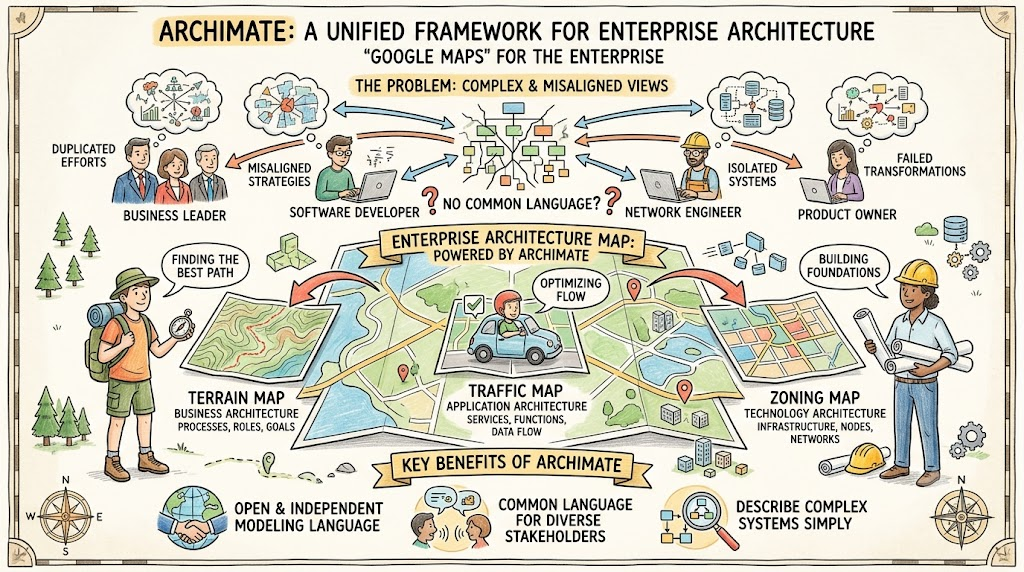
In the modern enterprise, organizational systems are incredibly complex. Business leaders, software developers, network engineers, and product owners all look at the same organization but see entirely different things. Without a unified framework, this leads to misaligned strategies, duplicated efforts, and failed transformations.
Enter ArchiMate.
ArchiMate is an open and independent modeling language for Enterprise Architecture (EA). It facilitates effective communication by acting as a common language, specifically designed to help architects describe complex organizational systems in a way that diverse stakeholders can understand.
The "Google Maps" Analogy:
Think of ArchiMate as Google Maps for the enterprise. Just as a map allows a hiker, a driver, and a city planner to all look at the same landscape through different "layers" (terrain, traffic, or zoning), ArchiMate allows different stakeholders to view the organization's architecture through the specific lens that matters to their job.
This guide will explore the key concepts of ArchiMate, demonstrate how it solves communication challenges, and provide practical PlantUML examples to help you start modeling your enterprise architecture today.
ArchiMate supports effective communication through five core mechanisms. Understanding these concepts is crucial for any Enterprise Architect.
ArchiMate provides a rich, standardized vocabulary covering multiple domains: Strategy, Motivation, Business, Application, and Technology.
The Grammar: It uses a grammar similar to natural language (Subject | Verb | Object) to describe what "things" or people do. For example, a Business Actor (Subject) triggers (Verb) a Business Process (Object). This makes it highly intuitive for non-technical stakeholders.
Universal Understanding: Even using the language's concepts without its formal visual notation allows people from different departments—or different organizations entirely—to understand one another.
A core strength of ArchiMate is its use of architecture viewpoints (borrowed from the ISO/IEC 42010 standard). This ensures you aren't just drawing diagrams; you are creating targeted "views" (diagrams, catalogs, or matrices) tailored to specific stakeholder concerns.
Stakeholder Awareness: Identify who is reading the model (e.g., CEO vs. Network Engineer) and what drives them.
Purpose-Driven Modeling: Viewpoints are categorized by their goal:
Informing: To gain commitment and buy-in.
Deciding: To support strategic or tactical decision-making.
Designing: To define detailed technical targets.
Content Calibration: Adjust the detail level. Use Overviews (helicopter views) for executives, and Details (deep dives) for subject matter experts.
Architecture description is a journey or a movie, where viewpoints act as individual "scenes." By connecting different viewpoints—such as linking a high-level business process view to a detailed application structure view—architects provide a "common frame." This helps every stakeholder see exactly where they fit into the broader story of the organization.
To ensure the model doesn't overwhelm non-architects, ArchiMate encourages practical simplifications:
Nesting over Relationships: Visual encapsulation (nesting one box inside another) is often preferred over drawing complex, spaghetti-like lines and arrows. It is much easier for stakeholders to digest.
Strategic Use of Color: While color has no formal meaning in the strict ArchiMate specification, it is heavily used in practice to emphasize scope, distinguish gaps, or highlight risks (e.g., using red for high-risk legacy data flows).
Language Subsets: Use only a small subset of the total ArchiMate concepts when presenting to specific audiences to avoid cognitive overload.
While initial brainstorming happens on whiteboards, professional modeling tools are required to maintain the coherence and integrity of the architecture. As information scales, a centralized model ensures consistency, allowing stakeholders to trust the insights and analysis provided by the architect.
Below are practical examples demonstrating how these concepts are applied in real-world scenarios using PlantUML syntax.
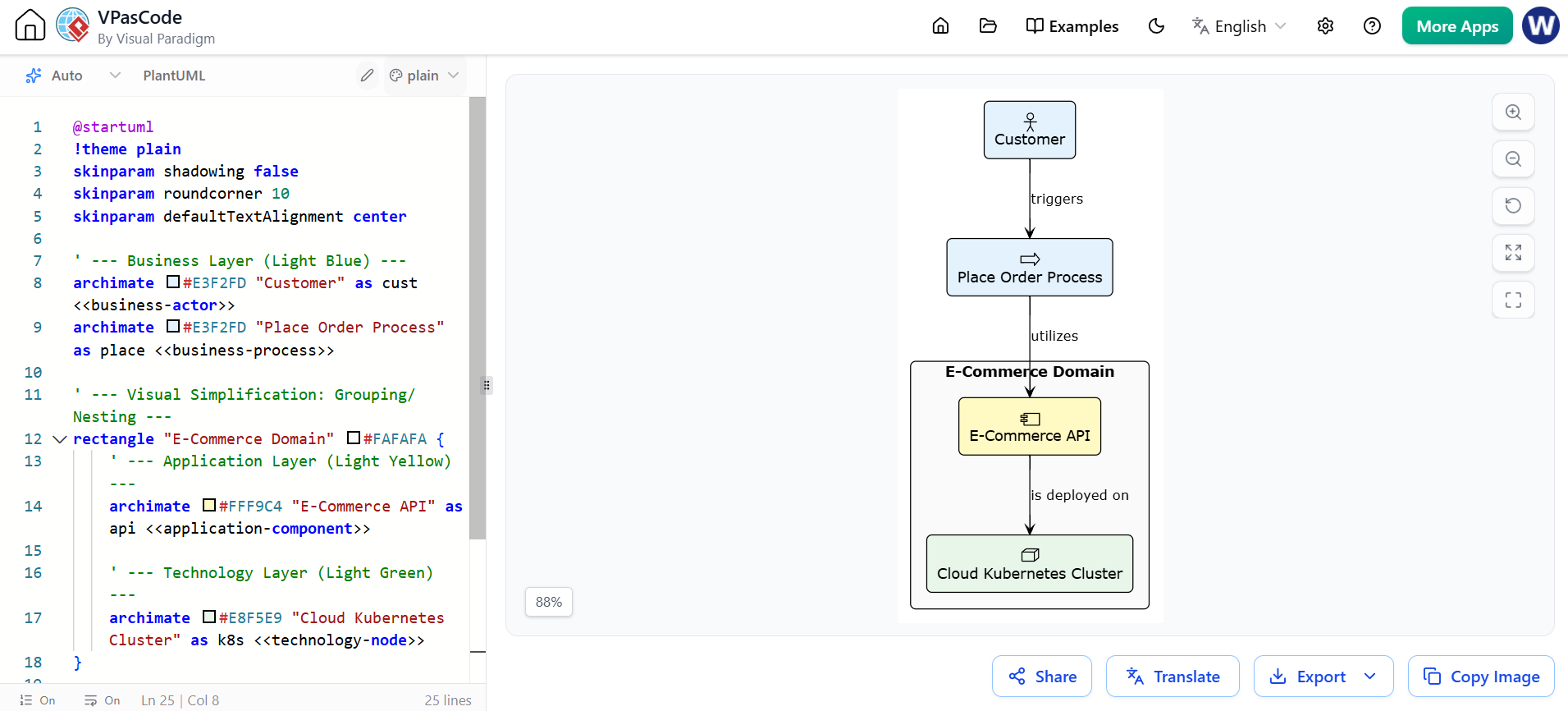
Concept Demonstrated: Visual Simplification (Nesting) and Cross-Layer Traceability.
This diagram shows how a simple business action cascades down through the application and technology layers. Notice how "nesting" is used to group related components into the "E-Commerce Domain," reducing the need for complex boundary lines.
@startuml
!theme plain
skinparam shadowing false
skinparam roundcorner 10
skinparam defaultTextAlignment center

' --- Business Layer (Light Blue) ---
archimate #E3F2FD "Customer" as cust <<business-actor>>
archimate #E3F2FD "Place Order Process" as place <<business-process>>

' --- Visual Simplification: Grouping/Nesting ---
rectangle "E-Commerce Domain" #FAFAFA {
    ' --- Application Layer (Light Yellow) ---
    archimate #FFF9C4 "E-Commerce API" as api <<application-component>>

    ' --- Technology Layer (Light Green) ---
    archimate #E8F5E9 "Cloud Kubernetes Cluster" as k8s <<technology-node>>
}

' --- Relationships (Grammar: Subject -> Verb -> Object) ---
cust --> place : triggers
place --> api : utilizes
api --> k8s : is deployed on

@enduml
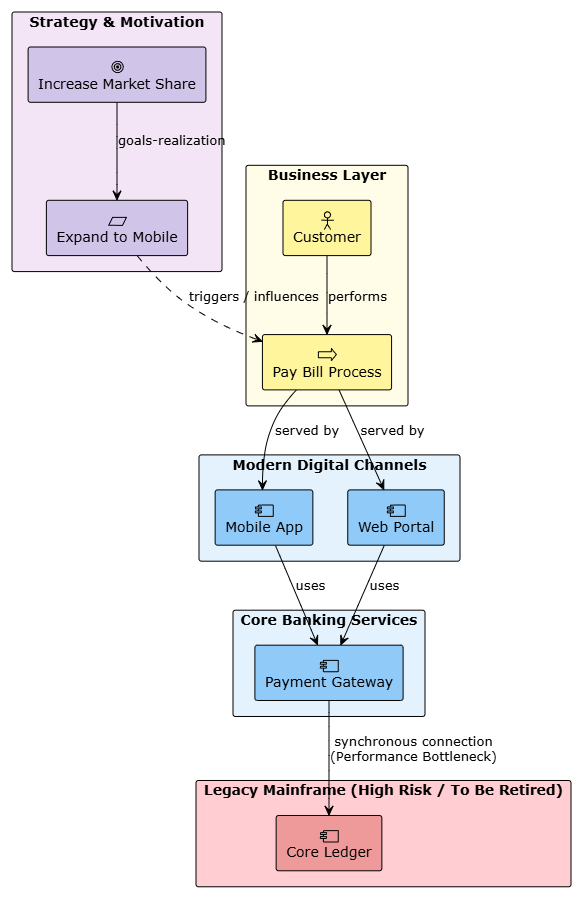
Concept Demonstrated: Visual Storytelling, Layering, and Strategic Use of Color.
This diagram illustrates a "journey" from high-level business strategy down to the technical reality. It uses color intentionally: purple for strategy, yellow for business, blue for modern applications, and red to highlight a high-risk legacy bottleneck. This is perfect for an "Informing" or "Deciding" viewpoint for executive stakeholders.
@startuml
!theme plain
skinparam shadowing false
skinparam packageStyle rectangle
skinparam defaultTextAlignment center

' ==============================================================================
' 1. STRATEGY & MOTIVATION LAYER (Purple)
' ==============================================================================
rectangle "Strategy & Motivation" #F3E5F5 {
    archimate #D1C4E9 "Increase Market Share" as goal <<motivation-goal>>
    archimate #D1C4E9 "Expand to Mobile" as req <<motivation-requirement>>

    goal --> req : goals-realization
}

' ==============================================================================
' 2. BUSINESS LAYER (Yellow)
' ==============================================================================
rectangle "Business Layer" #FFFDE7 {
    archimate #FFF59D "Customer" as cust <<business-actor>>
    archimate #FFF59D "Pay Bill Process" as process <<business-process>>

    req ..> process : triggers / influences
    cust --> process : performs
}

' ==============================================================================
' 3. APPLICATION LAYER (Light Blue)
' ==============================================================================
package "Modern Digital Channels" #E3F2FD {
    archimate #90CAF9 "Mobile App" as mobile <<application-component>>
    archimate #90CAF9 "Web Portal" as web <<application-component>>
}

package "Core Banking Services" #E3F2FD {
    archimate #90CAF9 "Payment Gateway" as pay <<technology-node>>
}

' --- Business to Application Connections ---
process --> mobile : served by
process --> web : served by
mobile --> pay : uses
web --> pay : uses

' ==============================================================================
' 4. HIGH RISK / LEGACY INFRASTRUCTURE (Red Heatmap Overlay)
' ==============================================================================
package "Legacy Mainframe (High Risk / To Be Retired)" #FFCDD2 {
    archimate #EF9A9A "Core Ledger" as ledger <<technology-node>>
}

pay --> ledger : synchronous connection\n(Performance Bottleneck)

@enduml
To get the most out of ArchiMate, keep these practical tips in mind:
Start with the "Why": Always define the stakeholder and the purpose of the view before drawing a single box.
Embrace White Space: Do not clutter your diagrams. If a diagram has more than 15-20 elements, break it down into multiple, linked viewpoints.
Use Standard Colors: Adopt an organizational color standard (e.g., Yellow = Business, Blue = IT, Red = Risk/Retirement) and apply it consistently across all models.
Traceability is Key: Ensure that every technical component can eventually be traced back to a business goal or requirement. This proves the ROI of your IT investments.
ArchiMate is much more than just a drawing tool; it is a strategic communication framework. By providing a common vocabulary, enabling stakeholder-specific viewpoints, and allowing for intentional simplification, it bridges the gap between business strategy and IT execution. Whether you are mapping out a simple business process or orchestrating a massive digital transformation, ArchiMate ensures that everyone is looking at the same map.
However, to truly leverage the power of this language, you need the right tooling. While whiteboards are great for initial concepts, maintaining the coherence, integrity, and scalability of your enterprise models requires professional software. Visual Paradigm stands out as a premier tooling choice for ArchiMate modeling. It offers comprehensive, out-of-the-box support for the ArchiMate standard, robust model validation, seamless collaboration features, and powerful reporting capabilities. By utilizing Visual Paradigm, Enterprise Architects can ensure their models remain consistent, traceable, and highly effective in driving organizational success.

