
Software development has historically been a technocentric endeavor—one in which engineers translate vague human needs into rigid, machine-oriented constructs. Users describe what they want in the language of their business; developers respond in the language of databases, pointers, and algorithms. This fundamental mismatch is one of the most persistent sources of project failure: requirements are misunderstood, features miss the mark, and the final product feels alien to the people it was built to serve.
Object-orientation offers a profound corrective. By shifting the development paradigm from a machine-centered view to an anthropocentric (human-oriented) one, it creates a shared conceptual space where developers and users can meet as collaborators rather than translators. Objects, classes, inheritance, messages—these are not merely programming constructs. They are metaphors that mirror the way humans already organize, categorize, and interact with the world.
This guide explores five key mechanisms through which object-orientation improves communication between developers and users. Each section explains the concept, illustrates its practical impact, and provides a PlantUML diagram that you can render to visualize the idea. Together, they form a comprehensive picture of how a human-centered design philosophy leads to software that is not only better engineered but better understood.
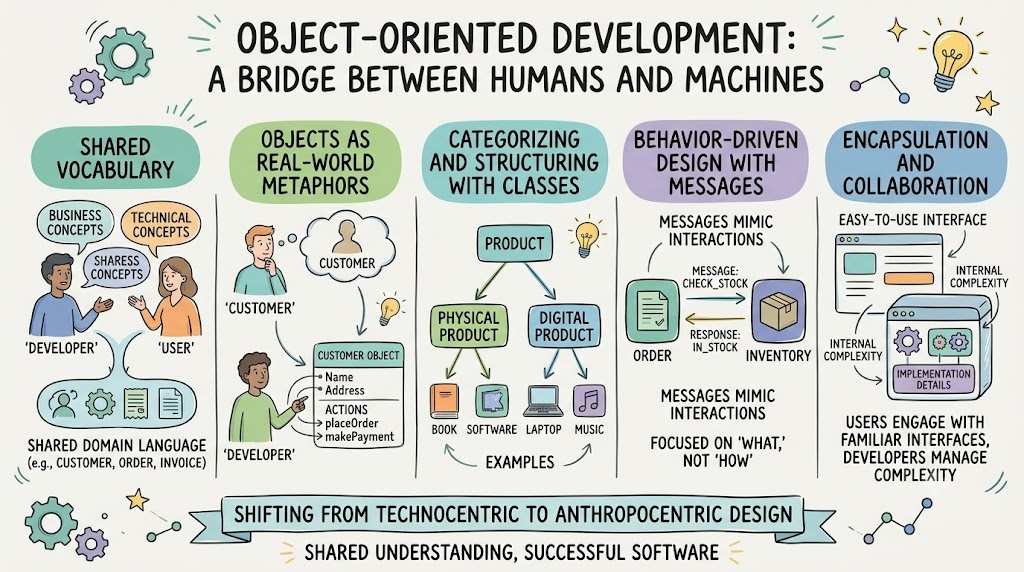
The object-oriented world is populated with concepts that naturally resemble human organizational structures. When we speak of objects having responsibilities, collaborating with one another, inheriting traits from parents, or sending messages, we are invoking metaphors that any person—technical or not—can intuitively grasp.
This is not accidental. The founders of object-orientation (notably Alan Kay) envisioned software as a society of autonomous agents, much like people working together in an organization. These anthropomorphic metaphors accomplish several things:
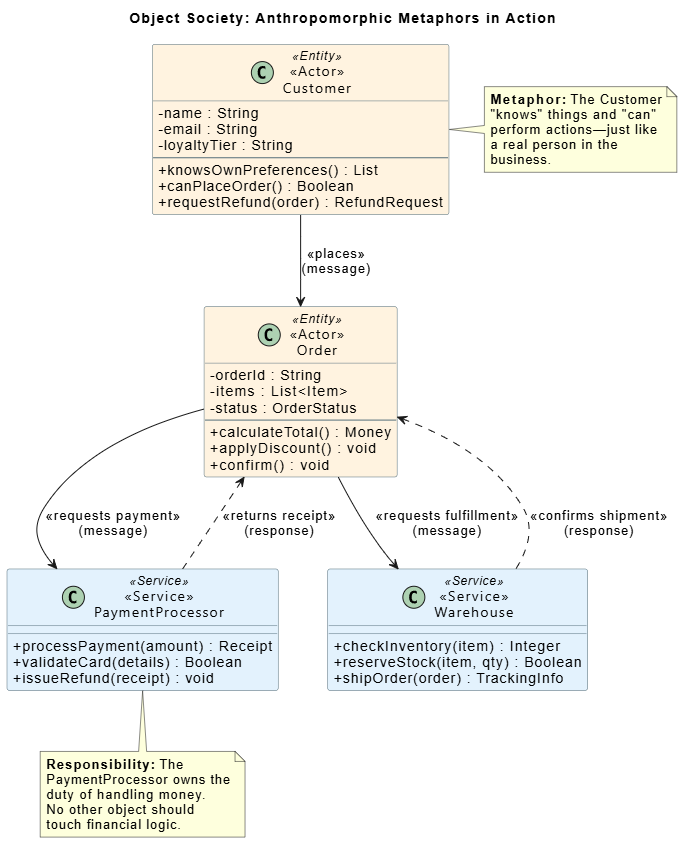
Customer object "knows" its own name and "can" place an order.In meetings between developers and domain experts, anthropomorphic language allows both parties to reason about system behavior without requiring either to fully enter the other's world. The developer thinks in terms of method dispatch and polymorphism; the user thinks in terms of roles and duties. The metaphor bridges both.
@startuml Anthropomorphic Metaphors - Object Society

title Object Society: Anthropomorphic Metaphors in Action

skinparam classAttributeIconSize 0
skinparam class {
    BackgroundColor<<Actor>> #E8F5E9
    BackgroundColor<<Service>> #E3F2FD
    BackgroundColor<<Entity>> #FFF3E0
    BorderColor #546E7A
    FontName "Segoe UI"
}

class "«Actor»\nCustomer" as Customer <<Entity>> {
    - name : String
    - email : String
    - loyaltyTier : String
    --
    + knowsOwnPreferences() : List
    + canPlaceOrder() : Boolean
    + requestRefund(order) : RefundRequest
}

class "«Actor»\nOrder" as Order <<Entity>> {
    - orderId : String
    - items : List<Item>
    - status : OrderStatus
    --
    + calculateTotal() : Money
    + applyDiscount() : void
    + confirm() : void
}

class "«Service»\nPaymentProcessor" as Payment <<Service>> {
    + processPayment(amount) : Receipt
    + validateCard(details) : Boolean
    + issueRefund(receipt) : void
}

class "«Service»\nWarehouse" as Warehouse <<Service>> {
    + checkInventory(item) : Integer
    + reserveStock(item, qty) : Boolean
    + shipOrder(order) : TrackingInfo
}

Customer --> Order : «places»\n(message)
Order --> Payment : «requests payment»\n(message)
Order --> Warehouse : «requests fulfillment»\n(message)
Payment ..> Order : «returns receipt»\n(response)
Warehouse ..> Order : «confirms shipment»\n(response)

note right of Customer
  **Metaphor:** The Customer
  "knows" things and "can"
  perform actions—just like
  a real person in the
  business.
end note

note bottom of Payment
  **Responsibility:** The
  PaymentProcessor owns the
  duty of handling money.
  No other object should
  touch financial logic.
end note

@enduml
Reading this diagram: Each class is an "actor" in a small society. Arrows represent messages (method calls). Notes highlight how OO terminology maps directly to human concepts of knowledge, responsibility, and communication.
One of the most damaging disconnects in traditional software projects is the terminology gap: the user says "client," the developer writes tbl_usr_acct; the user says "booking," the database stores RESERVATION_ENTRY_V2. Over time, these divergences compound until the codebase becomes an archaeological site that only senior developers can interpret.
Object-orientation combats this through methodological uniformity—the principle that the same core concepts (classes, objects, attributes, relationships) persist unbroken from the earliest analysis conversations all the way through to the deployed code. This creates a continuous thread of meaning:
| Phase | What the User Sees | What the Developer Builds |
|---|---|---|
| Requirements | "A Customer has a name and address" | User story / domain glossary entry |
| Analysis | Class diagram with Customer entity |
Analysis model |
| Design | Customer class with associations |
Design model with patterns |
| Implementation | public class Customer { ... } |
Source code |
| Testing | "Verify Customer can update address" | Unit / integration tests |
A critical practice in OO development is the creation of a technical dictionary or ubiquitous glossary (a concept later formalized in Domain-Driven Design). This living document ensures that every term—Invoice, Reservation, Customer, LineItem—has:
BillingAddress from a ShippingAddress).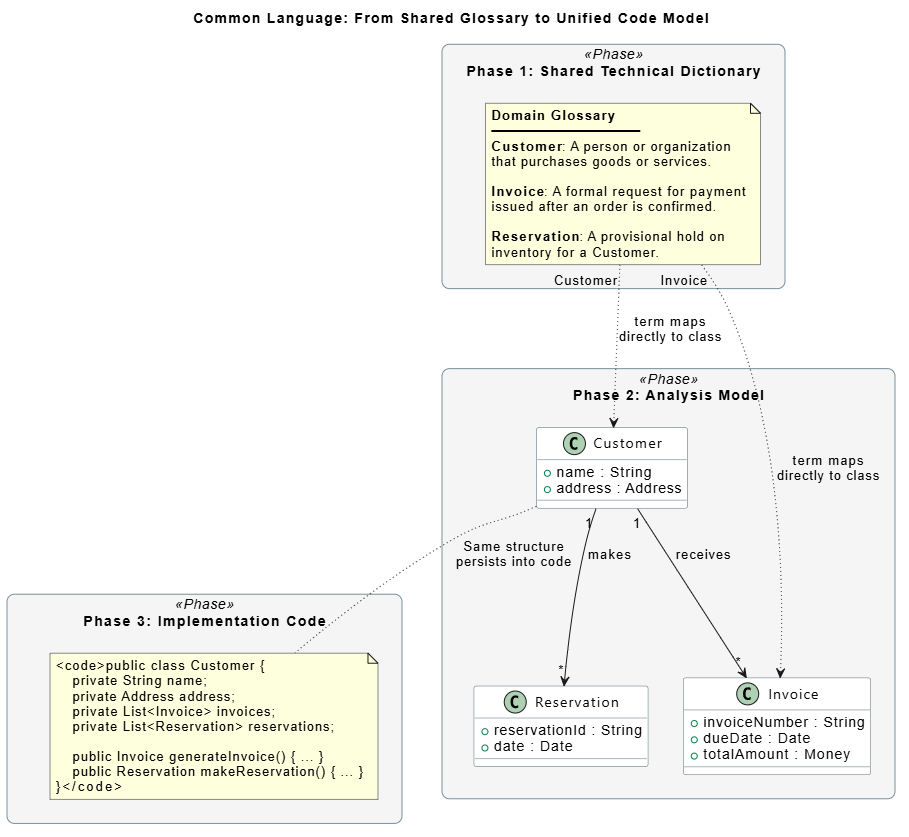
@startuml Common Language - Glossary to Code Pipeline

title Common Language: From Shared Glossary to Unified Code Model

skinparam rectangle {
    RoundCorner 15
    BackgroundColor<<Phase>> #F5F5F5
    BorderColor #78909C
}

skinparam class {
    BackgroundColor #FFFFFF
    BorderColor #546E7A
    FontName "Segoe UI"
}

rectangle "Phase 1: Shared Technical Dictionary" <<Phase>> as dict {
    note as glossaryNote
        **Domain Glossary**
        ───────────────────
        **Customer**: A person or organization
        that purchases goods or services.

        **Invoice**: A formal request for payment
        issued after an order is confirmed.

        **Reservation**: A provisional hold on
        inventory for a Customer.
    end note
}

rectangle "Phase 2: Analysis Model" <<Phase>> as analysis {
    class "Customer" as C1 {
        + name : String
        + address : Address
    }
    class "Invoice" as I1 {
        + invoiceNumber : String
        + dueDate : Date
        + totalAmount : Money
    }
    class "Reservation" as R1 {
        + reservationId : String
        + date : Date
    }
    C1 "1" --> "*" I1 : receives
    C1 "1" --> "*" R1 : makes
}

rectangle "Phase 3: Implementation Code" <<Phase>> as code {
    note as codeNote
        <code>public class Customer {
            private String name;
            private Address address;
            private List<Invoice> invoices;
            private List<Reservation> reservations;

            public Invoice generateInvoice() { ... }
            public Reservation makeReservation() { ... }
        }</code>
    end note
}

dict -[hidden]down-> analysis
analysis -[hidden]down-> code

glossaryNote -[dotted]-> C1 : "Customer" term maps\ndirectly to class
glossaryNote -[dotted]-> I1 : "Invoice" term maps\ndirectly to class
C1 -[dotted]-> codeNote : Same structure\npersists into code

@enduml
Reading this diagram: The same term ("Customer") originates in a shared glossary, becomes a class in the analysis model, and finally appears as source code. No translation is lost at any stage—this is the power of methodological uniformity.
Looking for a powerful, free diagram-as-code tool? Effortlessly render PlantUML, Mermaid, Graphviz, and 20+ programming languages in real time—powered by instant AI error fixing and automatic format detection.
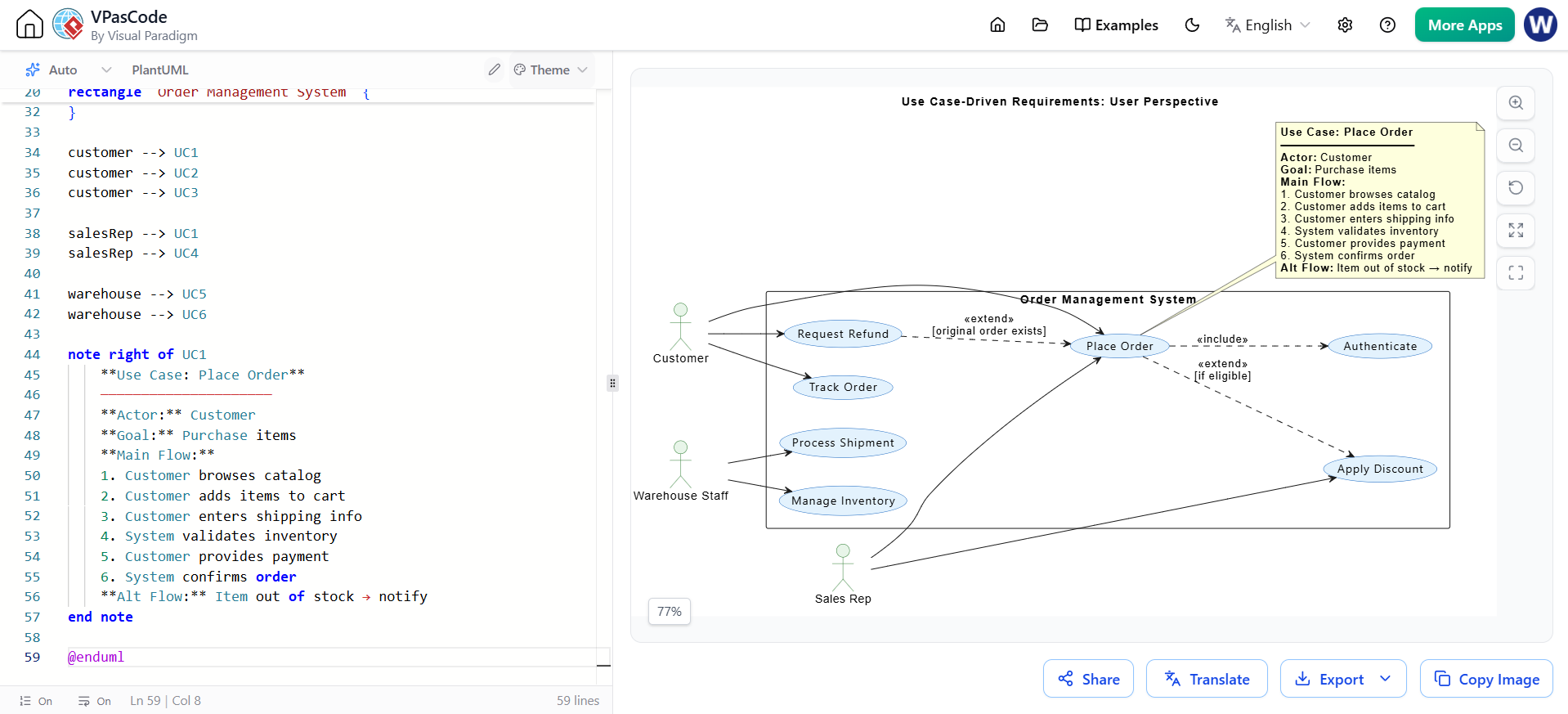
Traditional requirements documents often read like legal contracts: exhaustive, abstract, and detached from lived experience. Use cases, by contrast, describe system behavior from the user's perspective in natural language. They answer the question: "What does the user want to accomplish, and what does the system do in response?"
Use cases improve communication through:
| Element | Description |
|---|---|
| Actor | The user or external system initiating the interaction |
| Goal | What the actor wants to achieve |
| Preconditions | What must be true before the use case begins |
| Main Success Scenario | The "happy path" step-by-step flow |
| Alternative Flows | Branches for errors, edge cases, or choices |
| Postconditions | What is guaranteed to be true after completion |
@startuml Use Case Driven Requirements

title Use Case-Driven Requirements: User Perspective

left to right direction
skinparam actor {
    BackgroundColor #E8F5E9
    BorderColor #2E7D32
}
skinparam usecase {
    BackgroundColor #E3F2FD
    BorderColor #1565C0
    FontName "Segoe UI"
}

actor "Customer" as customer
actor "Sales Rep" as salesRep
actor "Warehouse Staff" as warehouse

rectangle "Order Management System" {
    usecase "Place Order" as UC1
    usecase "Track Order" as UC2
    usecase "Request Refund" as UC3
    usecase "Apply Discount" as UC4
    usecase "Manage Inventory" as UC5
    usecase "Process Shipment" as UC6
    usecase "Authenticate" as UC7

    UC1 ..> UC7 : <<include>>
    UC1 ..> UC4 : <<extend>>\n[if eligible]
    UC3 ..> UC1 : <<extend>>\n[original order exists]
}

customer --> UC1
customer --> UC2
customer --> UC3

salesRep --> UC1
salesRep --> UC4

warehouse --> UC5
warehouse --> UC6

note right of UC1
    **Use Case: Place Order**
    ─────────────────────
    **Actor:** Customer
    **Goal:** Purchase items
    **Main Flow:**
    1. Customer browses catalog
    2. Customer adds items to cart
    3. Customer enters shipping info
    4. System validates inventory
    5. Customer provides payment
    6. System confirms order
    **Alt Flow:** Item out of stock → notify
end note

@enduml
Reading this diagram: Each ellipse is a user-facing goal, not a technical module. Actors are real roles in the organization. The
<<include>>and<<extend>>relationships show how use cases compose naturally, mirroring how users think about their tasks.
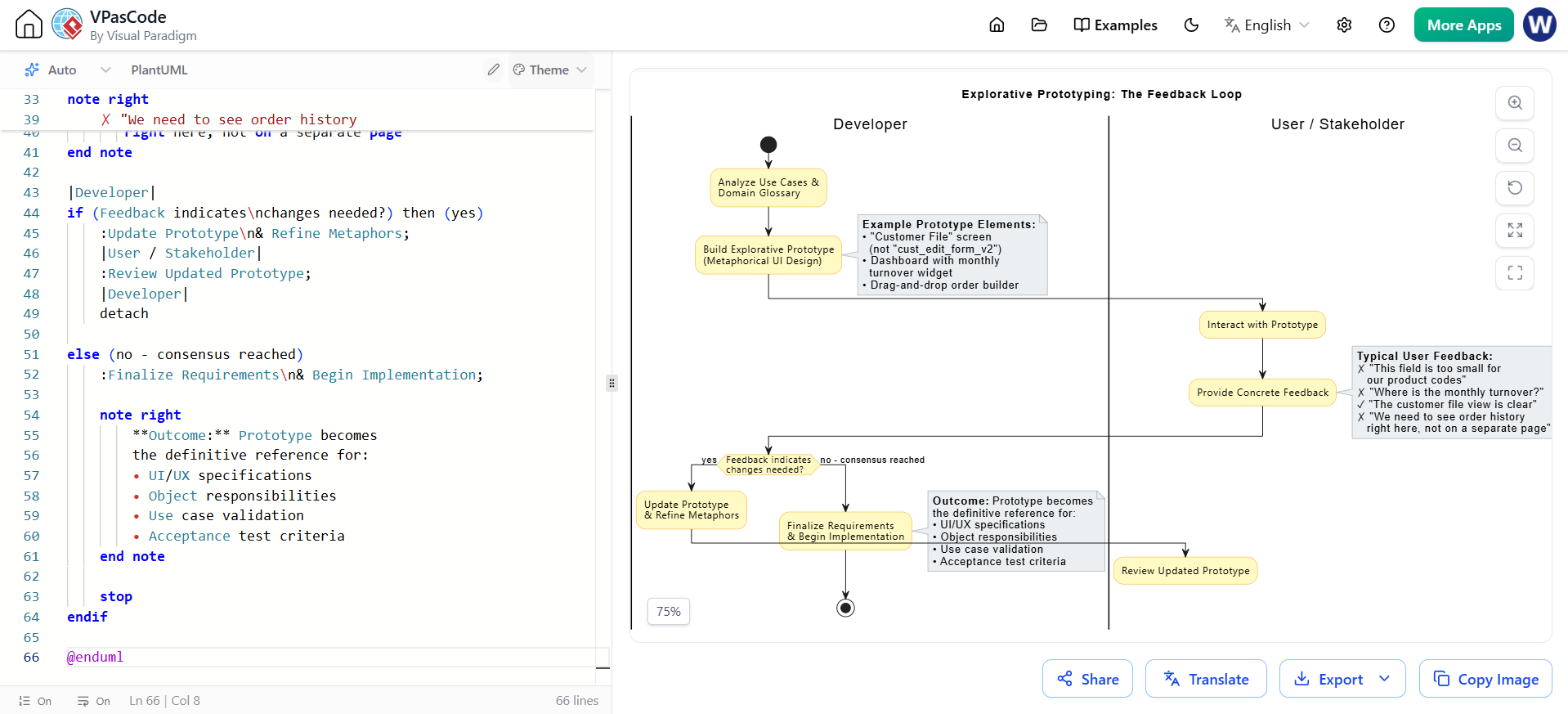
No amount of diagrams and documents can fully replace the experience of seeing and interacting with a system. Explorative prototyping turns abstract requirements into tangible artifacts—mock interfaces, clickable workflows, simulated data—that users can critique with specificity.
Prototypes serve as communication accelerators:
The prototyping process is inherently iterative and collaborative:
@startuml Explorative Prototyping Loop

title Explorative Prototyping: The Feedback Loop

skinparam activity {
    BackgroundColor #FFF9C4
    BorderColor #F9A825
    FontName "Segoe UI"
}
skinparam note {
    BackgroundColor #ECEFF1
    BorderColor #78909C
}

|Developer|
start
:Analyze Use Cases &\nDomain Glossary;

:Build Explorative Prototype\n(Metaphorical UI Design);
note right
    **Example Prototype Elements:**
    • "Customer File" screen
      (not "cust_edit_form_v2")
    • Dashboard with monthly
      turnover widget
    • Drag-and-drop order builder
end note

|User / Stakeholder|
:Interact with Prototype;

:Provide Concrete Feedback;
note right
    **Typical User Feedback:**
    ✗ "This field is too small for
       our product codes"
    ✗ "Where is the monthly turnover?"
    ✓ "The customer file view is clear"
    ✗ "We need to see order history
       right here, not on a separate page"
end note

|Developer|
if (Feedback indicates\nchanges needed?) then (yes)
    :Update Prototype\n& Refine Metaphors;
    |User / Stakeholder|
    :Review Updated Prototype;
    |Developer|
    detach

else (no - consensus reached)
    :Finalize Requirements\n& Begin Implementation;

    note right
        **Outcome:** Prototype becomes
        the definitive reference for:
        • UI/UX specifications
        • Object responsibilities
        • Use case validation
        • Acceptance test criteria
    end note

    stop
endif

@enduml
Reading this diagram: The swimlane structure emphasizes the collaborative dance between developer and user. The prototype is not a deliverable—it is a communication medium. The loop continues until both parties share a concrete, visual understanding of the system.
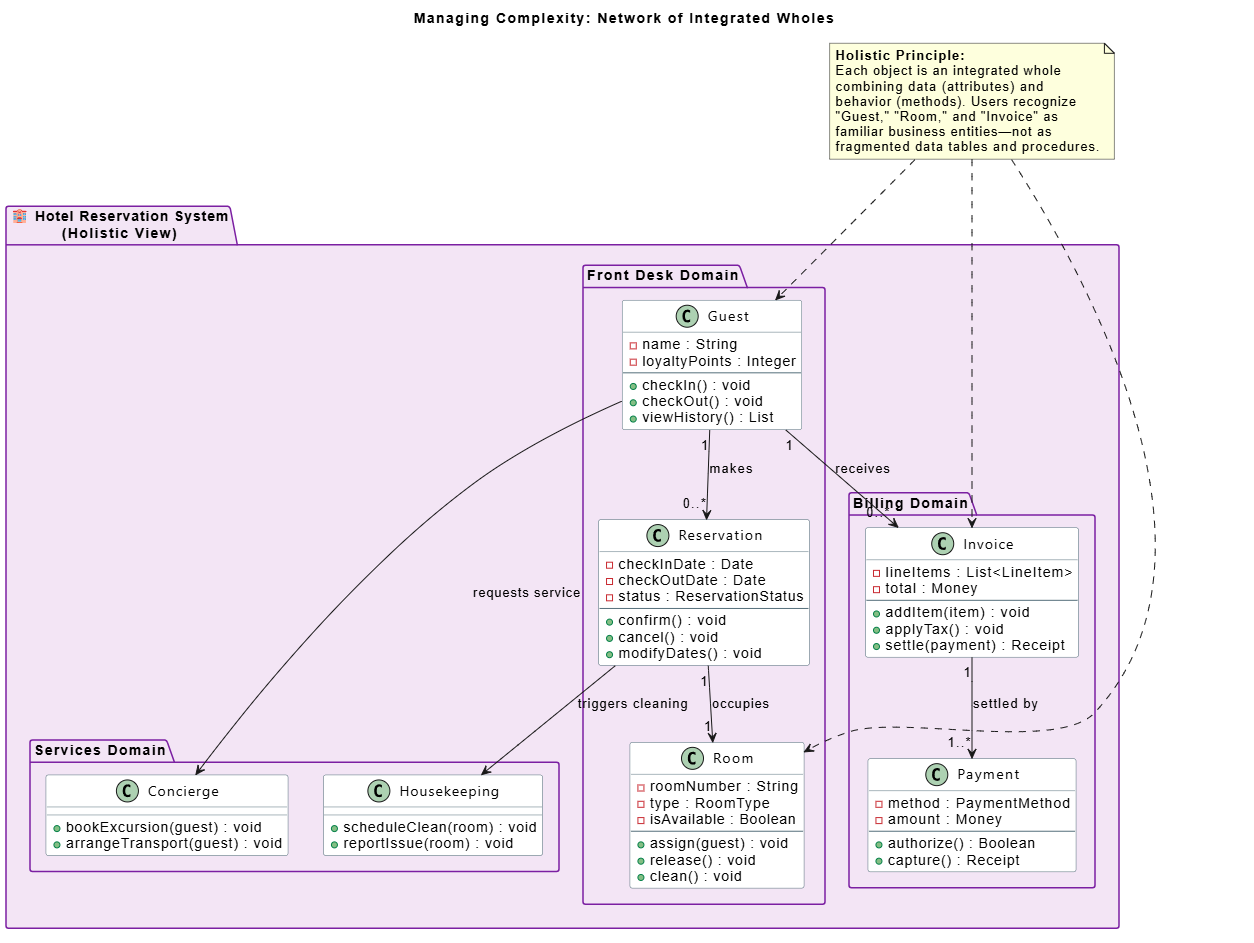
Traditional structured methods split the world into two orthogonal views: data (what things are) and functions (what things do). This separation mirrors how computers work, but it does not mirror how humans experience reality. A user does not think of a "Customer" as a row in a table plus a set of stored procedures—they think of a customer as a whole entity that has properties, behaviors, relationships, and a lifecycle.
Object-orientation embraces holistic thinking by encapsulating data and behavior together into integrated wholes. This approach manages complexity through several principles:
Hotel is composed of Rooms, Guests, and Reservations—a structure that mirrors reality.Rather than a flat list of tables and procedures, an OO system is a network of collaborating objects, each with its own identity, state, and behavior. This network topology is far easier for users to navigate mentally because it corresponds to the networks of relationships they deal with every day.
@startuml Managing Complexity - Holistic View

title Managing Complexity: Network of Integrated Wholes

skinparam package {
    BackgroundColor #F3E5F5
    BorderColor #7B1FA2
    FontSize 14
    FontStyle bold
}
skinparam class {
    BackgroundColor #FFFFFF
    BorderColor #546E7A
    FontName "Segoe UI"
}

package "🏨 Hotel Reservation System\n(Holistic View)" {

    package "Front Desk Domain" {
        class "Guest" as Guest {
            - name : String
            - loyaltyPoints : Integer
            --
            + checkIn() : void
            + checkOut() : void
            + viewHistory() : List
        }

        class "Reservation" as Reservation {
            - checkInDate : Date
            - checkOutDate : Date
            - status : ReservationStatus
            --
            + confirm() : void
            + cancel() : void
            + modifyDates() : void
        }

        class "Room" as Room {
            - roomNumber : String
            - type : RoomType
            - isAvailable : Boolean
            --
            + assign(guest) : void
            + release() : void
            + clean() : void
        }
    }

    package "Billing Domain" {
        class "Invoice" as Invoice {
            - lineItems : List<LineItem>
            - total : Money
            --
            + addItem(item) : void
            + applyTax() : void
            + settle(payment) : Receipt
        }

        class "Payment" as Payment {
            - method : PaymentMethod
            - amount : Money
            --
            + authorize() : Boolean
            + capture() : Receipt
        }
    }

    package "Services Domain" {
        class "Housekeeping" as Housekeeping {
            + scheduleClean(room) : void
            + reportIssue(room) : void
        }

        class "Concierge" as Concierge {
            + bookExcursion(guest) : void
            + arrangeTransport(guest) : void
        }
    }

    Guest "1" --> "0..*" Reservation : makes
    Reservation "1" --> "1" Room : occupies
    Guest "1" --> "0..*" Invoice : receives
    Invoice "1" --> "1..*" Payment : settled by
    Reservation --> Housekeeping : triggers cleaning
    Guest --> Concierge : requests service
}

note as holisticNote
    **Holistic Principle:**
    Each object is an integrated whole
    combining data (attributes) and
    behavior (methods). Users recognize
    "Guest," "Room," and "Invoice" as
    familiar business entities—not as
    fragmented data tables and procedures.
end note

holisticNote ..> Guest
holisticNote ..> Room
holisticNote ..> Invoice

@enduml
Reading this diagram: The system is organized into domains that mirror organizational departments. Each class encapsulates both what it knows (attributes) and what it does (methods). Users can look at this diagram and recognize their workplace—front desk, billing, services—as a coherent network rather than a confusing matrix of tables.
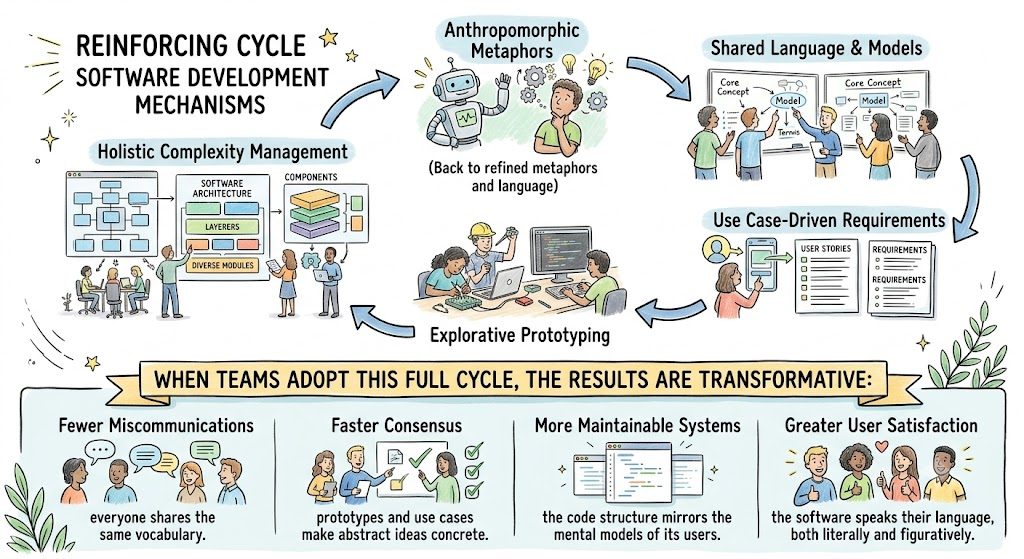
The five mechanisms described above do not operate in isolation. They form a reinforcing cycle:
Anthropomorphic Metaphors
        ↓
  Shared Language & Models
        ↓
  Use Case-Driven Requirements
        ↓
  Explorative Prototyping
        ↓
  Holistic Complexity Management
        ↓
  (Back to refined metaphors and language)
When teams adopt this full cycle, the results are transformative:
The promise of object-orientation extends far beyond code reuse and modularity. At its deepest level, OO is a philosophy of communication—a commitment to building software in a way that respects how humans naturally think, speak, and organize their world.
By employing anthropomorphic metaphors, teams create a shared narrative. By maintaining a common language from analysis through implementation, they eliminate the translation errors that plague traditional projects. By driving development with use cases, they anchor every technical decision in user intent. By iterating through explorative prototypes, they replace assumption with evidence. And by embracing holistic thinking, they ensure that the system's structure remains intelligible even as it grows in complexity.
The ultimate measure of this approach is not in lines of code or architectural elegance—it is in the moment when a user looks at a system diagram and says, "Yes, that's exactly how we work." That moment of recognition is the true return on investment of human-oriented software design.
How to Use the Diagrams: Copy any of the PlantUML code blocks above and paste them into Diagram as Code Editor, or any compatible PlantUML renderer to generate the visual diagrams.

