
The Agile Manifesto values "working software over comprehensive documentation" and "responding to change over following a plan." This has led many to believe that formal modeling languages like the Unified Modeling Language (UML) are relics of waterfall-era bureaucracy—too slow, too rigid, and destined for obsolescence in fast-paced Agile environments.
Yet, the reality in 2026 is quite different. Modern Agile teams—especially those working on complex systems, microservices architectures, or enterprise applications—have rediscovered UML not as heavy documentation, but as a lightweight, visual communication tool that accelerates understanding, reduces misunderstandings, and strengthens collaboration. When applied with an Agile mindset (iterative, just-in-time, and minimal), UML evolves into something more powerful: a living aid for clarity amid constant change.
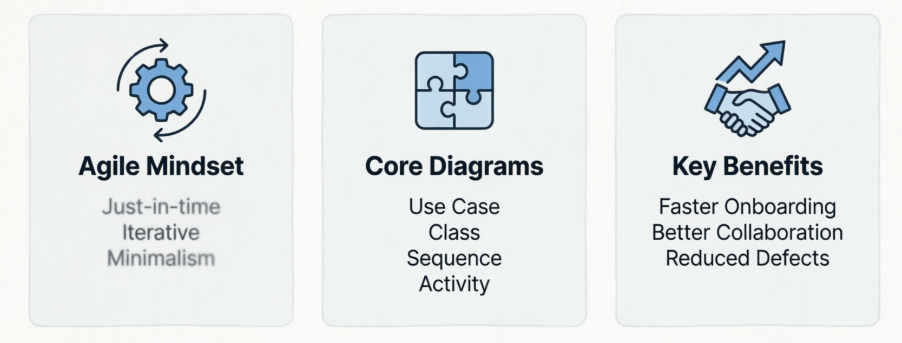
This guide explores how UML thrives in Agile, the key concepts, practical examples, best practices, and real-world benefits.
Traditional UML pitfalls:
Big upfront design (BUFD) with exhaustive diagrams that become outdated quickly.
Over-modeling every detail, leading to maintenance overhead.
Focus on perfection over delivering value.
Agile realities:
Requirements evolve sprint by sprint.
Teams prioritize working code and face-to-face communication.
Documentation should be "barely sufficient."
However, Agile does not ban documentation or modeling. The Manifesto values "individuals and interactions" and implies clear communication. Complex systems still need ways to visualize structure, behavior, and interactions—especially for onboarding, architecture decisions, refactoring, and stakeholder alignment.
UML's survival and evolution comes from Agile Modeling principles (popularized by Scott Ambler and others):
Just-in-time (JIT) modeling: Create diagrams when needed, not all at once.
Iterative refinement: Update models as the system evolves.
Minimalism: Sketch only what's valuable; discard or archive the rest.
Collaboration: Use diagrams in discussions, not as standalone artifacts.
In practice, UML becomes "living documentation" that supports, rather than hinders, velocity.
Apply the "barely good enough" principle: Diagrams should be understandable, not pixel-perfect.
Use whiteboard sketches or lightweight tools (Visual Paraigm / PlantUML during sprint planning or refinement.
Integrate with user stories, backlogs, and Definition of Done (DoD).
Version diagrams alongside code (e.g., in repositories) or generate them from code where possible.
Not all 14 UML diagram types are equally useful. Focus on these:
Use Case Diagrams (Behavioral): Visualize actors and system interactions. Perfect for clarifying user stories and scope.
Class Diagrams (Structural): Show classes, attributes, relationships. Essential for domain modeling and architecture.
Sequence Diagrams (Behavioral): Illustrate object interactions over time. Great for complex user stories or integration points.
Activity Diagrams (Behavioral): Model workflows and business processes. Useful for understanding end-to-end flows.
Component & Deployment Diagrams (Structural): For high-level architecture in larger systems.
Less common in pure Agile: Heavy state machines or object diagrams unless the domain demands it.
Scrum: Use UML in sprint planning/refinement for story elaboration and design spikes.
Kanban: Visualize workflow bottlenecks or architecture on boards.
XP (Extreme Programming): Pair programming + simple UML sketches for collective code ownership.
SAFe or LeSS (Scaled Agile): UML helps align teams on shared architecture and interfaces.
Example 1: Use Case Diagram for an E-commerce Checkout
Actors: Customer, Payment Gateway, Inventory Service.
Use Cases: "Add to Cart," "Proceed to Checkout," "Process Payment," "Handle Failed Payment."
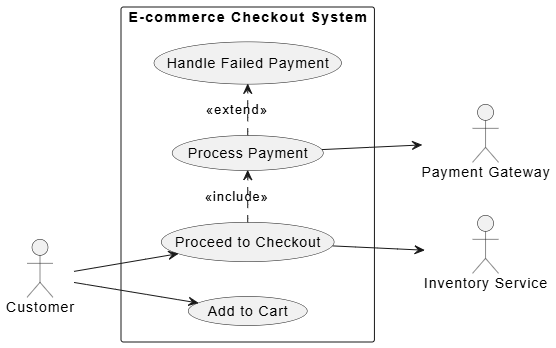
In Agile: During backlog refinement, the team sketches this to ensure all edge cases (e.g., out-of-stock, payment failures) are covered in user stories. It prevents scope creep and aligns Product Owner with developers.
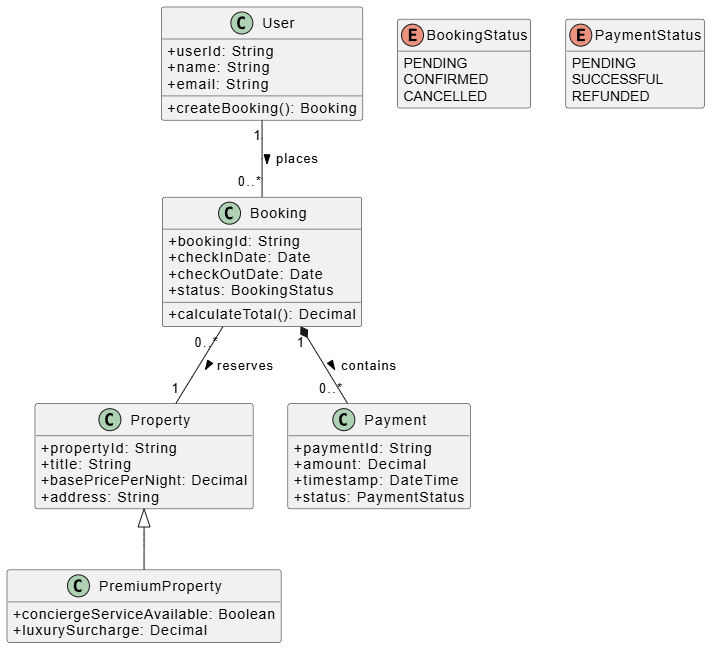
Example 2: Class Diagram for Domain Model (Online Booking System)
Classes: User, Booking, Property, Payment, with relationships (associations, inheritance for PremiumProperty).
In Agile: Created incrementally. Start with a simple sketch in Sprint 1, refine attributes/relationships as new stories emerge. Tools can reverse-engineer from code later.
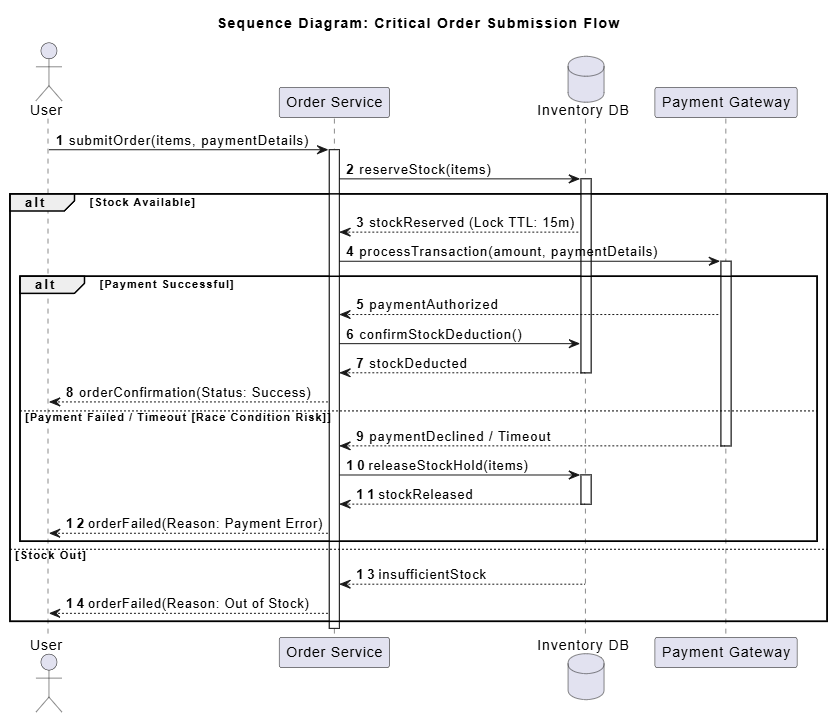
Example 3: Sequence Diagram for a Critical Flow
For "User submits order → Inventory check → Payment → Confirmation."
Reveals race conditions or integration issues early.
In Agile: Used in a design spike or during a retrospective when a bug surfaces. Discussed in daily stand-ups for complex stories.
Example 4: Activity Diagram for Business Process
Swimlanes for Customer, System, Admin in an approval workflow.
Helps non-technical stakeholders understand the process visually.
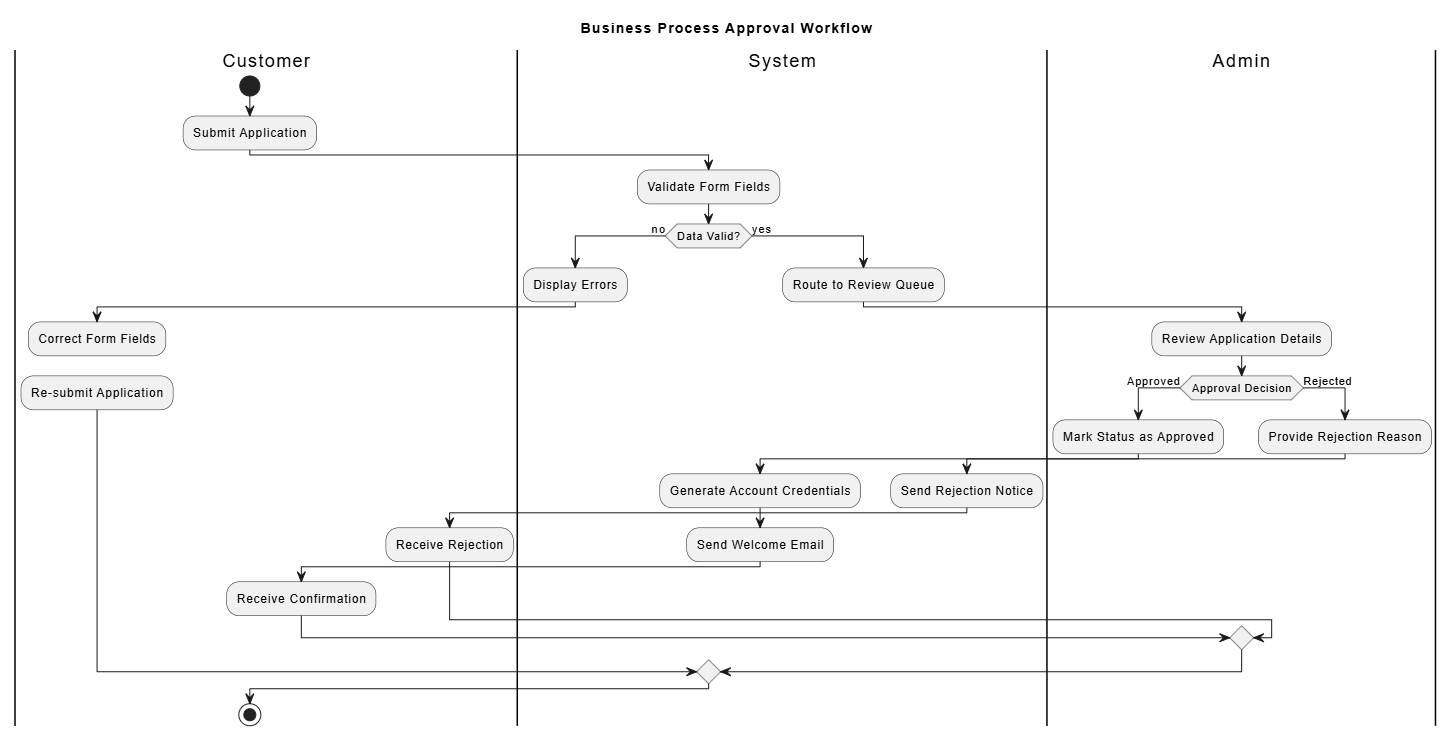
These diagrams are often created on whiteboards, photographed, and linked to tickets rather than maintained as formal docs.
Start Simple — Begin with sketches. Only formalize when communicating with external teams or for critical architecture.
Iterate — Update diagrams at the start or end of sprints as needed. Treat them as living artifacts.
Focus on Value — Ask: Does this diagram reduce ambiguity or speed up decisions? If not, skip it.
Tooling — Use collaborative tools (Visual Paraidgm), AI & code-friendly options (PlantUML for version control), or IDE plugins.
Combine with Other Practices — Pair with CRC cards, event storming, or C4 model for architecture.
Documentation Strategy — Generate diagrams from code (e.g., via reverse engineering) for maintenance. Archive outdated versions.
Team Buy-in — Train the team on lightweight UML. Not everyone needs to be an expert—focus on readability.
Challenges & Mitigations:
Outdated diagrams: Mitigate with "as-needed" updates and code-as-truth.
Overhead: Limit to high-impact areas (complex domains, integrations).
Skill gaps: Use pair modeling or external coaching initially.
Faster onboarding — New developers grasp the system quicker via visuals.
Better collaboration — Bridges technical and non-technical roles.
Reduced defects — Early visualization catches design flaws.
Improved architecture — Prevents "big ball of mud" in evolving codebases.
Stakeholder alignment — Visuals communicate intent better than text.
Companies like Spotify, Netflix, and Google-inspired teams use lightweight modeling successfully in Agile environments.
UML not only survives in Agile—it becomes more powerful when stripped of ceremony and infused with agility. It transforms from a heavyweight artifact into a strategic communication superpower that helps teams navigate complexity without sacrificing speed.
The key is mindset: Use UML as a tool for agility, not against it. Embrace just-in-time, collaborative, and iterative modeling. In a world of ever-changing requirements, clear visual thinking is a competitive advantage.
Whether you're a developer, architect, Product Owner, or Scrum Master, incorporating selective UML practices will help your Agile team deliver better software, faster, with fewer misunderstandings.
Next Steps:
Try sketching one diagram in your next sprint planning.
Explore tools like PlantUML and / or Visual Paradigm Desktop / Online.
Read Scott Ambler's Agile Modeling for deeper principles.
UML isn't dead—it's been reborn for the Agile age. The teams that master this balance will build more robust, understandable, and maintainable systems.
This guide draws on established practices from Agile Modeling, industry experiences, and modern applications of UML in iterative development.

