
Use cases are fundamental artifacts in Unified Modeling Language (UML) that capture functional requirements from a user's perspective. This case study explores the practical applications, key concepts, and real-world examples of use cases and their detailed descriptions in software development projects.
A use case represents a sequence of actions that provide a measurable value to an actor (user or external system). It describes what the system does without specifying how it does it.
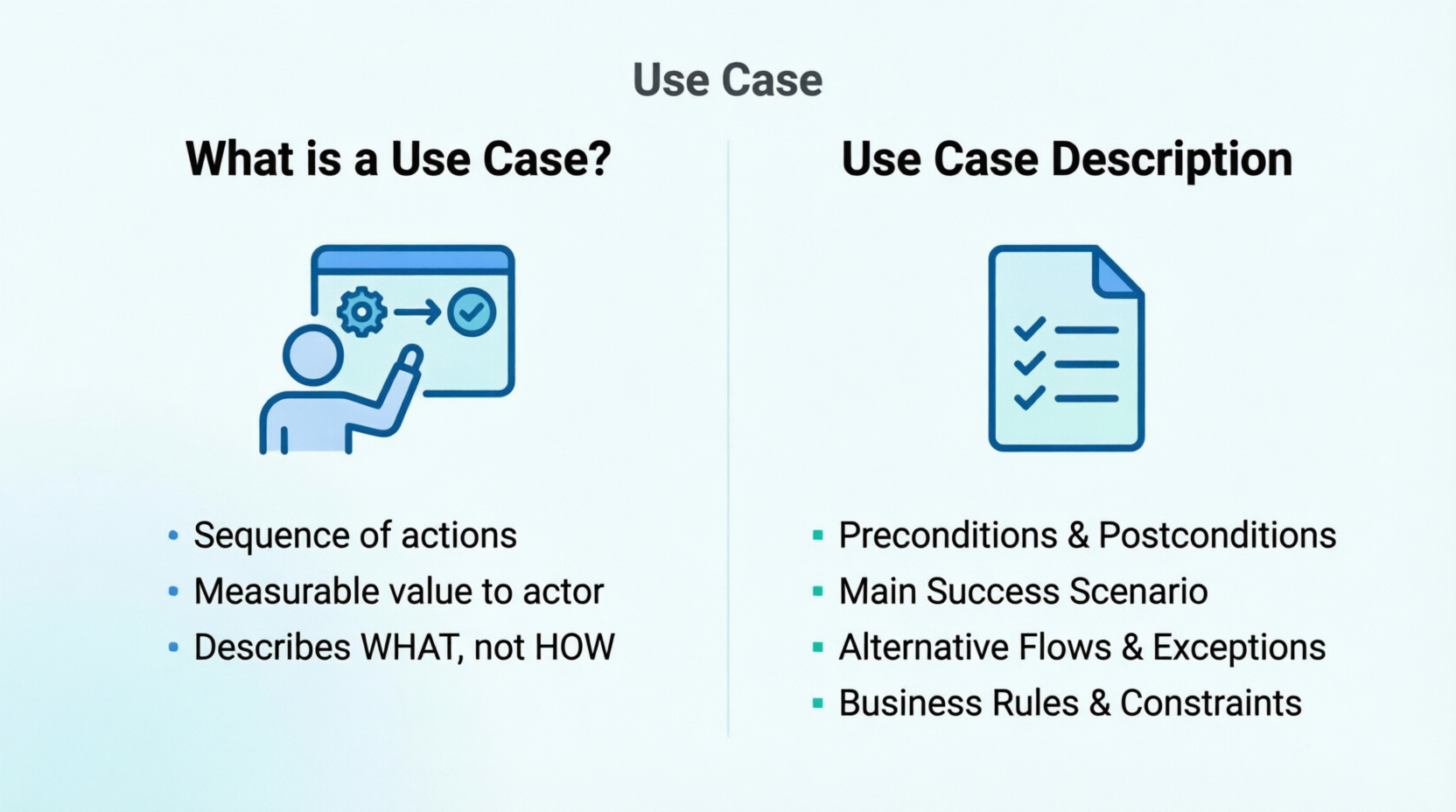
A use case description (also called use case specification) provides detailed textual documentation of a use case, including:
| Element | Definition | Example |
|---|---|---|
| Actor | Role played by user or external system | Customer, Admin, Payment Gateway |
| Use Case | Goal-oriented interaction | "Place Order," "Generate Report" |
| System Boundary | Scope of the system being modeled | The e-commerce platform |
| Relationships | Associations between actors and use cases | Includes, extends, generalization |
Purpose: Capture functional requirements in user-centric language
Example - Healthcare Management System:
Use Case: Schedule Patient Appointment

Actors: Patient, Receptionist, Calendar System

Preconditions:
- Patient is registered in the system
- Doctor's schedule is available

Main Success Scenario:
1. Patient selects preferred doctor
2. System displays available time slots
3. Patient selects date and time
4. System confirms appointment availability
5. Patient provides reason for visit
6. System creates appointment record
7. System sends confirmation email/SMS
8. Appointment appears in doctor's calendar

Alternative Flows:
3a. No available slots:
   - System suggests alternative dates
   - Patient selects new date or cancels

6a. Conflict detected:
   - System notifies patient of double-booking
   - Returns to step 2

Postconditions:
- Appointment is scheduled
- Notifications sent to patient and doctor
- Calendar updated
Benefits:
Purpose: Identify system components and interfaces
Example - E-Commerce Platform:
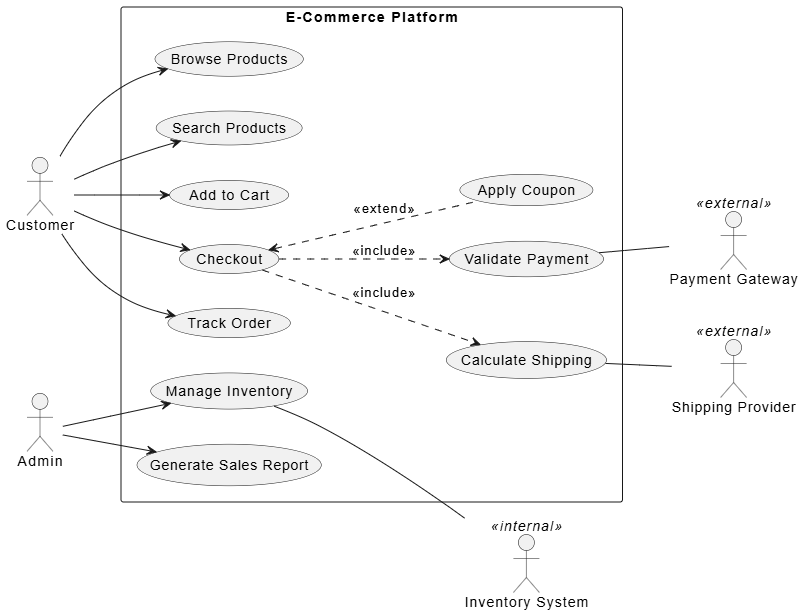
PlatnUML Use Case Diagram:
@startuml
left to right direction
skinparam packageStyle rectangle

actor "Customer" as Customer
actor "Admin" as Admin
actor "Payment Gateway" as PG <<external>>
actor "Shipping Provider" as SP <<external>>
actor "Inventory System" as IS <<internal>>

rectangle "E-Commerce Platform" {
usecase "Browse Products" as UC1
usecase "Search Products" as UC2
usecase "Add to Cart" as UC3
usecase "Checkout" as UC4
usecase "Validate Payment" as UC5
usecase "Calculate Shipping" as UC6
usecase "Apply Coupon" as UC7
usecase "Track Order" as UC8
usecase "Manage Inventory" as UC9
usecase "Generate Sales Report" as UC10
}

Customer --> UC1
Customer --> UC2
Customer --> UC3
Customer --> UC4
Customer --> UC8

Admin --> UC9
Admin --> UC10

UC4 ..> UC5 : <<include>>
UC4 ..> UC6 : <<include>>
UC4 <.. UC7 : <<extend>>

UC5 -- PG
UC6 -- SP
UC9 -- IS
@endumlDesign Insights:
Purpose: Guide UI/UX design decisions
Example - Banking Mobile App:
Use Case: Transfer Funds Between Accounts

UI Implications:
1. Screen: Select source account (dropdown/list)
2. Screen: Select destination account
3. Screen: Enter amount with validation
4. Screen: Review transfer details
5. Screen: Confirm with biometric/PIN
6. Screen: Confirmation receipt

Key UX Considerations:
- Clear error messages for insufficient funds
- Quick access to recent transfers
- One-handed operation support
- Accessibility for visually impaired users
Application:
Purpose: Create comprehensive test scenarios
Example - Social Media Platform:
Use Case: Post Photo with Caption

Test Cases Derived:

TC001 - Happy Path:
- Upload valid image (<10MB)
- Add caption (≤500 characters)
- Post successfully
- Verify post appears in feed

TC002 - Invalid Image Format:
- Attempt upload of .exe file
- Verify error message: "Unsupported format"

TC003 - File Size Exceeded:
- Upload 15MB image
- Verify error: "File too large. Max 10MB"

TC004 - Empty Caption:
- Upload image without caption
- Verify post succeeds (caption optional)

TC005 - Network Failure:
- Initiate post, disconnect network
- Verify retry mechanism activates

TC006 - Duplicate Detection:
- Upload same image within 5 minutes
- Verify warning: "Similar photo recently posted"
Coverage Benefits:
Purpose: Break down work into manageable user stories
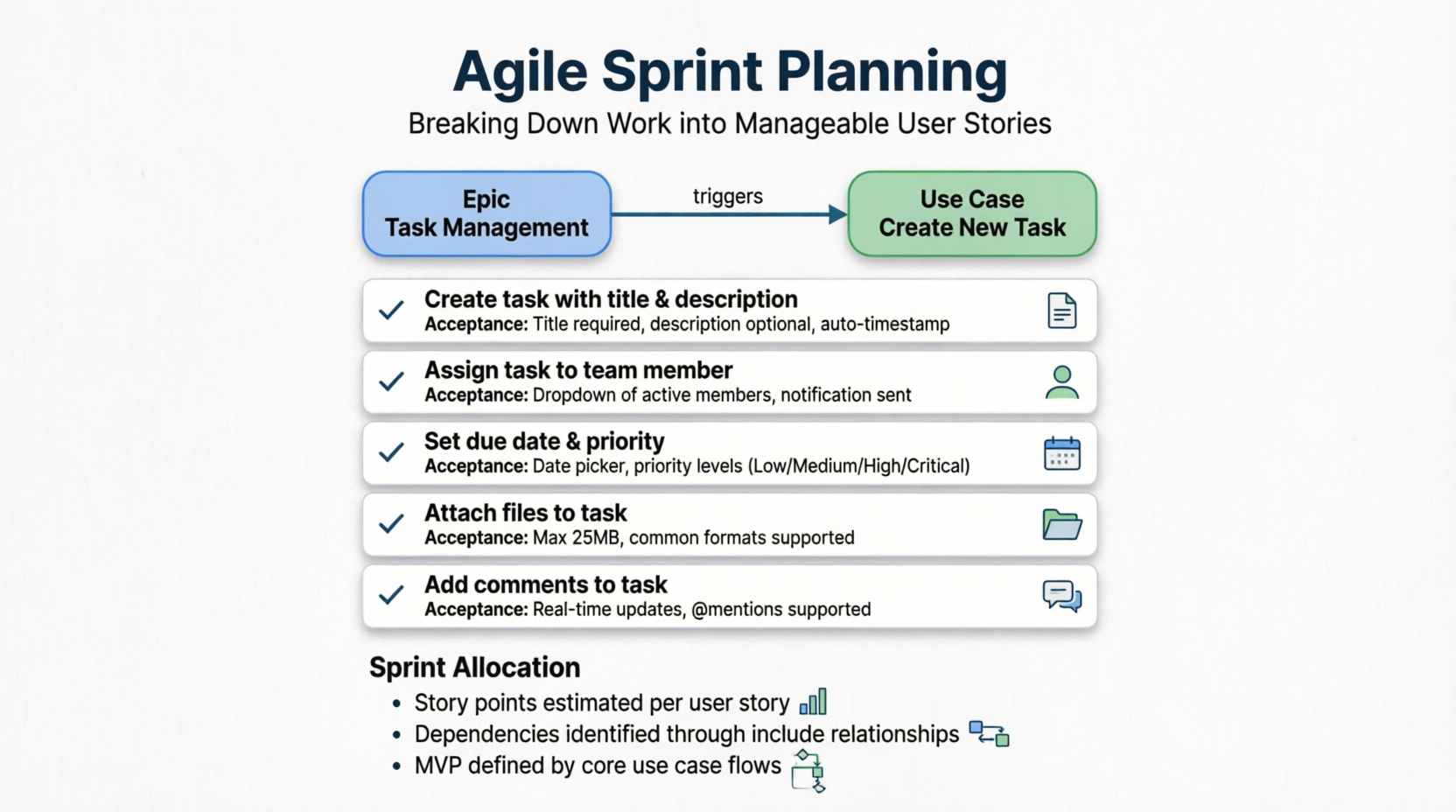
Example - Project Management Tool:
Epic: Task Management

Use Case: Create New Task

User Stories:
✓ As a team member, I want to create a task with title and description
  Acceptance Criteria: Title required, description optional, auto-timestamp

✓ As a team member, I want to assign a task to a team member
  Acceptance Criteria: Dropdown of active members, notification sent

✓ As a team member, I want to set due date and priority
  Acceptance Criteria: Date picker, priority levels (Low/Medium/High/Critical)

✓ As a team member, I want to attach files to a task
  Acceptance Criteria: Max 25MB, common formats supported

✓ As a team member, I want to add comments to a task
  Acceptance Criteria: Real-time updates, @mentions supported
Sprint Allocation:
Purpose: Bridge gap between technical and non-technical stakeholders
Example - Insurance Claims System:
Business Stakeholder View:
"Customer submits claim → System validates policy → Adjuster reviews → Payment processed"
Technical Team View:
Use Case: Submit Insurance Claim

Actors: Policyholder, Claims Adjuster, Payment System

Flow:
1. Policyholder uploads claim form + photos
2. System validates:
   - Policy is active
   - Claim type covered
   - Within filing deadline
3. System assigns claim ID
4. Notification to adjuster queue
5. Adjuster reviews and approves/denies
6. If approved → Payment System processes
7. Status update to policyholder
Communication Value:
Purpose: Document existing functionality before refactoring
Example - Legacy CRM Migration:
Current System Use Case: Generate Monthly Sales Report

As-Is Process:
1. Manual data export from 3 databases
2. Excel macros consolidate data
3. Manual formatting
4. Email distribution to 15 managers

To-Be Use Case (Modernized):

Use Case: Automated Sales Dashboard

Actors: Sales Manager, BI System, Data Warehouse

Main Flow:
1. System aggregates data nightly from unified database
2. Dashboard auto-refreshes with latest metrics
3. Manager filters by region/product/timeframe
4. System generates visualizations (charts/graphs)
5. Manager exports to PDF/Excel if needed
6. Scheduled email reports to stakeholders

Benefits Identified:
- Eliminate 8 hours/month manual work
- Real-time data vs. 3-day delay
- Self-service vs. IT dependency
Purpose: Demonstrate compliance with regulations (GDPR, HIPAA, SOX)
Example - Healthcare System (HIPAA Compliance):
Use Case: Access Patient Medical Records

Compliance Requirements:
- Actor must be authenticated healthcare provider
- Access logged with timestamp and purpose
- Patient consent verified for sensitive records
- Data encrypted in transit and at rest
- Automatic logout after 15 minutes idle

Audit Trail Generated:
✓ Who accessed (user ID)
✓ When (timestamp)
✓ What records viewed
✓ Why (purpose code)
✓ Duration of access

Regulatory Mapping:
- HIPAA §164.312(a): Access control
- HIPAA §164.312(b): Audit controls
- HIPAA §164.312(e): Transmission security
Purpose: Define service contracts and integration points
Example - Ride-Sharing Platform:
Use Case: Request Ride

API Endpoints Identified:

POST /api/v1/rides/request
Request Body:
{
  "pickup_location": {"lat": 37.7749, "lng": -122.4194},
  "dropoff_location": {"lat": 37.7849, "lng": -122.4094},
  "ride_type": "standard",
  "passenger_count": 2
}

Response:
{
  "ride_id": "ride_12345",
  "estimated_fare": 18.50,
  "estimated_arrival": "4 min",
  "driver_match_status": "searching"
}

<<include>> Validate Location
<<include>> Calculate Fare
<<include>> Check Driver Availability
<<extend>> Apply Surge Pricing (if high demand)
Integration Benefits:
Purpose: Create user manuals and training materials
Example - Enterprise ERP System:
Use Case: Process Invoice Payment

Training Module Structure:

Module 1: Navigate to Accounts Payable
- Login credentials
- Menu navigation
- Dashboard overview

Module 2: Locate Pending Invoices
- Filter by vendor/date/amount
- Sort and search functions
- Bulk selection options

Module 3: Review Invoice Details
- Line item verification
- Approval workflow status
- Attachment review

Module 4: Execute Payment
- Payment method selection
- Batch processing
- Confirmation and receipt

Module 5: Handle Exceptions
- Rejected invoices
- Partial payments
- Dispute resolution

Supporting Materials:
- Step-by-step screenshots
- Video demonstrations
- Quick reference cards
- FAQ based on alternative flows
USE CASE: [Name]

ID: UC-[Number]
Priority: [High/Medium/Low]
Version: [X.X]

ACTORS:
- Primary: [Who initiates]
- Secondary: [Who participates]

PRECONDITIONS:
- [What must be true before]

TRIGGER:
- [Event that starts use case]

MAIN SUCCESS SCENARIO:
1. [Step]
2. [Step]
...
n. [Final step achieving goal]

ALTERNATIVE FLOWS:
[a1] At step X:
   - Condition
   - Action
   - Return to step Y or end

[b1] At step Z:
   - Condition
   - Action
   - Return to step W or end

EXCEPTIONS:
[e1] System failure
   - Recovery action
   - Notification

POSTCONDITIONS:
- [State after completion]

BUSINESS RULES:
- [Rule 1]
- [Rule 2]

NON-FUNCTIONAL REQUIREMENTS:
- Performance: [Response time]
- Security: [Access control]
- Availability: [Uptime requirement]
✅ DO:
❌ DON'T:
Problem: Creating use cases for every click
❌ Bad: "Click Submit Button"
✅ Good: "Submit Application Form"
Solution: Focus on user goals, not interface actions
Problem: Only documenting happy path
❌ Bad: Assumes everything works perfectly
✅ Good: Covers errors, cancellations, edge cases
Solution: Brainstorm "what could go wrong?" for each step
Problem: Generic actor names
❌ Bad: "User"
✅ Good: "Registered Customer," "Guest Visitor," "Admin"
Solution: Differentiate actors by permissions and goals
Problem: Not capturing domain logic
❌ Bad: "System validates order"
✅ Good: "System validates: order total ≥ $10, items in stock,
          shipping address valid, payment method active"
Solution: Explicitly list validation criteria and business constraints
While many tools offer basic diagramming capabilities, the Visual Paradigm (VP) ecosystem provides a comprehensive, integrated environment specifically designed for rigorous UML modeling, requirements engineering, and agile development. Its strength lies in the seamless connection between visual models, textual specifications, and code implementation.
Visual Paradigm offers two primary interfaces, allowing teams to choose based on their workflow preferences:
| Feature | Visual Paradigm Desktop | Visual Paradigm Online (VPO) |
|---|---|---|
| Best For | Enterprise architects, complex systems, offline work | Collaborative teams, remote work, quick sharing |
| Performance | High performance for large-scale models | Lightweight, browser-based accessibility |
| Integration | Deep IDE plugins (Eclipse, IntelliJ, VS Code) | Real-time collaboration, cloud storage |
| Key Strength | Advanced automation, reporting, and code engineering | Ease of access, no installation required |
Recommendation: Use Desktop for heavy-duty modeling and code generation tasks. Use Online for stakeholder reviews, brainstorming sessions, and lightweight documentation.
The VP AI Chatbot integrates generative AI directly into the modeling process, significantly accelerating the creation of use cases and diagrams.
Key Capabilities for Use Cases:
Benefit: Reduces the "blank page" problem and ensures consistent terminology across models.
OpenDocs is Visual Paradigm’s innovative approach to documentation, bridging the gap between static documents and live models. Instead of writing separate Word documents that quickly become outdated, OpenDocs allows you to create living documents linked directly to your UML elements.
How it Enhances Use Case Modeling:
Benefit: Eliminates documentation drift and ensures that use case descriptions are always synchronized with the visual model.
VPasCode (Visual Paradigm as Code) represents the shift towards treating models as code, enabling version control, automation, and integration into DevOps pipelines.
Benefit: Brings rigor and automation to requirements management, appealing to engineering teams accustomed to code-centric workflows.
A typical high-efficiency workflow using the Visual Paradigm ecosystem might look like this:
Unlike generic diagramming tools, Visual Paradigm treats use cases as first-class citizens with rich metadata, behavior modeling, and traceability. The ecosystem’s integration of AI (Chatbot), dynamic documentation (OpenDocs), and code-centric practices (VPasCode) makes it uniquely suited for modern, agile, yet disciplined product development environments.
Startup building competitive food delivery platform similar to UberEats/DoorDash
Primary Actors: Customer, Restaurant, Driver, Support Agent
Secondary Actors: Payment Gateway, Map Service, Notification Service

Core Use Cases:
├── Customer Journey
│   ├── Browse Restaurants
│   ├── Search by Cuisine/Dish
│   ├── Place Order <<include>> Validate Address
│   │                      <<include>> Process Payment
│   │                      <<extend>> Apply Promo Code
│   ├── Track Order
│   ├── Rate Experience
│   └── Reorder Previous Meal
│
├── Restaurant Operations
│   ├── Receive Order
│   ├── Update Menu
│   ├── Mark Order Ready
│   └── View Analytics
│
├── Driver Workflow
│   ├── Accept Delivery
│   ├── Navigate to Restaurant
│   ├── Pick Up Order
│   ├── Navigate to Customer
│   └── Complete Delivery
│
└── Support Functions
    ├── Handle Complaint
    ├── Process Refund
    └── Manage Disputes
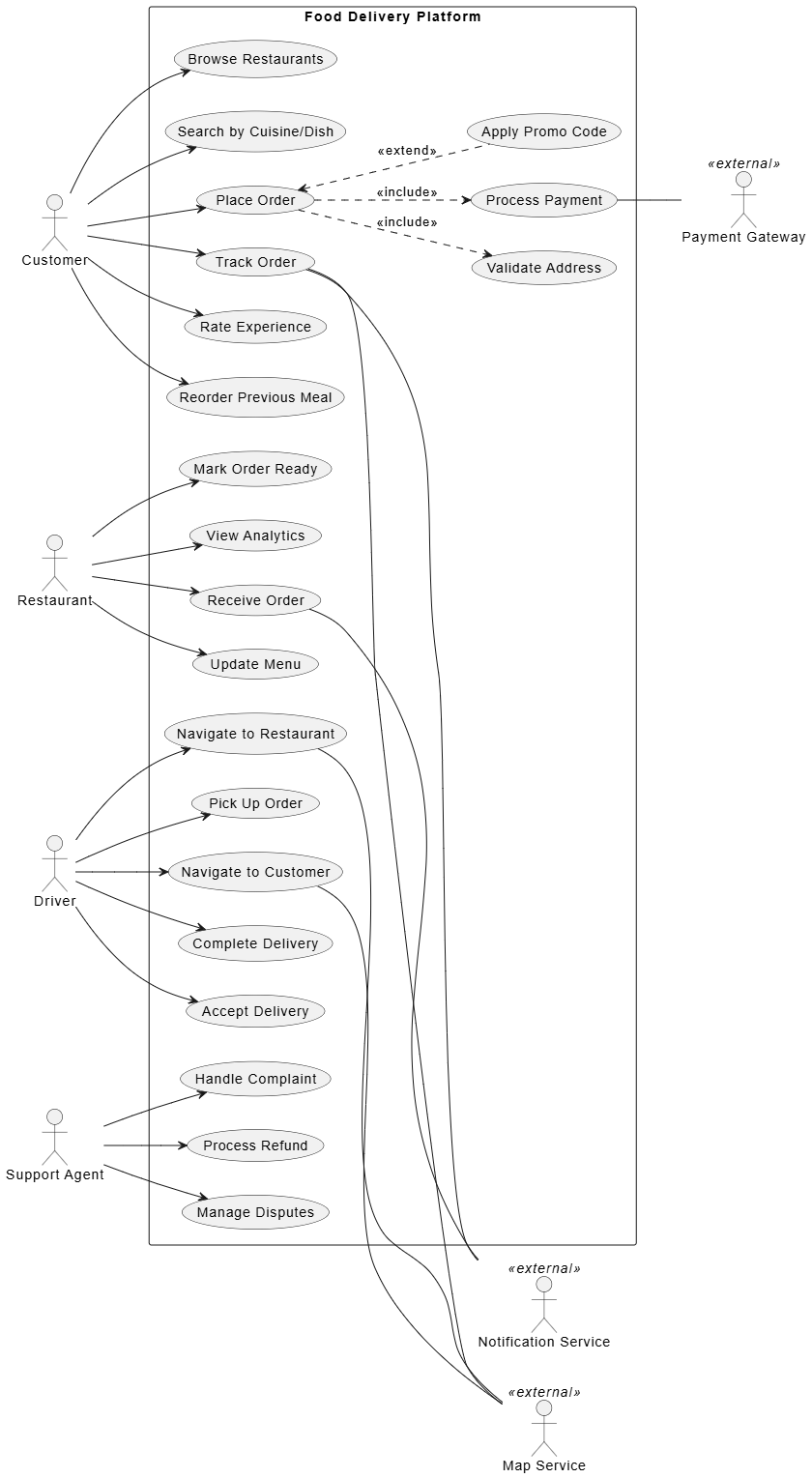
PlantUML Use Case code:
@startuml
left to right direction
skinparam packageStyle rectangle

' Actors
actor "Customer" as Customer
actor "Restaurant" as Restaurant
actor "Driver" as Driver
actor "Support Agent" as Support

actor "Payment Gateway" as PG <<external>>
actor "Map Service" as MS <<external>>
actor "Notification Service" as NS <<external>>

rectangle "Food Delivery Platform" {

' Customer Journey
usecase "Browse Restaurants" as UC1
usecase "Search by Cuisine/Dish" as UC2
usecase "Place Order" as UC3
usecase "Validate Address" as UC4
usecase "Process Payment" as UC5
usecase "Apply Promo Code" as UC6
usecase "Track Order" as UC7
usecase "Rate Experience" as UC8
usecase "Reorder Previous Meal" as UC9

' Restaurant Ops
usecase "Receive Order" as UC10
usecase "Update Menu" as UC11
usecase "Mark Order Ready" as UC12
usecase "View Analytics" as UC13

' Driver Workflow
usecase "Accept Delivery" as UC14
usecase "Navigate to Restaurant" as UC15
usecase "Pick Up Order" as UC16
usecase "Navigate to Customer" as UC17
usecase "Complete Delivery" as UC18

' Support
usecase "Handle Complaint" as UC19
usecase "Process Refund" as UC20
usecase "Manage Disputes" as UC21
}

' Customer Interactions
Customer --> UC1
Customer --> UC2
Customer --> UC3
Customer --> UC7
Customer --> UC8
Customer --> UC9

' Place Order Relationships
UC3 ..> UC4 : <<include>>
UC3 ..> UC5 : <<include>>
UC3 <.. UC6 : <<extend>>
UC5 -- PG
UC7 -- MS
UC7 -- NS

' Restaurant Interactions
Restaurant --> UC10
Restaurant --> UC11
Restaurant --> UC12
Restaurant --> UC13
UC10 -- NS

' Driver Interactions
Driver --> UC14
Driver --> UC15
Driver --> UC16
Driver --> UC17
Driver --> UC18
UC15 -- MS
UC17 -- MS

' Support Interactions
Support --> UC19
Support --> UC20
Support --> UC21

@endumlUSE CASE: Place Order
ID: UC-103
Priority: High
Version: 2.1
ACTORS:
- Primary: Customer
- Secondary: Payment Gateway, Restaurant, Notification Service
PRECONDITIONS:
- Customer is logged in
- Customer has valid delivery address saved
- Shopping cart contains items from single restaurant
- Restaurant is currently accepting orders
TRIGGER:
- Customer taps "Checkout" button
MAIN SUCCESS SCENARIO:
1. System displays order summary (items, subtotal, fees, total)
2. System shows estimated delivery time
3. Customer selects delivery address (or confirms default)
4. Customer selects payment method
5. Customer optionally adds delivery instructions
6. Customer optionally applies promo code
7. Customer confirms order
8. System validates payment authorization
9. System sends order to restaurant
10. System confirms order to customer with order ID
11. System initiates driver matching process
12. System sends order confirmation notification
ALTERNATIVE FLOWS:
[3a] No saved address:
- System prompts customer to enter new address
- System validates address via Map Service
- Customer saves address for future use
- Continue to step 4
[6a] Invalid promo code:
- System displays error: "Code expired or invalid"
- Customer removes code or enters different code
- Return to step 6
[6b] Promo code applied:
- System recalculates total
- Display savings amount
- Continue to step 7
[8a] Payment declined:
- System displays decline reason
- Customer selects different payment method
- Return to step 4
[8b] Payment gateway timeout:
- System retries up to 3 times
- If still failing, display error and save cart
- Customer can retry later
[9a] Restaurant unavailable:
- System notifies customer: "Restaurant temporarily closed"
- System refunds any pre-authorization
- Use case ends
EXCEPTIONS:
[e1] Network failure during checkout:
- System saves order draft locally
- Displays message: "Connection lost. Order saved as draft."
- Customer can resume when connection restored
[e2] Items become unavailable:
- System checks inventory before final submission
- If item unavailable, notify customer
- Offer substitute or remove item
- Return to step 1
POSTCONDITIONS:
- Order created in system with unique ID
- Payment authorized (not captured until delivery)
- Restaurant notified of new order
- Customer receives confirmation
- Order appears in customer's order history
- Driver matching initiated
BUSINESS RULES:
- BR-01: Minimum order value: $10
- BR-02: Maximum items per order: 50
- BR-03: Orders only accepted during restaurant operating hours
- BR-04: Payment pre-authorized at checkout, captured upon delivery
- BR-05: Promo codes cannot be combined unless explicitly allowed
- BR-06: Delivery fee waived for orders over $30
NON-FUNCTIONAL REQUIREMENTS:
- Performance: Checkout completes within 5 seconds
- Availability: 99.9% uptime during peak hours (11am-2pm, 5pm-9pm)
- Security: PCI-DSS compliant payment processing
- Scalability: Support 10,000 concurrent checkouts
Development Benefits:
Business Benefits:
Lessons Learned:
Use cases and use case descriptions remain invaluable tools in modern software development despite the rise of agile methodologies. They provide:
✅ Ideal For:
⚠️ Consider Alternatives When:
Use cases should be viewed as living artifacts that evolve with the product. Start with high-level use case diagrams for vision alignment, then progressively elaborate critical use cases with detailed descriptions. Maintain traceability to user stories, test cases, and acceptance criteria for maximum value throughout the development lifecycle.
The investment in quality use case modeling pays dividends in reduced rework, improved stakeholder satisfaction, and higher-quality software delivery.
Looking for a powerful, free diagram-as-code tool? Effortlessly render PlantUML, Mermaid, Graphviz, and 20+ programming languages in real time—powered by instant AI error fixing and automatic format detection.

