
Test case development is a critical phase in software quality assurance that ensures your application behaves as expected under various conditions. When derived systematically from use cases, test cases provide comprehensive coverage of functional requirements while maintaining traceability to business needs. This guide walks you through the complete process of transforming use cases into effective test cases, with practical examples, visual diagrams, and insights on leveraging modern tools like Visual Paradigm with AI capabilities.
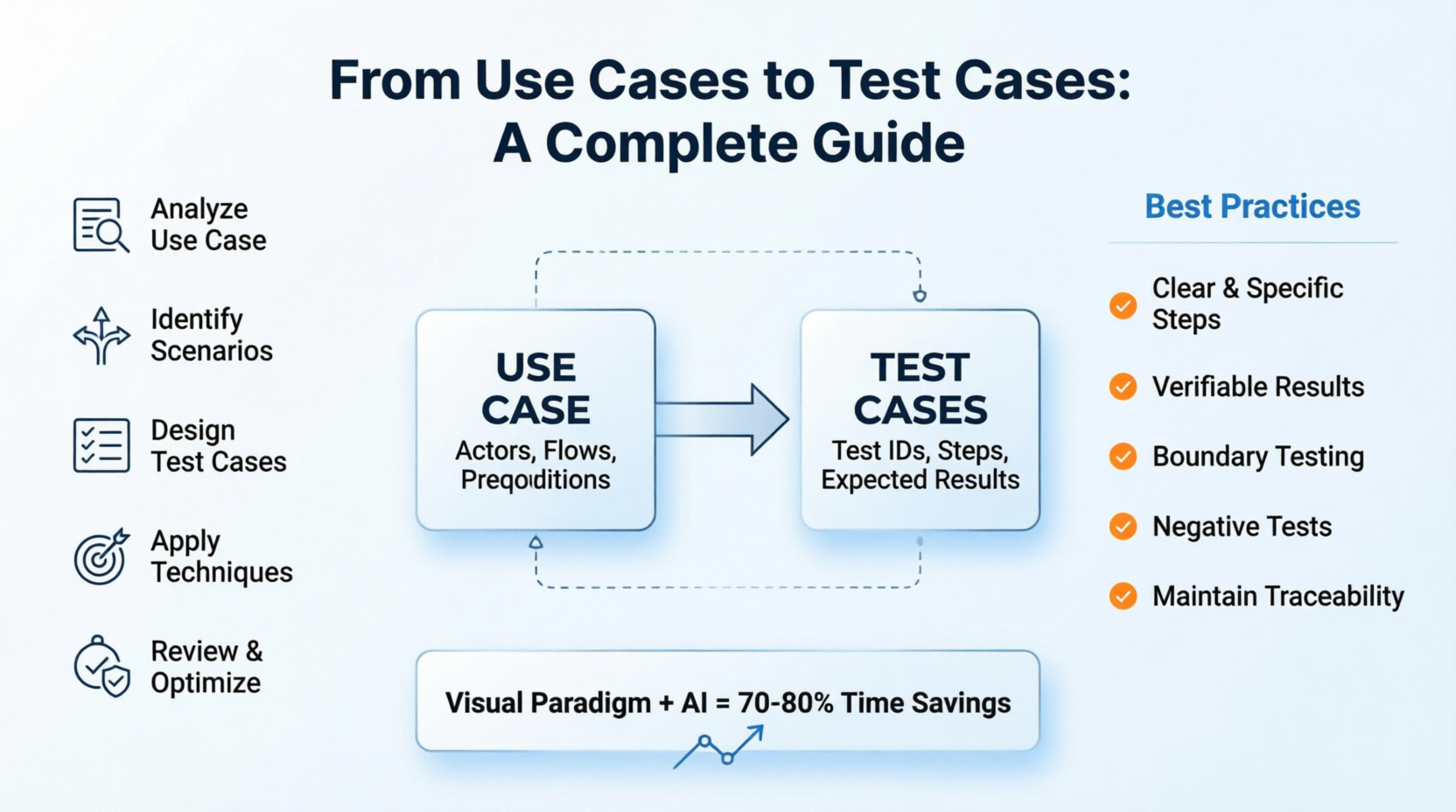
Whether you're a QA engineer, product manager, or developer, understanding this methodology will help you create more robust, maintainable, and comprehensive test suites that catch defects early and ensure user satisfaction.
A use case describes how users interact with a system to achieve specific goals. It includes:
Actors: Users or systems interacting with the application
Preconditions: Conditions that must be true before the use case begins
Main Flow (Happy Path): The primary sequence of steps for successful completion
Alternative Flows: Variations or exceptions to the main flow
Postconditions: System state after use case completion
A test case is a set of conditions used to determine whether a system feature works correctly. It includes:
Test Case ID: Unique identifier
Test Scenario: Brief description of what's being tested
Preconditions: Setup required before execution
Test Steps: Detailed actions to perform
Test Data: Specific inputs to use
Expected Results: What should happen
Actual Results: What actually happened (filled during execution)
Status: Pass/Fail/Blocked
The ability to link test cases back to their source use cases, ensuring complete coverage and facilitating impact analysis when requirements change.
Statement Coverage: Every line of code is executed
Branch Coverage: Every decision point is tested both ways
Path Coverage: Every possible path through the use case is tested
Boundary Value Analysis: Testing at edge conditions
Objective: Understand the complete scope and variations of the use case.
Actions:
Review the use case diagram and detailed description
Identify all actors involved
List all preconditions and postconditions
Map out the main flow step by step
Document all alternative flows and exception paths
Note any business rules or constraints
Example Use Case: Online Shopping - Place Order
Use Case: Place Order
Actor: Customer
Preconditions:
  - Customer is logged in
  - Shopping cart contains at least one item
  - Customer has valid payment method on file

Main Flow:
1. Customer reviews shopping cart
2. Customer clicks "Checkout"
3. System displays shipping address options
4. Customer selects or enters shipping address
5. System displays payment method options
6. Customer selects payment method
7. System calculates final total (items + tax + shipping)
8. Customer confirms order
9. System processes payment
10. System creates order record
11. System displays order confirmation with order number
12. System sends confirmation email

Alternative Flows:
A1: Invalid Payment Method
  - At step 9, if payment fails:
    - System displays error message
    - Customer can retry with different payment method
    - Return to step 6

A2: Out of Stock Item
  - At step 1, if item is out of stock:
    - System notifies customer
    - Customer can remove item or waitlist
    - If removed, return to step 1 with updated cart
    - If empty cart, cancel checkout

A3: Shipping Address Validation Failure
  - At step 4, if address is invalid:
    - System displays validation errors
    - Customer corrects address
    - Return to step 4

Postconditions:
  - Order is created in system
  - Inventory is reserved
  - Payment is processed (or authorization held)
  - Confirmation email is sent
Objective: Break down the use case into testable scenarios covering all flows.
Guidelines:
Create one scenario for the main flow (happy path)
Create separate scenarios for each alternative flow
Consider boundary conditions and edge cases
Think about negative testing (invalid inputs, error conditions)
Consider security and performance aspects if relevant
Test Scenarios for "Place Order":
| Scenario ID | Description | Type | Priority |
|---|---|---|---|
| TC-PO-001 | Successful order placement with valid data | Positive | High |
| TC-PO-002 | Order placement with payment failure | Negative | High |
| TC-PO-003 | Order placement with out-of-stock item | Negative | Medium |
| TC-PO-004 | Order placement with invalid shipping address | Negative | Medium |
| TC-PO-005 | Order placement with empty cart | Negative | Low |
| TC-PO-006 | Order placement with multiple items | Positive | Medium |
| TC-PO-007 | Order placement with promo code applied | Positive | Medium |
| TC-PO-008 | Order placement with guest checkout | Positive | High |
Objective: Create detailed, executable test cases for each scenario.
Template Structure:
Test Case ID: [Unique Identifier]
Test Scenario: [Brief Description]
Priority: [High/Medium/Low]
Preconditions: [Required setup]
Test Data: [Specific inputs]
Test Steps:
  1. [Action]
  2. [Action]
  ...
Expected Results:
  - [Result 1]
  - [Result 2]
  ...
Postconditions: [System state after test]
Detailed Example Test Cases:
Test Case ID: TC-PO-001
Test Scenario: Successful order placement with valid data
Priority: High
Preconditions:
  - User is registered and logged in
  - User has at least one item in shopping cart
  - User has valid credit card on file
  - Items in cart are in stock

Test Data:
  - Username: [email protected]
  - Password: SecurePass123!
  - Item: Wireless Headphones (SKU: WH-001, Price: $79.99)
  - Quantity: 1
  - Shipping Address: 123 Main St, San Francisco, CA 94102
  - Payment Method: Visa ending in 4242

Test Steps:
  1. Navigate to shopping cart page
  2. Verify item details and quantity
  3. Click "Proceed to Checkout" button
  4. Verify shipping address is displayed
  5. Select saved shipping address
  6. Click "Continue to Payment"
  7. Verify payment methods are displayed
  8. Select Visa ending in 4242
  9. Review order summary (item price, tax, shipping, total)
  10. Click "Place Order" button
  11. Wait for processing (max 10 seconds)

Expected Results:
  - Step 2: Cart shows 1x Wireless Headphones at $79.99
  - Step 4: Saved address "123 Main St, San Francisco, CA 94102" is displayed
  - Step 7: Payment options include "Visa ****4242"
  - Step 9: Order summary shows:
    * Subtotal: $79.99
    * Tax: $7.20 (9%)
    * Shipping: $5.99
    * Total: $93.18
  - Step 11: Order confirmation page displays with:
    * Success message: "Order Placed Successfully"
    * Order number (format: ORD-YYYYMMDD-XXXXX)
    * Estimated delivery date
    * Option to view order details

Postconditions:
  - Order record created in database with status "Confirmed"
  - Inventory reduced by 1 unit for SKU WH-001
  - Payment of $93.18 charged to Visa ****4242
  - Confirmation email sent to [email protected]
  - Shopping cart is emptied
Test Case ID: TC-PO-002
Test Scenario: Order placement with payment failure
Priority: High
Preconditions:
  - User is logged in
  - User has items in cart
  - User has payment method that will be declined

Test Data:
  - Item: Bluetooth Speaker (SKU: BS-002, Price: $49.99)
  - Payment Method: Card with insufficient funds

Test Steps:
  1. Add Bluetooth Speaker to cart
  2. Proceed to checkout
  3. Select shipping address
  4. Continue to payment
  5. Select payment method known to fail
  6. Click "Place Order"
  7. Observe system response

Expected Results:
  - Step 6: System shows loading indicator
  - Step 7: Within 5 seconds, error message displays:
    * "Payment Declined: Insufficient Funds"
    * "Please try a different payment method"
  - User remains on payment page
  - Cart items are preserved
  - No order is created
  - No email is sent

Postconditions:
  - No order record created
  - Inventory unchanged
  - No payment processed
  - User can select different payment method or cancel
Test Case ID: TC-PO-003
Test Scenario: Attempting to checkout with out-of-stock item
Priority: Medium
Preconditions:
  - User is logged in
  - Item was in stock when added to cart but is now out of stock

Test Data:
  - Item: Limited Edition Sneakers (SKU: LS-003)
  - Stock Status: 0 available

Test Steps:
  1. Add Limited Edition Sneakers to cart (while in stock)
  2. Wait until item goes out of stock (simulated)
  3. Navigate to shopping cart
  4. Observe cart display
  5. Attempt to proceed to checkout

Expected Results:
  - Step 4: Cart displays warning:
    * "Item Out of Stock: Limited Edition Sneakers"
    * Options: "Remove Item" or "Notify When Available"
  - Step 5: "Proceed to Checkout" button is disabled OR
    clicking it shows message: "Cannot checkout with out-of-stock items"
  - If user removes item and cart becomes empty:
    * Message: "Your cart is empty"
    * "Proceed to Checkout" button remains disabled

Postconditions:
  - No order created
  - If item removed, cart is empty
  - If waitlisted, user receives notification preference saved
Objective: Enhance test coverage using systematic techniques.
Test at the edges of input domains:
For quantity field (valid range: 1-10):
  - Test with 0 (below minimum)
  - Test with 1 (minimum boundary)
  - Test with 5 (normal value)
  - Test with 10 (maximum boundary)
  - Test with 11 (above maximum)
Group inputs that should behave similarly:
Payment Amount Categories:
  - Valid: $0.01 - $10,000
  - Invalid: $0, negative amounts, >$10,000

Test one value from each partition:
  - Valid: $50.00
  - Invalid: $0.00, -$10.00, $15,000.00
Map combinations of conditions to actions:
| Condition 1: Item in Stock | Condition 2: Valid Payment | Condition 3: Valid Address | Expected Action |
|---|---|---|---|
| Yes | Yes | Yes | Create Order |
| No | Yes | Yes | Show Error: Out of Stock |
| Yes | No | Yes | Show Error: Payment Failed |
| Yes | Yes | No | Show Error: Invalid Address |
| No | No | Yes | Show Error: Out of Stock |
| No | Yes | No | Show Error: Out of Stock |
| Yes | No | No | Show Error: Payment Failed |
| No | No | No | Show Error: Out of Stock |
Objective: Ensure test cases are complete, clear, and efficient.
Review Checklist:
✓ All use case flows are covered
✓ Preconditions are realistic and achievable
✓ Test steps are clear and unambiguous
✓ Expected results are specific and verifiable
✓ Test data is realistic and reusable
✓ No duplicate or redundant test cases
✓ Priority levels are assigned appropriately
✓ Traceability to use case is maintained
Optimization Tips:
Combine similar test cases where possible
Parameterize test data for reusability
Automate repetitive test cases
Remove low-value tests that don't add coverage
Use action verbs: "Click", "Enter", "Select", "Verify"
Be specific: "Click 'Submit' button" not "Submit the form"
One action per step
Include verification points
Avoid vague terms like "works correctly"
Specify exact values, messages, or states
Include UI elements, database changes, emails sent
Each test case should be independently executable
Don't rely on previous test case results
Set up own preconditions
High: Core functionality, frequent user paths, high-risk areas
Medium: Important features, less common paths
Low: Edge cases, nice-to-have features
Use consistent naming conventions
Document assumptions
Update when requirements change
Version control test cases
Functional: Does it work as specified?
Negative: Does it handle errors gracefully?
Boundary: Does it work at limits?
Integration: Do components work together?
Regression: Did new changes break existing functionality?
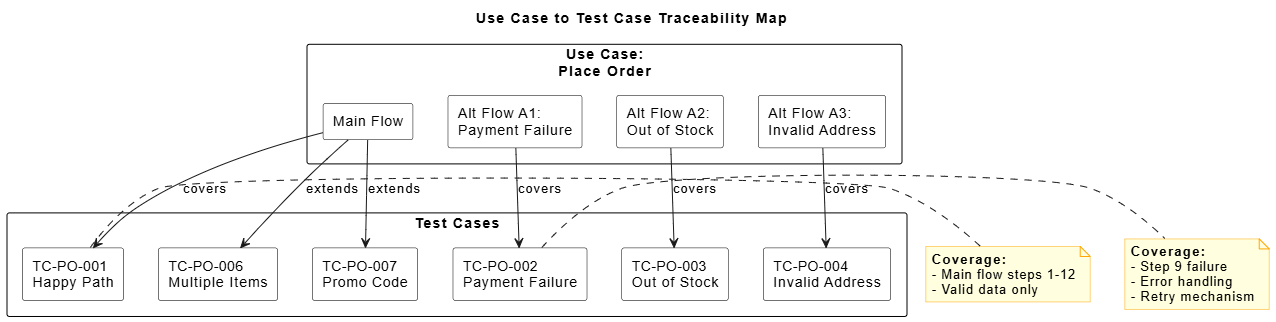
@startuml
skinparam backgroundColor white
skinparam rectangle {
  BackgroundColor White
  BorderColor Black
}
skinparam note {
  BackgroundColor LightYellow
  BorderColor Orange
}

title Use Case to Test Case Traceability Map

rectangle "Use Case:\nPlace Order" as UC {
  rectangle "Main Flow" as MF
  rectangle "Alt Flow A1:\nPayment Failure" as A1
  rectangle "Alt Flow A2:\nOut of Stock" as A2
  rectangle "Alt Flow A3:\nInvalid Address" as A3
}

rectangle "Test Cases" as TC {
  rectangle "TC-PO-001\nHappy Path" as TC1
  rectangle "TC-PO-002\nPayment Failure" as TC2
  rectangle "TC-PO-003\nOut of Stock" as TC3
  rectangle "TC-PO-004\nInvalid Address" as TC4
  rectangle "TC-PO-006\nMultiple Items" as TC5
  rectangle "TC-PO-007\nPromo Code" as TC6
}

MF --> TC1 : covers
MF --> TC5 : extends
MF --> TC6 : extends
A1 --> TC2 : covers
A2 --> TC3 : covers
A3 --> TC4 : covers

note right of TC1
  <b>Coverage:</b>
  - Main flow steps 1-12
  - Valid data only
end note

note right of TC2
  <b>Coverage:</b>
  - Step 9 failure
  - Error handling
  - Retry mechanism
end note

@enduml
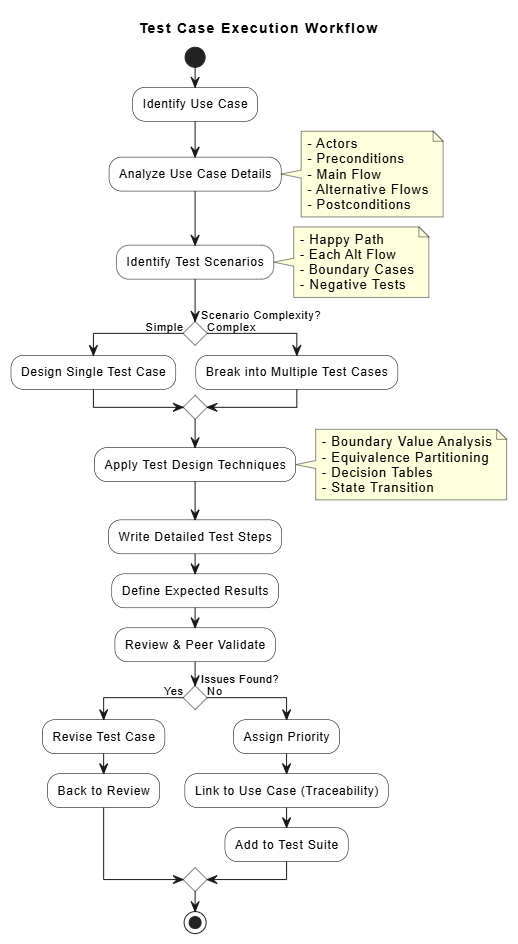
@startuml
skinparam backgroundColor white
skinparam conditionStyle diamond
skinparam activity {
  BackgroundColor White
  BorderColor Black
}

title Test Case Execution Workflow

start

:Identify Use Case;

:Analyze Use Case Details;
note right
  - Actors
  - Preconditions
  - Main Flow
  - Alternative Flows
  - Postconditions
end note

:Identify Test Scenarios;
note right
  - Happy Path
  - Each Alt Flow
  - Boundary Cases
  - Negative Tests
end note

if (Scenario Complexity?) then (Simple)
  :Design Single Test Case;
else (Complex)
  :Break into Multiple Test Cases;
endif

:Apply Test Design Techniques;
note right
  - Boundary Value Analysis
  - Equivalence Partitioning
  - Decision Tables
  - State Transition
end note

:Write Detailed Test Steps;

:Define Expected Results;

:Review & Peer Validate;

if (Issues Found?) then (Yes)
  :Revise Test Case;
  :Back to Review;
else (No)
  :Assign Priority;
  :Link to Use Case (Traceability);
  :Add to Test Suite;
endif

stop

@enduml
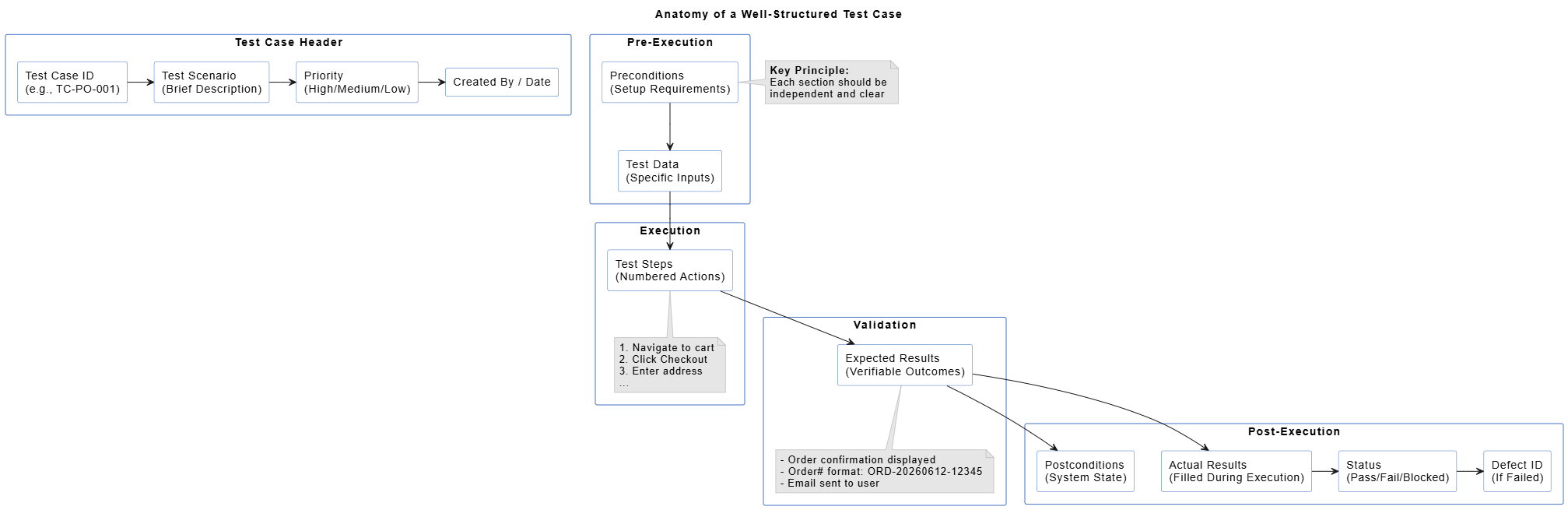
@startuml
skinparam backgroundColor white
skinparam packageStyle rectangle
skinparam rectangle {
  BackgroundColor White
  BorderColor #4472C4
  Shadowing false
}
skinparam note {
  BackgroundColor #E7E6E6
  BorderColor #A5A5A5
}

title Anatomy of a Well-Structured Test Case

package "Test Case Header" {
  rectangle "Test Case ID\n(e.g., TC-PO-001)" as ID
  rectangle "Test Scenario\n(Brief Description)" as SCENARIO
  rectangle "Priority\n(High/Medium/Low)" as PRIORITY
  rectangle "Created By / Date" as META
}

package "Pre-Execution" {
  rectangle "Preconditions\n(Setup Requirements)" as PRE
  rectangle "Test Data\n(Specific Inputs)" as DATA
}

package "Execution" {
  rectangle "Test Steps\n(Numbered Actions)" as STEPS
  note bottom of STEPS
    1. Navigate to cart
    2. Click Checkout
    3. Enter address
    ...
  end note
}

package "Validation" {
  rectangle "Expected Results\n(Verifiable Outcomes)" as EXPECTED
  note bottom of EXPECTED
    - Order confirmation displayed
    - Order# format: ORD-20260612-12345
    - Email sent to user
  end note
}

package "Post-Execution" {
  rectangle "Actual Results\n(Filled During Execution)" as ACTUAL
  rectangle "Status\n(Pass/Fail/Blocked)" as STATUS
  rectangle "Defect ID\n(If Failed)" as DEFECT
  rectangle "Postconditions\n(System State)" as POST
}

ID -right-> SCENARIO
SCENARIO -right-> PRIORITY
PRIORITY -right-> META

PRE -down-> DATA
DATA -down-> STEPS

STEPS -down-> EXPECTED

EXPECTED -down-> ACTUAL
ACTUAL -right-> STATUS
STATUS -right-> DEFECT
EXPECTED -down-> POST

note left of PRE
  <b>Key Principle:</b>
  Each section should be
  independent and clear
end note

@enduml

@startuml
skinparam backgroundColor white
skinparam rectangle {
  BackgroundColor White
  BorderColor Black
}
skinparam conditionStyle diamond

title Decision Table: Order Placement Logic

rectangle "Conditions" as CONDITIONS {
  rectangle "C1: Item In Stock?" as C1
  rectangle "C2: Valid Payment?" as C2
  rectangle "C3: Valid Address?" as C3
}

rectangle "Rules" as RULES {
  rectangle "R1: Y-Y-Y" as R1
  rectangle "R2: N-Y-Y" as R2
  rectangle "R3: Y-N-Y" as R3
  rectangle "R4: Y-Y-N" as R4
  rectangle "R5: N-N-Y" as R5
  rectangle "R6: N-Y-N" as R6
  rectangle "R7: Y-N-N" as R7
  rectangle "R8: N-N-N" as R8
}

rectangle "Actions" as ACTIONS {
  rectangle "A1: Create Order" as A1
  rectangle "A2: Error: Out of Stock" as A2
  rectangle "A3: Error: Payment Failed" as A3
  rectangle "A4: Error: Invalid Address" as A4
}

C1 -down-> R1
C1 -down-> R2
C1 -down-> R5
C1 -down-> R6

C2 -down-> R1
C2 -down-> R3
C2 -down-> R5
C2 -down-> R7

C3 -down-> R1
C3 -down-> R4
C3 -down-> R6
C3 -down-> R8

R1 -right-> A1
R2 -right-> A2
R3 -right-> A3
R4 -right-> A4
R5 -right-> A2
R6 -right-> A2
R7 -right-> A3
R8 -right-> A2

note right of R1
  <b>Test Case:</b> TC-PO-001
  <b>Type:</b> Positive
end note

note right of R3
  <b>Test Case:</b> TC-PO-002
  <b>Type:</b> Negative
end note

note right of R2
  <b>Test Case:</b> TC-PO-003
  <b>Type:</b> Negative
end note

@enduml
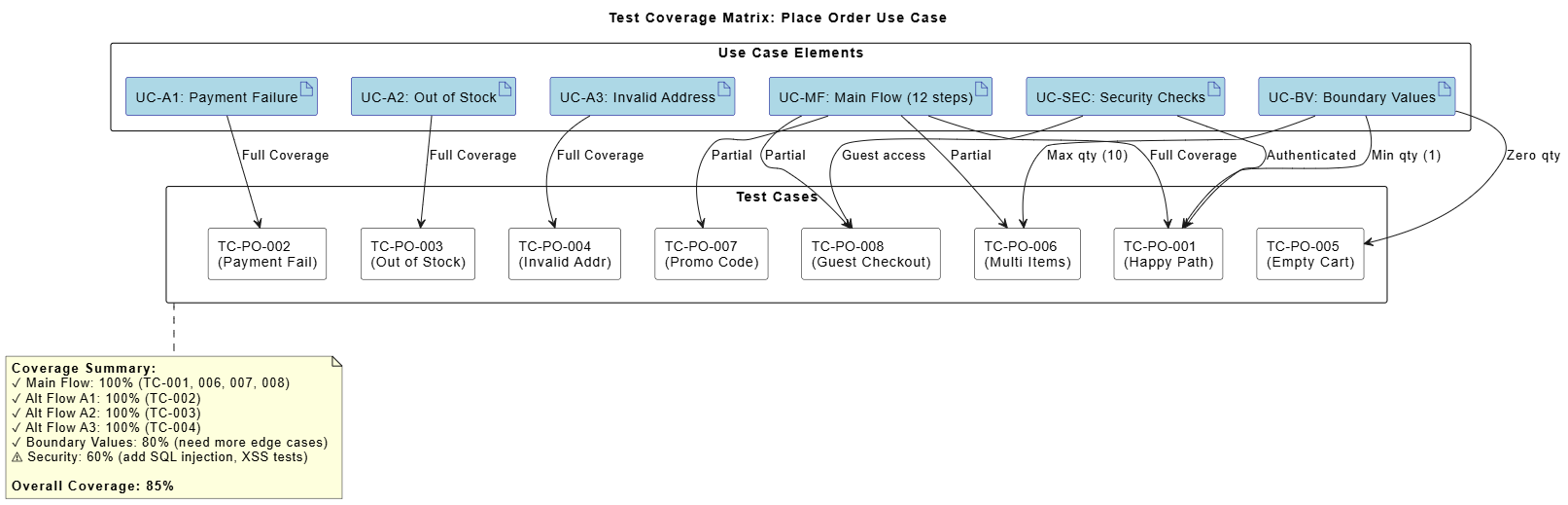
@startuml
skinparam backgroundColor white
skinparam rectangle {
  BackgroundColor White
  BorderColor Black
}
skinparam artifact {
  BackgroundColor LightBlue
  BorderColor DarkBlue
}

title Test Coverage Matrix: Place Order Use Case

rectangle "Use Case Elements" as UC_ELEMENTS {
  artifact "UC-MF: Main Flow (12 steps)" as MF
  artifact "UC-A1: Payment Failure" as A1
  artifact "UC-A2: Out of Stock" as A2
  artifact "UC-A3: Invalid Address" as A3
  artifact "UC-BV: Boundary Values" as BV
  artifact "UC-SEC: Security Checks" as SEC
}

rectangle "Test Cases" as TEST_CASES {
  rectangle "TC-PO-001\n(Happy Path)" as TC1
  rectangle "TC-PO-002\n(Payment Fail)" as TC2
  rectangle "TC-PO-003\n(Out of Stock)" as TC3
  rectangle "TC-PO-004\n(Invalid Addr)" as TC4
  rectangle "TC-PO-005\n(Empty Cart)" as TC5
  rectangle "TC-PO-006\n(Multi Items)" as TC6
  rectangle "TC-PO-007\n(Promo Code)" as TC7
  rectangle "TC-PO-008\n(Guest Checkout)" as TC8
}

MF --> TC1 : Full Coverage
MF --> TC6 : Partial
MF --> TC7 : Partial
MF --> TC8 : Partial

A1 --> TC2 : Full Coverage
A2 --> TC3 : Full Coverage
A3 --> TC4 : Full Coverage

BV --> TC1 : Min qty (1)
BV --> TC5 : Zero qty
BV --> TC6 : Max qty (10)

SEC --> TC1 : Authenticated
SEC --> TC8 : Guest access

note bottom of TEST_CASES
  <b>Coverage Summary:</b>
  ✓ Main Flow: 100% (TC-001, 006, 007, 008)
  ✓ Alt Flow A1: 100% (TC-002)
  ✓ Alt Flow A2: 100% (TC-003)
  ✓ Alt Flow A3: 100% (TC-004)
  ✓ Boundary Values: 80% (need more edge cases)
  ⚠ Security: 60% (add SQL injection, XSS tests)

  <b>Overall Coverage: 85%</b>
end note

@enduml
Use Case: User Login
Quick Test Cases:
- TC-LOG-001: Valid credentials (positive)
- TC-LOG-002: Invalid password (negative)
- TC-LOG-003: Non-existent username (negative)
- TC-LOG-004: Empty fields (negative)
- TC-LOG-005: SQL injection attempt (security)
- TC-LOG-006: Account locked after 5 failed attempts (boundary)
- TC-LOG-007: Remember me functionality (positive)
- TC-LOG-008: Login from new device (security)
Use Case: Upload Document
Boundary Value Tests:
- File size: 0 bytes, 1 byte, 9.9 MB, 10 MB (limit), 10.1 MB
- File types: .pdf, .docx, .jpg, .exe (invalid), .js (invalid)
- Filename: Normal name, 255 chars (max), 256 chars (overflow), special chars

Test Cases:
- TC-UPL-001: Valid PDF upload (1 MB)
- TC-UPL-002: Maximum size file (10 MB)
- TC-UPL-003: Oversized file (15 MB)
- TC-UPL-004: Invalid file type (.exe)
- TC-UPL-005: Empty file (0 bytes)
- TC-UPL-006: Multiple files upload (5 files)
- TC-UPL-007: Upload with special characters in filename
- TC-UPL-008: Interrupted upload (network loss)
Use Case: Product Search
Equivalence Partitions:
- Valid search: Single word, multiple words, phrase
- Invalid search: Empty string, special characters only, >100 chars

Test Cases:
- TC-SRC-001: Exact match search
- TC-SRC-002: Partial match search
- TC-SRC-003: No results found
- TC-SRC-004: Search with filters applied
- TC-SRC-005: Search with typo (fuzzy matching)
- TC-SRC-006: Empty search query
- TC-SRC-007: Very long search query (100+ chars)
- TC-SRC-008: Search with special characters
- TC-SRC-009: Search results pagination
- TC-SRC-010: Search result sorting
❌ Wrong: Only creating test cases for successful scenarios
✅ Right: Include negative tests, error handling, and edge cases
❌ Wrong: "System should work correctly"
✅ Right: "System displays success message 'Order Confirmed' with order number ORD-20260612-12345"
❌ Wrong: Assuming test environment is always ready
✅ Right: Explicitly state: "User must be logged in with active session"
❌ Wrong: Using production data or non-reusable data
✅ Right: Use parameterized data or data factories
❌ Wrong: Never updating test cases after creation
✅ Right: Review and update test cases when requirements change
❌ Wrong: Multiple test cases verifying the same thing
✅ Right: Consolidate redundant tests, ensure unique coverage
❌ Wrong: Treating all test cases equally
✅ Right: Assign priorities based on risk and business impact
Developing test cases from use cases is a systematic process that, when done correctly, ensures comprehensive test coverage and high-quality software delivery. By following the steps outlined in this guide—analyzing use cases, identifying test scenarios, designing detailed test cases, applying test design techniques, and reviewing for optimization—you can create robust test suites that catch defects early and validate that your application meets user needs.
Key takeaways:
Start with thorough use case analysis to understand all flows and variations
Create test scenarios for main flows, alternative flows, and edge cases
Write clear, specific test cases with verifiable expected results
Apply test design techniques like boundary value analysis and equivalence partitioning
Maintain traceability between use cases and test cases for impact analysis
Leverage modern tools like Visual Paradigm with AI features to accelerate the process by 70-80%
Continuously review and optimize your test suite for maintainability and effectiveness
The integration of AI-powered tools like Visual Paradigm transforms test case development from a tedious, time-consuming task into an efficient, intelligent process. These tools help identify gaps, generate comprehensive test cases, maintain traceability, and ensure quality—allowing QA teams to focus on strategic testing rather than repetitive documentation.
Remember: Great test cases are not just about finding bugs; they're about building confidence that your software delivers value to users. Invest time in developing thorough, well-structured test cases, and you'll reap the rewards in reduced defects, faster releases, and happier customers.
□ Use case analyzed completely (all flows identified)
□ Test scenarios cover main + all alternative flows
□ Boundary values identified and tested
□ Negative test cases included
□ Test steps are clear and actionable
□ Expected results are specific and verifiable
□ Test data is realistic and reusable
□ Preconditions are achievable
□ Priority assigned to each test case
□ Traceability to use case maintained
□ Peer review completed
□ Test cases stored in version-controlled repository
□ Automation candidates identified
□ Coverage metrics calculated and documented
By following this comprehensive guide and leveraging the power of AI-enhanced tools, you'll be well-equipped to develop high-quality test cases that ensure your software meets the highest standards of reliability and user satisfaction.

