
This guide provides a practical, step-by-step framework for identifying high-quality use cases. Drawing on established methodologies such as Constantine and Lockwood’s essential use case approach, Schneider and Winters’ user-centric modeling principles, and Agile Modeling (AM/AMDD) practices, you will learn how to elicit behaviors from stakeholders, validate candidates against core cohesion and value criteria, model them effectively, and iteratively refine them as your project evolves. Whether you are a business analyst, product owner, system architect, or developer, this guide equips you with the techniques, validation checklists, and mindset needed to build use case models that are lean, stakeholder-aligned, and firmly rooted in real-world needs.
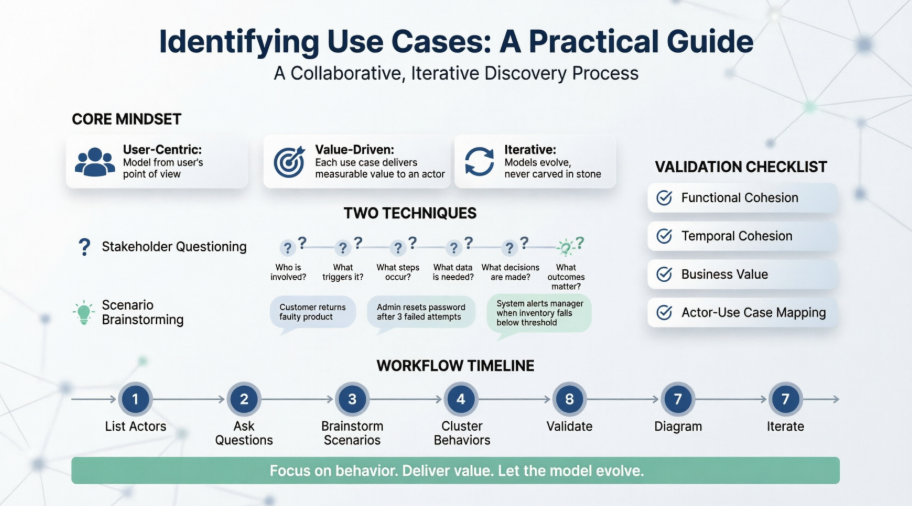
Use case modeling is a foundational practice for capturing behavioral requirements from the user’s perspective. Unlike functional specifications or technical designs, use cases describe what a system must do to deliver measurable value to its actors. This guide synthesizes established practices (Constantine & Lockwood, Schneider & Winters, Agile Modeling/AMDD principles) into a structured, actionable process for identifying use cases effectively.
Model from the user’s point of view, not the developer’s. Your goal is to capture how users will interact with the system to fulfill real-world needs.
Avoid technical assumptions, UI layouts, or implementation details at this stage. Focus on essential behavior.
Start by listing all roles (not individuals) that will interact with the system:
Primary actors: Those who initiate actions to achieve a goal (e.g., Student, Professor, Registrar).
Secondary actors: External systems or roles that support or are invoked by the system (e.g., Payment Gateway, Notification Service).
Note: An “actors-first” approach is highly effective, though you may also start with a single actor and expand outward. Both are valid; stay flexible.
Use two complementary techniques to uncover potential use cases. You may apply one, the other, or both.
Ask stakeholders the following questions from each actor’s perspective:
| Question | Purpose |
|---|---|
| What are users in this role trying to accomplish? | Identify core goals |
| What do users need to be able to do to fulfill this role? | Surface required capabilities |
| What are the main tasks of users in this role? | Reveal recurring workflows |
| What information do users need to examine, create, or change? | Highlight data interactions |
| What do users need to be informed of by the system? | Capture system-to-user communications |
| What do users need to inform the system about? | Capture user-to-system inputs |
Example (Student Actor):
Enroll in, drop, pass, or fail seminars
View available seminars & prerequisites
Obtain transcripts, schedules, fee statements
Pay fees, receive loans/grants, process reimbursements
Receive notifications about room/time changes or cancellations
Provide/update personal contact information
Facilitate workshops where stakeholders describe real-world situations the system should (or should not) support.
Focus on behavioral outcomes, not technical constraints.
Examples:
A student tries to enroll in a seminar but lacks prerequisites.
A professor requests a seminar list for all courses they teach.
A student wants to drop a seminar the day after the official drop deadline.
A researcher applies for a grant and receives only partial funding.
💡 Tip: Combine both techniques. Questions ensure completeness; scenarios ground requirements in reality.
Group elicited behaviors into preliminary use cases, then validate them against core quality criteria.
| Criterion | Description | How to Apply |
|---|---|---|
| Functional Cohesion | One use case = one cohesive service that delivers clear value | Split Enroll in Seminar and Drop Seminar into separate use cases |
| Temporal Cohesion | Steps occur within a contiguous time period without long pauses or restarts | Avoid bundling Enroll → Attend → Pass into one use case; the waiting periods break temporal cohesion |
| Business Value | Must provide measurable value to at least one actor | If it doesn’t deliver value, it’s likely a step inside a use case, not a use case itself |
| Actor-Use Case Mapping | Every actor ↔ at least one use case; every use case ↔ at least one actor | Remove orphaned actors or valueless use cases |
| Repetition Handling | Multiple invocations are normal | A student enrolling in 5 seminars doesn’t require 5 use cases; one Enroll in Seminar invoked multiple times suffices |
📌 Remember: Use cases are not system functions. A need like “available seminar list” may be a function, but in use case modeling, it’s often just a reference or data element within a larger use case (e.g., Browse Seminars).
Use case diagrams provide a high-level overview. The real depth lives in the written use case specifications.
Keep diagrams small & simple → Favor multiple focused diagrams over one massive view.
Draw associations between actors and use cases → Omit arrowheads to prevent confusion with data flow.
System boundary box is optional → Include only if you need to explicitly mark out-of-scope use cases.
Do not model time or sequence → Use case diagrams show capabilities, not order. Use UML State Machine or Activity diagrams for lifecycle/flow.
Use a subset of UML notation → Essential modeling strips away non-essential syntax to keep focus on behavior.
Expect evolution → Models are living artifacts. Refactor, merge, split, or discard use cases as understanding deepens.
📝 Naming Convention: Use Verb + Noun format (e.g., Enroll in Seminar, Record Student Marks). Consistency is helpful, but agile modeling embraces “just barely good enough” → prioritize clarity over perfection in early drafts.
| Practice | Why It Matters |
|---|---|
| Breadth-first approach | Paint a wide picture first to understand scope, then dive into details iteratively. |
| Model with others | Collaborate with stakeholders, domain experts, and developers. Flexibility > rigid process. |
| Requirements-first mindset | No requirements = nothing to build. Software must solve real stakeholder needs. |
| Essential over concrete | Delay technological decisions. Record Student Marks could be web-based, form-based, or API-driven → the use case remains valid regardless. |
| Incremental refinement | Initial use cases are preliminary. Expect to refactor as you learn more. |
| Pitfall | Consequence | Solution |
|---|---|---|
| Confusing use cases with functions/features | Overly granular or technical models | Validate against “measurable value to actor” |
| Adding UI/tech details prematurely | Locks design too early | Stick to essential, technology-agnostic behavior |
| Trying to show sequence/time in diagrams | Clutters diagrams, misuses UML | Move ordering logic to state/activity diagrams |
| Building massive, monolithic diagrams | Hard to read, maintain, or discuss | Split by actor, domain, or release scope |
| Perfectionism in early drafts | Slows progress, discourages iteration | Embrace “good enough” → refine later |
List actors (roles, not people)
Ask the 6 essential questions per actor
Brainstorm usage scenarios with stakeholders
Cluster behaviors into candidate use cases
Validate against functional/temporal cohesion, business value, and actor mapping
Sketch lightweight use case diagrams (no arrows, small scope, essential focus)
Iterate → refactor, split, merge, or retire use cases as the project evolves
Document → expand validated use cases into detailed specifications for development
Identifying use cases is not a one-time documentation exercise. It’s a collaborative, iterative discovery process that aligns system capabilities with real user goals. By starting broad, validating against cohesion and value, keeping diagrams lean, and embracing evolutionary refinement, you ensure that your use cases remain actionable, stakeholder-aligned, and development-ready.
“If there are no requirements, then you are done because you have nothing to build.”
Focus on behavior, deliver value, and let the model evolve with your project.
For next steps: Once use cases are identified, transition to writing detailed use case specifications (basic flow, alternate flows, exceptions, pre/post-conditions) and link them to traceable requirements and test cases.

