
ArchiMate is an open and independent enterprise architecture (EA) modeling language maintained by The Open Group. It provides a uniform representation for diagrams that describe enterprise architectures, enabling clear communication between stakeholders across business, application, technology, and strategy domains.
With the advent of Diagram as Code approaches using tools like VPasCode and Visual Paradigm, EA teams can now create, version, and collaborate on ArchiMate models more efficiently—making the modeling process more agile, AI-friendly, and integrated into modern DevOps workflows.
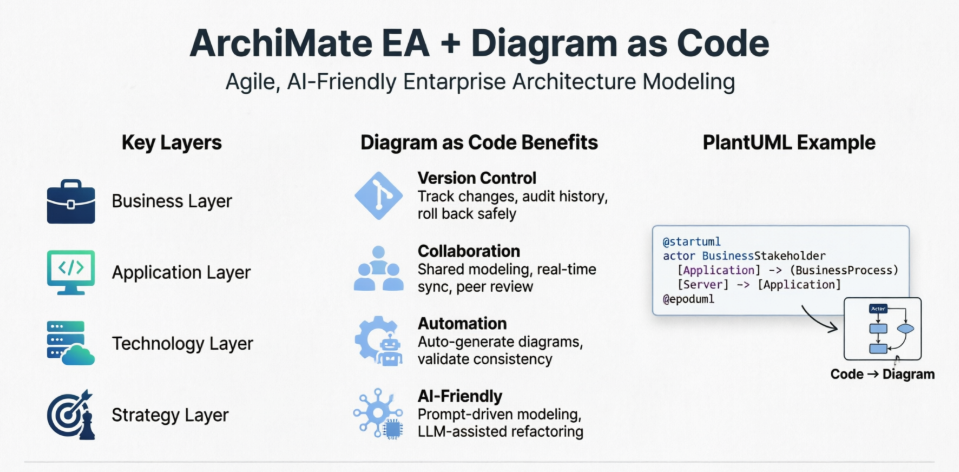
ArchiMate organizes concepts into three primary layers:
Additionally, there are cross-layer concepts:
ArchiMate defines several relationship types:
Viewpoints define subsets of the language relevant to specific stakeholders:
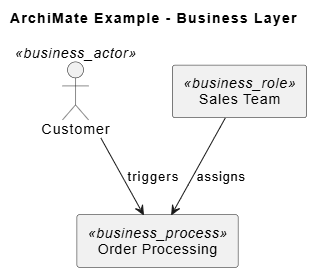
@startuml
skinparam backgroundColor white
title ArchiMate Example - Business Layer

' Define Business Layer Elements
actor "Customer" as Customer <<business_actor>>
rectangle "Order Processing" as OrderProcess <<business_process>>
rectangle "Sales Team" as SalesTeam <<business_role>>

' Define Relationships
Customer --> OrderProcess : triggers
SalesTeam --> OrderProcess : assigns

@enduml
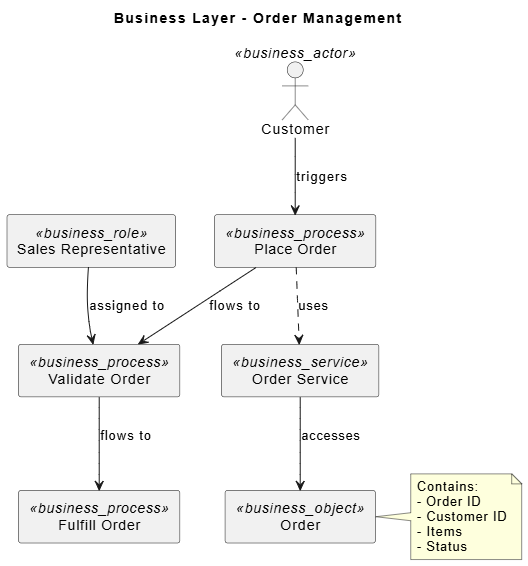
@startuml
skinparam backgroundColor white
title Business Layer - Order Management

' Business Actors and Roles
actor "Customer" as Customer <<business_actor>>
rectangle "Sales Representative" as SalesRep <<business_role>>

' Business Processes
rectangle "Place Order" as PlaceOrder <<business_process>>
rectangle "Validate Order" as ValidateOrder <<business_process>>
rectangle "Fulfill Order" as FulfillOrder <<business_process>>

' Business Services
rectangle "Order Service" as OrderService <<business_service>>

' Business Objects
rectangle "Order" as OrderObj <<business_object>>

' Relationships
Customer --> PlaceOrder : triggers
PlaceOrder --> ValidateOrder : flows to
ValidateOrder --> FulfillOrder : flows to
SalesRep --> ValidateOrder : assigned to
OrderService --> OrderObj : accesses
PlaceOrder ..> OrderService : uses

note right of OrderObj
  Contains:
  - Order ID
  - Customer ID
  - Items
  - Status
end note

@enduml
Looking for a powerful, free diagram-as-code tool? Effortlessly render PlantUML, Mermaid, Graphviz, and 20+ programming languages in real time—powered by instant AI error fixing and automatic format detection.
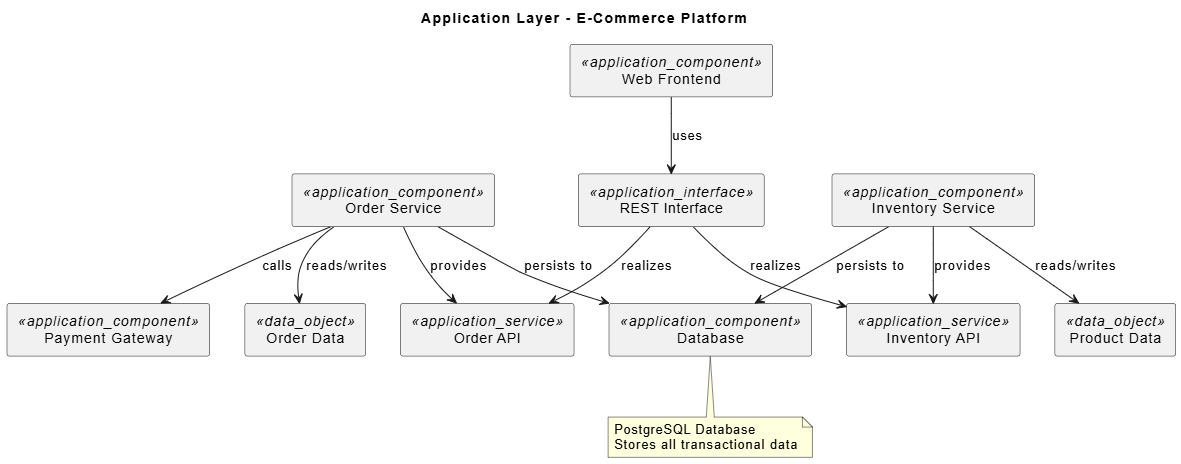
@startuml
skinparam backgroundColor white
title Application Layer - E-Commerce Platform

' Application Components
rectangle "Web Frontend" as WebFront <<application_component>>
rectangle "Order Service" as OrderSvc <<application_component>>
rectangle "Inventory Service" as InventorySvc <<application_component>>
rectangle "Payment Gateway" as PaymentGW <<application_component>>
rectangle "Database" as DB <<application_component>>

' Application Services
rectangle "Order API" as OrderAPI <<application_service>>
rectangle "Inventory API" as InventoryAPI <<application_service>>

' Application Interfaces
rectangle "REST Interface" as RESTInterface <<application_interface>>

' Data Objects
rectangle "Order Data" as OrderData <<data_object>>
rectangle "Product Data" as ProductData <<data_object>>

' Relationships
WebFront --> RESTInterface : uses
RESTInterface --> OrderAPI : realizes
RESTInterface --> InventoryAPI : realizes
OrderSvc --> OrderAPI : provides
InventorySvc --> InventoryAPI : provides
OrderSvc --> OrderData : reads/writes
InventorySvc --> ProductData : reads/writes
OrderSvc --> PaymentGW : calls
OrderSvc --> DB : persists to
InventorySvc --> DB : persists to

note bottom of DB
  PostgreSQL Database
  Stores all transactional data
end note

@enduml
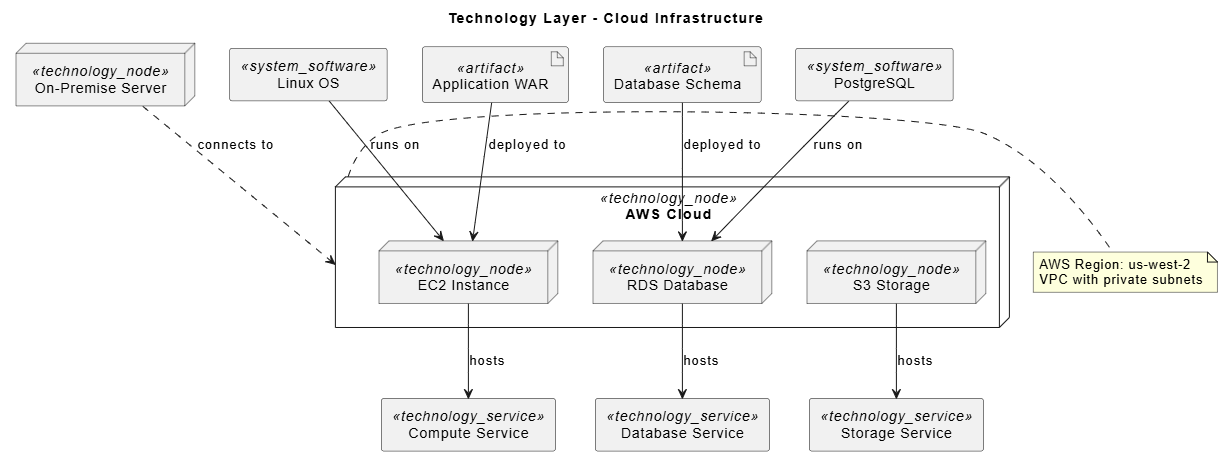
@startuml
skinparam backgroundColor white
title Technology Layer - Cloud Infrastructure

' Technology Nodes
node "AWS Cloud" as AWSCloud <<technology_node>> {
  node "EC2 Instance" as EC2 <<technology_node>>
  node "RDS Database" as RDS <<technology_node>>
  node "S3 Storage" as S3 <<technology_node>>
}

node "On-Premise Server" as OnPrem <<technology_node>>

' Technology Services
rectangle "Compute Service" as ComputeSvc <<technology_service>>
rectangle "Database Service" as DBSvc <<technology_service>>
rectangle "Storage Service" as StorageSvc <<technology_service>>

' System Software
rectangle "Linux OS" as Linux <<system_software>>
rectangle "PostgreSQL" as PostgreSQL <<system_software>>

' Artifacts
artifact "Application WAR" as AppWAR <<artifact>>
artifact "Database Schema" as DBSchema <<artifact>>

' Relationships
EC2 --> ComputeSvc : hosts
RDS --> DBSvc : hosts
S3 --> StorageSvc : hosts
Linux --> EC2 : runs on
PostgreSQL --> RDS : runs on
AppWAR --> EC2 : deployed to
DBSchema --> RDS : deployed to
OnPrem ..> AWSCloud : connects to

note right of AWSCloud
  AWS Region: us-west-2
  VPC with private subnets
end note

@enduml
@startuml
skinparam backgroundColor white
title Cross-Layer View - Order Processing End-to-End

' === BUSINESS LAYER ===
actor "Customer" as Customer <<business_actor>>
rectangle "Place Order" as BizPlaceOrder <<business_process>>
rectangle "Order" as BizOrder <<business_object>>

' === APPLICATION LAYER ===
rectangle "Web Application" as WebApp <<application_component>>
rectangle "Order Service" as AppOrderSvc <<application_component>>
rectangle "Order API" as OrderAPI <<application_service>>

' === TECHNOLOGY LAYER ===
node "Cloud Server" as CloudServer <<technology_node>>
rectangle "Java Runtime" as JavaRT <<system_software>>

' === CROSS-LAYER RELATIONSHIPS ===
' Business to Application
Customer --> BizPlaceOrder : triggers
BizPlaceOrder ..> WebApp : realized by
WebApp --> OrderAPI : uses
AppOrderSvc --> OrderAPI : provides

' Application to Technology
AppOrderSvc --> CloudServer : deployed on
JavaRT --> CloudServer : runs on
AppOrderSvc --> JavaRT : runs on

' Data Flow
BizOrder <.. AppOrderSvc : accessed by

note left of Customer
Initiates order via
web interface
end note

note right of CloudServer
AWS EC2 Instance
t3.medium
end note

@enduml
@startuml
skinparam backgroundColor white
title Cross-Layer View - Order Processing End-to-End

' === BUSINESS LAYER ===
actor "Customer" as Customer <<business_actor>>
rectangle "Place Order" as BizPlaceOrder <<business_process>>
rectangle "Order" as BizOrder <<business_object>>

' === APPLICATION LAYER ===
rectangle "Web Application" as WebApp <<application_component>>
rectangle "Order Service" as AppOrderSvc <<application_component>>
rectangle "Order API" as OrderAPI <<application_service>>

' === TECHNOLOGY LAYER ===
node "Cloud Server" as CloudServer <<technology_node>>
rectangle "Java Runtime" as JavaRT <<system_software>>

' === CROSS-LAYER RELATIONSHIPS ===
' Business to Application
Customer --> BizPlaceOrder : triggers
BizPlaceOrder ..> WebApp : realized by
WebApp --> OrderAPI : uses
AppOrderSvc --> OrderAPI : provides

' Application to Technology
AppOrderSvc --> CloudServer : deployed on
JavaRT --> CloudServer : runs on
AppOrderSvc --> JavaRT : runs on

' Data Flow
BizOrder <.. AppOrderSvc : accessed by

note left of Customer
  Initiates order via
  web interface
end note

note right of CloudServer
  AWS EC2 Instance
  t3.medium
end note

@enduml
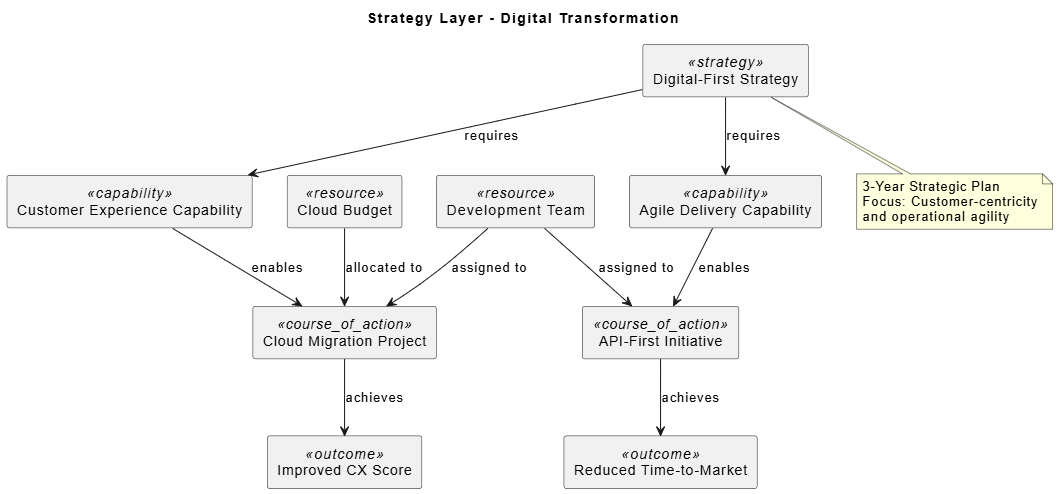
@startuml
skinparam backgroundColor white
title Strategy Layer - Digital Transformation

' Strategy Elements
rectangle "Digital-First Strategy" as Strategy <<strategy>>
rectangle "Customer Experience Capability" as CustExpCap <<capability>>
rectangle "Agile Delivery Capability" as AgileCap <<capability>>
rectangle "Cloud Migration Project" as CloudProject <<course_of_action>>
rectangle "API-First Initiative" as APIInitiative <<course_of_action>>

' Resources
rectangle "Development Team" as DevTeam <<resource>>
rectangle "Cloud Budget" as CloudBudget <<resource>>

' Outcomes
rectangle "Improved CX Score" as CXOutcome <<outcome>>
rectangle "Reduced Time-to-Market" as TTMOutcome <<outcome>>

' Relationships
Strategy --> CustExpCap : requires
Strategy --> AgileCap : requires
CustExpCap --> CloudProject : enables
AgileCap --> APIInitiative : enables
DevTeam --> CloudProject : assigned to
DevTeam --> APIInitiative : assigned to
CloudBudget --> CloudProject : allocated to
CloudProject --> CXOutcome : achieves
APIInitiative --> TTMOutcome : achieves

note bottom of Strategy
  3-Year Strategic Plan
  Focus: Customer-centricity
  and operational agility
end note

@enduml
' Good
rectangle "Order Processing Service" as OrderProcSvc <<application_service>>

' Avoid
rectangle "svc1" as s1 <<application_service>>
package "Business Layer" {
  actor "Customer" as Customer <<business_actor>>
  rectangle "Order Process" as OrderProc <<business_process>>
}

package "Application Layer" {
  rectangle "Order Service" as OrderSvc <<application_component>>
}
Define common elements in separate files and include them:
!include common_business_elements.puml
!include common_application_elements.puml
rectangle "Critical Service" as CriticalSvc <<application_service>> #FF6B6B
rectangle "Standard Service" as StandardSvc <<application_service>> #4ECDC4
note right of Element
  Detailed description,
  assumptions, and constraints
end note
Store PlantUML files in Git with meaningful commit messages:
git add architecture/order_processing.puml
git commit -m "Add Order Processing cross-layer view v1.2"
Generate diagrams automatically on code changes:
# .github/workflows/generate-diagrams.yml
name: Generate ArchiMate Diagrams
on: [push]
jobs:
  generate:
    runs-on: ubuntu-latest
    steps:
      - uses: actions/checkout@v3
      - name: Generate PNG diagrams
        run: |
          docker run -v $(pwd):/data plantuml/plantuml /data/*.puml
      - name: Upload artifacts
        uses: actions/upload-artifact@v3
        with:
          name: diagrams
          path: "*.png"
Combine PlantUML diagrams with Markdown documentation:
# Order Processing Architecture
## Business Process Flow

## Application Components

Use AI tools to:
Example prompt for AI:
Generate an ArchiMate PlantUML diagram for a customer onboarding process
that includes business actors (Customer, Sales Rep), business processes
(Submit Application, Verify Identity, Create Account), application
components (CRM System, Identity Verification Service), and their
relationships.
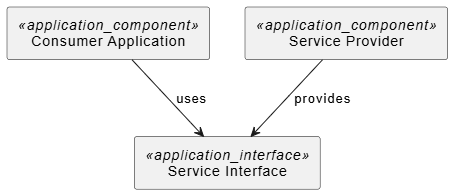
@startuml
rectangle "Consumer Application" as Consumer <<application_component>>
rectangle "Service Interface" as ServiceInterface <<application_interface>>
rectangle "Service Provider" as Provider <<application_component>>

Consumer --> ServiceInterface : uses
Provider --> ServiceInterface : provides
@enduml
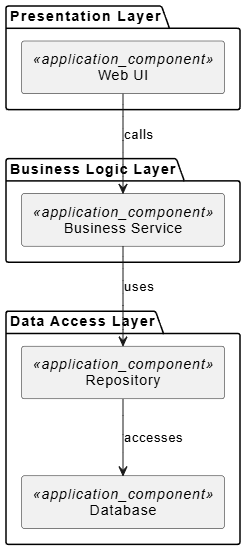
@startuml
package "Presentation Layer" {
  rectangle "Web UI" as WebUI <<application_component>>
}

package "Business Logic Layer" {
  rectangle "Business Service" as BizSvc <<application_component>>
}

package "Data Access Layer" {
  rectangle "Repository" as Repo <<application_component>>
  rectangle "Database" as DB <<application_component>>
}

WebUI --> BizSvc : calls
BizSvc --> Repo : uses
Repo --> DB : accesses
@enduml
@startuml
rectangle "Order Service" as OrderSvc <<application_component>>
rectangle "Order Created Event" as OrderEvent <<application_event>>
rectangle "Inventory Service" as InventorySvc <<application_component>>
rectangle "Notification Service" as NotifSvc <<application_component>>

OrderSvc --> OrderEvent : publishes
OrderEvent --> InventorySvc : triggers
OrderEvent --> NotifSvc : triggers
@enduml
ArchiMate provides a powerful, standardized language for enterprise architecture modeling. By combining ArchiMate with Diagram as Code approaches using PlantUML, EA teams can:
✅ Increase agility through version-controlled, collaborative modeling
✅ Improve consistency with reusable templates and standards
✅ Enable automation via CI/CD integration
✅ Leverage AI for faster diagram generation and review
✅ Maintain documentation that stays synchronized with implementation
This approach bridges the gap between traditional EA practices and modern software development methodologies, making enterprise architecture more accessible, maintainable, and valuable to the organization.

