
ArchiMate is an open enterprise architecture modeling language maintained by The Open Group. It provides a standardized way to describe, analyze, and visualize the relationships among business domains in an unambiguous manner. ArchiMate helps stakeholders understand complex systems by offering different viewpoints—each tailored to specific concerns and audiences.
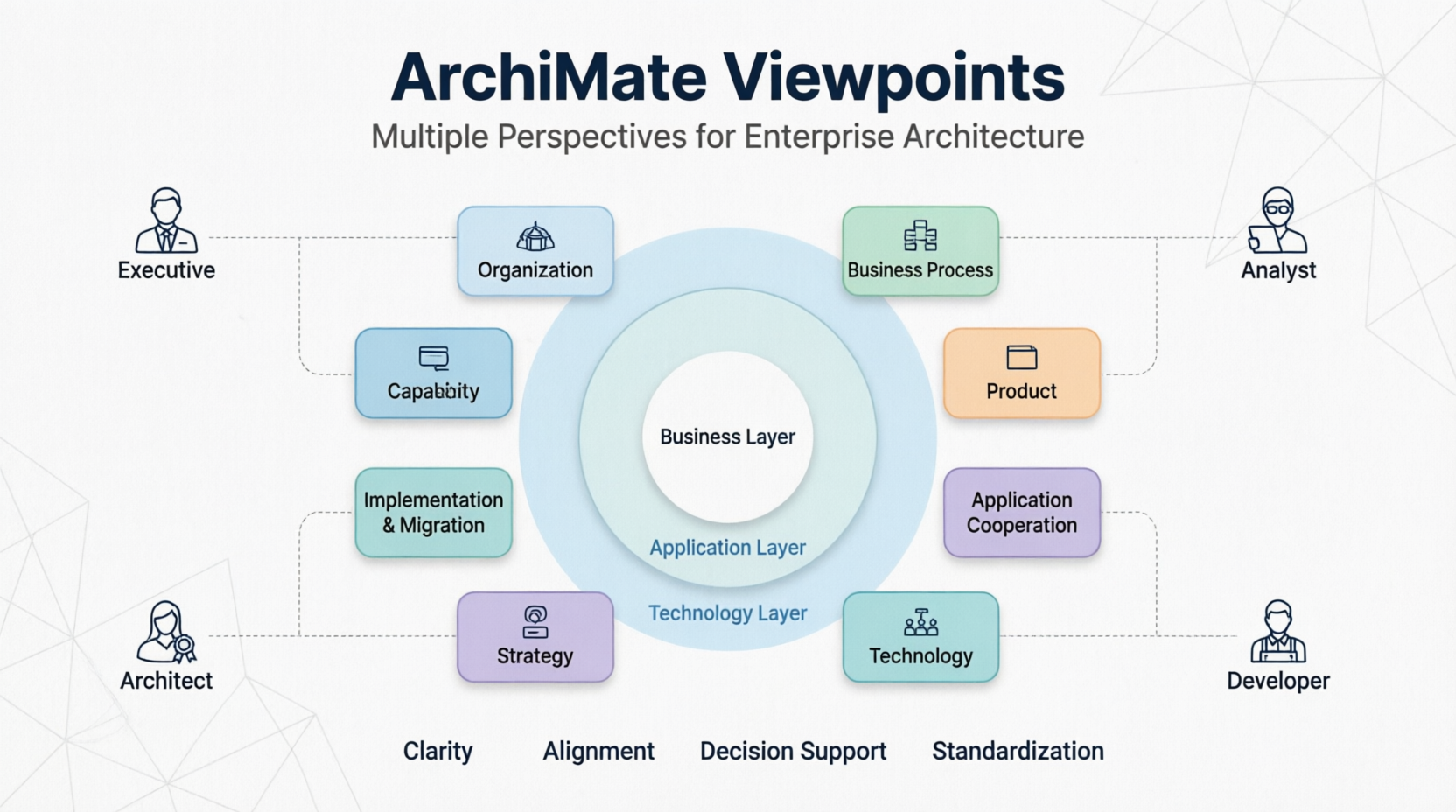
ArchiMate organizes elements into three main layers:
Each layer addresses three aspects:
ArchiMate defines various relationship types:
A viewpoint is a subset of the ArchiMate language tailored for a specific stakeholder concern. Each viewpoint:
A viewpoint is a focused perspective on the enterprise architecture that addresses specific stakeholder concerns. Think of it as a "lens" through which you view the architecture.
Purpose: Shows organizational structure and responsibilities
Audience: Business managers, HR
Elements: Business actors, roles, collaborations
Use Case: Organizational restructuring, role clarity
Purpose: Illustrates business processes and their interactions
Audience: Business analysts, process owners
Elements: Business processes, functions, services, events
Use Case: Process optimization, workflow analysis
Purpose: Shows products/services offered to customers
Audience: Marketing, sales, product managers
Elements: Products, services, value streams
Use Case: Product portfolio management, service design
Purpose: Depicts how applications interact
Audience: Application architects, developers
Elements: Application components, interfaces, services
Use Case: Integration planning, API design
Purpose: Shows how applications support business processes
Audience: Business-IT liaison, solution architects
Elements: Business processes, application services, applications
Use Case: Digital transformation, application rationalization
Purpose: Illustrates technology infrastructure
Audience: Infrastructure architects, IT operations
Elements: Nodes, devices, system software, networks
Use Case: Infrastructure planning, cloud migration
Purpose: Shows transition from current to target architecture
Audience: Project managers, program managers
Elements: Work packages, deliverables, plateaus
Use Case: Roadmap planning, project sequencing
Purpose: Captures strategic goals and capabilities
Audience: C-level executives, strategy teams
Elements: Goals, outcomes, capabilities, resources
Use Case: Strategic planning, capability assessment
Purpose: Models physical structures and locations
Audience: Facility managers, logistics planners
Elements: Locations, equipment, materials
Use Case: Supply chain optimization, facility planning
Purpose: Shows relationships across all layers
Audience: Enterprise architects, senior management
Elements: Cross-layer elements and relationships
Use Case: End-to-end traceability, impact analysis
Scenario: A retail company wants to transform its customer experience through digital channels.
Relevant Viewpoints:
Scenario: Two companies are merging and need to integrate their IT systems.
Relevant Viewpoints:
Scenario: A financial institution must comply with new data privacy regulations.
Relevant Viewpoints:
PlantUML supports ArchiMate notation through specialized syntax. Below are comprehensive examples for each major viewpoint.
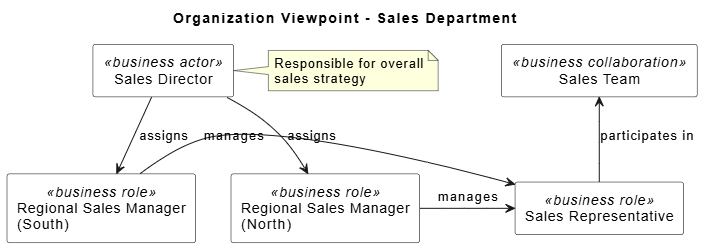
@startuml
skinparam backgroundColor white
skinparam shadowing false

' Define styles
skinparam rectangle {
  BackgroundColor White
  BorderColor Black
}

title Organization Viewpoint - Sales Department

rectangle "Sales Director" as SD <<business actor>> {
}

rectangle "Regional Sales Manager\n(North)" as RSM_N <<business role>> {
}

rectangle "Regional Sales Manager\n(South)" as RSM_S <<business role>> {
}

rectangle "Sales Representative" as SR <<business role>> {
}

rectangle "Sales Team" as ST <<business collaboration>> {
}

' Relationships
SD -down-> RSM_N : assigns
SD -down-> RSM_S : assigns
RSM_N -right-> SR : manages
RSM_S -right-> SR : manages
SR -up-> ST : participates in

note right of SD
  Responsible for overall
  sales strategy
end note

@enduml
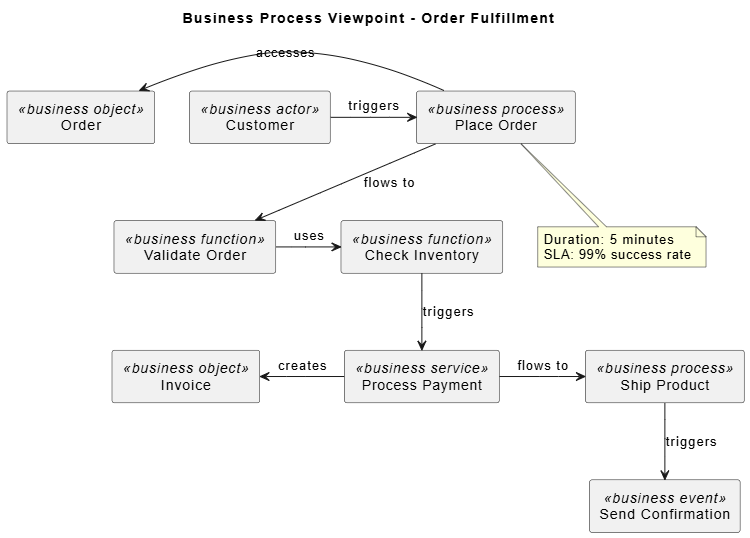
@startuml
skinparam backgroundColor white

title Business Process Viewpoint - Order Fulfillment

rectangle "Customer" as Customer <<business actor>>
rectangle "Place Order" as PlaceOrder <<business process>>
rectangle "Validate Order" as ValidateOrder <<business function>>
rectangle "Check Inventory" as CheckInventory <<business function>>
rectangle "Process Payment" as ProcessPayment <<business service>>
rectangle "Ship Product" as ShipProduct <<business process>>
rectangle "Send Confirmation" as SendConfirmation <<business event>>

rectangle "Order" as Order <<business object>>
rectangle "Invoice" as Invoice <<business object>>

' Flow relationships
Customer -right-> PlaceOrder : triggers
PlaceOrder -down-> ValidateOrder : flows to
ValidateOrder -right-> CheckInventory : uses
CheckInventory -down-> ProcessPayment : triggers
ProcessPayment -right-> ShipProduct : flows to
ShipProduct -down-> SendConfirmation : triggers

' Access relationships
PlaceOrder -left-> Order : accesses
ProcessPayment -left-> Invoice : creates

note bottom of PlaceOrder
  Duration: 5 minutes
  SLA: 99% success rate
end note

@enduml
@startuml
skinparam backgroundColor white

title Product Viewpoint - Cloud Services Portfolio

rectangle "Cloud Platform\nProvider" as Provider <<business actor>>

rectangle "Enterprise Cloud\nSuite" as ECS <<product>>
rectangle "SME Cloud\nPackage" as SCP <<product>>
rectangle "Developer\nToolkit" as DT <<product>>

rectangle "Compute Service" as Compute <<business service>>
rectangle "Storage Service" as Storage <<business service>>
rectangle "Analytics Service" as Analytics <<business service>>
rectangle "API Gateway" as APIGW <<business service>>

' Composition
Provider -down-> ECS : offers
Provider -down-> SCP : offers
Provider -down-> DT : offers

' Service composition
ECS -right-> Compute : includes
ECS -right-> Storage : includes
ECS -right-> Analytics : includes
SCP -right-> Compute : includes
SCP -right-> Storage : includes
DT -right-> APIGW : includes
DT -right-> Compute : includes

note right of ECS
Target: Large enterprises
Price: Custom pricing
end note

note right of SCP
Target: Small-medium businesses
Price: $99/month
end note

@enduml
@startuml
skinparam backgroundColor white

title Product Viewpoint - Cloud Services Portfolio

rectangle "Cloud Platform\nProvider" as Provider <<business actor>>

rectangle "Enterprise Cloud\nSuite" as ECS <<product>>
rectangle "SME Cloud\nPackage" as SCP <<product>>
rectangle "Developer\nToolkit" as DT <<product>>

rectangle "Compute Service" as Compute <<business service>>
rectangle "Storage Service" as Storage <<business service>>
rectangle "Analytics Service" as Analytics <<business service>>
rectangle "API Gateway" as APIGW <<business service>>

' Composition
Provider -down-> ECS : offers
Provider -down-> SCP : offers
Provider -down-> DT : offers

' Service composition
ECS -right-> Compute : includes
ECS -right-> Storage : includes
ECS -right-> Analytics : includes
SCP -right-> Compute : includes
SCP -right-> Storage : includes
DT -right-> APIGW : includes
DT -right-> Compute : includes

note right of ECS
  Target: Large enterprises
  Price: Custom pricing
end note

note right of SCP
  Target: Small-medium businesses
  Price: $99/month
end note

@enduml
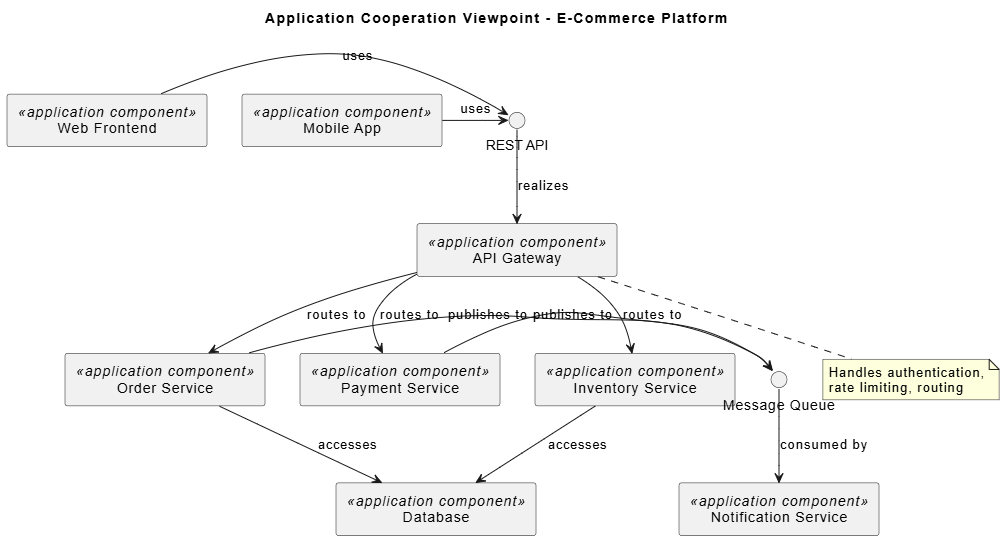
@startuml
skinparam backgroundColor white

title Application Cooperation Viewpoint - E-Commerce Platform

rectangle "Web Frontend" as WebFront <<application component>>
rectangle "Mobile App" as MobileApp <<application component>>
rectangle "API Gateway" as APIGateway <<application component>>
rectangle "Order Service" as OrderSvc <<application component>>
rectangle "Payment Service" as PaymentSvc <<application component>>
rectangle "Inventory Service" as InventorySvc <<application component>>
rectangle "Notification Service" as NotifSvc <<application component>>
rectangle "Database" as DB <<application component>>

' Interfaces
interface "REST API" as REST
interface "Message Queue" as MQ

' Relationships
WebFront -right-> REST : uses
MobileApp -right-> REST : uses
REST -down-> APIGateway : realizes
APIGateway -down-> OrderSvc : routes to
APIGateway -down-> PaymentSvc : routes to
APIGateway -down-> InventorySvc : routes to

OrderSvc -right-> MQ : publishes to
PaymentSvc -right-> MQ : publishes to
MQ -down-> NotifSvc : consumed by

OrderSvc -down-> DB : accesses
InventorySvc -down-> DB : accesses

note bottom of APIGateway
  Handles authentication,
  rate limiting, routing
end note

@enduml
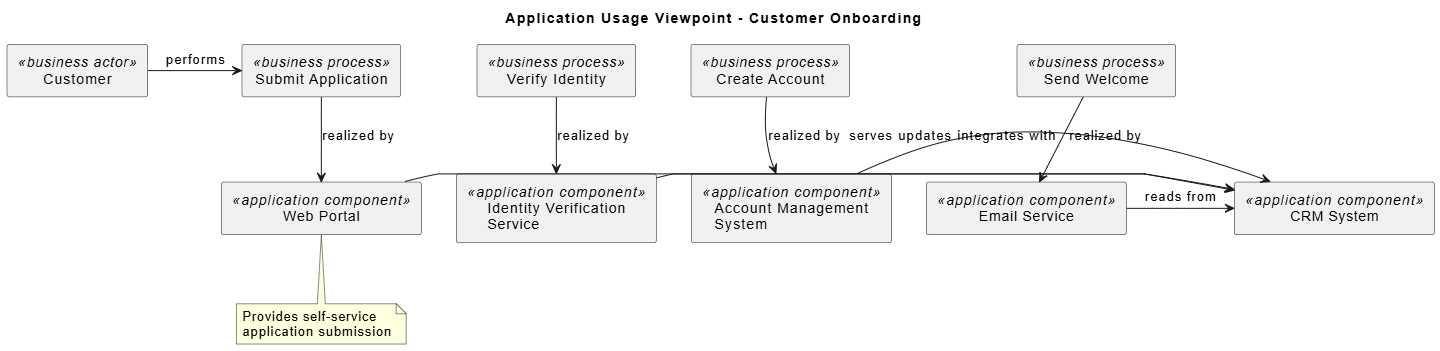
@startuml
skinparam backgroundColor white

title Application Usage Viewpoint - Customer Onboarding

rectangle "Customer" as Customer <<business actor>>
rectangle "Submit Application" as SubmitApp <<business process>>
rectangle "Verify Identity" as VerifyID <<business process>>
rectangle "Create Account" as CreateAccount <<business process>>
rectangle "Send Welcome" as SendWelcome <<business process>>

rectangle "Web Portal" as WebPortal <<application component>>
rectangle "CRM System" as CRM <<application component>>
rectangle "Identity Verification\nService" as IDVerify <<application component>>
rectangle "Account Management\nSystem" as AMS <<application component>>
rectangle "Email Service" as EmailSvc <<application component>>

' Business process to application service mapping
Customer -right-> SubmitApp : performs
SubmitApp -down-> WebPortal : realized by
WebPortal -right-> CRM : serves

VerifyID -down-> IDVerify : realized by
IDVerify -right-> CRM : updates

CreateAccount -down-> AMS : realized by
AMS -right-> CRM : integrates with

SendWelcome -down-> EmailSvc : realized by
EmailSvc -right-> CRM : reads from

note bottom of WebPortal
  Provides self-service
  application submission
end note

@enduml
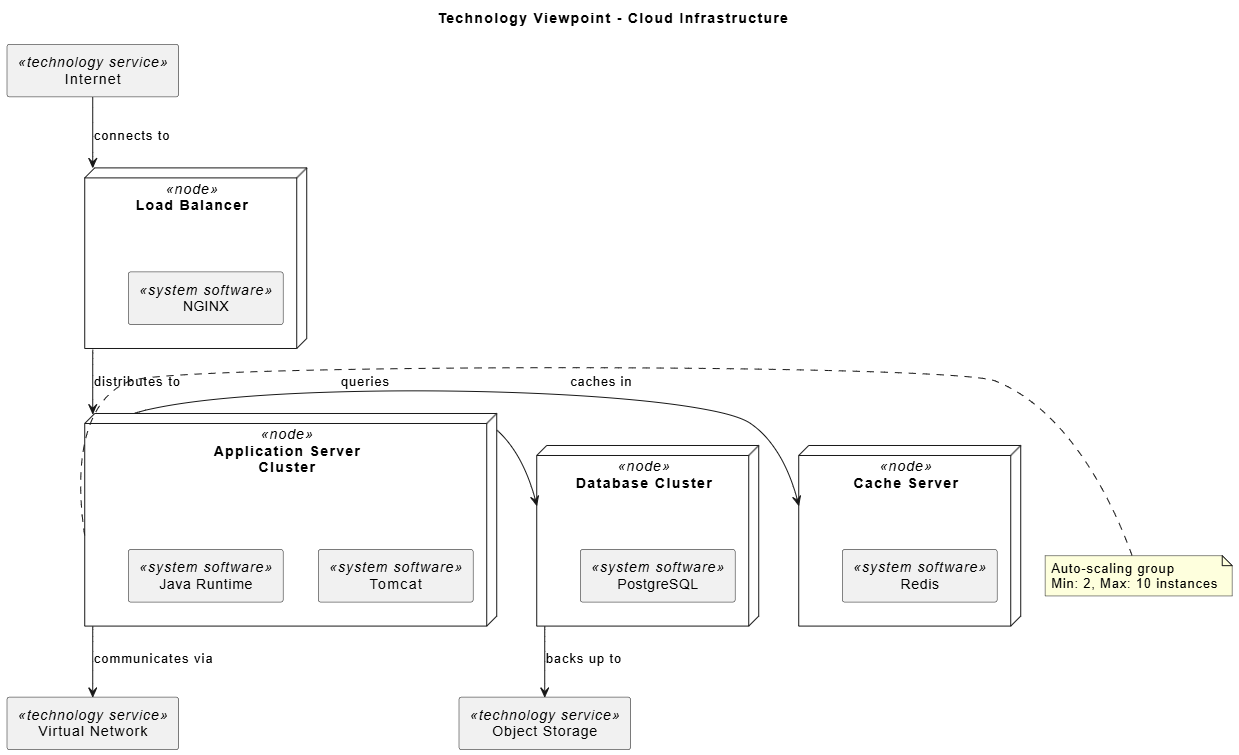
@startuml
skinparam backgroundColor white

title Technology Viewpoint - Cloud Infrastructure

rectangle "Internet" as Internet <<technology service>>

node "Load Balancer" as LB <<node>> {
  rectangle "NGINX" as NGINX <<system software>>
}

node "Application Server\nCluster" as AppCluster <<node>> {
  rectangle "Tomcat" as Tomcat <<system software>>
  rectangle "Java Runtime" as JVM <<system software>>
}

node "Database Cluster" as DBCluster <<node>> {
  rectangle "PostgreSQL" as Postgres <<system software>>
}

node "Cache Server" as Cache <<node>> {
  rectangle "Redis" as Redis <<system software>>
}

rectangle "Virtual Network" as VNet <<technology service>>
rectangle "Object Storage" as ObjStore <<technology service>>

' Connections
Internet -down-> LB : connects to
LB -down-> AppCluster : distributes to
AppCluster -right-> DBCluster : queries
AppCluster -right-> Cache : caches in
AppCluster -down-> VNet : communicates via
DBCluster -down-> ObjStore : backs up to

note right of AppCluster
  Auto-scaling group
  Min: 2, Max: 10 instances
end note

@enduml
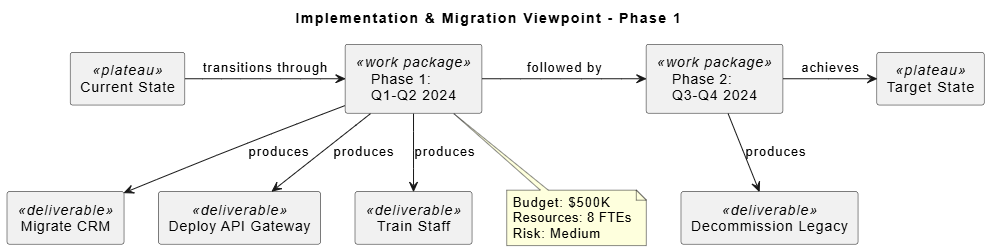
@startuml
skinparam backgroundColor white

title Implementation & Migration Viewpoint - Phase 1

rectangle "Current State" as Current <<plateau>>
rectangle "Target State" as Target <<plateau>>

rectangle "Phase 1:\nQ1-Q2 2024" as Phase1 <<work package>>
rectangle "Phase 2:\nQ3-Q4 2024" as Phase2 <<work package>>

rectangle "Migrate CRM" as MigrateCRM <<deliverable>>
rectangle "Deploy API Gateway" as DeployAPI <<deliverable>>
rectangle "Train Staff" as TrainStaff <<deliverable>>
rectangle "Decommission Legacy" as DecomLegacy <<deliverable>>

' Relationships
Current -right-> Phase1 : transitions through
Phase1 -right-> Phase2 : followed by
Phase2 -right-> Target : achieves

Phase1 -down-> MigrateCRM : produces
Phase1 -down-> DeployAPI : produces
Phase1 -down-> TrainStaff : produces

Phase2 -down-> DecomLegacy : produces

note bottom of Phase1
  Budget: $500K
  Resources: 8 FTEs
  Risk: Medium
end note

@enduml
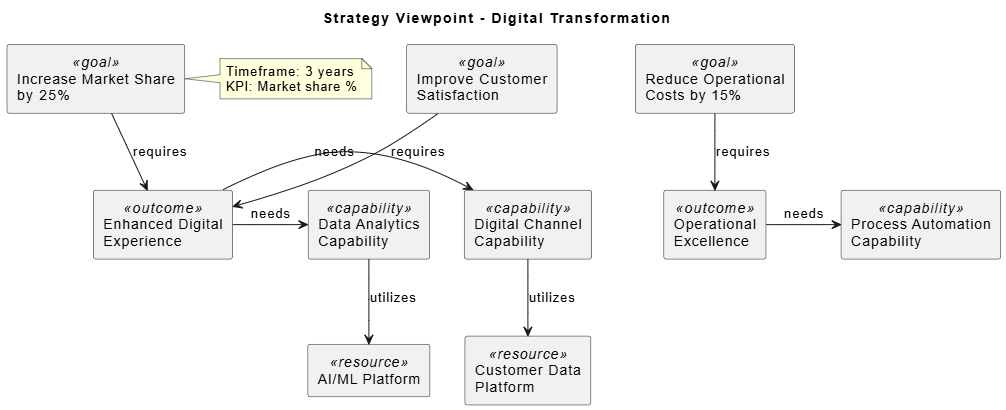
@startuml
skinparam backgroundColor white

title Strategy Viewpoint - Digital Transformation

rectangle "Increase Market Share\nby 25%" as Goal1 <<goal>>
rectangle "Improve Customer\nSatisfaction" as Goal2 <<goal>>
rectangle "Reduce Operational\nCosts by 15%" as Goal3 <<goal>>

rectangle "Enhanced Digital\nExperience" as Outcome1 <<outcome>>
rectangle "Operational\nExcellence" as Outcome2 <<outcome>>

rectangle "Digital Channel\nCapability" as Cap1 <<capability>>
rectangle "Data Analytics\nCapability" as Cap2 <<capability>>
rectangle "Process Automation\nCapability" as Cap3 <<capability>>

rectangle "Customer Data\nPlatform" as Resource1 <<resource>>
rectangle "AI/ML Platform" as Resource2 <<resource>>

' Relationships
Goal1 -down-> Outcome1 : requires
Goal2 -down-> Outcome1 : requires
Goal3 -down-> Outcome2 : requires

Outcome1 -right-> Cap1 : needs
Outcome1 -right-> Cap2 : needs
Outcome2 -right-> Cap3 : needs

Cap1 -down-> Resource1 : utilizes
Cap2 -down-> Resource2 : utilizes

note right of Goal1
  Timeframe: 3 years
  KPI: Market share %
end note

@enduml
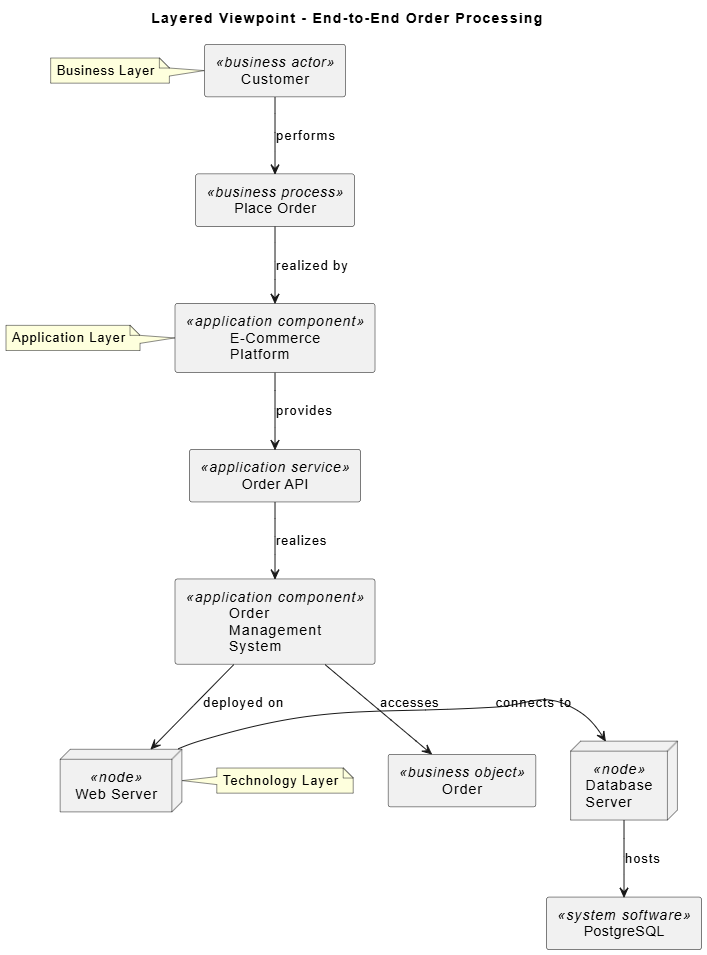
@startuml
skinparam backgroundColor white

title Layered Viewpoint - End-to-End Order Processing

' Business Layer
rectangle "Customer" as Cust <<business actor>>
rectangle "Place Order" as PlaceOrd <<business process>>
rectangle "Order" as Ord <<business object>>

' Application Layer
rectangle "E-Commerce\nPlatform" as EComm <<application component>>
rectangle "Order\nManagement\nSystem" as OMS <<application component>>
rectangle "Order API" as OrderAPI <<application service>>

' Technology Layer
node "Web Server" as WebSrv <<node>>
node "Database\nServer" as DBSrv <<node>>
rectangle "PostgreSQL" as Postgres <<system software>>

' Cross-layer relationships
Cust -down-> PlaceOrd : performs
PlaceOrd -down-> EComm : realized by
EComm -down-> OrderAPI : provides
OrderAPI -down-> OMS : realizes
OMS -down-> WebSrv : deployed on
WebSrv -right-> DBSrv : connects to
DBSrv -down-> Postgres : hosts
OMS -down-> Ord : accesses

note left of Cust
  Business Layer
end note

note left of EComm
  Application Layer
end note

note left of WebSrv
  Technology Layer
end note

@enduml
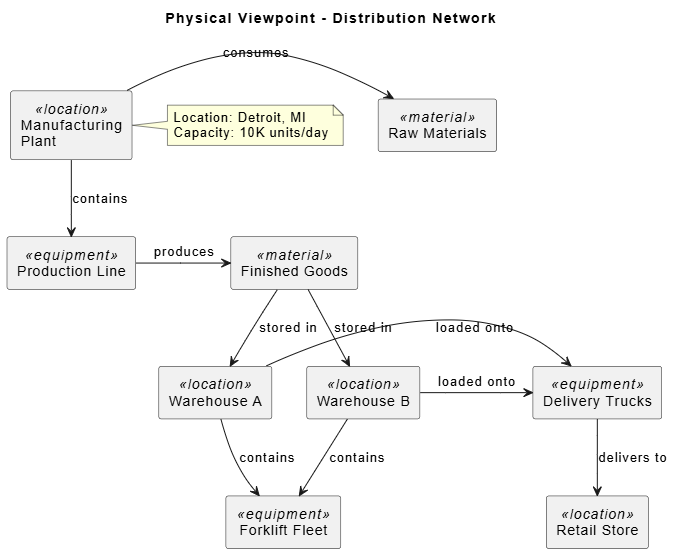
@startuml
skinparam backgroundColor white

title Physical Viewpoint - Distribution Network

rectangle "Manufacturing\nPlant" as Plant <<location>>
rectangle "Warehouse A" as WH_A <<location>>
rectangle "Warehouse B" as WH_B <<location>>
rectangle "Retail Store" as Store <<location>>

rectangle "Production Line" as ProdLine <<equipment>>
rectangle "Forklift Fleet" as Forklift <<equipment>>
rectangle "Delivery Trucks" as Trucks <<equipment>>

rectangle "Raw Materials" as RawMat <<material>>
rectangle "Finished Goods" as FinGoods <<material>>

' Location containment
Plant -down-> ProdLine : contains
WH_A -down-> Forklift : contains
WH_B -down-> Forklift : contains

' Material flow
Plant -right-> RawMat : consumes
ProdLine -right-> FinGoods : produces
FinGoods -down-> WH_A : stored in
FinGoods -down-> WH_B : stored in
WH_A -right-> Trucks : loaded onto
WH_B -right-> Trucks : loaded onto
Trucks -down-> Store : delivers to

note right of Plant
  Location: Detroit, MI
  Capacity: 10K units/day
end note

@enduml
Consider tools that support ArchiMate:
ArchiMate viewpoints provide a structured approach to enterprise architecture modeling. By selecting appropriate viewpoints for specific stakeholder concerns, you can create clear, focused diagrams that communicate effectively. The PlantUML examples provided demonstrate how to implement these viewpoints programmatically, enabling version control and automated documentation generation.
Remember that effective architecture modeling is iterative—start simple, validate with stakeholders, and refine continuously. The combination of proper viewpoint selection, consistent modeling practices, and appropriate tooling will help you create valuable architectural artifacts that drive informed decision-making.

