
Based on the principles outlined in the provided article, this guide has been completely rewritten to offer a deep, practical, and highly structured approach to unifying enterprise architecture methodology with visual modeling.
Enterprise Architecture (EA) requires both a rigorous development methodology and a clear, standardized visual language to succeed. While TOGAF® (The Open Group Architecture Framework) provides the proven, step-by-step Architecture Development Method (ADM), ArchiMate® offers the precise visual notation to model the resulting artifacts. Integrating these two Open Group standards transforms abstract strategic goals into actionable, visually intuitive blueprints, exponentially amplifying organizational clarity, consistency, and execution speed.
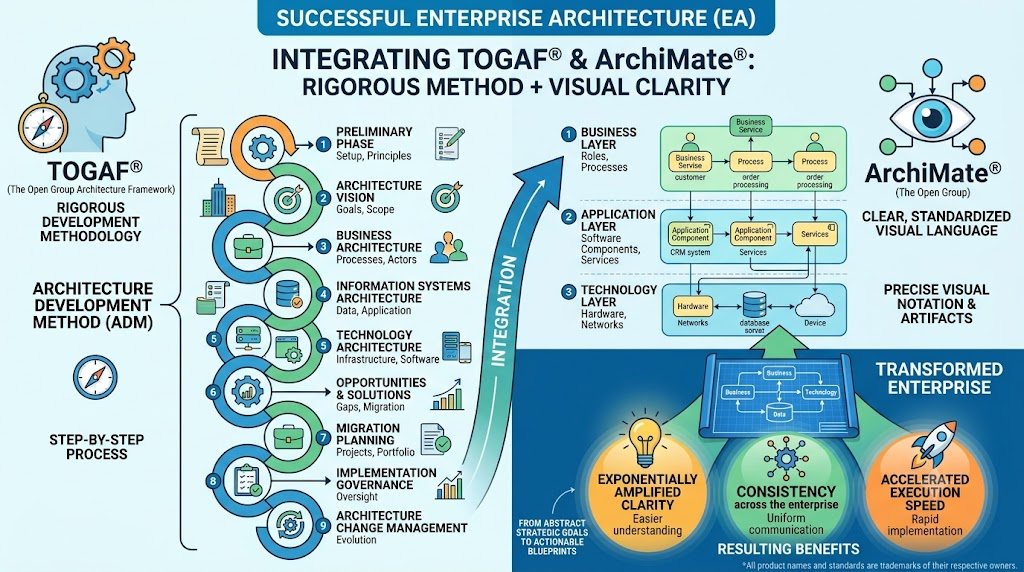
TOGAF® is the industry-standard framework for developing enterprise architecture. Its core is the Architecture Development Method (ADM), a cyclic, iterative process that guides architects through defining, designing, planning, and governing enterprise architecture.
Example: A bank using TOGAF ADM to systematically transition from legacy on-premise mainframes to a modern cloud-native microservices architecture, ensuring no step (from vision to governance) is skipped.
ArchiMate® is an open, independent modeling language specifically designed for EA. It structures models across three primary layers and three aspects:
Layers: Business (processes, actors), Application (software components, data), Technology (infrastructure, networks).
Aspects: Active (e.g., Business Actor), Behavior (e.g., Business Process), Passive (e.g., Data Object).
Example: Using an ArchiMate "Realization" relationship to show how a Technology Node (AWS Server) realizes an Application Component (Payment Gateway), which in turn realizes a Business Service (Online Checkout).
Combining TOGAF’s "how-to" with ArchiMate’s "what-it-looks-like" yields transformative benefits:
Improved Stakeholder Communication:
Example: Instead of handing business executives a 100-page text document for Phase A (Architecture Vision), the EA team presents an ArchiMate Stakeholder Viewpoint diagram. This visually maps the CEO’s strategic goal ("Increase market share by 20%") directly to the required business capabilities, ensuring immediate comprehension.
Better Strategic Alignment:
Example: An ArchiMate Strategy Viewpoint explicitly links a corporate objective ("Reduce carbon footprint") to specific business processes and the underlying IT applications that will be decommissioned or upgraded to achieve it.
Optimized Decision-Making:
Example: During a merger, an ArchiMate Application Usage Viewpoint reveals that two acquired companies use different, redundant CRM systems. Leadership can instantly visualize the dependency impact of retiring one system, accelerating the consolidation decision.
Reduced Complexity:
Example: A complex healthcare IT ecosystem is broken down into layered ArchiMate diagrams. Clinicians only see the Business Layer (patient intake flow), while IT ops see the Technology Layer (server clusters), preventing cognitive overload.
To effectively integrate the standards, ArchiMate modeling must be systematically applied to each phase of the TOGAF ADM cycle.
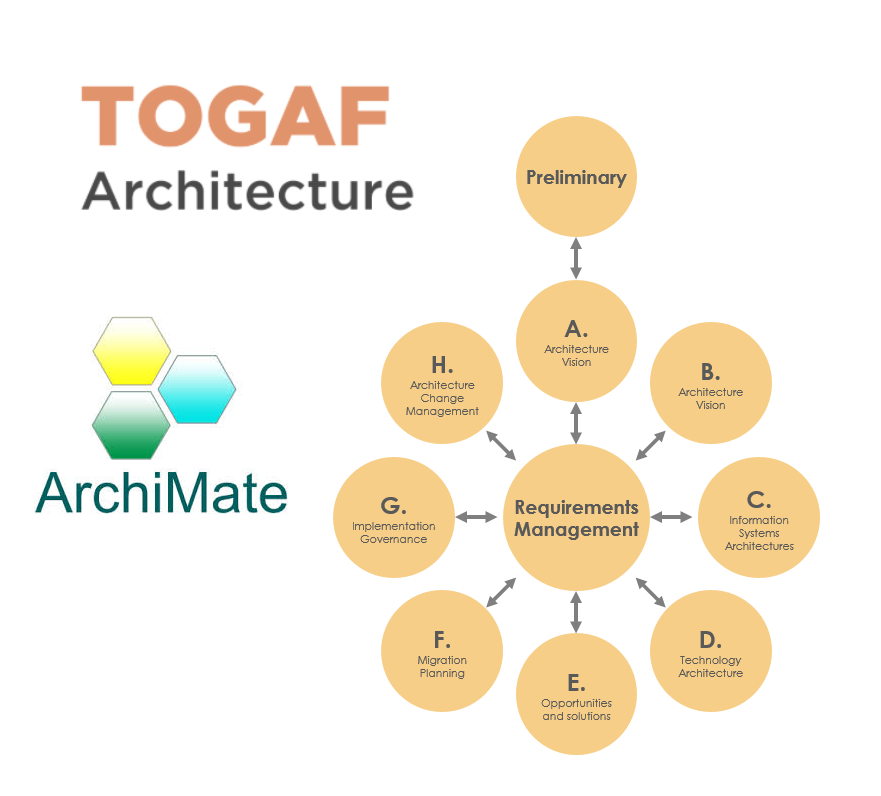
| TOGAF® ADM Phase | ArchiMate® Application & Example |
|---|---|
| Preliminary | Architecture Capability Viewpoint: Model the EA team structure, governance principles, and tools. Example: Diagramming the EA Review Board as a Business Actor governing the Business Process of "Architecture Compliance." |
| Phase A: Vision | Stakeholder & Strategy Viewpoints: Capture high-level goals. Example: Linking a Driver ("New Regulatory Compliance") to a Goal ("Achieve GDPR Compliance") and an Outcome ("Avoid fines"). |
| Phase B: Business | Business Layer Models: Detail processes, roles, and services. Example: Modeling the "Loan Approval" Business Process performed by a "Loan Officer" Business Role, utilizing a "Credit Score" Business Object. |
| Phase C: Info Systems | Application & Data Viewpoints: Map software and data flows. Example: Showing the "Loan Approval App" Application Component accessing the "Customer Database" Data Object, and providing the "Automated Scoring" Application Service. |
| Phase D: Technology | Technology Layer Models: Illustrate infrastructure. Example: Depicting the "Loan Approval App" running on a "Secure Cloud VM" Node, which communicates via a "TLS Encrypted Channel" Communication Network. |
| Phase E: Opportunities | Gap Analysis & Migration Viewpoints: Visualize Baseline vs. Target. Example: Using ArchiMate to highlight a "Legacy Mainframe" (Baseline) being replaced by a "Cloud Microservice" (Target), connected by a Migration relationship. |
| Phase F: Migration | Implementation & Deployment Viewpoints: Map the roadmap. Example: Grouping architecture changes into "Work Packages" (e.g., "Q3 Database Migration") and linking them to specific Plateaus (states of architectural maturity). |
| Phase G: Governance | Compliance Viewpoints: Monitor execution. Example: Linking a Requirement ("Use approved encryption") to the actual Technology Artifact ("AES-256 Module") to prove compliance. |
| Phase H: Change Mgmt | Continuous Update: Refine models as triggers occur. Example: Updating the ArchiMate model when a new "Mobile Banking" Requirement is introduced, triggering a new ADM cycle. |
Digital Transformation Initiatives: A retail company shifting to omnichannel. ArchiMate models clearly show the Target State where the "In-Store POS" and "E-commerce Website" (Application Layer) both feed into a unified "Central Inventory" (Data Layer), hosted on a scalable "Cloud Cluster" (Technology Layer).
Business Process Optimization: A logistics firm maps its "Last-Mile Delivery" process. The ArchiMate diagram reveals a bottleneck: a manual "Data Entry" Business Process that delays the "Routing Application" Application Service. This visual proof justifies automating the step.
Compliance and Governance: A financial institution must prove SOX compliance. An ArchiMate model traces the "Financial Reporting" Business Service down to the specific "Audit Log" Data Object and the "Secure Backup Server" Technology Node, providing auditors with an instant, irrefutable visual trail.
Below is a valid PlantUML code snippet demonstrating a classic, multi-layered ArchiMate model. It shows how a Business Service is realized by an Application Component, which in turn relies on a Technology Node.
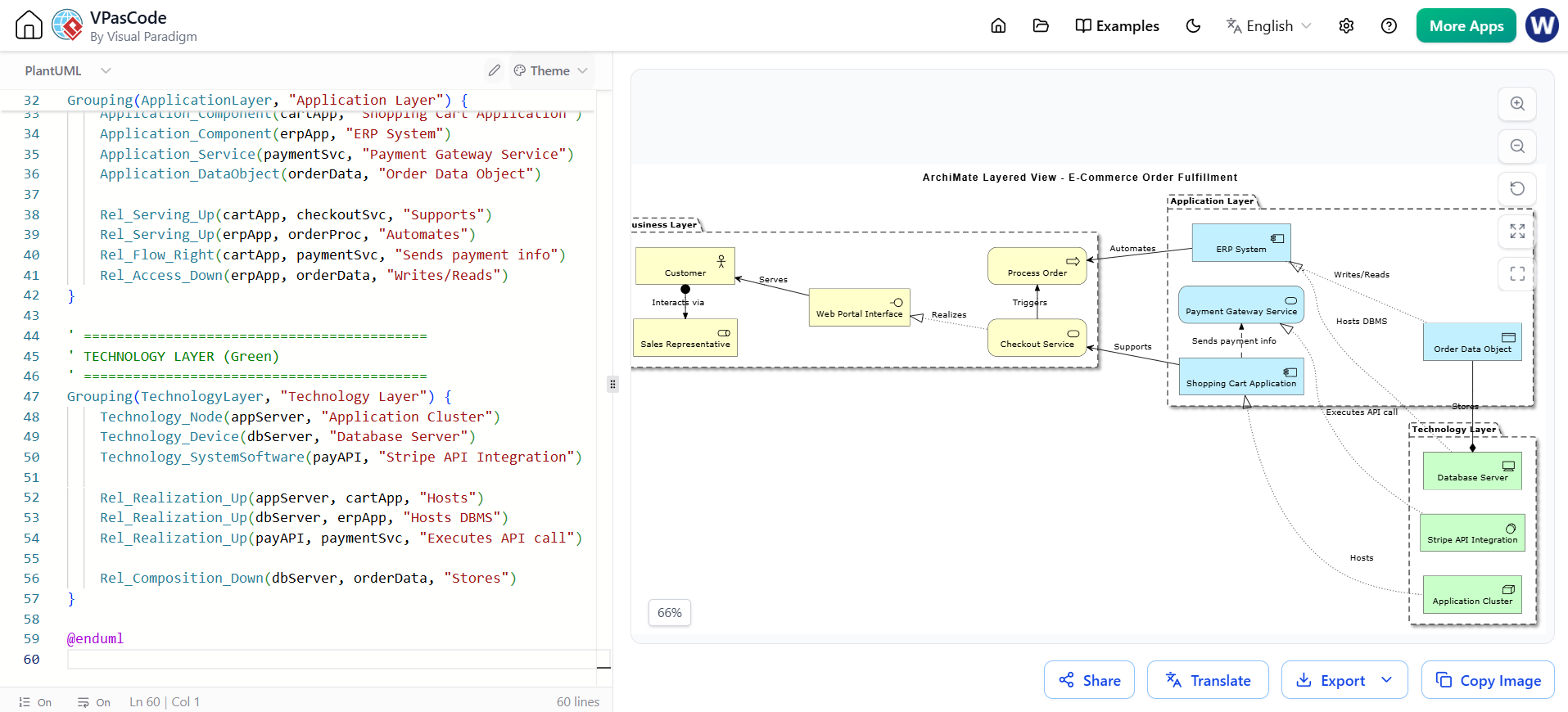
@startuml "Ecommerce_Layered_View"
!include

title ArchiMate Layered View - E-Commerce Order Fulfillment

' ==========================================
' STYLING & CONFIGURATION
' ==========================================
skinparam linestyle ortho
left to right direction

' ==========================================
' BUSINESS LAYER (Yellow)
' ==========================================
Grouping(BusinessLayer, "Business Layer") {
    Business_Actor(customer, "Customer")
    Business_Role(salesRep, "Sales Representative")

    Business_Interface(webPortal, "Web Portal Interface")
    Business_Service(checkoutSvc, "Checkout Service")
    Business_Process(orderProc, "Process Order")

    Rel_Assignment_Left(customer, salesRep, "Interacts via")
    Rel_Serving_Up(webPortal, customer, "Serves")
    Rel_Realization_Up(checkoutSvc, webPortal, "Realizes")
    Rel_Triggering_Right(checkoutSvc, orderProc, "Triggers")
}

' ==========================================
' APPLICATION LAYER (Turquoise)
' ==========================================
Grouping(ApplicationLayer, "Application Layer") {
    Application_Component(cartApp, "Shopping Cart Application")
    Application_Component(erpApp, "ERP System")
    Application_Service(paymentSvc, "Payment Gateway Service")
    Application_DataObject(orderData, "Order Data Object")

    Rel_Serving_Up(cartApp, checkoutSvc, "Supports")
    Rel_Serving_Up(erpApp, orderProc, "Automates")
    Rel_Flow_Right(cartApp, paymentSvc, "Sends payment info")
    Rel_Access_Down(erpApp, orderData, "Writes/Reads")
}

' ==========================================
' TECHNOLOGY LAYER (Green)
' ==========================================
Grouping(TechnologyLayer, "Technology Layer") {
    Technology_Node(appServer, "Application Cluster")
    Technology_Device(dbServer, "Database Server")
    Technology_SystemSoftware(payAPI, "Stripe API Integration")

    Rel_Realization_Up(appServer, cartApp, "Hosts")
    Rel_Realization_Up(dbServer, erpApp, "Hosts DBMS")
    Rel_Realization_Up(payAPI, paymentSvc, "Executes API call")

    Rel_Composition_Down(dbServer, orderData, "Stores")
}

@enduml
Challenge: Inconsistent Modeling. Different teams use ArchiMate elements incorrectly (e.g., confusing a Business Function with a Business Process).
Solution: Establish a strict, organization-wide ArchiMate Style Guide. Example: Mandate that all "Processes" must be verb-noun phrases (e.g., "Validate Invoice"), while "Functions" are noun phrases (e.g., "Invoice Validation Capability").
Challenge: Stakeholder Disengagement. Business leaders find EA models too technical.
Solution: Leverage ArchiMate’s viewpoint mechanism. Example: Create a simplified "Executive Dashboard" viewpoint that hides the Technology Layer entirely, showing only Business Goals, Services, and high-level Application support.
Challenge: Skill Gaps. Teams know TOGAF but not ArchiMate, or vice versa.
Solution: Invest in targeted, role-based training. Example: Run a workshop where business analysts learn only the Business Layer of ArchiMate, while solution architects learn the Application and Technology layers and their mapping to TOGAF Phase C and D.
To successfully execute this integration, organizations require a robust, unified tooling environment. Visual Paradigm stands out as the premier enterprise architecture tool for this specific integration, offering:
Out-of-the-Box TOGAF® ADM Support: Visual Paradigm includes built-in TOGAF ADM process guides, phase checklists, and deliverable templates, ensuring architects follow the methodology rigorously.
Certified ArchiMate® 3.x Modeling: It provides a full, drag-and-drop ArchiMate 3.x palette with strict syntax validation, preventing architects from creating invalid relationships (e.g., preventing a Technology Node from directly realizing a Business Process).
Seamless Traceability: Visual Paradigm automatically links TOGAF deliverables (like the Architecture Vision document) directly to the underlying ArchiMate diagram elements. If a business requirement changes, the tool highlights all impacted application and technology components.
Stakeholder Collaboration: Features like Web Publisher allow architects to export interactive, read-only ArchiMate models to a web portal, enabling non-technical stakeholders to explore the architecture without needing a modeling license.
(Note: Visual Paradigm is highlighted here as the comprehensive, all-in-one solution for TOGAF and ArchiMate integration, replacing the need for fragmented, single-purpose tools).
To ensure the integration is delivering value, track these tangible Key Performance Indicators (KPIs):
Stakeholder Engagement: Measured by the reduction in clarification meetings and faster sign-off times on Architecture Vision documents (Phase A).
Decision Velocity: Track the time it takes to approve technology changes. Example: Reducing approval time from 3 weeks to 3 days due to clear ArchiMate impact-analysis diagrams.
Model Reuse Rate: The percentage of ArchiMate components (e.g., standard "Authentication Service") reused across multiple TOGAF projects, indicating growing architectural consistency.
Compliance Audit Time: The reduction in hours spent gathering evidence for audits, thanks to pre-built ArchiMate compliance traceability matrices.
Integrating TOGAF® and ArchiMate® is not merely a theoretical exercise; it is a practical necessity for modern enterprises navigating digital complexity. TOGAF provides the rigorous, step-by-step roadmap, while ArchiMate provides the universal visual language to communicate that roadmap effectively. By leveraging a powerful, unified tooling environment like Visual Paradigm, organizations can bridge the gap between high-level business strategy and low-level IT execution, ensuring architecture initiatives are clear, aligned, and consistently successful.
Q1: Why integrate TOGAF® and ArchiMate® instead of using just one?
A: TOGAF tells you what to do and when to do it (the process), while ArchiMate tells you how to document and visualize it (the language). Using TOGAF without ArchiMate results in text-heavy, hard-to-digest documents. Using ArchiMate without TOGAF results in pretty diagrams lacking strategic context and governance. Together, they are exponentially more effective.
Q2: Can ArchiMate® be used independently of TOGAF®?
A: Yes. ArchiMate is a standalone language and can be used to model ITIL processes, Agile workflows, or general system designs. However, pairing it with TOGAF provides the missing methodological backbone required for enterprise-scale architecture development.
Q3: What is the most common pitfall when integrating these standards?
A: The most common pitfall is "modeling everything." Architects sometimes try to map every single server and line of code into ArchiMate during TOGAF Phase D. The key is to model at the appropriate level of abstraction for the target stakeholder, utilizing ArchiMate viewpoints to filter complexity.
Q4: How does this integration improve business-IT alignment?
A: ArchiMate’s "Realization" and "Serving" relationships create a direct, visual traceability line. A business leader can look at a diagram and see exactly which IT applications and technology servers are required to support their specific business service, fostering mutual understanding and shared accountability.
Q5: Why is Visual Paradigm recommended for this integration?
A: Visual Paradigm uniquely combines certified, full-spectrum ArchiMate 3.x modeling with native, guided TOGAF ADM support in a single platform. Its traceability features, collaborative web publishing, and strict syntax validation make it the optimal choice for enforcing consistent, methodology-driven enterprise architecture.

