
In UML, stereotypes and profiles provide a language-inherent extension mechanism, allowing modelers to adapt the general-purpose Unified Modeling Language to specific domains or technologies without modifying the core metamodel. This is known as a lightweight extension, which ensures that different modeling tools remain interoperable.
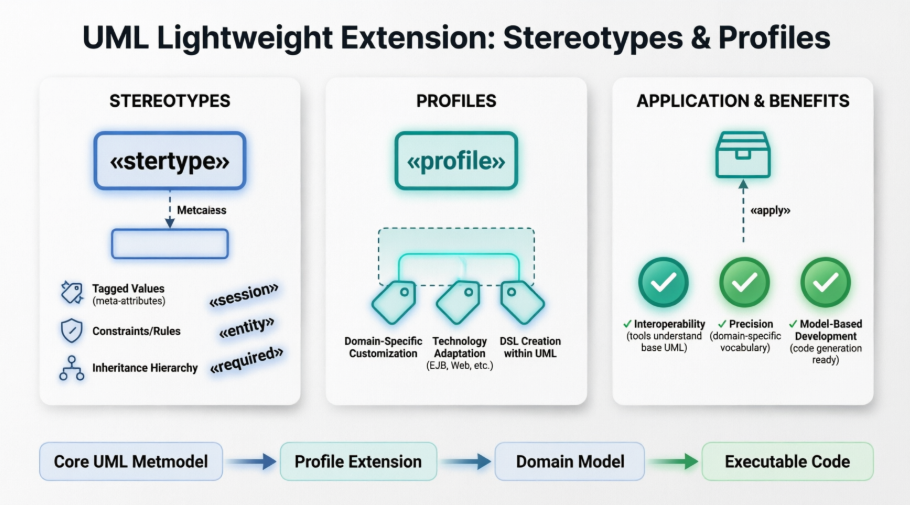
A stereotype is a special metaclass in the UML metamodel used to extend existing metaclasses (like Class, Component, or Interface) with additional properties and constraints.
Core Concepts:
Extension: A stereotype makes a metaclass more specific but leaves the original definition unchanged.
Meta-attributes (Tagged Values): These are additional attributes defined within the stereotype to store extra information about the model element.
Constraints: Stereotypes can include specific rules that the extended element must follow.
Notation:
Represented as a rectangle similar to a class, but with the keyword «stereotype» above the name.
Special pictograms or symbols can also be assigned to a stereotype to represent its elements visually.
Extension Relationship:
Shown as an arrow with a solid line and a filled arrowhead pointing from the stereotype to the extended metaclass (labeled «metaclass»).
Extensions can be optional or mandatory. Mandatory extensions are marked with the keyword {required}, meaning every instance of that metaclass in the model must use the stereotype.
Inheritance: Stereotypes can inherit from other stereotypes, allowing more specific stereotypes to adopt the meta-attributes and constraints of their parent.
A profile is a specialized form of a package that groups together a set of stereotypes, constraints, and data types designed for a specific purpose or domain.
Purpose: Profiles allow UML to be customized for specific technologies, such as Java Enterprise Beans (EJB) or web applications.
Notation: Represented by a package symbol with the keyword «profile» prepended to the name.
Domain-Specific Languages (DSL): By using profiles, modelers can create smaller languages tailored to a domain while remaining within the standardized framework of UML.
To use the custom concepts defined in a profile within a model, the profile must be explicitly applied to a package.
Application Process:
A dashed arrow with an open arrowhead points from the model package to the profile, labeled with the keyword «apply».
This application imports the stereotypes into the namespace of the package, making them available for use on model elements.
Usage in Models:
Once applied, a stereotype is displayed on a model element by placing its name in guillemets (e.g., «session») above the element's name.
Specific values for the stereotype's meta-attributes (tags) are often noted within the element or in an attached note.
Interoperability: Because profiles only extend existing metaclasses rather than creating new ones, modeling tools that do not recognize a specific profile can still understand the basic UML elements.
Precision: Profiles provide the vocabulary needed to model complex technical or organizational requirements that general UML might otherwise describe too vaguely.
Model-Based Development: They are essential for Model-Based Software Development (MBSD), providing the unambiguous semantics required to automatically transform models into executable code.

