
Test cases are the backbone of quality assurance in software development. They serve as detailed instructions that validate whether a software application behaves as expected under various conditions. A well-designed test case not only identifies defects but also ensures that requirements are met, functionality works correctly, and the user experience remains consistent across different scenarios.
This comprehensive guide explores major test case techniques, templates, and best practices used by QA professionals worldwide. Whether you're a beginner learning the fundamentals or an experienced tester looking to refine your approach, this guide provides practical examples, visual diagrams, and actionable insights to enhance your testing effectiveness. We'll cover everything from basic structure to advanced techniques like boundary value analysis, equivalence partitioning, and state transition testing, complete with PlantUML diagrams to visualize complex testing concepts.
A test case is a set of conditions or variables under which a tester determines whether a system under test satisfies requirements or works correctly. It includes:
Preconditions: State of the system before execution
Test Steps: Detailed actions to perform
Test Data: Input values required
Expected Results: What should happen
Actual Results: What actually happened (filled during execution)
Clear and Concise: Easy to understand without ambiguity
Repeatable: Can be executed multiple times with same results
Independent: Should not depend on other test cases
Traceable: Linked to specific requirements
Maintainable: Easy to update when requirements change
Test Case ID: TC_001
Test Case Title: Verify User Login with Valid Credentials
Priority: High
Severity: Critical
Preconditions:
  - User account exists in the system
  - Application is accessible
  - Browser is open
Test Data:
  - Username: [email protected]
  - Password: SecurePass123!
Test Steps:
  1. Navigate to login page
  2. Enter username in username field
  3. Enter password in password field
  4. Click 'Login' button
Expected Result: User is redirected to dashboard; welcome message displays
Actual Result: [To be filled during execution]
Status: Pass/Fail/Blocked
Tester: [Name]
Date Executed: [Date]
Comments: [Any observations]
Test Case ID: TC_002
Module: Authentication
Feature: User Registration
Requirement ID: REQ_AUTH_001
Test Scenario: Register new user with valid information
Test Type: Functional
Automation Status: Automated/Manual
Estimated Execution Time: 5 minutes
Dependencies: None
Environment: Production/Staging/Development
Browser/Device: Chrome v120, Windows 11
Test Data:
  - First Name: John
  - Last Name: Doe
  - Email: [email protected]
  - Password: P@ssw0rd2024
  - Confirm Password: P@ssw0rd2024
  - Phone: +1-555-0123
Test Steps:
  Step 1: Navigate to registration page
    Action: Click 'Sign Up' link on homepage
    Expected: Registration form loads

  Step 2: Fill in personal information
    Action: Enter first name, last name, email, phone
    Expected: All fields accept input; validation passes

  Step 3: Create password
    Action: Enter password and confirm password
    Expected: Password strength indicator shows 'Strong'

  Step 4: Accept terms and submit
    Action: Check 'I agree to Terms' checkbox; click 'Register'
    Expected: Success message appears; verification email sent

  Step 5: Verify account creation
    Action: Check database for new user record
    Expected: User record exists with status 'Pending Verification'
Expected Results:
  - User account created successfully
  - Confirmation email sent within 2 minutes
  - User redirected to 'Check Your Email' page
Actual Results: [Filled during execution]
Status: Not Run/Pass/Fail/Blocked
Defect ID: [If failed, link to bug report]
Attachments: Screenshots, logs
Tester: Jane Smith
Date Created: 2024-01-15
Date Executed: 2024-01-20
Reviewed By: QA Lead
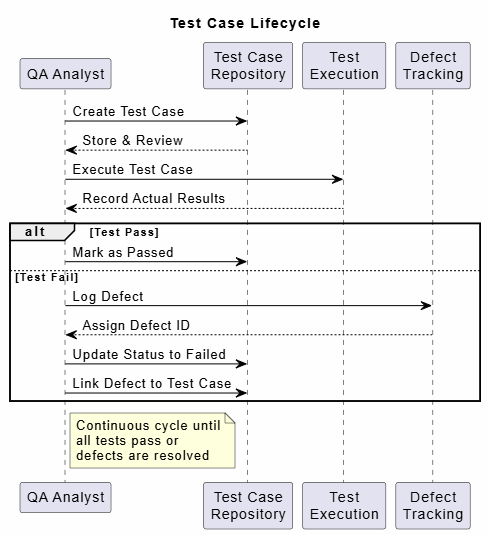
@startuml
title Test Case Lifecycle

skinparam backgroundColor #FEFEFE
skinparam sequence {
  ArrowColor Black
  ActorBorderColor Black
  LifeLineBorderColor black
  LifeLineBackgroundColor #EFFFFF
}

participant "QA Analyst" as QA
participant "Test Case\nRepository" as TC
participant "Test\nExecution" as TE
participant "Defect\nTracking" as DT

QA -> TC: Create Test Case
TC --> QA: Store & Review
QA -> TE: Execute Test Case
TE --> QA: Record Actual Results
alt Test Pass
  QA -> TC: Mark as Passed
else Test Fail
  QA -> DT: Log Defect
  DT --> QA: Assign Defect ID
  QA -> TC: Update Status to Failed
  QA -> TC: Link Defect to Test Case
end

note right of QA
  Continuous cycle until
  all tests pass or
  defects are resolved
end note

@enduml
Test case design techniques are systematic approaches to create effective test cases. They help ensure comprehensive coverage while optimizing the number of test cases needed.
Test Case Design Techniques
├── Specification-Based (Black-Box)
│   ├── Equivalence Partitioning
│   ├── Boundary Value Analysis
│   ├── Decision Table Testing
│   ├── State Transition Testing
│   └── Use Case Testing
├── Structure-Based (White-Box)
│   ├── Statement Coverage
│   ├── Branch Coverage
│   ├── Path Coverage
│   └── Condition Coverage
└── Experience-Based
    ├── Error Guessing
    ├── Exploratory Testing
    └── Checklist-Based Testing
Black-box testing techniques focus on testing functionality without knowledge of internal code structure.
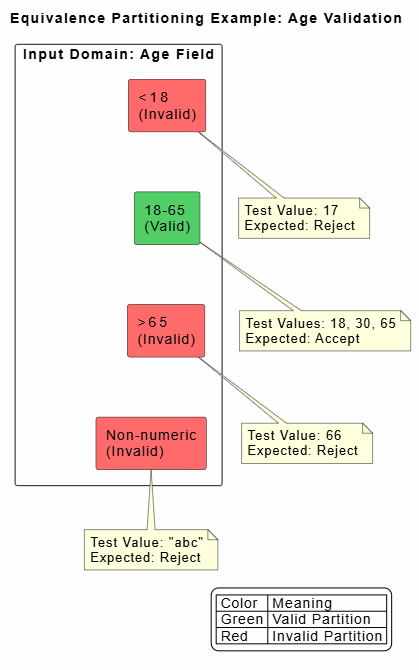
Concept: Divide input data into partitions where all values in a partition are expected to behave the same way. Test one value from each partition.
When to Use: When input has defined ranges or categories
Scenario: System accepts age between 18 and 65 (inclusive)
Partitions:
Valid Partition: 18-65
Invalid Partition 1: < 18 (e.g., 17)
Invalid Partition 2: > 65 (e.g., 66)
Invalid Partition 3: Non-numeric (e.g., "abc")
Test Case ID: TC_EP_001
Title: Validate Age Field Using Equivalence Partitioning
Technique: Equivalence Partitioning

Test Cases:
1. TC_EP_001a: Enter age = 30 (Valid partition)
   Expected: Accept input; proceed to next field

2. TC_EP_001b: Enter age = 17 (Invalid - below range)
   Expected: Display error "Age must be between 18 and 65"

3. TC_EP_001c: Enter age = 66 (Invalid - above range)
   Expected: Display error "Age must be between 18 and 65"

4. TC_EP_001d: Enter age = "abc" (Invalid - non-numeric)
   Expected: Display error "Please enter a valid number"
@startuml
title Equivalence Partitioning Example: Age Validation

skinparam backgroundColor #FEFEFE

rectangle "Input Domain: Age Field" {

  rectangle "<18\n(Invalid)" as inv1 #FF6B6B
  rectangle "18-65\n(Valid)" as valid #51CF66
  rectangle ">65\n(Invalid)" as inv2 #FF6B6B
  rectangle "Non-numeric\n(Invalid)" as inv3 #FF6B6B

  inv1 -[hidden]- valid
  valid -[hidden]- inv2
  inv2 -[hidden]- inv3
}

note bottom of inv1
  Test Value: 17
  Expected: Reject
end note

note bottom of valid
  Test Values: 18, 30, 65
  Expected: Accept
end note

note bottom of inv2
  Test Value: 66
  Expected: Reject
end note

note bottom of inv3
  Test Value: "abc"
  Expected: Reject
end note

legend right
  | Color | Meaning |
  | Green | Valid Partition |
  | Red | Invalid Partition |
endlegend

@enduml
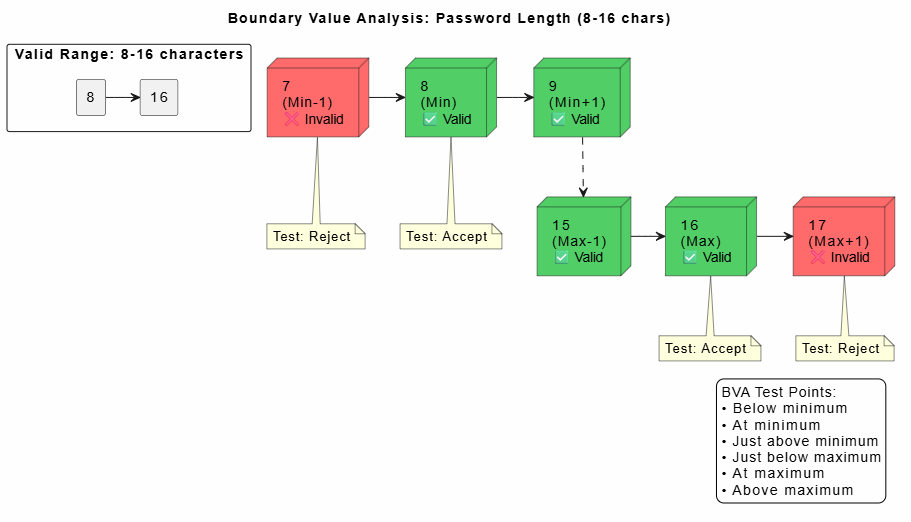
Concept: Errors often occur at boundaries of input domains. Test values at, just below, and just above boundaries.
Rule: For a range [min, max], test: min-1, min, min+1, max-1, max, max+1
Scenario: Password must be 8-16 characters
Boundary Values: 7, 8, 9, 15, 16, 17
Test Case ID: TC_BVA_001
Title: Validate Password Length Using Boundary Value Analysis
Technique: Boundary Value Analysis

Test Cases:
1. TC_BVA_001a: Password length = 7 characters (Min-1)
   Input: "Abc123!"
   Expected: Error "Password must be 8-16 characters"

2. TC_BVA_001b: Password length = 8 characters (Min)
   Input: "Abc1234!"
   Expected: Accept; password strength evaluated

3. TC_BVA_001c: Password length = 9 characters (Min+1)
   Input: "Abc12345!"
   Expected: Accept; password strength evaluated

4. TC_BVA_001d: Password length = 15 characters (Max-1)
   Input: "Abc12345678901!"
   Expected: Accept; password strength evaluated

5. TC_BVA_001e: Password length = 16 characters (Max)
   Input: "Abc123456789012!"
   Expected: Accept; password strength evaluated

6. TC_BVA_001f: Password length = 17 characters (Max+1)
   Input: "Abc1234567890123!"
   Expected: Error "Password must be 8-16 characters"
@startuml
title Boundary Value Analysis: Password Length (8-16 chars)

skinparam backgroundColor #FEFEFE

' Draw the valid range
rectangle "Valid Range: 8-16 characters" as valid {
  rectangle "8" as min
  rectangle "16" as max
  min -right-> max
}

' Mark boundary test points
node "7\n(Min-1)\n❌ Invalid" as b1 #FF6B6B
node "8\n(Min)\n✅ Valid" as b2 #51CF66
node "9\n(Min+1)\n✅ Valid" as b3 #51CF66
node "15\n(Max-1)\n✅ Valid" as b4 #51CF66
node "16\n(Max)\n✅ Valid" as b5 #51CF66
node "17\n(Max+1)\n❌ Invalid" as b6 #FF6B6B

' Position them along a line
b1 -right-> b2
b2 -right-> b3
b3 -[dashed]-> b4
b4 -right-> b5
b5 -right-> b6

note bottom of b1
  Test: Reject
end note

note bottom of b2
  Test: Accept
end note

note bottom of b5
  Test: Accept
end note

note bottom of b6
  Test: Reject
end note

legend right
  BVA Test Points:
  • Below minimum
  • At minimum
  • Just above minimum
  • Just below maximum
  • At maximum
  • Above maximum
endlegend

@enduml
Concept: Used when business logic involves multiple conditions leading to different actions. Creates a table showing all condition combinations and corresponding actions.
When to Use: Complex business rules with multiple conditions
Conditions:
C1: Credit Score ≥ 700?
C2: Annual Income ≥ $50,000?
C3: Employment Duration ≥ 2 years?
Actions:
A1: Approve Loan
A2: Request Co-signer
A3: Deny Loan
Decision Table:
| Rule | C1: Credit ≥ 700 | C2: Income ≥ $50K | C3: Employed ≥ 2yr | A1: Approve | A2: Co-signer | A3: Deny |
|---|---|---|---|---|---|---|
| 1 | Y | Y | Y | X | ||
| 2 | Y | Y | N | X | ||
| 3 | Y | N | Y | X | ||
| 4 | Y | N | N | X | ||
| 5 | N | Y | Y | X | ||
| 6 | N | Y | N | X | ||
| 7 | N | N | Y | X | ||
| 8 | N | N | N | X |
Test Case ID: TC_DT_001
Title: Loan Approval Decision Table Testing
Technique: Decision Table Testing

Test Cases (one per rule):

1. TC_DT_001_R1: Credit=750, Income=$60K, Employed=3 years
   Expected: Loan Approved

2. TC_DT_001_R2: Credit=720, Income=$55K, Employed=1 year
   Expected: Request Co-signer

3. TC_DT_001_R3: Credit=710, Income=$45K, Employed=5 years
   Expected: Request Co-signer

4. TC_DT_001_R4: Credit=730, Income=$40K, Employed=1 year
   Expected: Loan Denied

5. TC_DT_001_R5: Credit=650, Income=$70K, Employed=4 years
   Expected: Request Co-signer

6. TC_DT_001_R6: Credit=680, Income=$55K, Employed=1 year
   Expected: Loan Denied

7. TC_DT_001_R7: Credit=690, Income=$45K, Employed=3 years
   Expected: Loan Denied

8. TC_DT_001_R8: Credit=600, Income=$40K, Employed=6 months
   Expected: Loan Denied
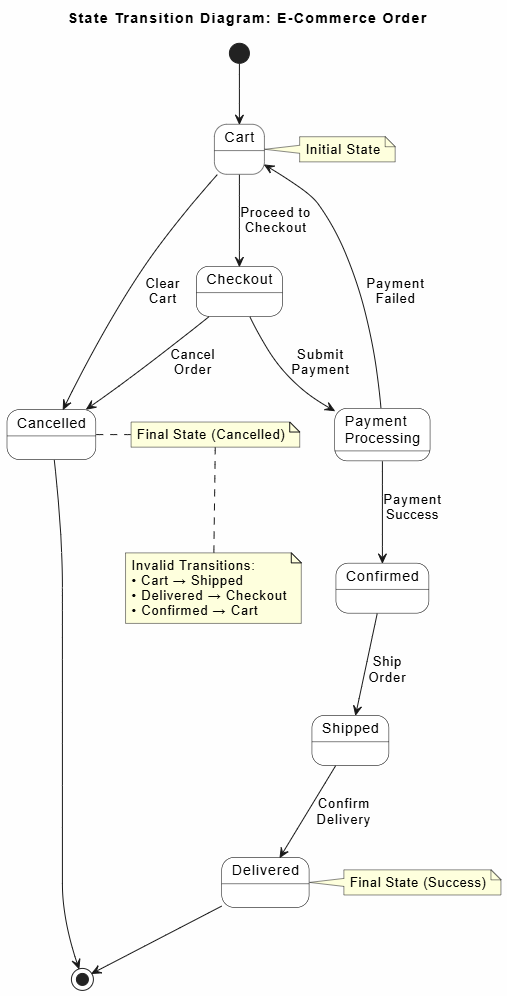
Concept: Tests system behavior when transitioning between different states. Useful for systems with distinct states and defined transitions.
When to Use: Workflow systems, order processing, user sessions
States: Cart → Checkout → Payment Processing → Confirmed → Shipped → Delivered
Valid Transitions:
Cart → Checkout
Checkout → Payment Processing
Payment Processing → Confirmed (success) or Cart (failure)
Confirmed → Shipped
Shipped → Delivered
Invalid Transitions:
Cart → Shipped (skip steps)
Delivered → Checkout (reverse flow)
Test Case ID: TC_ST_001
Title: Order Status State Transition Testing
Technique: State Transition Testing

Test Cases:

1. TC_ST_001_ValidFlow: Complete valid order flow
   Steps:
     - Add item to cart (State: Cart)
     - Proceed to checkout (Transition: Cart→Checkout)
     - Enter payment details (State: Checkout)
     - Submit payment (Transition: Checkout→Payment Processing)
     - Payment succeeds (Transition: Payment Processing→Confirmed)
     - Order ships (Transition: Confirmed→Shipped)
     - Order delivered (Transition: Shipped→Delivered)
   Expected: All transitions successful; final state = Delivered

2. TC_ST_001_PaymentFailure: Test payment failure transition
   Steps:
     - Reach Payment Processing state
     - Payment fails
     - System returns to Cart
   Expected: State transitions back to Cart; items remain in cart

3. TC_ST_001_InvalidTransition: Attempt invalid transition
   Steps:
     - Item in Cart
     - Try to mark as Shipped directly
   Expected: System rejects transition; error message displayed

4. TC_ST_001_CancelOrder: Cancel during checkout
   Steps:
     - In Checkout state
     - Click 'Cancel Order'
   Expected: Return to Cart; order not created
@startuml
title State Transition Diagram: E-Commerce Order

skinparam backgroundColor #FEFEFE
skinparam state {
  BackgroundColor White
  BorderColor Black
}

state "Cart" as cart
state "Checkout" as checkout
state "Payment\nProcessing" as payment
state "Confirmed" as confirmed
state "Shipped" as shipped
state "Delivered" as delivered
state "Cancelled" as cancelled

[*] --> cart

cart --> checkout : Proceed to\nCheckout
checkout --> payment : Submit\nPayment
payment --> confirmed : Payment\nSuccess
payment --> cart : Payment\nFailed
confirmed --> shipped : Ship\nOrder
shipped --> delivered : Confirm\nDelivery

checkout --> cancelled : Cancel\nOrder
cart --> cancelled : Clear\nCart

cancelled --> [*]
delivered --> [*]

note right of cart
  Initial State
end note

note right of delivered
  Final State (Success)
end note

note right of cancelled
  Final State (Cancelled)
end note

' Highlight invalid transitions
note bottom
  Invalid Transitions:
  • Cart → Shipped
  • Delivered → Checkout
  • Confirmed → Cart
end note

@enduml
Concept: Derive test cases from use cases (user stories). Tests complete user workflows from start to finish.
When to Use: End-to-end testing, user journey validation
Use Case: Purchase a Book
Actors: Customer, Payment Gateway
Main Flow:
Customer searches for book
Customer selects book
Customer adds to cart
Customer proceeds to checkout
Customer enters shipping info
Customer enters payment info
System processes payment
System confirms order
System sends confirmation email
Alternative Flows:
A1: Book out of stock
A2: Payment declined
A3: Invalid shipping address
Test Case ID: TC_UC_001
Title: Purchase Book - Main Success Flow
Technique: Use Case Testing
Use Case Reference: UC_BOOK_001

Preconditions:
  - User is logged in
  - Payment method saved
  - Book is in stock

Test Steps:
  1. Search for "The Great Gatsby"
  2. Click on book result
  3. Click "Add to Cart"
  4. Click "Checkout"
  5. Verify shipping address (use default)
  6. Select saved payment method
  7. Click "Place Order"
  8. Wait for confirmation page

Expected Results:
  - Order confirmation page displays
  - Order number generated (format: ORD-YYYYMMDD-XXXX)
  - Confirmation email received within 5 minutes
  - Book removed from available inventory
  - Cart is empty

Test Data:
  - Book ISBN: 978-0743273565
  - Quantity: 1
  - Shipping: Default address
  - Payment: Visa ending in 1234
Test Case ID: TC_UC_001_A1
Title: Purchase Book - Alternative Flow: Out of Stock
Technique: Use Case Testing
Use Case Reference: UC_BOOK_001 (Alt Flow A1)

Test Steps:
  1. Search for rare/out-of-stock book
  2. Click on book result
  3. Observe product page

Expected Results:
  - "Out of Stock" message displayed
  - "Add to Cart" button disabled or shows "Notify Me"
  - Option to receive restock notification available
White-box testing techniques require knowledge of internal code structure and logic.
Concept: Ensure every statement in the code is executed at least once.
Formula: Statement Coverage = (Number of executed statements / Total statements) × 100%
def calculate_discount(price, is_member, coupon_code):
    discount = 0

    if is_member:                    # Statement 1
        discount += 10               # Statement 2

    if coupon_code == "SAVE20":      # Statement 3
        discount += 20               # Statement 4
    elif coupon_code == "SAVE10":    # Statement 5
        discount += 10               # Statement 6

    final_price = price - discount   # Statement 7

    if final_price < 0:              # Statement 8
        final_price = 0              # Statement 9

    return final_price               # Statement 10
Test Cases for 100% Statement Coverage:
Test Case 1: Member with SAVE20 coupon
  Input: price=100, is_member=True, coupon_code="SAVE20"
  Executes: Statements 1, 2, 3, 4, 7, 10
  Result: final_price = 70

Test Case 2: Non-member with SAVE10 coupon
  Input: price=50, is_member=False, coupon_code="SAVE10"
  Executes: Statements 1(skip), 3(skip), 5, 6, 7, 10
  Result: final_price = 40

Test Case 3: Price becomes negative
  Input: price=15, is_member=True, coupon_code="SAVE20"
  Executes: Statements 1, 2, 3, 4, 7, 8, 9, 10
  Result: final_price = 0
Concept: Ensure every branch (true/false outcome) of each decision point is executed.
Formula: Branch Coverage = (Number of executed branches / Total branches) × 100%
Decision Points:
if is_member → True branch, False branch
if coupon_code == "SAVE20" → True branch, False branch
elif coupon_code == "SAVE10" → True branch, False branch
if final_price < 0 → True branch, False branch
Total Branches: 8 (2 per decision × 4 decisions)
Test Case 1: is_member=True, coupon="SAVE20", price=100
  Branches covered:
    - is_member: True ✓
    - coupon=="SAVE20": True ✓
    - final_price<0: False ✓

Test Case 2: is_member=False, coupon="SAVE10", price=50
  Branches covered:
    - is_member: False ✓
    - coupon=="SAVE20": False ✓
    - coupon=="SAVE10": True ✓
    - final_price<0: False ✓

Test Case 3: is_member=True, coupon="SAVE20", price=15
  Branches covered:
    - final_price<0: True ✓

Total Branch Coverage: 100% (8/8 branches)
Concept: Test all possible paths through the code. Most thorough but often impractical for complex code.
Note: Number of paths can grow exponentially with loops and nested conditions.
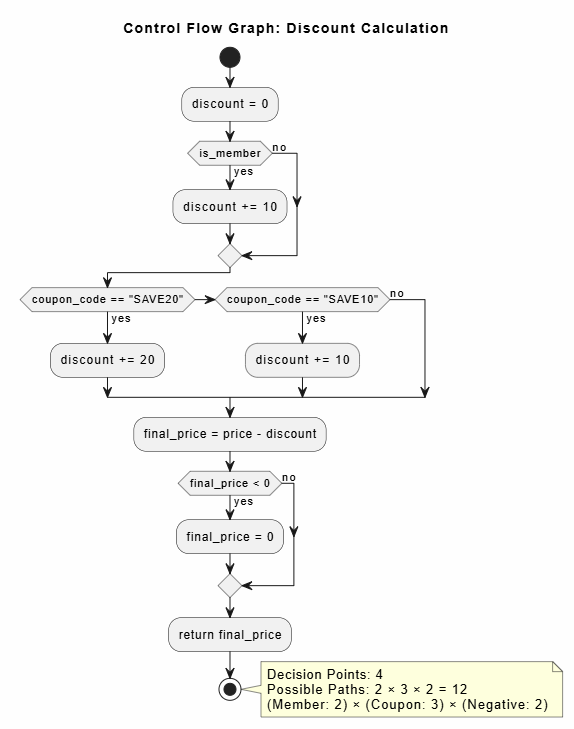
@startuml
title Control Flow Graph: Discount Calculation

skinparam backgroundColor #FEFEFE

start

:discount = 0;

if (is_member) then (yes)
  :discount += 10;
else (no)
endif

if (coupon_code == "SAVE20") then (yes)
  :discount += 20;
elseif (coupon_code == "SAVE10") then (yes)
  :discount += 10;
else (no)
endif

:final_price = price - discount;

if (final_price < 0) then (yes)
  :final_price = 0;
else (no)
endif

:return final_price;

stop

note right
  Decision Points: 4
  Possible Paths: 2 × 3 × 2 = 12
  (Member: 2) × (Coupon: 3) × (Negative: 2)
end note

@enduml
Concept: Each boolean sub-expression in a decision evaluates to both true and false at least once.
Example: if (A && B) requires testing:
A=True, B=True
A=True, B=False
A=False, B=True
A=False, B=False
Concept: Use tester's experience and intuition to guess where errors might occur.
Common Error-Prone Areas:
Division by zero
Null/empty inputs
Special characters in text fields
Date format issues
Timezone problems
Concurrent user actions
Test Case ID: TC_EG_001
Title: Error Guessing - Edge Cases for User Profile
Technique: Error Guessing

Test Scenarios Based on Experience:

1. Enter emoji in name field: "John 😀 Doe"
   Expected: Either accept or display appropriate error

2. Enter SQL injection attempt: "' OR 1=1 --"
   Expected: Input sanitized; no SQL execution

3. Upload file with .exe extension
   Expected: Rejected; only images/PDFs allowed

4. Set date of birth to future date
   Expected: Error "Date cannot be in the future"

5. Leave all fields empty and submit
   Expected: Validation errors for required fields

6. Copy-paste 10,000 character bio
   Expected: Truncated or error if exceeds limit

7. Rapidly click submit button multiple times
   Expected: Only one submission processed
Concept: Simultaneous learning, test design, and execution. Tester explores the application without predefined test cases.
Session-Based Approach:
Charter: Mission statement for the session
Time Box: Fixed duration (e.g., 90 minutes)
Debrief: Review findings after session
Exploratory Testing Session Charter

Session Title: Explore New Checkout Flow
Duration: 90 minutes
Tester: Alex Johnson
Date: 2024-01-25

Charter:
"Explore the new one-page checkout flow to identify
usability issues, functional defects, and performance
problems. Focus on mobile responsiveness and payment
integration."

Areas to Explore:
✓ Form validation behavior
✓ Payment gateway integration
✓ Error handling and messages
✓ Mobile layout (iOS Safari, Android Chrome)
✓ Accessibility (keyboard navigation, screen reader)
✓ Performance under slow network

Notes Area:
[Tester records observations during session]

Issues Found:
1. [CRITICAL] Payment fails silently on Safari iOS
2. [MAJOR] Address autocomplete doesn't work on mobile
3. [MINOR] Tab order skips coupon code field
4. [USABILITY] No loading indicator during payment processing

Coverage Summary:
- Pages explored: 3
- Features tested: 8
- Defects logged: 4
- Questions raised: 6
Concept: Use predefined checklists to ensure common issues aren't missed.
Web Application Testing Checklist

□ Functionality
  □ All links work correctly
  □ Forms submit successfully
  □ Validation messages display appropriately
  □ Search returns relevant results
  □ Filters and sorting work correctly

□ Usability
  □ Navigation is intuitive
  □ Content is readable (font size, contrast)
  □ Error messages are clear and helpful
  □ Consistent UI elements across pages

□ Compatibility
  □ Works on Chrome, Firefox, Safari, Edge
  □ Responsive on mobile, tablet, desktop
  □ Functions correctly on different OS versions

□ Security
  □ HTTPS enabled
  □ Sensitive data encrypted
  □ Session timeout implemented
  □ SQL injection prevented
  □ XSS vulnerabilities addressed

□ Performance
  □ Page load time < 3 seconds
  ✅ No memory leaks detected
  □ Handles concurrent users appropriately

□ Accessibility
  □ WCAG 2.1 AA compliant
  □ Keyboard navigation works
  □ Screen reader compatible
  □ Alt text for images
Concept: Test all possible pairs of parameter values rather than all combinations. Dramatically reduces test cases while maintaining good coverage.
When to Use: Multiple parameters with multiple values each
Parameters:
Browser: Chrome, Firefox, Safari, Edge (4 values)
OS: Windows, macOS, Linux (3 values)
Resolution: 1920x1080, 1366x768, 375x667 (3 values)
Full Combinations: 4 × 3 × 3 = 36 test cases
Pairwise Testing: ~12-15 test cases (covers all pairs)
Pairwise Test Cases:

TC 1: Chrome + Windows + 1920x1080
TC 2: Chrome + macOS + 1366x768
TC 3: Chrome + Linux + 375x667
TC 4: Firefox + Windows + 1366x768
TC 5: Firefox + macOS + 1920x1080
TC 6: Firefox + Linux + 375x667
TC 7: Safari + Windows + 375x667
TC 8: Safari + macOS + 1366x768
TC 9: Safari + Linux + 1920x1080
TC 10: Edge + Windows + 1920x1080
TC 11: Edge + macOS + 375x667
TC 12: Edge + Linux + 1366x768

Coverage: Every pair of values appears at least once
Reduction: 67% fewer test cases (12 vs 36)
Concept: Prioritize testing based on risk (probability × impact). Focus effort on high-risk areas.
Risk Assessment Matrix:
| Impact ↓ / Probability → | Low | Medium | High |
|---|---|---|---|
| High | Medium Risk | High Risk | Critical Risk |
| Medium | Low Risk | Medium Risk | High Risk |
| Low | Very Low Risk | Low Risk | Medium Risk |
Risk-Based Test Plan

Feature: Payment Processing
Risk Level: CRITICAL (High Impact × High Probability)

Test Priority: P0 (Must test before release)
Test Depth: Exhaustive testing
Resources: Senior QA engineers
Automation: 100% automated regression

Test Areas:
✓ Payment gateway integration
✓ Transaction security
✓ Error handling for failed payments
✓ Refund processing
✓ Currency conversion
✓ Compliance (PCI-DSS)

---

Feature: Profile Picture Upload
Risk Level: LOW (Low Impact × Low Probability)

Test Priority: P3 (Test if time permits)
Test Depth: Basic smoke testing
Resources: Junior QA or automation
Automation: Optional

Test Areas:
✓ Upload common image formats
✓ File size validation
Concept: Intentionally introduce small changes (mutations) to code to verify that existing tests detect the changes. Measures test suite effectiveness.
Mutation Types:
Change arithmetic operator (+ to -)
Change comparison operator (> to >=)
Remove method call
Change constant value
Original Code:
if (age >= 18) {
    allowAccess();
}

Mutated Code (Mutation 1):
if (age > 18) {  // Changed >= to >
    allowAccess();
}

If test case with age=18 still passes → MUTATION SURVIVED
(Test suite weakness detected!)

If test case with age=18 now fails → MUTATION KILLED
(Test suite is effective)
❌ BAD: Vague and combined steps
Step 1: Test the login functionality
Expected: It should work

✅ GOOD: Specific and atomic
Step 1: Enter username "testuser" in username field
Step 2: Enter password "Pass123!" in password field
Step 3: Click "Login" button
Expected: User redirected to dashboard; session token created
❌ BAD: TC001, TC002, TC003
✅ GOOD: TC_LOGIN_001, TC_LOGIN_002, TC_CART_001
✅ BETTER: AUTH-LOGIN-VALID-001, AUTH-LOGIN-INVALID-001
❌ BAD: Test case depends on previous test creating data
TC_002: Delete the user created in TC_001

✅ GOOD: Each test creates its own data
TC_002: Create test user "delete_test_user"; Delete user; Verify deletion
Positive Test: Login with valid credentials → Success
Negative Tests:
  - Login with invalid password → Error message
  - Login with non-existent user → Error message
  - Login with empty fields → Validation errors
  - Login with SQL injection attempt → Blocked
  - Login after 5 failed attempts → Account locked
❌ BAD: Hardcoded test data in test steps
Enter "[email protected]" in email field

✅ GOOD: Reference test data section
Test Data:
  - Valid Email: [email protected]
  - Invalid Email: invalid-email
Steps:
  Enter [Valid Email] in email field
❌ Mistake: Only testing successful scenarios
✅ Solution: Include edge cases, error conditions, and negative tests

Example for File Upload:
✓ Upload valid PDF (happy path)
✓ Upload file exceeding size limit
✓ Upload unsupported file type (.exe)
✓ Upload empty file
✓ Upload file with special characters in name
✓ Cancel upload mid-process
✓ Network interruption during upload
❌ BAD: Expected: System works correctly
❌ BAD: Expected: Appropriate error shown
✅ GOOD: Expected: Error message "File size exceeds 10MB limit"
         displays in red text below upload button
Problem: Requirements change but test cases remain outdated
Solution:
  - Link test cases to requirements
  - Review test cases during sprint planning
  - Archive obsolete test cases
  - Version control test case repository
❌ TOO DETAILED:
Step 1: Move mouse cursor to top-right corner
Step 2: Click left mouse button on element with id="login-btn"
Step 3: Wait 2 seconds for page transition
Step 4: Verify URL contains "/dashboard"

✅ APPROPRIATE:
Step 1: Click "Login" button
Step 2: Verify redirect to dashboard page
Problem: Test suite grows unmaintained; becomes unreliable
Solution:
  - Regular test case reviews (quarterly)
  - Remove duplicate tests
  - Update tests when UI changes
  - Monitor test flakiness
  - Track test execution trends
Mastering test case design techniques is essential for delivering high-quality software efficiently. This guide has explored the spectrum of testing approaches—from foundational black-box techniques like equivalence partitioning and boundary value analysis to sophisticated white-box methods and experience-based strategies.
As you apply these techniques:
Remember, the goal isn't to find every possible defect—that's impossible. The goal is to find the important defects efficiently, ensure critical functionality works correctly, and provide confidence that the software meets user needs. With the techniques and templates outlined in this guide, you're equipped to create robust, effective test cases that contribute significantly to software quality and user satisfaction.
Happy testing! 🧪✅
This guide serves as a reference document. Adapt techniques and templates to your organization's specific needs, industry standards, and project requirements.

