
Use case elaboration is the process of detailing and refining use cases to transform them from high-level requirements into detailed, actionable specifications. This critical phase in requirements engineering bridges the gap between stakeholder needs and system design, ensuring that all parties have a shared understanding of system behavior.
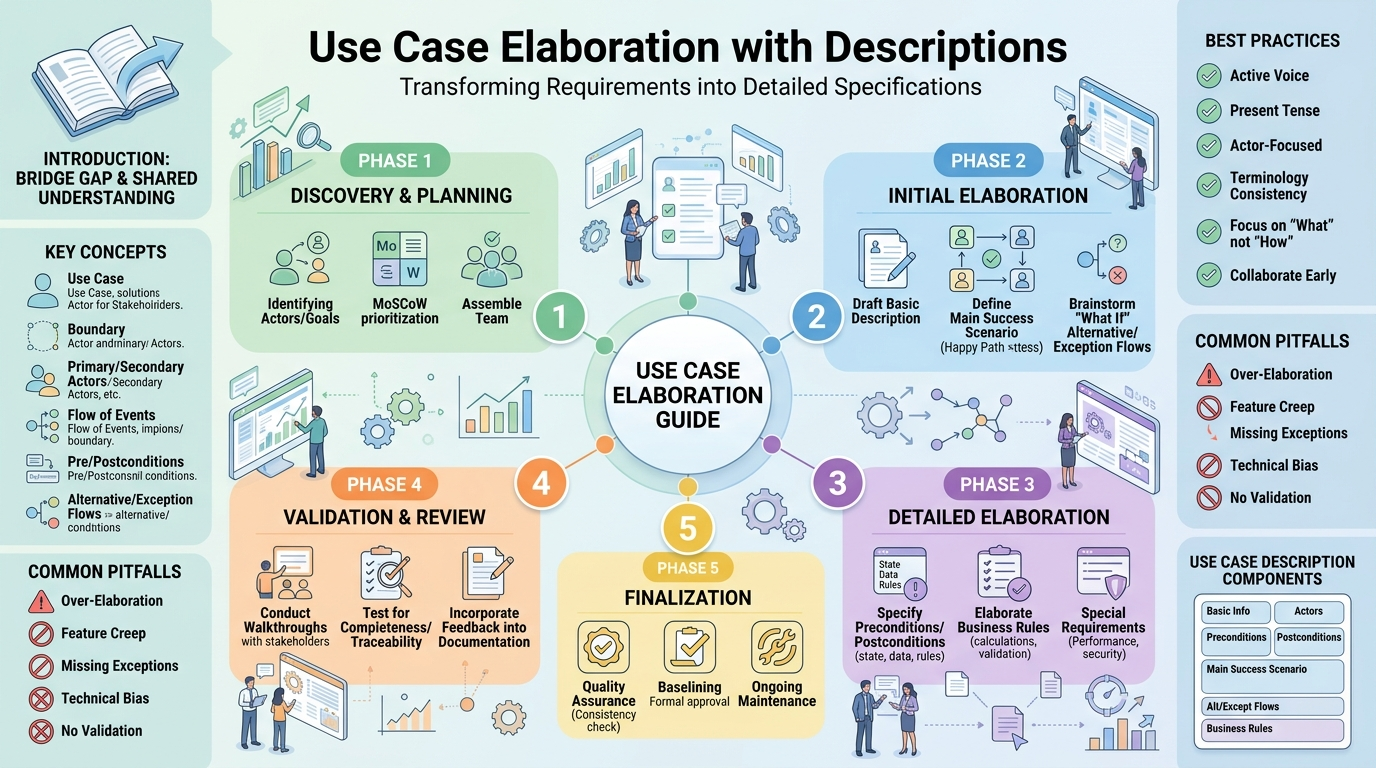
Why Elaborate Use Cases?
A use case describes a specific way in which an actor interacts with a system to achieve a goal. It represents a functional requirement from the user's perspective.
An entity (human user, external system, or hardware device) that interacts with the system. Actors exist outside the system boundary but initiate or participate in use cases.
The conceptual line that separates the system being designed from its external environment. Everything inside the boundary is the responsibility of the system.
The actor who initiates the use case to achieve a goal. Typically the one who has the interest in the successful completion of the use case.
An actor that the system interacts with to support the primary actor's goal. Often external systems or services.
The sequence of interactions between actors and the system during the execution of a use case.
Conditions that must be true before the use case can start. These represent the required state of the system.
Conditions that must be true after the use case completes successfully. These represent the expected state of the system.
Variations from the main flow due to exceptions, optional behavior, or different scenarios.
Flows that occur when something goes wrong, including error handling and recovery.
- Use Case ID: Unique identifier
- Use Case Name: Clear, verb-noun phrase
- Version: Current version number
- Author: Person who created/updated it
- Date: Creation/modification date
- Status: Draft, Reviewed, Approved
- Primary Actor: The initiator
- Secondary Actors: Supporting actors
- Stakeholders: Who has interest in this use case
A concise summary (2-3 sentences) explaining what the use case accomplishes.
- System state requirements
- User authentication requirements
- Data availability requirements
- External system availability
- Success guarantees
- State changes
- Data created/updated/deleted
- Notifications sent
The "happy path" showing the typical successful execution:
1. Actor performs action X
2. System validates input
3. System processes request
4. System displays confirmation
5. Actor acknowledges
- Alt Flow 1: [Condition] -> [Different behavior]
- Alt Flow 2: [Condition] -> [Different behavior]
- Except Flow 1: [Error condition] -> [Handling behavior]
- Except Flow 2: [Error condition] -> [Handling behavior]
- Rule 1: [Business constraint]
- Rule 2: [Validation requirement]
- Performance requirements
- Security requirements
- Usability requirements
- Interface requirements
- Assumption 1: [What we assume to be true]
- Assumption 2: [What we assume will be available]
- Issue 1: [Unresolved question]
- Issue 2: [Need clarification]
================================================================
USE CASE: [Name]
================================================================
ID: UC-XX
Version: 1.0
Status: [Draft/Reviewed/Approved]
Author: [Name]
Date: [YYYY-MM-DD]

================================================================
BASIC INFORMATION
================================================================
Brief Description:
[1-2 sentences describing the use case]

Priority: [High/Medium/Low]
Risk: [High/Medium/Low]

================================================================
ACTORS
================================================================
Primary Actor: [Main actor]
Secondary Actors: [Supporting actors]
Stakeholders: [Who has interest]

================================================================
PRECONDITIONS
================================================================
1. [Condition that must be true]
2. [Condition that must be true]

================================================================
POSTCONDITIONS
================================================================
Success Guarantee:
1. [State after successful completion]
2. [State after successful completion]

Minimal Guarantee:
1. [Minimum guarantee if use case fails]
2. [Minimum guarantee if use case fails]

================================================================
MAIN SUCCESS SCENARIO (Basic Flow)
================================================================
1. [Actor] [action]
2. System [response]
3. [Actor] [action]
4. System [response]
5. [Actor] [action]
6. System [response]
7. [Goal achieved]

================================================================
ALTERNATIVE FLOWS
================================================================
Alt Flow 1: [Condition]
   1. [Different behavior]
   2. [Different behavior]
   Resume at step X

Alt Flow 2: [Condition]
   1. [Different behavior]
   2. [Different behavior]
   Resume at step X

================================================================
EXCEPTION FLOWS
================================================================
Except Flow 1: [Error condition]
   1. System [handling]
   2. System [handling]

Except Flow 2: [Error condition]
   1. System [handling]
   2. System [handling]

================================================================
BUSINESS RULES
================================================================
BR-1: [Rule description]
BR-2: [Rule description]
BR-3: [Rule description]

================================================================
SPECIAL REQUIREMENTS
================================================================
Performance:
- [Performance requirement]
- [Performance requirement]

Security:
- [Security requirement]
- [Security requirement]

Usability:
- [Usability requirement]
- [Usability requirement]

================================================================
ASSUMPTIONS
================================================================
1. [Assumption]
2. [Assumption]

================================================================
OPEN ISSUES
================================================================
1. [Issue description] - Owner: [Name] - Due: [Date]
2. [Issue description] - Owner: [Name] - Due: [Date]

================================================================
CHANGE HISTORY
================================================================
| Version | Date | Author | Changes |
|---------|------|--------|---------|
| 1.0 | YYYY-MM-DD | Name | Initial |
| 1.1 | YYYY-MM-DD | Name | Updated flows |
================================================================
================================================================
USE CASE: Process Online Order
================================================================
ID: UC-101
Version: 2.1
Status: Reviewed
Author: Jane Smith
Date: 2026-06-18

================================================================
BASIC INFORMATION
================================================================
Brief Description:
This use case allows a customer to purchase products by
adding items to a shopping cart, providing shipping and
payment information, and confirming the order.

Priority: High
Risk: High

================================================================
ACTORS
================================================================
Primary Actor: Customer
Secondary Actors: Payment Gateway, Inventory System, Shipping System
Stakeholders: Customer, Customer Service, Finance, Logistics

================================================================
PRECONDITIONS
================================================================
1. Customer is logged into the system
2. Shopping cart contains at least one item
3. All items in cart are in stock
4. System is connected to payment and inventory services

================================================================
POSTCONDITIONS
================================================================
Success Guarantee:
1. Order is created with "Confirmed" status
2. Inventory is reserved for all items
3. Payment is authorized (not captured)
4. Order confirmation email is sent to customer
5. Order is sent to fulfillment system

Minimal Guarantee:
1. Cart items remain in cart if order fails
2. No payment is processed if transaction fails
3. Inventory is released if order cannot be completed

================================================================
MAIN SUCCESS SCENARIO (Basic Flow)
================================================================
1. Customer initiates checkout process
2. System displays order summary with items, quantities, and prices
3. Customer provides shipping address
4. System validates shipping address format
5. Customer selects shipping method
6. System calculates shipping cost and total
7. Customer provides payment information
8. System validates payment information
9. System submits payment for authorization
10. System processes order
11. System reserves inventory
12. System sends order confirmation
13. System displays order confirmation to customer
14. Customer acknowledges completion

================================================================
ALTERNATIVE FLOWS
================================================================
Alt Flow 1: Customer uses saved address
   1. Customer selects saved shipping address
   2. System populates address fields
   Resume at step 5

Alt Flow 2: Customer applies promotion code
   1. Customer enters promotion code
   2. System validates code
   3. System applies discount
   4. System recalculates total
   Resume at step 7

Alt Flow 3: Customer uses saved payment method
   1. Customer selects saved payment method
   2. System populates payment fields
   Resume at step 7

Alt Flow 4: Payment requires 3D Secure
   1. System redirects to 3D Secure page
   2. Customer completes 3D Secure verification
   3. System returns to checkout
   Resume at step 9

================================================================
EXCEPTION FLOWS
================================================================
Except Flow 1: Shopping cart is empty
   1. System displays "Cart is empty" message
   2. System redirects to product browsing
   Use case ends

Except Flow 2: Item becomes unavailable during checkout
   1. System notifies customer of unavailable item
   2. System removes item from cart
   3. System updates order summary
   Resume at step 2

Except Flow 3: Invalid address format
   1. System displays address validation error
   2. System asks customer to correct address
   Resume at step 3

Except Flow 4: Payment authorization fails
   1. System displays payment declined message
   2. System asks customer to use different payment method
   Resume at step 7

Except Flow 5: Promotion code is invalid
   1. System displays "Invalid code" message
   2. System asks customer to try another code
   Resume at step 6

================================================================
BUSINESS RULES
================================================================
BR-101: Order total must be at least $1.00
BR-102: Customer must be over 18 years old for certain items
BR-103: Shipping address must be within service area
BR-104: Promotion codes are single-use only
BR-105: Maximum quantity per item is 99 units
BR-106: Order must be confirmed within 30 minutes of checkout start

================================================================
SPECIAL REQUIREMENTS
================================================================
Performance:
- Checkout process must complete within 30 seconds
- Payment authorization must respond within 5 seconds

Security:
- All payment data must be encrypted
- Credit card information must not be stored
- Session must timeout after 30 minutes of inactivity

Usability:
- Step-by-step progress indicator required
- Must be mobile-responsive
- Real-time validation on address fields

================================================================
ASSUMPTIONS
================================================================
1. Customer has a valid payment method available
2. Customer has internet connectivity
3. System has sufficient inventory to fulfill order
4. Payment gateway service is available

================================================================
OPEN ISSUES
================================================================
1. Handling of international shipping addresses - Owner: Team - Due: 2026-07-01
2. Tax calculation for digital products - Owner: Finance - Due: 2026-06-25

================================================================
CHANGE HISTORY
================================================================
| Version | Date | Author | Changes |
|---------|------|--------|---------|
| 1.0 | 2026-05-01 | J. Smith | Initial |
| 1.1 | 2026-05-15 | J. Smith | Added promotion flows |
| 2.0 | 2026-05-30 | J. Smith | Added 3D Secure flow |
| 2.1 | 2026-06-18 | J. Smith | Updated business rules |
================================================================
Use case elaboration is a critical skill for requirements analysts and system designers. A well-elaborated use case serves as a bridge between business needs and technical implementation, providing clarity, reducing ambiguity, and improving stakeholder communication.
Key Takeaways:
By following this guide, teams can create high-quality use case specifications that serve as an effective foundation for successful software development projects.

