
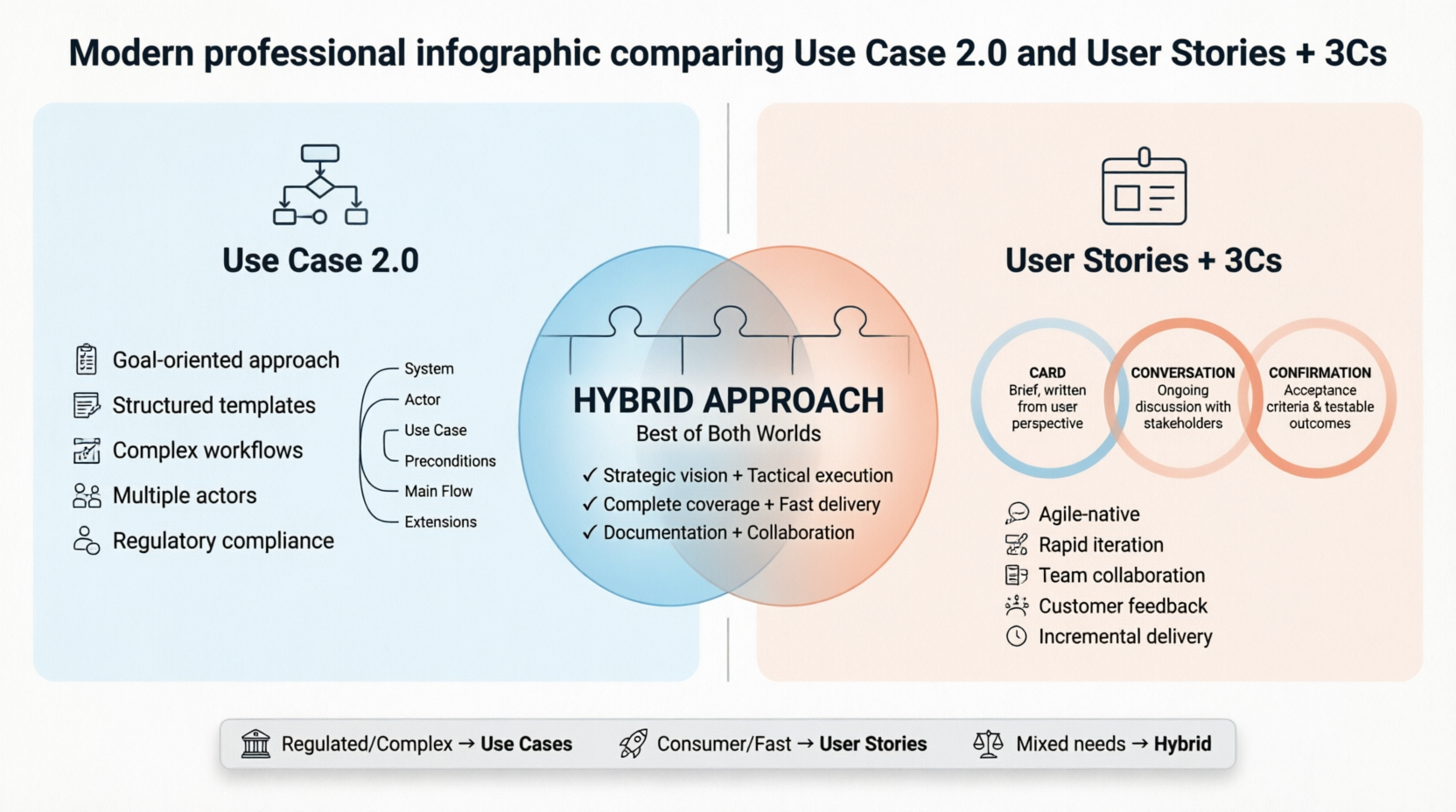
Use Case 2.0 is an evolution of traditional use cases, popularized by Alistair Cockburn and Ivar Jacobson. It emphasizes:
Goal-oriented approach focusing on user objectives
Incremental delivery through use case slices
Lightweight documentation suitable for agile environments
Stakeholder collaboration rather than heavy specification
User Stories are the primary requirement format in Agile/Scrum, enhanced by Ron Jeffries' 3Cs:
Card: The written description (brief placeholder)
Conversation: The discussion between stakeholders
Confirmation: Acceptance criteria that validate completion
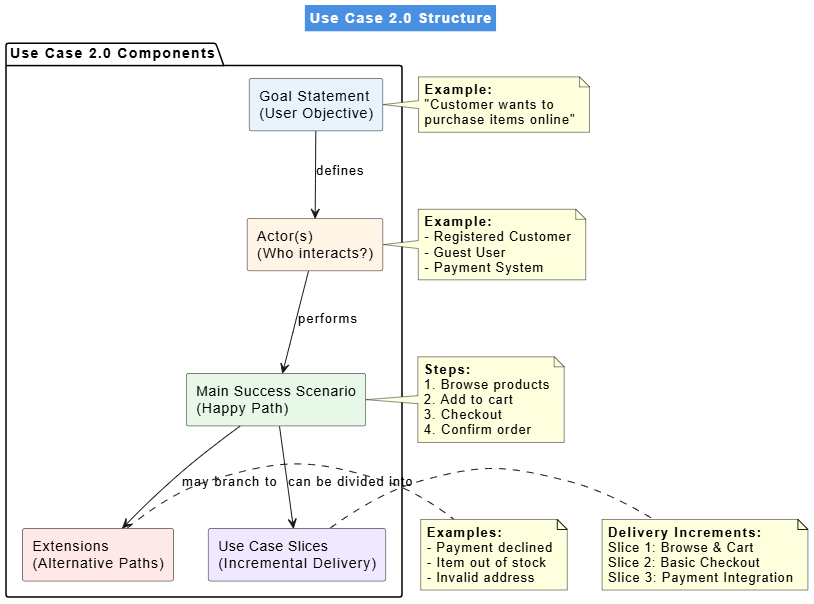
@startuml
skinparam backgroundColor white
skinparam titleBackgroundColor #4A90E2
skinparam titleFontColor white

title Use Case 2.0 Structure

package "Use Case 2.0 Components" {

  rectangle "Goal Statement\n(User Objective)" as Goal #E8F4FD
  rectangle "Actor(s)\n(Who interacts?)" as Actor #FFF4E6
  rectangle "Main Success Scenario\n(Happy Path)" as MainSuccess #E8F8E8
  rectangle "Extensions\n(Alternative Paths)" as Extensions #FFE8E8
  rectangle "Use Case Slices\n(Incremental Delivery)" as Slices #F0E8FF

  Goal --> Actor : defines
  Actor --> MainSuccess : performs
  MainSuccess --> Extensions : may branch to
  MainSuccess --> Slices : can be divided into
}

note right of Goal
  <b>Example:</b>
  "Customer wants to
  purchase items online"
end note

note right of Actor
  <b>Example:</b>
  - Registered Customer
  - Guest User
  - Payment System
end note

note right of MainSuccess
  <b>Steps:</b>
  1. Browse products
  2. Add to cart
  3. Checkout
  4. Confirm order
end note

note right of Extensions
  <b>Examples:</b>
  - Payment declined
  - Item out of stock
  - Invalid address
end note

note right of Slices
  <b>Delivery Increments:</b>
  Slice 1: Browse & Cart
  Slice 2: Basic Checkout
  Slice 3: Payment Integration
end note

@enduml
USE CASE: Place Online Order

GOAL IN CONTEXT:
As a customer, I want to purchase items from the online store
so that I can receive products at my home.

SCOPE: E-commerce Platform
LEVEL: User goal
PRIMARY ACTOR: Customer
SECONDARY ACTORS: Payment Gateway, Inventory System

PRECONDITIONS:
- Customer has internet access
- Products are available in inventory

MAIN SUCCESS SCENARIO:
1. Customer browses product catalog
2. Customer selects items and adds to shopping cart
3. Customer proceeds to checkout
4. Customer enters shipping information
5. Customer selects payment method
6. System validates payment
7. System confirms order and sends confirmation email
8. System updates inventory

EXTENSIONS:
2a. Product out of stock:
   - System notifies customer
   - Customer removes item or waits for restock

5a. Payment declined:
   - System displays error message
   - Customer tries different payment method
   - Return to step 5

5b. Invalid shipping address:
   - System validates address format
   - Customer corrects address
   - Return to step 4

TECHNOLOGY & DATA VARIATIONS LIST:
- Mobile app vs. web interface
- Credit card, PayPal, Apple Pay
- Standard vs. express shipping

FREQUENCY OF OCCURRENCE:
High - multiple times per day

OPEN ISSUES:
- Should we support guest checkout?
- How long to hold inventory during checkout?
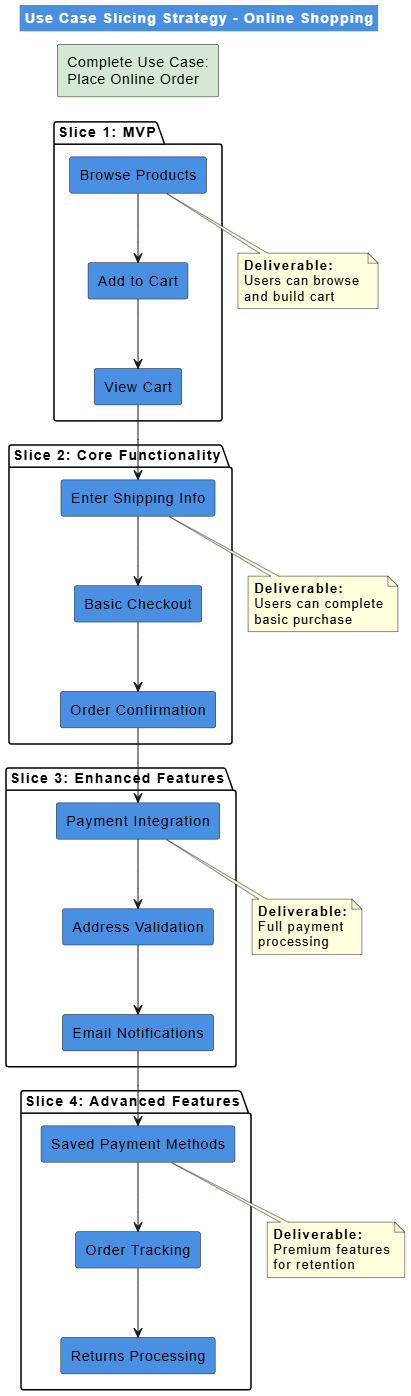
@startuml
skinparam backgroundColor white
skinparam titleBackgroundColor #4A90E2
skinparam titleFontColor white

title Use Case Slicing Strategy - Online Shopping

rectangle "Complete Use Case:\nPlace Online Order" as Complete #D5E8D4

package "Slice 1: MVP" {
  rectangle "Browse Products" as Browse
  rectangle "Add to Cart" as Cart
  rectangle "View Cart" as ViewCart
}

package "Slice 2: Core Functionality" {
  rectangle "Enter Shipping Info" as Shipping
  rectangle "Basic Checkout" as Checkout
  rectangle "Order Confirmation" as Confirm
}

package "Slice 3: Enhanced Features" {
  rectangle "Payment Integration" as Payment
  rectangle "Address Validation" as Validate
  rectangle "Email Notifications" as Email
}

package "Slice 4: Advanced Features" {
  rectangle "Saved Payment Methods" as SavedPay
  rectangle "Order Tracking" as Track
  rectangle "Returns Processing" as Returns
}

Complete -[hidden]-> Browse
Browse --> Cart
Cart --> ViewCart
ViewCart --> Shipping
Shipping --> Checkout
Checkout --> Confirm
Confirm --> Payment
Payment --> Validate
Validate --> Email
Email --> SavedPay
SavedPay --> Track
Track --> Returns

note bottom of Browse
  <b>Deliverable:</b>
  Users can browse
  and build cart
end note

note bottom of Shipping
  <b>Deliverable:</b>
  Users can complete
  basic purchase
end note

note bottom of Payment
  <b>Deliverable:</b>
  Full payment
  processing
end note

note bottom of SavedPay
  <b>Deliverable:</b>
  Premium features
  for retention
end note

@enduml
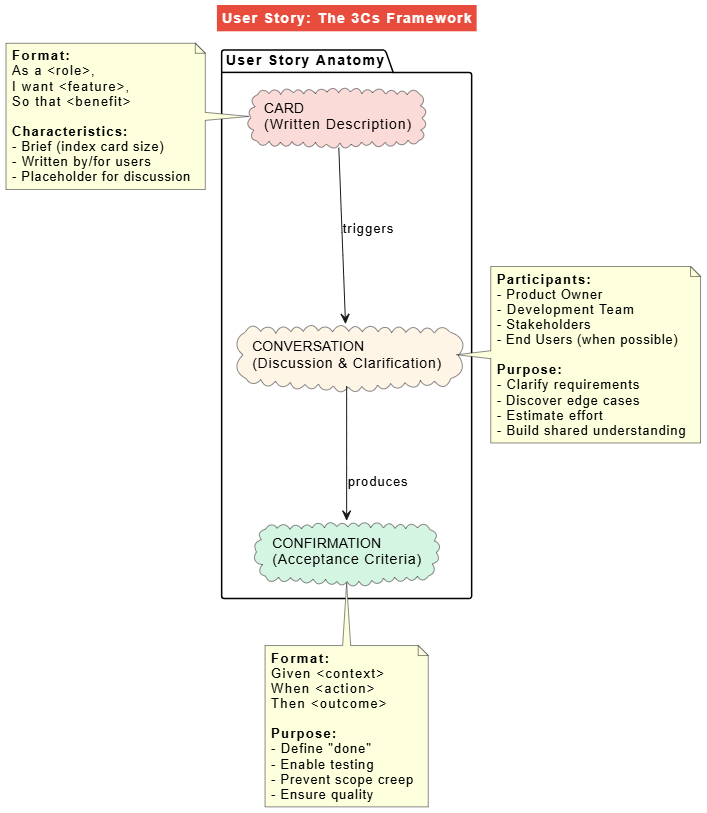
@startuml
skinparam backgroundColor white
skinparam titleBackgroundColor #E74C3C
skinparam titleFontColor white

title User Story: The 3Cs Framework

package "User Story Anatomy" {

  cloud "CARD\n(Written Description)" as Card #FADBD8
  cloud "CONVERSATION\n(Discussion & Clarification)" as Conversation #FEF5E7
  cloud "CONFIRMATION\n(Acceptance Criteria)" as Confirmation #D5F5E3

  Card --> Conversation : triggers
  Conversation --> Confirmation : produces
}

note left of Card
  <b>Format:</b>
  As a <role>,
  I want <feature>,
  So that <benefit>

  <b>Characteristics:</b>
  - Brief (index card size)
  - Written by/for users
  - Placeholder for discussion
end note

note right of Conversation
  <b>Participants:</b>
  - Product Owner
  - Development Team
  - Stakeholders
  - End Users (when possible)

  <b>Purpose:</b>
  - Clarify requirements
  - Discover edge cases
  - Estimate effort
  - Build shared understanding
end note

note bottom of Confirmation
  <b>Format:</b>
  Given <context>
  When <action>
  Then <outcome>

  <b>Purpose:</b>
  - Define "done"
  - Enable testing
  - Prevent scope creep
  - Ensure quality
end note

@enduml
CARD:
As a registered customer,
I want to save items to a wishlist,
So that I can purchase them later when I have time.

CONVERSATION NOTES:
- Should wishlist be private or shareable?
- Can users add notes to wishlist items?
- Should we notify when wishlist items go on sale?
- How many items can be saved?
- Should wishlist sync across devices?

CONFIRMATION (Acceptance Criteria):
Given I am logged in as a registered customer
When I view a product detail page
Then I see a "Add to Wishlist" button

Given I click "Add to Wishlist"
When the item is successfully added
Then I see a confirmation message
And the button changes to "Remove from Wishlist"

Given I have items in my wishlist
When I navigate to my account page
Then I can view all saved items
And each item shows current price and availability

Given a wishlist item goes on sale
When I log in
Then I see a notification about the price drop
CARD:
As a trail runner,
I want to track my running routes using GPS,
So that I can analyze my performance over time.

CONVERSATION NOTES:
- What metrics should we track? (distance, pace, elevation)
- How often should we sample GPS data?
- Should it work offline?
- Battery consumption concerns?
- Export formats for data?

CONFIRMATION (Acceptance Criteria):
Given I start a new run
When GPS signal is available
Then the app records my location every 5 seconds

Given I'm tracking a run
When I pause the activity
Then GPS recording stops but session remains active

Given I complete a run
When I save the activity
Then the app calculates total distance, average pace, and elevation gain
And stores the route map

Given I have no internet connection
When I track a run
Then the app stores data locally
And syncs when connection is restored
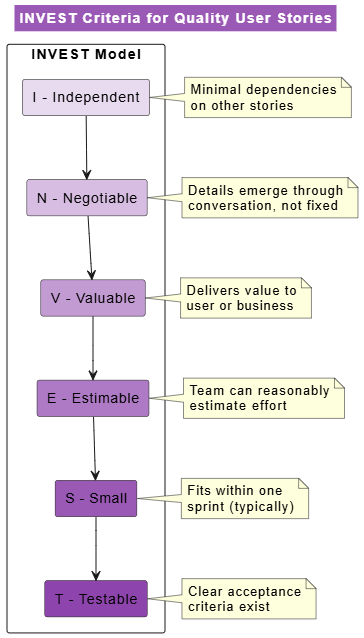
@startuml
skinparam backgroundColor white
skinparam titleBackgroundColor #9B59B6
skinparam titleFontColor white

title INVEST Criteria for Quality User Stories

rectangle "INVEST Model" as Invest {

  rectangle "I - Independent" as Independent #E8DAEF
  rectangle "N - Negotiable" as Negotiable #D7BDE2
  rectangle "V - Valuable" as Valuable #C39BD3
  rectangle "E - Estimable" as Estimable #AF7AC5
  rectangle "S - Small" as Small #9B59B6
  rectangle "T - Testable" as Testable #8E44AD
}

Independent --> Negotiable
Negotiable --> Valuable
Valuable --> Estimable
Estimable --> Small
Small --> Testable

note right of Independent
  Minimal dependencies
  on other stories
end note

note right of Negotiable
  Details emerge through
  conversation, not fixed
end note

note right of Valuable
  Delivers value to
  user or business
end note

note right of Estimable
  Team can reasonably
  estimate effort
end note

note right of Small
  Fits within one
  sprint (typically)
end note

note right of Testable
  Clear acceptance
  criteria exist
end note

@enduml
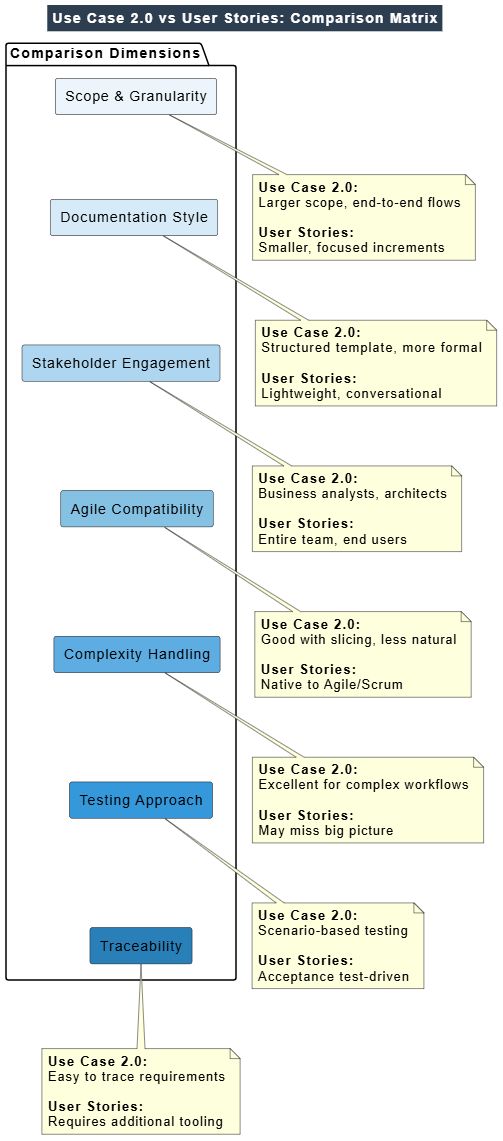
@startuml
skinparam backgroundColor white
skinparam titleBackgroundColor #2C3E50
skinparam titleFontColor white

title Use Case 2.0 vs User Stories: Comparison Matrix

package "Comparison Dimensions" {

  rectangle "Scope & Granularity" as Scope #EBF5FB
  rectangle "Documentation Style" as DocStyle #D6EAF8
  rectangle "Stakeholder Engagement" as Stakeholder #AED6F1
  rectangle "Agile Compatibility" as Agile #85C1E2
  rectangle "Complexity Handling" as Complexity #5DADE2
  rectangle "Testing Approach" as Testing #3498DB
  rectangle "Traceability" as Trace #2980B9
}

Scope -[hidden]-> DocStyle
DocStyle -[hidden]-> Stakeholder
Stakeholder -[hidden]-> Agile
Agile -[hidden]-> Complexity
Complexity -[hidden]-> Testing
Testing -[hidden]-> Trace

note bottom of Scope
  <b>Use Case 2.0:</b>
  Larger scope, end-to-end flows

  <b>User Stories:</b>
  Smaller, focused increments
end note

note bottom of DocStyle
  <b>Use Case 2.0:</b>
  Structured template, more formal

  <b>User Stories:</b>
  Lightweight, conversational
end note

note bottom of Stakeholder
  <b>Use Case 2.0:</b>
  Business analysts, architects

  <b>User Stories:</b>
  Entire team, end users
end note

note bottom of Agile
  <b>Use Case 2.0:</b>
  Good with slicing, less natural

  <b>User Stories:</b>
  Native to Agile/Scrum
end note

note bottom of Complexity
  <b>Use Case 2.0:</b>
  Excellent for complex workflows

  <b>User Stories:</b>
  May miss big picture
end note

note bottom of Testing
  <b>Use Case 2.0:</b>
  Scenario-based testing

  <b>User Stories:</b>
  Acceptance test-driven
end note

note bottom of Trace
  <b>Use Case 2.0:</b>
  Easy to trace requirements

  <b>User Stories:</b>
  Requires additional tooling
end note

@enduml
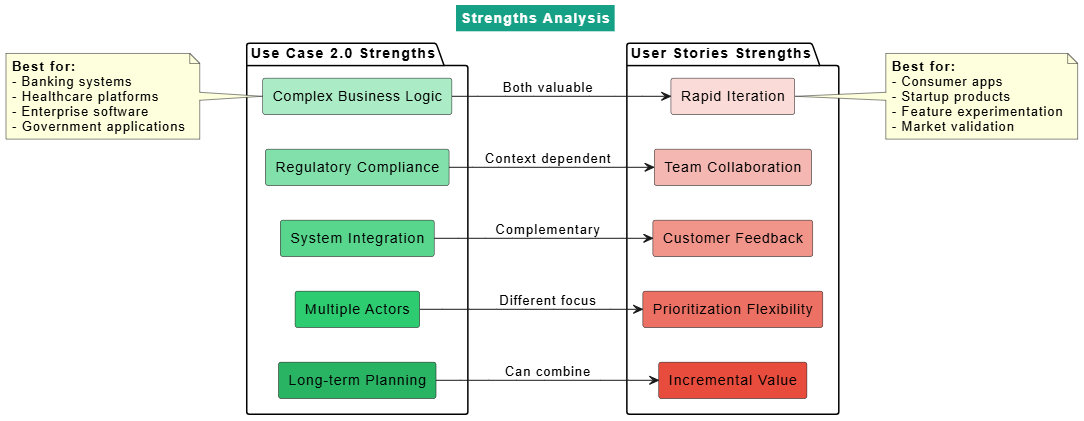
@startuml
skinparam backgroundColor white
skinparam titleBackgroundColor #16A085
skinparam titleFontColor white

title Strengths Analysis

left to right direction

package "Use Case 2.0 Strengths" {

  rectangle "Complex Business Logic" as UC1 #ABEBC6
  rectangle "Regulatory Compliance" as UC2 #82E0AA
  rectangle "System Integration" as UC3 #58D68D
  rectangle "Multiple Actors" as UC4 #2ECC71
  rectangle "Long-term Planning" as UC5 #28B463
}

package "User Stories Strengths" {

  rectangle "Rapid Iteration" as US1 #FADBD8
  rectangle "Team Collaboration" as US2 #F5B7B1
  rectangle "Customer Feedback" as US3 #F1948A
  rectangle "Prioritization Flexibility" as US4 #EC7063
  rectangle "Incremental Value" as US5 #E74C3C
}

UC1 --> US1 : Both valuable
UC2 --> US2 : Context dependent
UC3 --> US3 : Complementary
UC4 --> US4 : Different focus
UC5 --> US5 : Can combine

note left of UC1
  <b>Best for:</b>
  - Banking systems
  - Healthcare platforms
  - Enterprise software
  - Government applications
end note

note right of US1
  <b>Best for:</b>
  - Consumer apps
  - Startup products
  - Feature experimentation
  - Market validation
end note

@enduml
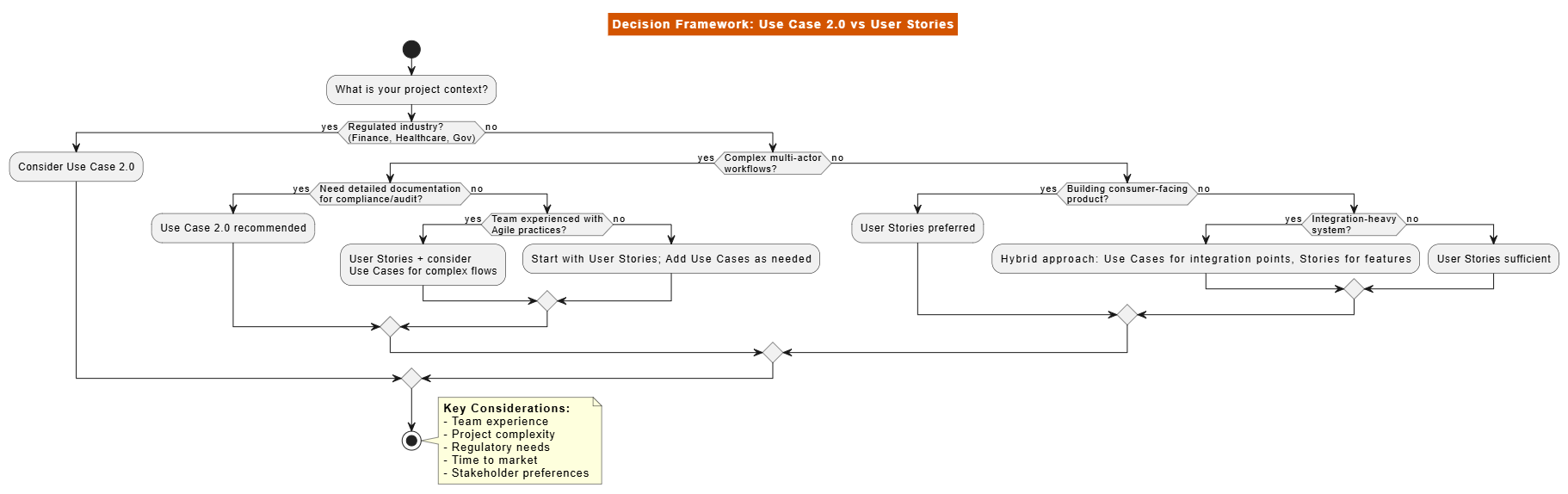
@startuml
skinparam backgroundColor white
skinparam titleBackgroundColor #D35400
skinparam titleFontColor white

title Decision Framework: Use Case 2.0 vs User Stories

start

:What is your project context?;

if (Regulated industry?\n(Finance, Healthcare, Gov)) then (yes)
  :Consider Use Case 2.0;
else (no)
  if (Complex multi-actor\nworkflows?) then (yes)
    if (Need detailed documentation\nfor compliance/audit?) then (yes)
      :Use Case 2.0 recommended;
    else (no)
      if (Team experienced with\nAgile practices?) then (yes)
        :User Stories + consider\nUse Cases for complex flows;
      else (no)
        :Start with User Stories;\
        Add Use Cases as needed;
      endif
    endif
  else (no)
    if (Building consumer-facing\nproduct?) then (yes)
      :User Stories preferred;
    else (no)
      if (Integration-heavy\nsystem?) then (yes)
        :Hybrid approach:\
        Use Cases for integration points,\
        Stories for features;
      else (no)
        :User Stories sufficient;
      endif
    endif
  endif
endif

stop

note right
  <b>Key Considerations:</b>
  - Team experience
  - Project complexity
  - Regulatory needs
  - Time to market
  - Stakeholder preferences
end note

@enduml
Recommendation: Use Case 2.0
WHY:
✓ Complex regulatory requirements (SEC, FINRA)
✓ Multiple actors (traders, compliance, risk management)
✓ Critical error handling paths
✓ Audit trail requirements
✓ Long-term maintenance needs

EXAMPLE USE CASE SLICE:
Slice 1: View portfolio balances
Slice 2: Place market orders
Slice 3: Place limit orders with validation
Slice 4: Real-time risk checks
Slice 5: Compliance reporting
Recommendation: User Stories
WHY:
✓ Rapid iteration needed
✓ Heavy user feedback loop
✓ Simple core workflows
✓ Experimental features
✓ Frequent pivots based on metrics

EXAMPLE STORY MAP:
Epic: Content Creation
- As a user, I want to post text updates
- As a user, I want to add photos to posts
- As a user, I want to tag friends in photos
- As a user, I want to schedule posts

Epic: Engagement
- As a user, I want to like posts
- As a user, I want to comment on posts
- As a user, I want to share posts
Recommendation: Both (Strategic Combination)
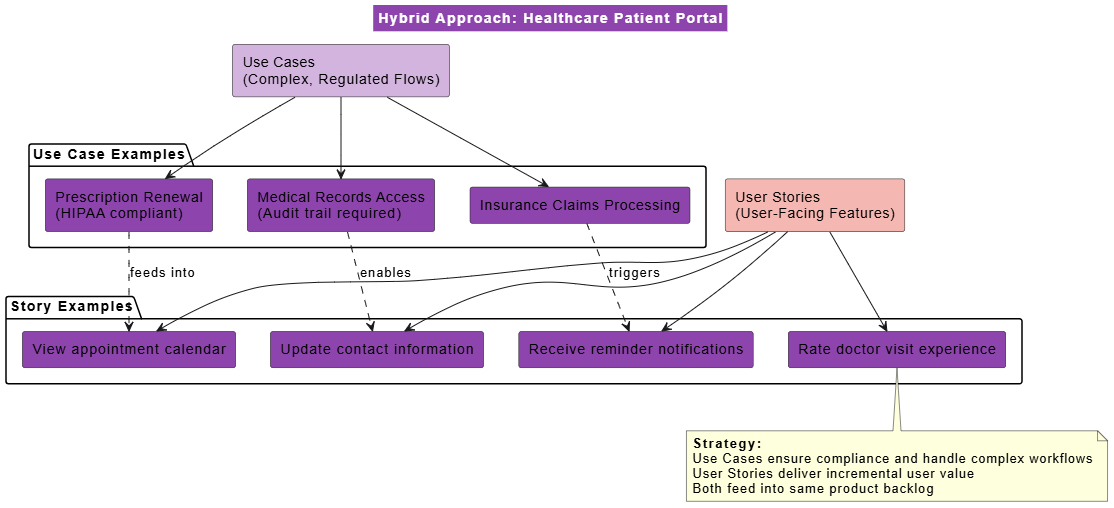
@startuml
skinparam backgroundColor white
skinparam titleBackgroundColor #8E44AD
skinparam titleFontColor white

title Hybrid Approach: Healthcare Patient Portal

rectangle "Use Cases\n(Complex, Regulated Flows)" as UCBox #D2B4DE

package "Use Case Examples" {
  rectangle "Prescription Renewal\n(HIPAA compliant)" as UC1
  rectangle "Insurance Claims Processing" as UC2
  rectangle "Medical Records Access\n(Audit trail required)" as UC3
}

UCBox --> UC1
UCBox --> UC2
UCBox --> UC3

rectangle "User Stories\n(User-Facing Features)" as USBox #F5B7B1

package "Story Examples" {
  rectangle "View appointment calendar" as US1
  rectangle "Receive reminder notifications" as US2
  rectangle "Update contact information" as US3
  rectangle "Rate doctor visit experience" as US4
}

USBox --> US1
USBox --> US2
USBox --> US3
USBox --> US4

UC1 ..> US1 : feeds into
UC2 ..> US2 : triggers
UC3 ..> US3 : enables

note bottom
  <b>Strategy:</b>
  Use Cases ensure compliance and handle complex workflows
  User Stories deliver incremental user value
  Both feed into same product backlog
end note

@enduml
❌ BAD: "The system shall allow users to login"
✅ GOOD: "Authenticated users need to access their personalized dashboard"

Focus on WHY before HOW
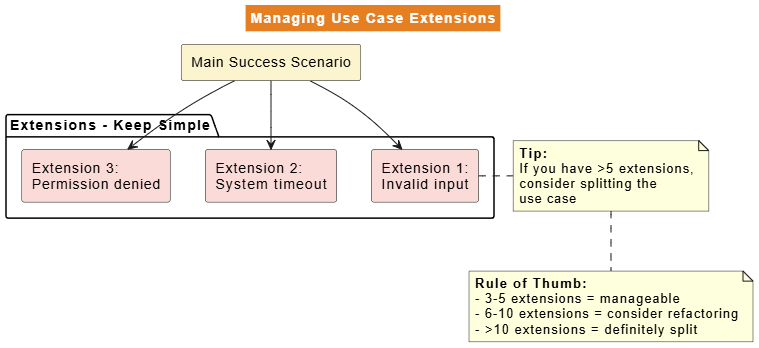
@startuml
skinparam backgroundColor white
skinparam titleBackgroundColor #E67E22
skinparam titleFontColor white

title Managing Use Case Extensions

rectangle "Main Success Scenario" as Main #FCF3CF

package "Extensions - Keep Simple" {
  rectangle "Extension 1:\nInvalid input" as Ext1 #FADBD8
  rectangle "Extension 2:\nSystem timeout" as Ext2 #FADBD8
  rectangle "Extension 3:\nPermission denied" as Ext3 #FADBD8
}

Main --> Ext1
Main --> Ext2
Main --> Ext3

note right of Ext1
  <b>Tip:</b>
  If you have >5 extensions,
  consider splitting the
  use case
end note

note bottom
  <b>Rule of Thumb:</b>
  - 3-5 extensions = manageable
  - 6-10 extensions = consider refactoring
  - >10 extensions = definitely split
end note

@enduml
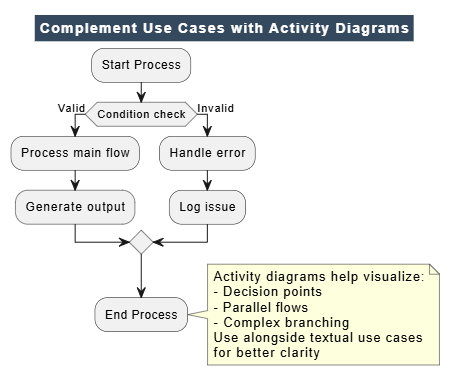
@startuml
skinparam backgroundColor white
skinparam titleBackgroundColor #34495E
skinparam titleFontColor white

title Complement Use Cases with Activity Diagrams

:Start Process;

if (Condition check) then (Valid)
  :Process main flow;
  :Generate output;
else (Invalid)
  :Handle error;
  :Log issue;
endif

:End Process;

note right
  Activity diagrams help visualize:
  - Decision points
  - Parallel flows
  - Complex branching
  Use alongside textual use cases
  for better clarity
end note

@enduml
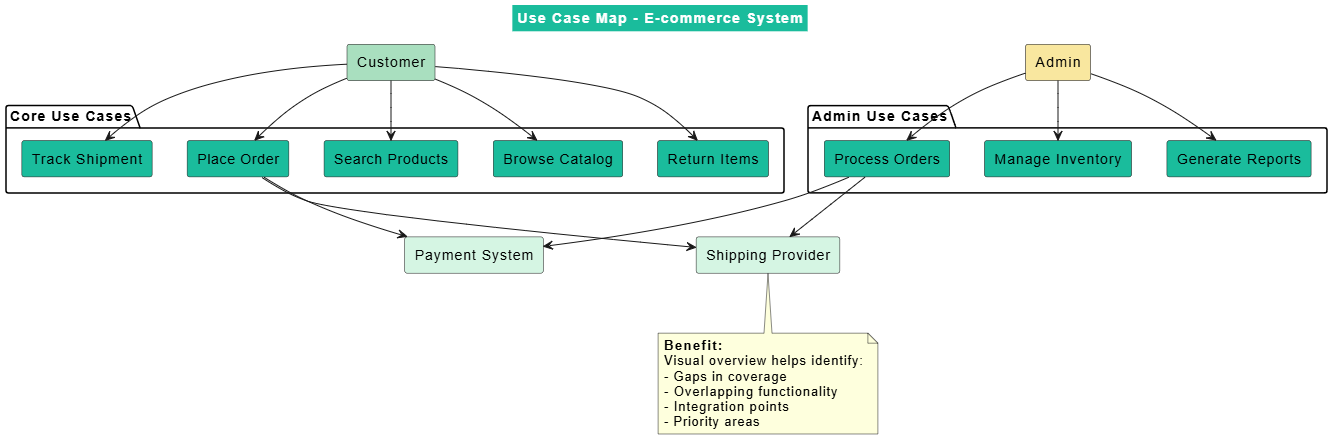
@startuml
skinparam backgroundColor white
skinparam titleBackgroundColor #1ABC9C
skinparam titleFontColor white

title Use Case Map - E-commerce System

rectangle "Customer" as Customer #A9DFBF

package "Core Use Cases" {
  rectangle "Browse Catalog" as Browse
  rectangle "Search Products" as Search
  rectangle "Place Order" as Order
  rectangle "Track Shipment" as Track
  rectangle "Return Items" as Return
}

Customer --> Browse
Customer --> Search
Customer --> Order
Customer --> Track
Customer --> Return

rectangle "Admin" as Admin #F9E79F

package "Admin Use Cases" {
  rectangle "Manage Inventory" as Inventory
  rectangle "Process Orders" as Process
  rectangle "Generate Reports" as Reports
}

Admin --> Inventory
Admin --> Process
Admin --> Reports

rectangle "Payment System" as Payment #D5F5E3
rectangle "Shipping Provider" as Shipping #D5F5E3

Order --> Payment
Order --> Shipping
Process --> Payment
Process --> Shipping

note bottom
  <b>Benefit:</b>
  Visual overview helps identify:
  - Gaps in coverage
  - Overlapping functionality
  - Integration points
  - Priority areas
end note

@enduml
❌ BAD: "Implement OAuth 2.0 authentication"
✅ GOOD: "As a user, I want to login with my Google account so that I don't need to remember another password"

Focus on user value, not technical implementation
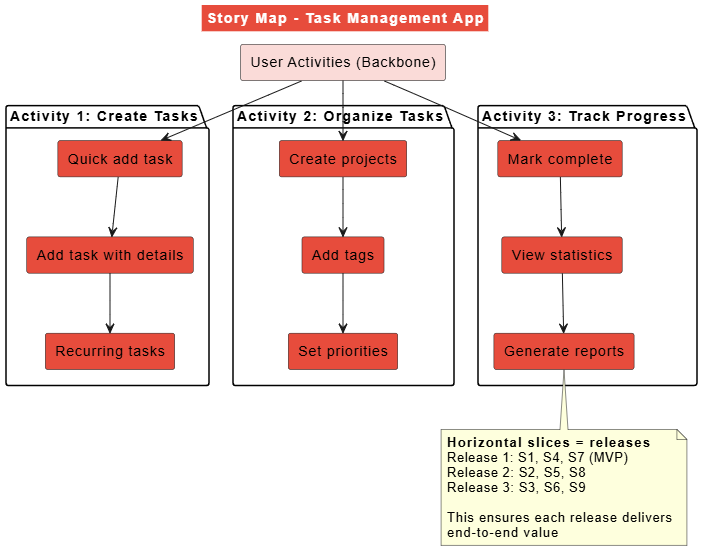
@startuml
skinparam backgroundColor white
skinparam titleBackgroundColor #E74C3C
skinparam titleFontColor white

title Story Map - Task Management App

rectangle "User Activities (Backbone)" as Backbone #FADBD8

package "Activity 1: Create Tasks" {
  rectangle "Quick add task" as S1
  rectangle "Add task with details" as S2
  rectangle "Recurring tasks" as S3
}

package "Activity 2: Organize Tasks" {
  rectangle "Create projects" as S4
  rectangle "Add tags" as S5
  rectangle "Set priorities" as S6
}

package "Activity 3: Track Progress" {
  rectangle "Mark complete" as S7
  rectangle "View statistics" as S8
  rectangle "Generate reports" as S9
}

Backbone --> S1
Backbone --> S4
Backbone --> S7

S1 --> S2
S2 --> S3

S4 --> S5
S5 --> S6

S7 --> S8
S8 --> S9

note bottom
  <b>Horizontal slices = releases</b>
  Release 1: S1, S4, S7 (MVP)
  Release 2: S2, S5, S8
  Release 3: S3, S6, S9

  This ensures each release delivers
  end-to-end value
end note

@enduml
STORY: As a customer, I want free shipping on orders over $50

ACCEPTANCE CRITERIA (with examples):

Scenario 1: Order qualifies for free shipping
  Given my cart total is $75
  When I proceed to checkout
  Then shipping cost is $0
  And I see "Free Shipping Applied" message

Scenario 2: Order doesn't qualify
  Given my cart total is $35
  When I proceed to checkout
  Then shipping cost is $5.99
  And I see "Add $15 more for free shipping" message

Scenario 3: Edge case - exactly $50
  Given my cart total is $50.00
  When I proceed to checkout
  Then shipping cost is $0
  And free shipping applies

Scenario 4: Sale items excluded
  Given my cart has $60 of regular items and $20 of sale items
  When I proceed to checkout
  Then only $60 counts toward free shipping threshold
  And shipping cost is $5.99
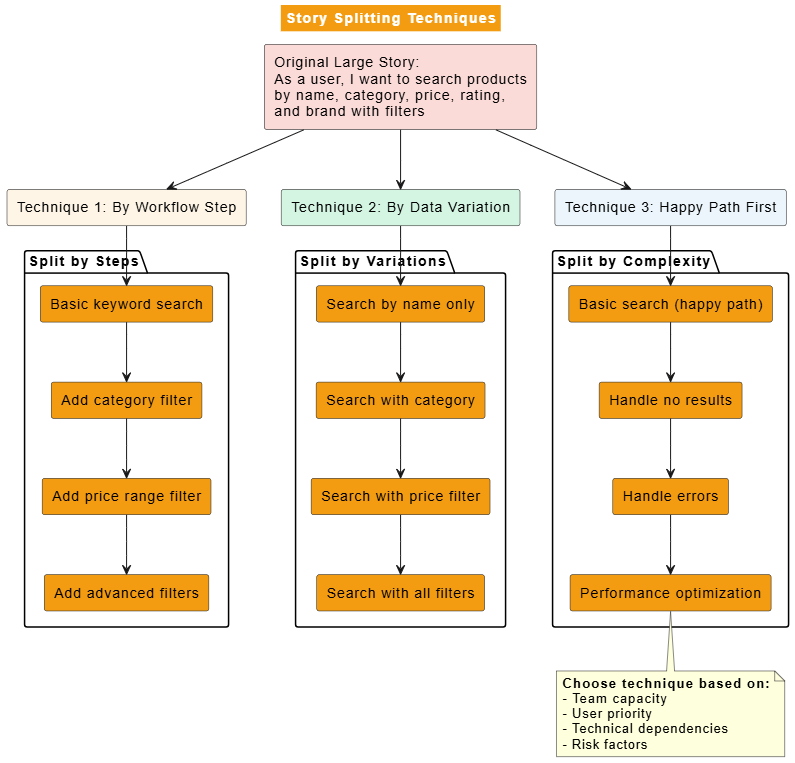
@startuml
skinparam backgroundColor white
skinparam titleBackgroundColor #F39C12
skinparam titleFontColor white

title Story Splitting Techniques

rectangle "Original Large Story:\nAs a user, I want to search products\nby name, category, price, rating,\nand brand with filters" as Large #FADBD8

rectangle "Technique 1: By Workflow Step" as Technique1 #FEF5E7
rectangle "Technique 2: By Data Variation" as Technique2 #D5F5E3
rectangle "Technique 3: Happy Path First" as Technique3 #EBF5FB

Large --> Technique1
Large --> Technique2
Large --> Technique3

package "Split by Steps" {
  rectangle "Basic keyword search" as Step1
  rectangle "Add category filter" as Step2
  rectangle "Add price range filter" as Step3
  rectangle "Add advanced filters" as Step4
}

Technique1 --> Step1
Step1 --> Step2
Step2 --> Step3
Step3 --> Step4

package "Split by Variations" {
  rectangle "Search by name only" as Var1
  rectangle "Search with category" as Var2
  rectangle "Search with price filter" as Var3
  rectangle "Search with all filters" as Var4
}

Technique2 --> Var1
Var1 --> Var2
Var2 --> Var3
Var3 --> Var4

package "Split by Complexity" {
  rectangle "Basic search (happy path)" as Happy
  rectangle "Handle no results" as NoResult
  rectangle "Handle errors" as Error
  rectangle "Performance optimization" as Perf
}

Technique3 --> Happy
Happy --> NoResult
NoResult --> Error
Error --> Perf

note bottom
  <b>Choose technique based on:</b>
  - Team capacity
  - User priority
  - Technical dependencies
  - Risk factors
end note

@enduml
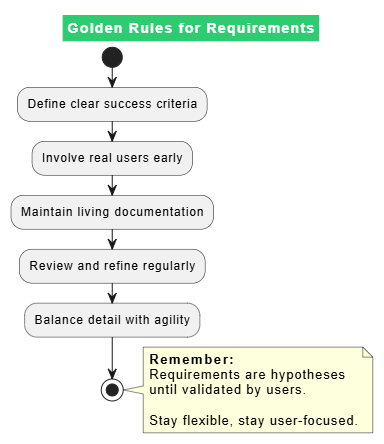
@startuml
skinparam backgroundColor white
skinparam titleBackgroundColor #2ECC71
skinparam titleFontColor white

title Golden Rules for Requirements

start

:Define clear success criteria;

:Involve real users early;

:Maintain living documentation;

:Review and refine regularly;

:Balance detail with agility;

stop

note right
  <b>Remember:</b>
  Requirements are hypotheses
  until validated by users.

  Stay flexible, stay user-focused.
end note

@enduml
HYBRID APPROACH WORKS BEST:

✓ Use Use Cases for:
  - Complex business processes
  - Regulatory/compliance requirements
  - System integration points
  - Training documentation

✓ Use User Stories for:
  - User-facing features
  - Incremental delivery
  - Rapid experimentation
  - Team collaboration

✓ Connect them:
  - Map stories to use case slices
  - Use acceptance criteria from use case scenarios
  - Maintain traceability between both
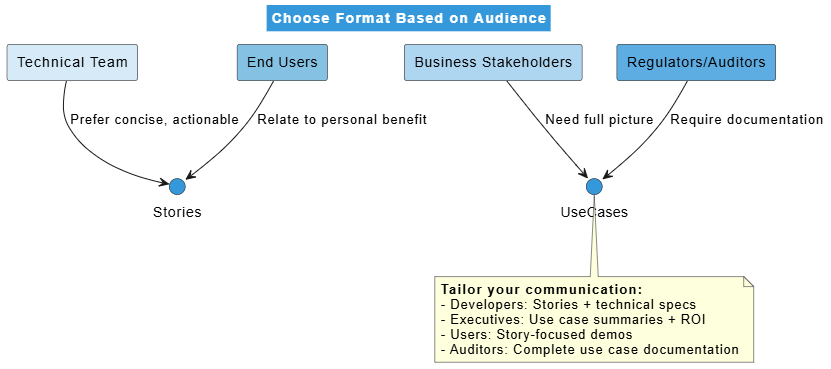
@startuml
skinparam backgroundColor white
skinparam titleBackgroundColor #3498DB
skinparam titleFontColor white

title Choose Format Based on Audience

rectangle "Technical Team" as Tech #D6EAF8
rectangle "Business Stakeholders" as Business #AED6F1
rectangle "End Users" as Users #85C1E2
rectangle "Regulators/Auditors" as Regulators #5DADE2

Tech --> Stories : Prefer concise, actionable
Business --> UseCases : Need full picture
Users --> Stories : Relate to personal benefit
Regulators --> UseCases : Require documentation

note bottom
  <b>Tailor your communication:</b>
  - Developers: Stories + technical specs
  - Executives: Use case summaries + ROI
  - Users: Story-focused demos
  - Auditors: Complete use case documentation
end note

@enduml
CONSISTENCY CHECKLIST:

□ Use consistent terminology across all artifacts
□ Link related use cases and stories explicitly
□ Maintain single source of truth for requirements
□ Regular grooming sessions to keep backlog current
□ Version control for use case documents
□ Clear ownership for each requirement type
□ Regular stakeholder reviews
METRICS TO TRACK:

For Use Cases:
- Coverage: % of business processes documented
- Clarity: Stakeholder comprehension scores
- Reuse: How often use cases inform multiple features
- Maintenance: Time spent updating vs. creating

For User Stories:
- Velocity: Stories completed per sprint
- Quality: Bug rate post-release
- Satisfaction: User feedback scores
- Predictability: Estimate vs. actual variance

Combined:
- Time to market for features
- Requirement change frequency
- Stakeholder satisfaction
- Team productivity trends
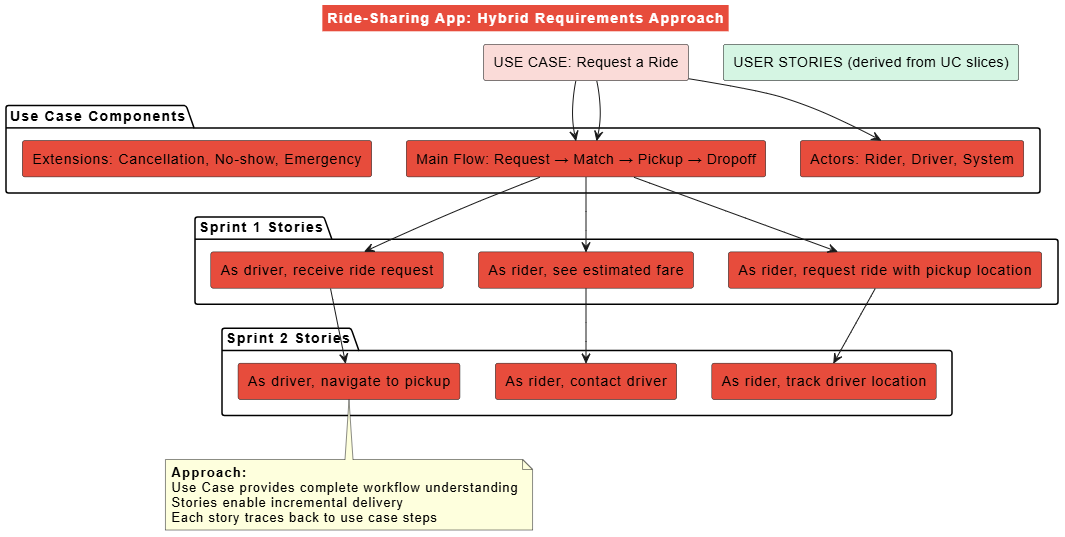
@startuml
skinparam backgroundColor white
skinparam titleBackgroundColor #E74C3C
skinparam titleFontColor white

title Ride-Sharing App: Hybrid Requirements Approach

rectangle "USE CASE: Request a Ride" as UC #FADBD8

package "Use Case Components" {
  rectangle "Actors: Rider, Driver, System" as Actors
  rectangle "Main Flow: Request → Match → Pickup → Dropoff" as Flow
  rectangle "Extensions: Cancellation, No-show, Emergency" as Ext
}

UC --> Actors
UC --> Flow
UC --> Flow

rectangle "USER STORIES (derived from UC slices)" as Stories #D5F5E3

package "Sprint 1 Stories" {
  rectangle "As rider, request ride with pickup location" as S1
  rectangle "As rider, see estimated fare" as S2
  rectangle "As driver, receive ride request" as S3
}

package "Sprint 2 Stories" {
  rectangle "As rider, track driver location" as S4
  rectangle "As rider, contact driver" as S5
  rectangle "As driver, navigate to pickup" as S6
}

Flow --> S1
Flow --> S2
Flow --> S3
S1 --> S4
S2 --> S5
S3 --> S6

note bottom
  <b>Approach:</b>
  Use Case provides complete workflow understanding
  Stories enable incremental delivery
  Each story traces back to use case steps
end note

@enduml
USE CASE: Manage Customer Account

This complex use case covers:
- Account creation and validation
- Role-based permissions
- Data privacy compliance (GDPR)
- Integration with billing system
- Audit logging requirements

DERIVED USER STORIES:

Sprint 1-2 (Foundation):
- As admin, create new customer account with basic info
- As admin, assign account owner
- As system, validate email format

Sprint 3-4 (Compliance):
- As admin, set data retention policies
- As customer, request data export (GDPR)
- As system, log all account modifications

Sprint 5-6 (Integration):
- As system, sync account to billing platform
- As admin, view billing status on account
- As system, handle billing failures gracefully

Sprint 7-8 (Advanced):
- As admin, bulk import accounts
- As admin, merge duplicate accounts
- As system, detect suspicious account activity
❌ MISTAKE: Writing 50-page use case documents upfront
✅ SOLUTION: Start with outline, elaborate as needed

❌ MISTAKE: Documenting every possible exception
✅ SOLUTION: Focus on common and critical exceptions first

❌ MISTAKE: Treating use cases as contracts
✅ SOLUTION: Treat as living documents that evolve
❌ MISTAKE: "Make the app faster"
✅ SOLUTION: "Reduce page load time from 5s to 2s for 95% of users"

❌ MISTAKE: Missing acceptance criteria
✅ SOLUTION: Always include Given-When-Then scenarios

❌ MISTAKE: Stories too large (>13 story points)
✅ SOLUTION: Split using techniques shown earlier
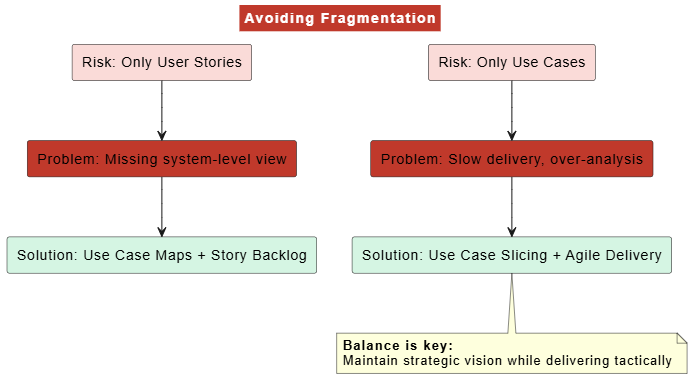
@startuml
skinparam backgroundColor white
skinparam titleBackgroundColor #C0392B
skinparam titleFontColor white

title Avoiding Fragmentation

rectangle "Risk: Only User Stories" as Risk1 #FADBD8
rectangle "Risk: Only Use Cases" as Risk2 #FADBD8
rectangle "Problem: Missing system-level view" as Problem1
rectangle "Problem: Slow delivery, over-analysis" as Problem2
rectangle "Solution: Use Case Maps + Story Backlog" as Solution1 #D5F5E3
rectangle "Solution: Use Case Slicing + Agile Delivery" as Solution2 #D5F5E3

Risk1 --> Problem1
Risk2 --> Problem2
Problem1 --> Solution1
Problem2 --> Solution2

note bottom
  <b>Balance is key:</b>
  Maintain strategic vision while delivering tactically
end note

@enduml
□ Clear goal statement (user objective)
□ Identified all actors (primary + secondary)
□ Main success scenario (happy path) defined
□ Key extensions documented (not exhaustive)
□ Use case sliced for incremental delivery
□ Pre/post conditions specified
□ Technology variations noted
□ Frequency of occurrence estimated
□ Open issues tracked
□ Follows "As a... I want... So that..." format
□ Meets INVEST criteria
□ Has clear acceptance criteria (Given-When-Then)
□ Sized appropriately for one sprint
□ Dependencies identified
□ Conversation happened with stakeholders
□ Value to user/business is clear
□ Testable outcomes defined
□ Linked to epic/theme if applicable
| Factor | Choose Use Case 2.0 | Choose User Stories | Either/Hybrid |
|---|---|---|---|
| Project Size | Large enterprise | Small-medium | Medium-large |
| Regulation | High compliance needs | Low/no regulation | Moderate |
| Complexity | Complex workflows | Simple features | Mixed |
| Timeline | Longer timeline | Fast iterations | Flexible |
| Team Experience | BA/analyst heavy | Agile-native | Mixed skills |
| Stakeholders | Formal approval needed | Collaborative culture | Both |
| Documentation | Must be comprehensive | Lightweight OK | Balanced |
| Change Frequency | Stable requirements | Evolving requirements | Moderate change |
Both Use Case 2.0 and User Stories + 3Cs are powerful tools in your requirements toolkit. The key is understanding when and how to use each:
Use Case 2.0 excels when you need:
Comprehensive understanding of complex systems
Regulatory compliance documentation
Clear actor interactions and responsibilities
Long-term maintainability
User Stories + 3Cs excel when you need:
Rapid iteration and feedback
Strong team collaboration
Customer-centric development
Flexible prioritization
Best Practice: Don't choose one exclusively. Use them complementarily:
Use Cases provide the strategic framework
User Stories enable tactical execution
Together they ensure both completeness and agility
Remember: Requirements are means to an end (delivering value), not the end itself. Stay focused on outcomes, remain flexible, and always validate with real users.
This guide provides a comprehensive framework for choosing and implementing Use Case 2.0 and User Stories + 3Cs. Adapt these practices to your specific context, team maturity, and organizational culture.

