
This guide walks you through the systematic transformation from requirements (Use Cases) to object-oriented design (Class Diagrams) to database design (ERDs). Understanding this progression is crucial for building robust, well-structured applications.
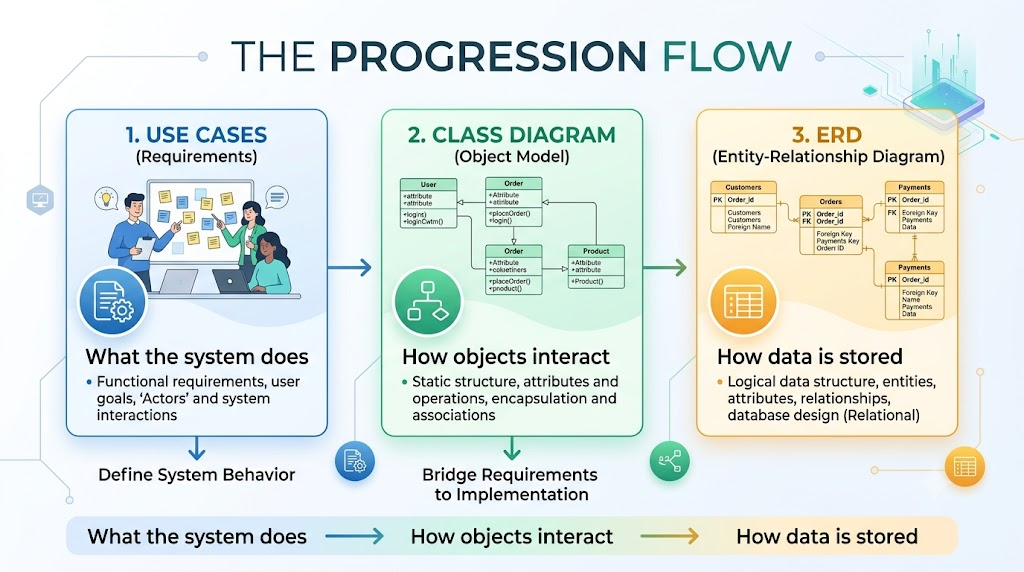
Use Case: A description of how a user interacts with a system to achieve a goal.
Components:
Actor: User or external system interacting with the system
Use Case: Specific functionality or feature
Relationship: Include, Extend, Generalization
Who uses the system?
What are their roles?
List all user types and external systems
What functions does the system provide?
What are the user goals?
Group related functionalities
Include: Mandatory sub-function (e.g., "Login" included in "Place Order")
Extend: Optional behavior (e.g., "Apply Discount" extends "Checkout")
Generalization: Parent-child relationship between use cases
For each use case, document:
Primary actor
Preconditions
Postconditions
Main flow (happy path)
Alternative flows
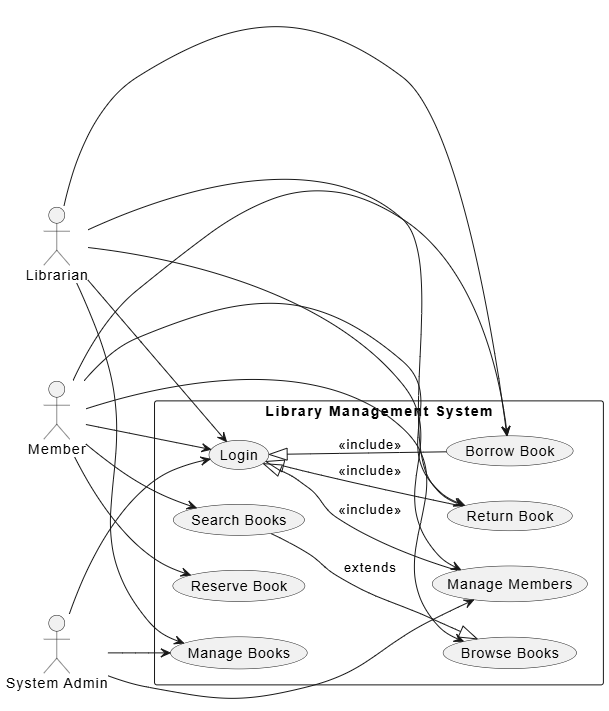
@startuml Library System Use Cases
left to right direction
actor "Librarian" as Librarian
actor "Member" as Member
actor "System Admin" as Admin

rectangle "Library Management System" {
  usecase "Browse Books" as UC1
  usecase "Search Books" as UC2
  usecase "Borrow Book" as UC3
  usecase "Return Book" as UC4
  usecase "Reserve Book" as UC5
  usecase "Manage Members" as UC6
  usecase "Manage Books" as UC7
  usecase "Login" as UC8

  UC2 --|> UC1 : extends

  Member --> UC1
  Member --> UC2
  Member --> UC3
  Member --> UC4
  Member --> UC5
  Member --> UC8

  Librarian --> UC3
  Librarian --> UC4
  Librarian --> UC6
  Librarian --> UC7
  Librarian --> UC8

  Admin --> UC6
  Admin --> UC7
  Admin --> UC8

  UC8 <|-- UC3 : <<include>>
  UC8 <|-- UC4 : <<include>>
  UC8 <|-- UC6 : <<include>>
}
@enduml
Keep it simple: Use cases should be understandable to non-technical stakeholders
Focus on user goals: Write from the user's perspective
Avoid implementation details: Don't include technical constraints
Prioritize: Identify core vs. supporting use cases
Validate: Ensure each use case provides value to the user
Class: Blueprint for objects with attributes and methods
Components:
Attributes: Properties/fields (e.g., name, price)
Methods: Behaviors/functions (e.g., calculateTotal())
Relationships: Association, Aggregation, Composition, Inheritance
Look for nouns in use case descriptions
Identify "thing" concepts (Book, Member, Transaction)
Group related concepts
What data does each class hold?
What operations does each class perform?
Apply Single Responsibility Principle
| Relationship | Type | Description | Example |
|---|---|---|---|
| Association | Uses | General connection between classes | Student → Course |
| Aggregation | Has-a | Part-whole relationship (weak) | Department → Employees |
| Composition | Has-a | Strong part-whole (lifecycle dependent) | Order → OrderLineItem |
| Inheritance | Is-a | Parent-child relationship | Book → EBook |
Specify how many instances participate in a relationship
1, 0..1, 0.., 1.., etc.
Identify operations from use cases
Assign methods to appropriate classes
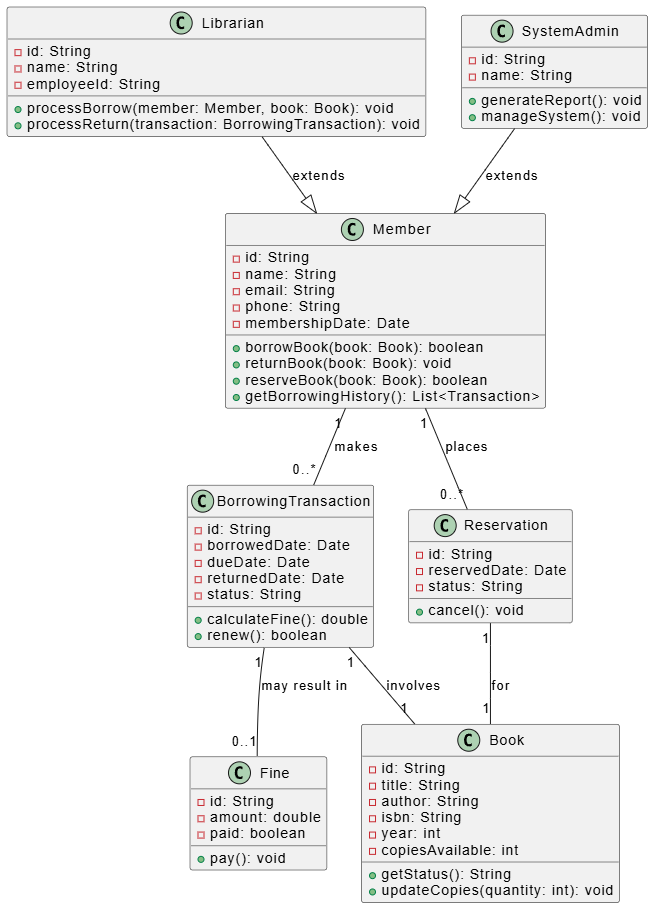
@startuml Library Class Diagram

class Book {
  -id: String
  -title: String
  -author: String
  -isbn: String
  -year: int
  -copiesAvailable: int
  +getStatus(): String
  +updateCopies(quantity: int): void
}

class Member {
  -id: String
  -name: String
  -email: String
  -phone: String
  -membershipDate: Date
  +borrowBook(book: Book): boolean
  +returnBook(book: Book): void
  +reserveBook(book: Book): boolean
  +getBorrowingHistory(): List<Transaction>
}

class BorrowingTransaction {
  -id: String
  -borrowedDate: Date
  -dueDate: Date
  -returnedDate: Date
  -status: String
  +calculateFine(): double
  +renew(): boolean
}

class Fine {
  -id: String
  -amount: double
  -paid: boolean
  +pay(): void
}

class Reservation {
  -id: String
  -reservedDate: Date
  -status: String
  +cancel(): void
}

class Librarian {
  -id: String
  -name: String
  -employeeId: String
  +processBorrow(member: Member, book: Book): void
  +processReturn(transaction: BorrowingTransaction): void
}

class SystemAdmin {
  -id: String
  -name: String
  +generateReport(): void
  +manageSystem(): void
}

Member "1" -- "0..*" BorrowingTransaction : makes
BorrowingTransaction "1" -- "1" Book : involves
Member "1" -- "0..*" Reservation : places
Reservation "1" -- "1" Book : for
BorrowingTransaction "1" -- "0..1" Fine : may result in
Librarian --|> Member : extends
SystemAdmin --|> Member : extends

@enduml
Start with nouns: Use cases → nouns → candidate classes
Validate with CRUD: Every class should support Create, Read, Update, Delete
Avoid over-engineering: Don't create classes for everything
Use design patterns: When applicable (e.g., Factory, Observer)
Consider future changes: Design for extensibility
Entity: Real-world object or concept (becomes table)
Components:
Entities (Tables)
Attributes (Columns)
Relationships (Foreign Keys)
Primary Keys (Unique identifiers)
Foreign Keys (Pointers to other tables)
Each class typically becomes a table
Attributes become columns
Identify primary key for each entity
One-to-One: Choose one side as parent
One-to-Many: Add foreign key on "many" side
Many-to-Many: Create junction table
1NF: Eliminate repeating groups
2NF: Remove partial dependencies
3NF: Remove transitive dependencies
Primary key constraints
Foreign key constraints
Unique constraints
Check constraints
Default values
Add indexes on frequently queried columns
Denormalize where necessary for performance
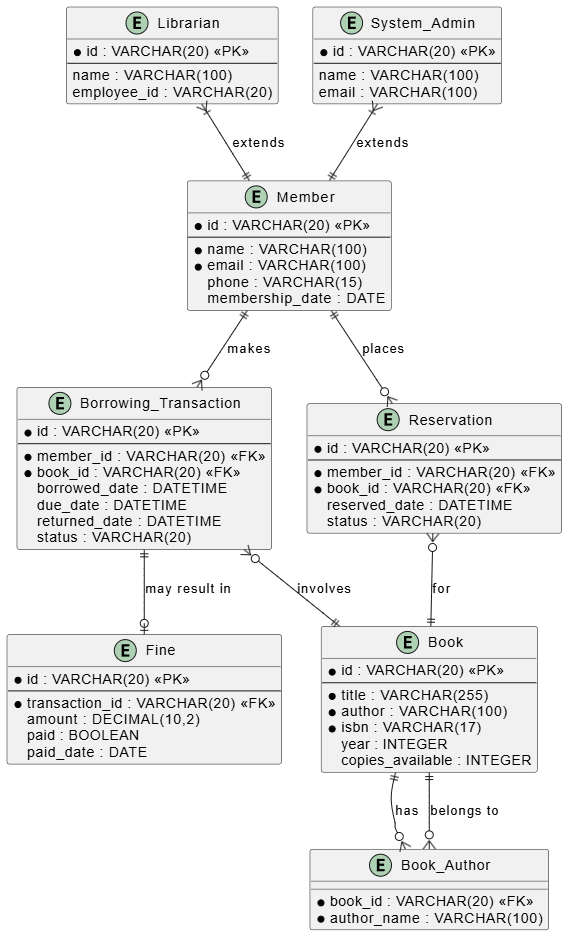
@startuml Library ERD

entity "Book" as book {
  * id : VARCHAR(20) <<PK>>
  --
  * title : VARCHAR(255)
  * author : VARCHAR(100)
  * isbn : VARCHAR(17)
  year : INTEGER
  copies_available : INTEGER
}

entity "Member" as member {
  * id : VARCHAR(20) <<PK>>
  --
  * name : VARCHAR(100)
  * email : VARCHAR(100)
  phone : VARCHAR(15)
  membership_date : DATE
}

entity "Borrowing_Transaction" as transaction {
  * id : VARCHAR(20) <<PK>>
  --
  * member_id : VARCHAR(20) <<FK>>
  * book_id : VARCHAR(20) <<FK>>
  borrowed_date : DATETIME
  due_date : DATETIME
  returned_date : DATETIME
  status : VARCHAR(20)
}

entity "Reservation" as reservation {
  * id : VARCHAR(20) <<PK>>
  --
  * member_id : VARCHAR(20) <<FK>>
  * book_id : VARCHAR(20) <<FK>>
  reserved_date : DATETIME
  status : VARCHAR(20)
}

entity "Fine" as fine {
  * id : VARCHAR(20) <<PK>>
  --
  * transaction_id : VARCHAR(20) <<FK>>
  amount : DECIMAL(10,2)
  paid : BOOLEAN
  paid_date : DATE
}

entity "Librarian" as librarian {
  * id : VARCHAR(20) <<PK>>
  --
  name : VARCHAR(100)
  employee_id : VARCHAR(20)
}

entity "System_Admin" as admin {
  * id : VARCHAR(20) <<PK>>
  --
  name : VARCHAR(100)
  email : VARCHAR(100)
}

entity "Book_Author" as book_author {
  * book_id : VARCHAR(20) <<FK>>
  * author_name : VARCHAR(100)
}

member ||--o{ transaction : "makes"
transaction }o--|| book : "involves"
member ||--o{ reservation : "places"
reservation }o--|| book : "for"
transaction ||--o| fine : "may result in"
librarian }|--|| member : "extends"
admin }|--|| member : "extends"
book ||--o{ book_author : "has"
book_author }o--|| book : "belongs to"

@enduml
Options for mapping inheritance in ERD:
Single Table: All classes in one table (with type discriminator)
Class Table: One table per class (with foreign keys)
Concrete Table: One table per concrete class
When a relationship has attributes, make it an entity:
entity "Student" {
  * id : PK
  name : VARCHAR
}

entity "Course" {
  * id : PK
  title : VARCHAR
}

entity "Enrollment" {
  * student_id : FK
  * course_id : FK
  enrollment_date : DATE
  grade : VARCHAR
}

Student ||--o{ Enrollment : "enrolls in"
Course ||--o{ Enrollment : "has"
| UML Relationship | ERD Relationship | Implementation |
|---|---|---|
| Association (1..*) | One-to-Many | Foreign key in child |
| Association (..) | Many-to-Many | Junction table |
| Association (1..1) | One-to-One | Foreign key on either side |
| Aggregation | One-to-Many | Foreign key with nullable parent |
| Composition | One-to-Many with cascade | Foreign key with ON DELETE CASCADE |
| Inheritance | Varied | See below |
' Single Table Strategy
entity "Payment" {
  * id : PK
  amount : DECIMAL
  status : VARCHAR
  type_discriminator : VARCHAR
  card_number : VARCHAR  (nullable)
  account_number : VARCHAR  (nullable)
  bank_code : VARCHAR  (nullable)
  expiry_date : DATE  (nullable)
}

' Class Table Strategy
entity "Payment" {
  * id : PK
  amount : DECIMAL
  status : VARCHAR
}

entity "CreditCardPayment" {
  * payment_id : FK
  card_number : VARCHAR
  expiry_date : DATE
}

entity "BankTransferPayment" {
  * payment_id : FK
  account_number : VARCHAR
  bank_code : VARCHAR
}

' Concrete Table Strategy
entity "CreditCardPayment" {
  * id : PK
  amount : DECIMAL
  status : VARCHAR
  card_number : VARCHAR
  expiry_date : DATE
}

entity "BankTransferPayment" {
  * id : PK
  amount : DECIMAL
  status : VARCHAR
  account_number : VARCHAR
  bank_code : VARCHAR
}
✅ DO:
Extract nouns from use case descriptions
Group related data and behavior
Consider system boundaries
❌ DON'T:
Create classes for every noun
Ignore behavior (methods)
Overlook relationships
✅ DO:
Each persistent class → table
Each attribute → column
Consider performance (indexes, denormalization)
❌ DON'T:
Map transient/derived fields (calculate instead)
Forget to handle inheritance
Ignore data integrity constraints
Start with High-Level Use Cases
Focus on main system functionality
Prioritize core features
Iterate and Refine
Design → Review → Refine → Repeat
Get stakeholder feedback
Use Naming Conventions
Classes: PascalCase (e.g., BorrowingTransaction)
Attributes: camelCase (e.g., borrowedDate)
Tables: snake_case (e.g., borrowing_transaction)
Columns: snake_case (e.g., borrowed_date)
Consider Different Perspectives
Business domain (use cases)
Object orientation (class diagrams)
Data persistence (ERD)
Maintain Consistency
Traceability: Each use case → classes → tables
Keep documentation in sync
| Pitfall | Solution |
|---|---|
| Overcomplicating use cases | Keep them high-level and user-focused |
| Missing relationships | Review associations carefully |
| Forgetting navigation | Consider both directions of relationships |
| Inconsistent naming | Adopt and follow a naming convention |
| Ignoring performance | Add indexes, consider denormalization |
| Not handling edge cases | Include alternative flows in use cases |
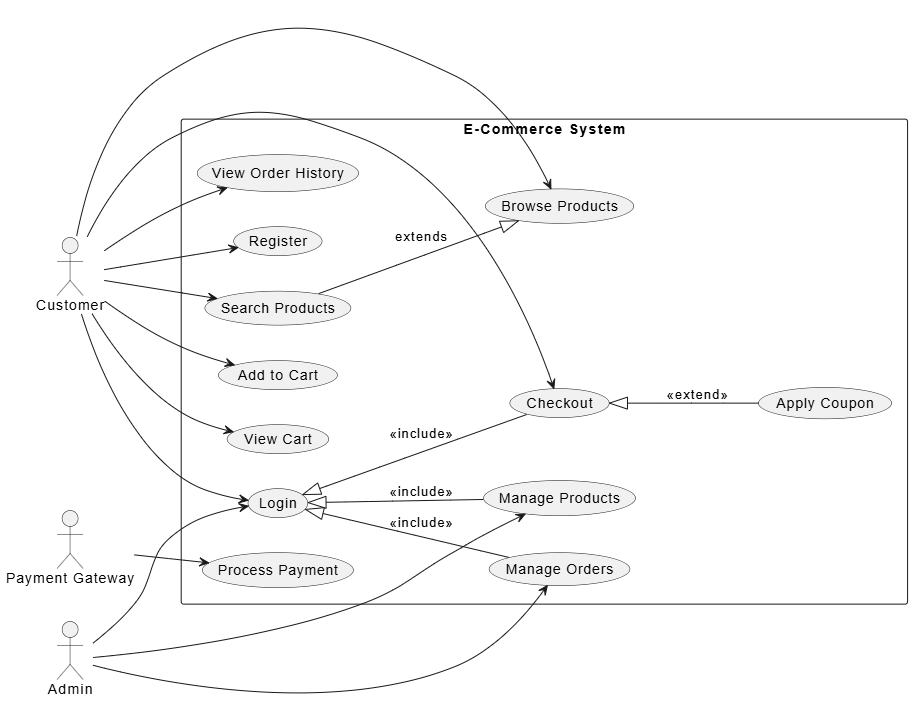
@startuml E-Commerce Use Cases
left to right direction
actor "Customer" as Customer
actor "Admin" as Admin
actor "Payment Gateway" as PaymentGateway

rectangle "E-Commerce System" {
  usecase "Browse Products" as UC1
  usecase "Search Products" as UC2
  usecase "Add to Cart" as UC3
  usecase "View Cart" as UC4
  usecase "Checkout" as UC5
  usecase "Process Payment" as UC6
  usecase "View Order History" as UC7
  usecase "Manage Products" as UC8
  usecase "Manage Orders" as UC9
  usecase "Login" as UC10
  usecase "Register" as UC11
  usecase "Apply Coupon" as UC12

  UC2 --|> UC1 : extends

  Customer --> UC1
  Customer --> UC2
  Customer --> UC3
  Customer --> UC4
  Customer --> UC5
  Customer --> UC7
  Customer --> UC10
  Customer --> UC11

  Admin --> UC8
  Admin --> UC9
  Admin --> UC10

  PaymentGateway --> UC6

  UC10 <|-- UC5 : <<include>>
  UC10 <|-- UC8 : <<include>>
  UC10 <|-- UC9 : <<include>>
  UC5 <|-- UC12 : <<extend>>
}
@enduml
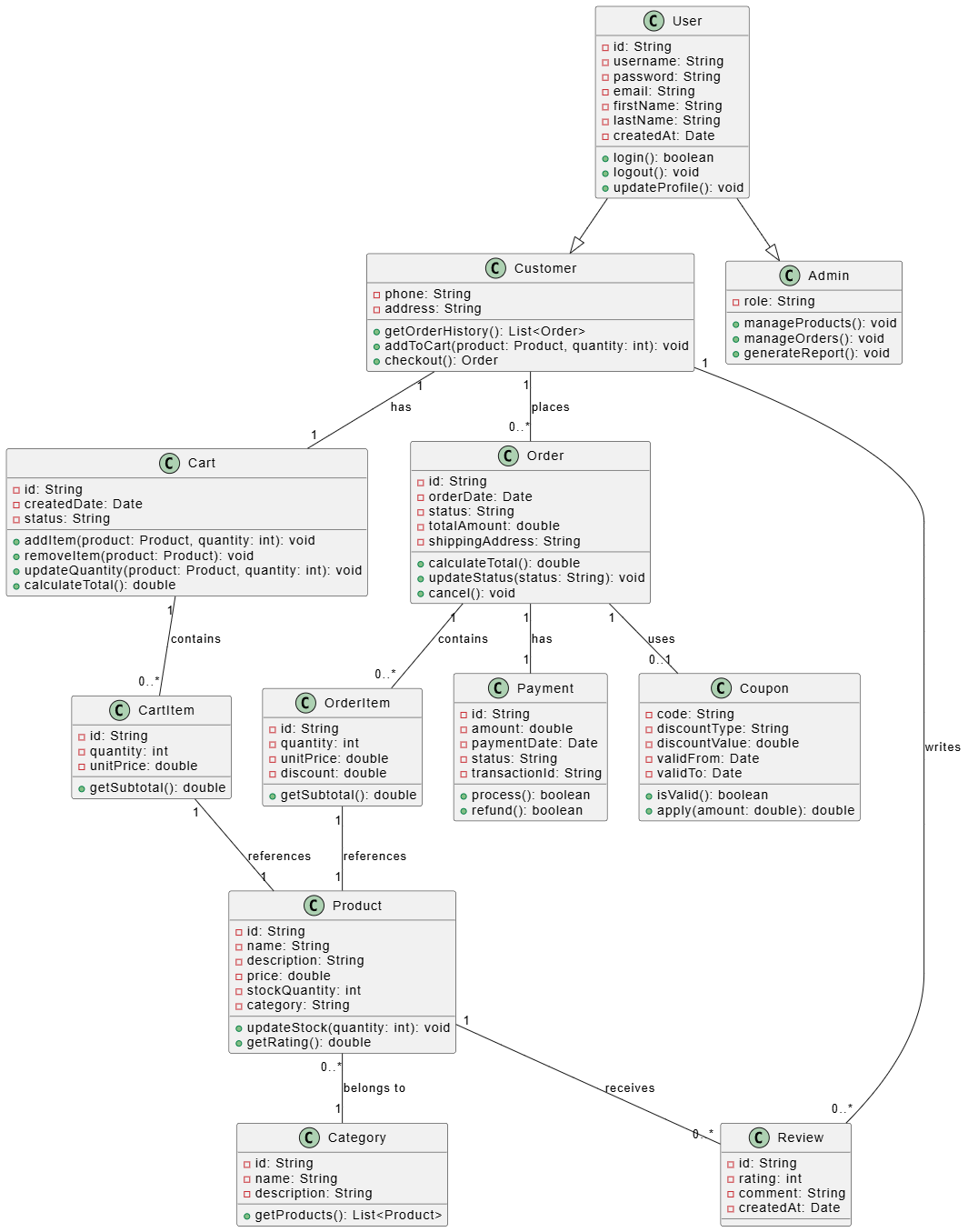
@startuml E-Commerce Classes

class User {
  -id: String
  -username: String
  -password: String
  -email: String
  -firstName: String
  -lastName: String
  -createdAt: Date
  +login(): boolean
  +logout(): void
  +updateProfile(): void
}

class Customer {
  -phone: String
  -address: String
  +getOrderHistory(): List<Order>
  +addToCart(product: Product, quantity: int): void
  +checkout(): Order
}

class Admin {
  -role: String
  +manageProducts(): void
  +manageOrders(): void
  +generateReport(): void
}

class Product {
  -id: String
  -name: String
  -description: String
  -price: double
  -stockQuantity: int
  -category: String
  +updateStock(quantity: int): void
  +getRating(): double
}

class Category {
  -id: String
  -name: String
  -description: String
  +getProducts(): List<Product>
}

class Cart {
  -id: String
  -createdDate: Date
  -status: String
  +addItem(product: Product, quantity: int): void
  +removeItem(product: Product): void
  +updateQuantity(product: Product, quantity: int): void
  +calculateTotal(): double
}

class CartItem {
  -id: String
  -quantity: int
  -unitPrice: double
  +getSubtotal(): double
}

class Order {
  -id: String
  -orderDate: Date
  -status: String
  -totalAmount: double
  -shippingAddress: String
  +calculateTotal(): double
  +updateStatus(status: String): void
  +cancel(): void
}

class OrderItem {
  -id: String
  -quantity: int
  -unitPrice: double
  -discount: double
  +getSubtotal(): double
}

class Payment {
  -id: String
  -amount: double
  -paymentDate: Date
  -status: String
  -transactionId: String
  +process(): boolean
  +refund(): boolean
}

class Coupon {
  -code: String
  -discountType: String
  -discountValue: double
  -validFrom: Date
  -validTo: Date
  +isValid(): boolean
  +apply(amount: double): double
}

class Review {
  -id: String
  -rating: int
  -comment: String
  -createdAt: Date
}

User --|> Customer
User --|> Admin
Customer "1" -- "1" Cart : has
Cart "1" -- "0..*" CartItem : contains
CartItem "1" -- "1" Product : references
Product "0..*" -- "1" Category : belongs to
Customer "1" -- "0..*" Order : places
Order "1" -- "0..*" OrderItem : contains
OrderItem "1" -- "1" Product : references
Order "1" -- "1" Payment : has
Customer "1" -- "0..*" Review : writes
Product "1" -- "0..*" Review : receives
Order "1" -- "0..1" Coupon : uses

@enduml
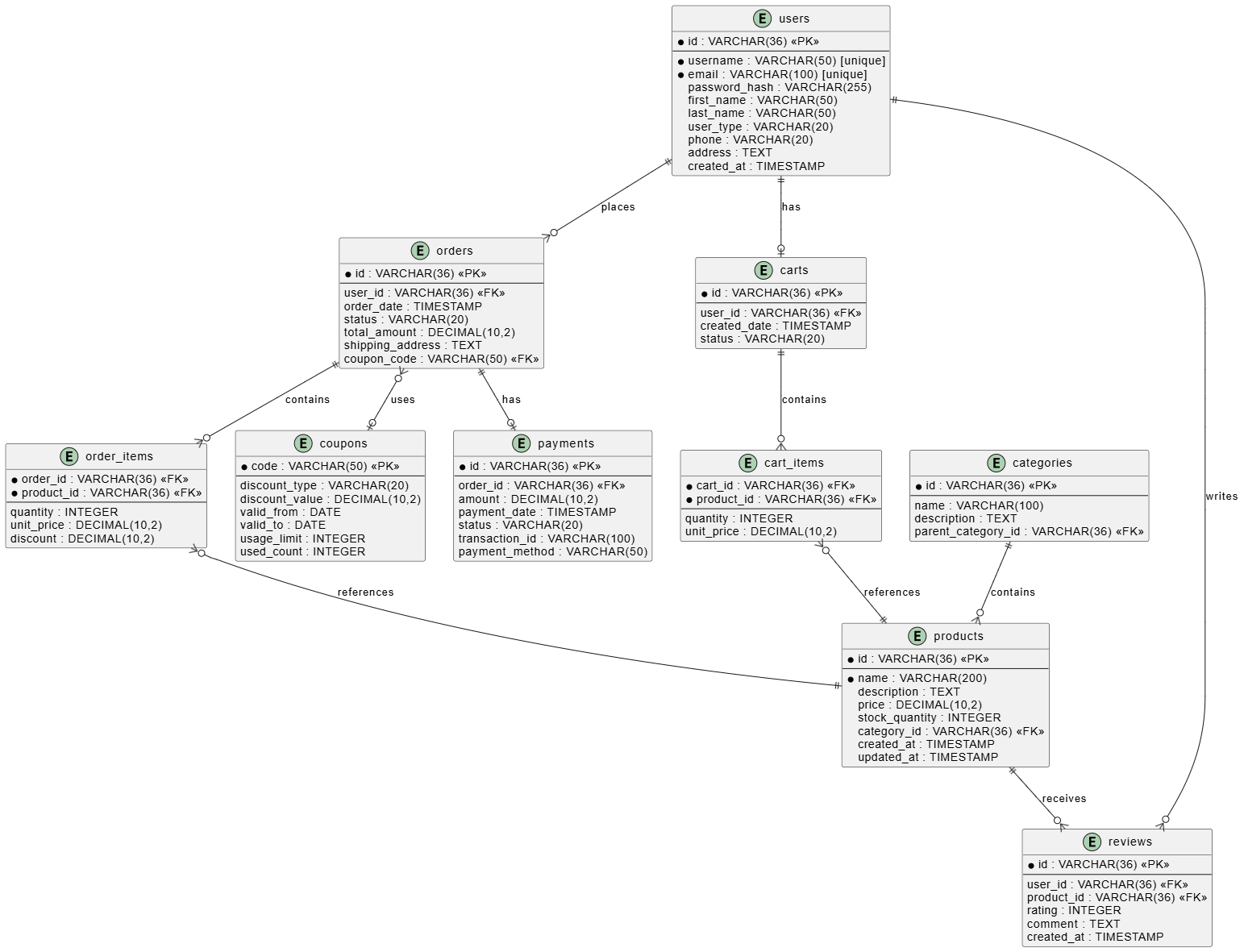
@startuml E-Commerce ERD

entity "users" as user {
  * id : VARCHAR(36) <<PK>>
  --
  * username : VARCHAR(50) [unique]
  * email : VARCHAR(100) [unique]
  password_hash : VARCHAR(255)
  first_name : VARCHAR(50)
  last_name : VARCHAR(50)
  user_type : VARCHAR(20)
  phone : VARCHAR(20)
  address : TEXT
  created_at : TIMESTAMP
}

entity "products" as product {
  * id : VARCHAR(36) <<PK>>
  --
  * name : VARCHAR(200)
  description : TEXT
  price : DECIMAL(10,2)
  stock_quantity : INTEGER
  category_id : VARCHAR(36) <<FK>>
  created_at : TIMESTAMP
  updated_at : TIMESTAMP
}

entity "categories" as category {
  * id : VARCHAR(36) <<PK>>
  --
  name : VARCHAR(100)
  description : TEXT
  parent_category_id : VARCHAR(36) <<FK>>
}

entity "carts" as cart {
  * id : VARCHAR(36) <<PK>>
  --
  user_id : VARCHAR(36) <<FK>>
  created_date : TIMESTAMP
  status : VARCHAR(20)
}

entity "cart_items" as cart_item {
  * cart_id : VARCHAR(36) <<FK>>
  * product_id : VARCHAR(36) <<FK>>
  --
  quantity : INTEGER
  unit_price : DECIMAL(10,2)
}

entity "orders" as order {
  * id : VARCHAR(36) <<PK>>
  --
  user_id : VARCHAR(36) <<FK>>
  order_date : TIMESTAMP
  status : VARCHAR(20)
  total_amount : DECIMAL(10,2)
  shipping_address : TEXT
  coupon_code : VARCHAR(50) <<FK>>
}

entity "order_items" as order_item {
  * order_id : VARCHAR(36) <<FK>>
  * product_id : VARCHAR(36) <<FK>>
  --
  quantity : INTEGER
  unit_price : DECIMAL(10,2)
  discount : DECIMAL(10,2)
}

entity "payments" as payment {
  * id : VARCHAR(36) <<PK>>
  --
  order_id : VARCHAR(36) <<FK>>
  amount : DECIMAL(10,2)
  payment_date : TIMESTAMP
  status : VARCHAR(20)
  transaction_id : VARCHAR(100)
  payment_method : VARCHAR(50)
}

entity "coupons" as coupon {
  * code : VARCHAR(50) <<PK>>
  --
  discount_type : VARCHAR(20)
  discount_value : DECIMAL(10,2)
  valid_from : DATE
  valid_to : DATE
  usage_limit : INTEGER
  used_count : INTEGER
}

entity "reviews" as review {
  * id : VARCHAR(36) <<PK>>
  --
  user_id : VARCHAR(36) <<FK>>
  product_id : VARCHAR(36) <<FK>>
  rating : INTEGER
  comment : TEXT
  created_at : TIMESTAMP
}

user ||--o| cart : "has"
user ||--o{ order : "places"
user ||--o{ review : "writes"
category ||--o{ product : "contains"
cart ||--o{ cart_item : "contains"
cart_item }o--|| product : "references"
order ||--o{ order_item : "contains"
order_item }o--|| product : "references"
order ||--o| payment : "has"
order }o--o| coupon : "uses"
product ||--o{ review : "receives"

@enduml
Successfully transforming Use Cases → Class Diagrams → ERDs requires:
Understanding the purpose of each diagram type
Systematic extraction of concepts at each stage
Maintaining traceability between models
Considering multiple perspectives (business, object-oriented, data)
Following best practices and avoiding common pitfalls
The examples provided demonstrate how to apply these concepts to real-world scenarios. Remember that software development is iterative—your models will evolve as you gain deeper understanding of requirements and constraints.
| Phase | Focus | Primary Output | Key Technique |
|---|---|---|---|
| Use Cases | Requirements | Functional requirements | Identify actors and goals |
| Class Diagrams | Object Design | Object structure | Extract classes and relationships |
| ERDs | Database Design | Data storage model | Map classes to entities |
Remember: These models work together to create a complete picture of your system—from user requirements to database implementation.

