
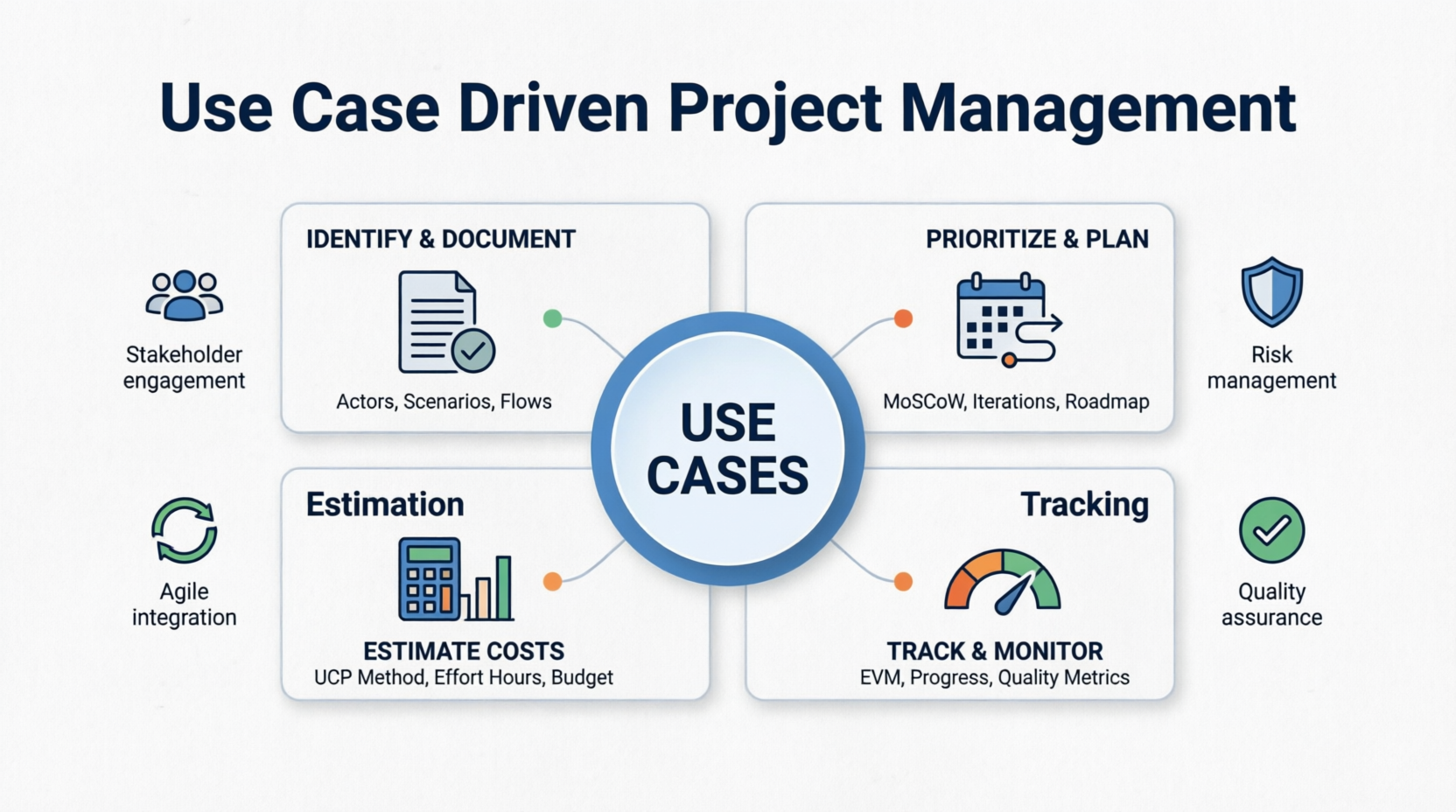
Use Case Driven Development (UCDD) is a software development methodology that uses use cases as the primary artifact to drive requirements gathering, design, implementation, testing, and project management activities. Originally popularized by Ivar Jacobson and the Rational Unified Process (RUP), this approach focuses on capturing functional requirements from the user's perspective.
User-Centric Focus: Ensures deliverables align with actual user needs
Clear Scope Definition: Provides concrete boundaries for what's in and out of scope
Better Estimation: Enables more accurate cost and effort estimation
Improved Communication: Creates shared understanding among stakeholders
Traceability: Links requirements to design, code, and tests
Risk Reduction: Identifies potential issues early through scenario analysis
Structured Requirements Management: Clear documentation of system behavior
Incremental Delivery: Natural breakdown into manageable iterations
Stakeholder Alignment: Visual and textual artifacts everyone can understand
Quality Assurance: Testable scenarios built into requirements
Change Management: Easier to assess impact of requirement changes
Use Case: A description of a set of sequences of actions, including variants, that a system performs to yield an observable result of value to an actor.
Actor: Any entity (human or system) that interacts with the system to achieve a goal.
Scenario: A specific instance or path through a use case (happy path, alternative paths, exception paths).
System Boundary: Defines what is inside the system versus external actors.
| Type | Description | Best For |
|---|---|---|
| Brief Use Cases | One-paragraph summaries | High-level planning, executive summaries |
| Casual Use Cases | Informal narrative descriptions | Early exploration, stakeholder workshops |
| Fully Dressed Use Cases | Detailed specifications with all elements | Development, testing, contractual agreements |
| Relationship | Symbol | Description | Example |
|---|---|---|---|
| Include | <<include>> |
Mandatory sub-functionality | "Place Order" includes "Validate Payment" |
| Extend | <<extend>> |
Optional or conditional functionality | "Place Order" extends with "Apply Promo Code" |
| Generalization | Arrow with hollow head | Inheritance between actors or use cases | "Premium User" generalizes from "Registered User" |
| Phase | Primary Objectives | Key Deliverables | Typical Duration |
|---|---|---|---|
| Inception | • Identify stakeholders • Define vision & scope • Create business case • High-level use case model |
• Vision document • Stakeholder analysis • Initial use case diagram • ROM estimate |
2-4 weeks |
| Elaboration | • Detail critical use cases • Establish architecture • Refine estimates • Identify risks |
• Detailed use case specs • Architecture document • Refined cost estimates • Risk matrix • Iteration plan |
4-8 weeks |
| Construction | • Implement use cases incrementally • Track progress • Manage scope & budget • Conduct reviews |
• Working software increments • Updated use case status • Actual vs. planned tracking • Quality metrics |
60-70% of project |
| Transition | • Deploy completed use cases • Validate acceptance criteria • Capture lessons learned • Finalize documentation |
• Production-ready system • User documentation • Final budget reconciliation • Post-implementation review |
10-15% of project |
Techniques:
Stakeholder interviews
Business process analysis
Organizational charts review
User persona development
Key Questions:
Who will use the system?
Who provides information to the system?
Who receives information from the system?
What external systems interact with our system?
Methods:
Goal-oriented analysis (what do actors want to achieve?)
Event decomposition (what triggers system responses?)
CRUD analysis (Create, Read, Update, Delete operations)
Business process mapping
Validation Criteria:
✓ Each use case delivers value to an actor
✓ Use cases are at appropriate level of abstraction
✓ No overlap or redundancy between use cases
✓ All major functionality is captured
USE CASE: [Use Case Name]
ID: UC-[Number]
Priority: [High/Medium/Low]
Actor(s): [Primary Actor, Secondary Actors]
Description: [Brief overview of the use case purpose]

Preconditions:
- [Condition 1]
- [Condition 2]

Postconditions:
- [Success outcome]
- [Alternative outcomes]

Main Success Scenario (Happy Path):
1. [Step 1]
2. [Step 2]
3. [Step 3]
...

Alternative Flows:
A1. [Alternative at step X]:
   - [What happens instead]
   - [How to return to main flow or end]

Exception Flows:
E1. [Exception at step Y]:
   - [Error condition]
   - [System response]
   - [Recovery or termination]

Business Rules:
- [Rule 1]
- [Rule 2]

Non-Functional Requirements:
- Performance: [Response time requirements]
- Security: [Access control requirements]
- Availability: [Uptime requirements]

Special Requirements:
- [Any technical constraints]
- [Regulatory requirements]

Frequency of Use: [Estimated usage per day/week/month]
Complexity Estimate: [Simple/Medium/Complex]
Story Points/Effort: [Estimated effort units]
| Priority | Definition | Action |
|---|---|---|
| Must Have | Critical for project success; without these, the project fails | Include in current release |
| Should Have | Important but not vital; significant pain if missing | Include if time permits |
| Could Have | Desirable but not necessary; nice-to-have features | Include only if resources available |
| Won't Have | Explicitly excluded from current scope | Defer to future releases |
| Low Effort | High Effort | |
|---|---|---|
| High Value | 🟢 Quick Wins Do first |
🔵 Major Features Plan carefully |
| Low Value | 🟡 Fill-ins Consider if time permits |
🔴 Avoid Defer or eliminate |
| Category | Characteristics | Customer Reaction |
|---|---|---|
| Basic Needs | Expected features; dissatisfiers if missing | Dissatisfied if absent, neutral if present |
| Performance Needs | More is better; linear satisfaction | Proportional satisfaction based on quality |
| Excitement Needs | Delighters; unexpected value | Highly satisfied if present, neutral if absent |
| Release | Use Cases Included | Duration | Target Date | Strategic Focus |
|---|---|---|---|---|
| MVP | UC-01, UC-02, UC-05 | 6 weeks | Month 2 | Core functionality validation |
| Release 1 | UC-03, UC-04, UC-06, UC-07 | 8 weeks | Month 4 | Enhanced user experience |
| Release 2 | UC-08, UC-09, UC-10 | 6 weeks | Month 6 | Advanced features & integrations |
Step 1: Count Unadjusted Use Case Points (UUCP)
| Complexity | Description | Weight |
|---|---|---|
| Simple | ≤ 3 transactions, basic UI | 5 points |
| Average | 4-7 transactions, some integration | 10 points |
| Complex | ≥ 8 transactions, complex logic, multiple integrations | 15 points |
Formula: UUCP = (Simple × 5) + (Average × 10) + (Complex × 15)
Step 2: Calculate Unadjusted Actor Weight (UAW)
| Actor Type | Description | Weight |
|---|---|---|
| Simple | Automated API or simple interface | 1 point |
| Average | Human via GUI or protocol | 2 points |
| Complex | Human via complex GUI or multiple interfaces | 3 points |
Formula: UAW = Σ(Actor count × weight)
Step 3: Calculate Total Unadjusted Use Case Points
Formula: Total Unadjusted Points = UUCP + UAW
Step 4: Determine Technical Complexity Factor (TCF)
Rate 13 technical factors from 0-5 (0 = not important, 5 = very important):
| Factor | Description | Weight |
|---|---|---|
| T1 | Distributed system | Standard |
| T2 | Response time objectives | Standard |
| T3 | End-user efficiency | Standard |
| T4 | Complex processing | Standard |
| T5 | Reusable code | Standard |
| T6 | Easy to install | Standard |
| T7 | Easy to use | Standard |
| T8 | Portable | Standard |
| T9 | Easy to change | Standard |
| T10 | Concurrent | Standard |
| T11 | Security features | Standard |
| T12 | Third-party access | Standard |
| T13 | Special training required | Standard |
Formula: TCF = 0.6 + (0.01 × Σ(Ti × weight))
Step 5: Determine Environmental Factor (EF)
Rate 8 environmental factors from 0-5:
| Factor | Description | Weight |
|---|---|---|
| E1 | Familiar with process | Standard |
| E2 | Application experience | Standard |
| E3 | Object-oriented experience | Standard |
| E4 | Lead analyst capability | Standard |
| E5 | Motivation | Standard |
| E6 | Stable requirements | Standard |
| E7 | Part-time team members | Standard |
| E8 | Difficult programming language | Standard |
Formula: EF = 1.4 + (-0.03 × Σ(Ei × weight))
Step 6: Calculate Adjusted Use Case Points
Formula: Adjusted UCP = Total Unadjusted Points × TCF × EF
Step 7: Convert to Effort
Industry standard: 20 hours per adjusted use case point (varies by organization)
Formula: Total Hours = Adjusted UCP × Hours per Point
Similar to UCP but uses different counting rules based on:
External Inputs
External Outputs
External Inquiries
Internal Logical Files
External Interface Files
For Agile teams:
Break use cases into user stories
Estimate stories using planning poker
Sum story points per use case
Use team velocity for timeline estimation
| Component | Description | Calculation Method |
|---|---|---|
| Labor Costs | Development, QA, PM, Design | Total Hours × Blended Hourly Rate |
| Infrastructure | Cloud services, servers, licenses | Monthly costs × project duration |
| Third-Party Services | APIs, consulting, outsourced components | Vendor quotes + integration costs |
Blended Rate Formula:
Blended Rate = (Dev Hours × Dev Rate + QA Hours × QA Rate +
                PM Hours × PM Rate + Design Hours × Design Rate) / Total Hours
| Component | Typical Percentage | Description |
|---|---|---|
| Overhead | 20-30% of direct costs | Office space, utilities, admin support |
| Contingency | 10-20% of total | Risk buffer, scope changes, unknowns |
| Training & Documentation | 5-10% of labor | User training, technical docs, knowledge transfer |
| Use Case | Complexity | Actors | UCP | Est. Hours |
|---|---|---|---|---|
| UC-01 Login | Simple | 1 Avg | 7 | 140 |
| UC-02 View Dashboard | Average | 1 Avg | 12 | 240 |
| UC-03 Place Order | Complex | 2 Avg | 19 | 380 |
| UC-04 Track Order | Average | 1 Avg | 12 | 240 |
| UC-05 Customer Support | Simple | 2 Avg | 9 | 180 |
| Total | 59 | 1,180 |
| Metric | Value | Notes |
|---|---|---|
| Total Unadjusted Points | 59 | From use case breakdown |
| Technical Factor (TCF) | 1.15 | Based on technical complexity assessment |
| Environmental Factor (EF) | 1.25 | Based on team capability assessment |
| Adjusted UCP | 84.8 | 59 × 1.15 × 1.25 |
| Total Hours | 1,696 | 84.8 × 20 hours/UCP |
| Role | Hours | Rate/Hr | Subtotal |
|---|---|---|---|
| Developers | 1,018 | $75 | $76,350 |
| QA Engineers | 339 | $65 | $22,035 |
| Product Manager | 170 | $85 | $14,450 |
| UX Designer | 169 | $80 | $13,520 |
| Direct Labor Subtotal | $126,355 | ||
| Infrastructure | $15,000 | ||
| Third-Party Services | $8,000 | ||
| Subtotal | $149,355 | ||
| Overhead (25%) | $37,339 | ||
| Contingency (15%) | $22,403 | ||
| TOTAL ESTIMATE | $209,097 |
| Phase | Percentage | Focus Areas | Key Activities |
|---|---|---|---|
| Inception | 5-10% | Requirements, planning, architecture | Stakeholder workshops, initial modeling |
| Elaboration | 15-20% | Detailed design, prototyping, risk mitigation | Use case detailing, architecture baseline |
| Construction | 60-70% | Development, testing, integration | Coding, unit testing, integration testing |
| Transition | 10-15% | Deployment, training, documentation | UAT, production deployment, user training |
Allocation Formula:
Use Case Budget = (Use Case UCP / Total UCP) × Total Project Budget × Priority Multiplier
Priority Multipliers:
| Priority | Multiplier | Rationale |
|---|---|---|
| Must Have | 1.2 | Additional buffer for critical features |
| Should Have | 1.0 | Standard allocation |
| Could Have | 0.8 | Reduced allocation for nice-to-haves |
| Complexity | Developers | QA Engineers | UX Designer | Business Analyst | PM Attention |
|---|---|---|---|---|---|
| Simple | 1 | 0.5 | Minimal | None | Light oversight |
| Average | 2 | 1 | 0.5 | 0.5 | Regular check-ins |
| Complex | 3-4 | 1-2 | 1 | 1 | Dedicated attention |
| Week | 1-2 | 3-4 | 5-6 | 7-8 | 9-10 | 11-12 |
|---|---|---|---|---|---|---|
| Dev 1 | UC-01 | UC-01 | UC-02 | UC-02 | UC-03 | UC-03 |
| Dev 2 | — | UC-01 | UC-02 | UC-02 | UC-03 | UC-03 |
| Dev 3 | — | — | — | — | UC-03 | UC-04 |
| QA 1 | — | — | UC-01 | UC-02 | UC-02 | UC-03 |
| UX 1 | UC-01 | UC-01 | UC-02 | UC-02 | — | — |
| PM 1 | Plan | Review | Review | Review | Review | Review |
Example Calculation:
| Component | Annual Cost | Monthly Cost |
|---|---|---|
| Team Salaries (8 people @ avg $80K/year) | $640,000 | $53,333 |
| Infrastructure | $50,000 | $4,167 |
| Overhead | $100,000 | $8,333 |
| Total Annual | $790,000 | |
| Monthly Burn Rate | $65,833 |
| Milestone | Percentage | Trigger |
|---|---|---|
| Project Kickoff | 20% | Contract signing |
| MVP Delivery | 20% | Successful MVP demonstration |
| Release 1 | 20% | Release 1 deployment |
| Release 2 | 20% | Release 2 deployment |
| Final Acceptance | 20% | Client sign-off |
Key Metrics:
| Metric | Formula | Interpretation |
|---|---|---|
| Planned Value (PV) | Budgeted cost of scheduled use cases | What should have been spent |
| Earned Value (EV) | Budgeted cost of completed use cases | Value actually delivered |
| Actual Cost (AC) | Actual cost incurred | What was actually spent |
Performance Indices:
| Index | Formula | Interpretation |
|---|---|---|
| Cost Performance Index (CPI) | EV / AC | >1: Under budget <1: Over budget |
| Schedule Performance Index (SPI) | EV / PV | >1: Ahead of schedule <1: Behind schedule |
Estimate at Completion (EAC):
Formula: EAC = Total Budget / CPI
| Use Case | Planned Date | Actual Date | Budgeted Cost | Actual Cost | Status | Variance |
|---|---|---|---|---|---|---|
| UC-01 | Week 2 | Week 2 | $15,000 | $14,200 | ✅ Complete | +$800 |
| UC-02 | Week 4 | Week 5 | $25,000 | $27,500 | ✅ Complete | -$2,500 |
| UC-03 | Week 8 | Week 9 | $40,000 | $38,000 | ✅ Complete | +$2,000 |
| UC-04 | Week 10 | — | $30,000 | $18,000 | 🔄 In Progress | — |
| Totals | $110,000 | $97,700 | +$12,300 |
Status Categories:
| Status | Color Code | Description |
|---|---|---|
| Not Started | ⚪ Gray | Use case identified but work not begun |
| In Analysis | 🔵 Blue | Requirements being detailed |
| In Design | 🟣 Purple | Technical design in progress |
| In Development | 🟡 Yellow | Coding underway |
| In Testing | 🟠 Orange | QA testing active |
| Completed | 🟢 Green | All acceptance criteria met |
| Blocked | 🔴 Red | Impediment preventing progress |
Visual Indicators:
Traffic light system (Red/Yellow/Green)
Burndown charts by use case
Cumulative flow diagrams
WEEKLY USE CASE STATUS REPORT
Week of: [Date]
Project: [Name]

COMPLETED THIS WEEK:
✓ UC-XX: [Name] - [Notes]
✓ UC-YY: [Name] - [Notes]

IN PROGRESS:
🔄 UC-ZZ: [Name] - [X% complete] - [Blockers if any]

UPCOMING NEXT WEEK:
📅 UC-AA: [Name] - Starting [Date]

METRICS:
• Use Cases Completed: X of Y total
• Budget Spent: $X of $Y total (Z%)
• Schedule Variance: [+/- X days]
• Quality Metrics: [Defects found/fixed]

RISKS AND ISSUES:
⚠️ [Risk/Issue description] - [Mitigation plan]
| Metric | Formula | Target | Purpose |
|---|---|---|---|
| Defect Density | Defects / Use Case Points | < 0.5 per UCP | Measure code quality |
| Test Coverage | Tested Scenarios / Total Scenarios | > 95% | Ensure thorough testing |
| Requirement Stability | Changes / Iteration | < 10% | Monitor scope creep |
| Customer Satisfaction | Feedback Score (1-5) | > 4.0 | Validate value delivery |
For each use case, verify:
All main success scenarios work correctly
Alternative flows handled appropriately
Exception flows managed gracefully
Performance requirements met
Security requirements satisfied
Accessibility standards complied with
User documentation updated
| Category | Examples | Impact Areas |
|---|---|---|
| Technical Risks | • Complex algorithms • New technology adoption • Integration challenges • Performance bottlenecks |
Development timeline, quality, stability |
| Business Risks | • Unclear requirements • Changing priorities • Stakeholder availability • Market timing |
Scope, budget, ROI |
| Resource Risks | • Skill gaps • Team turnover • Vendor dependencies • Tool limitations |
Capacity, continuity, delivery |
| Use Case | Probability (1-5) | Impact (1-5) | Risk Score | Mitigation Strategy |
|---|---|---|---|---|
| UC-03 Payment Processing | 5 (High) | 5 (High) | 25 | Early prototype, security audit, expert review |
| UC-07 Real-time Analytics | 3 (Medium) | 5 (High) | 15 | Proof of concept, vendor consultation, phased rollout |
| UC-10 Mobile Integration | 2 (Low) | 3 (Medium) | 6 | Standard API usage, vendor support contract |
| UC-15 AI Recommendations | 4 (High) | 4 (High) | 16 | ML specialist engagement, data quality assessment |
Risk Score Interpretation:
20-25: Critical - Immediate action required
12-19: High - Active monitoring and mitigation
6-11: Medium - Plan contingencies
1-5: Low - Accept and monitor
| Strategy | Description | When to Use |
|---|---|---|
| Spike Solutions | Time-boxed research iterations | Technology uncertainty |
| Prototyping | Build throwaway prototypes | Validate approach feasibility |
| Incremental Delivery | Break into smaller, testable pieces | Complex functionality |
| Expert Review | Bring in specialists | Skill gaps identified |
| Parallel Development | Run alternative approaches concurrently | High uncertainty, critical path |
| Reserve Type | Percentage | Control | Purpose |
|---|---|---|---|
| Management Reserve | 10-15% | Senior management | Unknown risks ("unknown unknowns") |
| Contingency Reserve | 10-20% | Project manager | Identified risks ("known unknowns") |
| Trigger | Threshold | Response Action |
|---|---|---|
| Schedule Slip | Use case takes >150% of estimated time | Activate contingency plan, reassess scope |
| Quality Issues | Defect rate exceeds 5 per UCP | Pause development, root cause analysis |
| Resource Loss | Key resource becomes unavailable | Activate backup resource plan |
| Scope Change | Requirements change >20% | Formal change request, rebaseline |
| # | Practice | Implementation Tips |
|---|---|---|
| 1 | Start Simple | Begin with brief use cases; add detail only where needed; avoid over-documentation |
| 2 | Involve Stakeholders Early | Conduct use case workshops; get sign-off on models; maintain ongoing engagement |
| 3 | Keep Right Level | One use case = one user goal; avoid mixing abstraction levels; use include/extend for reuse |
| 4 | Iterate and Refine | Expect evolution; review regularly; capture lessons learned |
| 5 | Link to Artifacts | Connect to user stories; map to test cases; trace to design components |
| 6 | Use Tools Effectively | Choose appropriate tools; maintain single source of truth; enable collaboration |
| 7 | Train the Team | Ensure understanding of notation; provide templates; conduct regular reviews |
| ❌ Pitfall | Problem | ✅ Solution |
|---|---|---|
| Over-Engineering | Spending too much time documenting every detail upfront | Use progressive elaboration; detail just before implementation |
| Ignoring NFRs | Focusing only on functional flows | Include NFRs in specs; create separate NFR use cases if needed |
| Poor Actor ID | Missing key stakeholders or creating too many actors | Conduct thorough stakeholder analysis; consolidate similar actors |
| Unrealistic Estimates | Underestimating complexity or overhead | Use historical data; apply buffers; review with team |
| Scope Creep | Adding features without proper change control | Establish change management; reassess budget/timeline |
| Rigid Contracts | Treating use cases as unchangeable contracts | Maintain flexibility; focus on delivering value |
| Neglecting Maintenance | Use cases become outdated quickly | Assign ownership; schedule reviews; integrate with change mgmt |
Use Case: Place Order
USE CASE: Place Order
ID: UC-101
Priority: Must Have
Actors: Customer (primary), Payment Gateway (secondary), Inventory System (secondary)

Description: Customer selects items and completes purchase transaction

Preconditions:
- Customer is logged in
- Shopping cart has items
- Items are in stock

Postconditions:
- Order is created in system
- Payment is processed
- Inventory is updated
- Confirmation sent to customer

Main Success Scenario:
1. Customer reviews shopping cart
2. Customer proceeds to checkout
3. System displays shipping options
4. Customer selects shipping method
5. System calculates total with shipping and tax
6. Customer enters payment information
7. System validates payment details
8. Payment gateway processes payment
9. System confirms payment success
10. Inventory system reserves items
11. System creates order record
12. System sends confirmation email
13. System displays order confirmation page

Alternative Flows:
A1. At step 4, customer applies promo code:
   - System validates promo code
   - System recalculates total
   - Continue to step 6

A2. At step 7, payment validation fails:
   - System displays error message
   - Customer corrects payment info
   - Return to step 7 (max 3 attempts)

Exception Flows:
E1. At step 8, payment gateway timeout:
   - System logs error
   - System displays "payment processing" message
   - System retries (max 2 times)
   - If still fails, display contact support message
   - End use case

E2. At step 10, inventory insufficient:
   - System releases payment hold
   - System notifies customer item unavailable
   - System suggests alternatives
   - End use case

Business Rules:
- Orders over $50 get free shipping
- Promo codes cannot be combined
- Payment must be authorized within 5 minutes

Non-Functional Requirements:
- Payment processing < 3 seconds
- 99.9% uptime during business hours
- PCI-DSS compliance for payment data

Frequency: ~500 times/day
Complexity: Complex
Story Points: 13
Estimated Hours: 260
Use Case: Schedule Appointment
USECASE: Schedule Appointment
ID: UC-205
Priority: Must Have
Actors: Patient (primary), Doctor Scheduling System (secondary)

Description: Patient books appointment with healthcare provider

[Detailed structure follows same template as above...]

Estimated Hours: 180
Complexity: Average
Story Points: 8
PROJECT BUDGET WORKSHEET

1. USE CASE INVENTORY
   □ List all use cases with complexity ratings
   □ Calculate total UCP

2. EFFORT ESTIMATION
   □ Apply productivity factor
   □ Calculate total hours by role

3. COST ESTIMATION
   □ Apply hourly rates
   □ Add infrastructure costs
   □ Include third-party services

4. BUDGET ALLOCATION
   □ Distribute across phases
   □ Allocate contingency reserves
   □ Set payment milestones

5. TRACKING SETUP
   □ Define EVM baselines
   □ Create reporting templates
   □ Establish review cadence
| Use Case Element | Scrum Equivalent | Notes |
|---|---|---|
| Use Cases | Epics | Large use cases become epics |
| Scenarios | User Stories | Individual flows become stories |
| Acceptance Criteria | Acceptance Criteria | Derived from use case flows |
| Definition of Done | DoD | Includes use case validation |
Select use cases for sprint based on priority
Break use cases into stories
Estimate stories using story points
Commit to sprint backlog
Track use case completion across sprints
| Aspect | Implementation |
|---|---|
| Workflow | Use cases flow through Kanban board columns |
| WIP Limits | Applied per use case or use case type |
| Visualization | Cumulative flow shows use case progress |
| Metrics | Lead time tracked per use case type |
| Method | Purpose | Strength |
|---|---|---|
| UCP | Initial project estimation | Long-term planning accuracy |
| Story Points | Sprint-level planning | Short-term flexibility |
Calibration:
Example conversion: 1 UCP ≈ 8-12 story points (team-dependent)
Adjust based on historical team velocity
Refine conversion factor after first few sprints
Benefits:
✓ Long-term planning accuracy from UCP
✓ Short-term flexibility from agile methods
✓ Better stakeholder communication
✓ Improved predictability
The use case driven approach provides a structured, user-centric framework for project management that excels in requirements clarity, estimation accuracy, and stakeholder alignment. By treating use cases as the central artifact throughout the project lifecycle, teams can:
✅ Define clear scope and boundaries
✅ Produce more accurate cost estimates
✅ Track progress meaningfully
✅ Manage risks proactively
✅ Deliver value incrementally
✅ Maintain quality through traceability
Identify key stakeholders and actors
Conduct use case discovery workshop
Create initial use case model
Prioritize use cases using chosen framework
Estimate effort using UCP or story points
Develop detailed cost estimate
Create budget with contingencies
Establish tracking mechanisms
Set up regular review cadence
Train team on use case practices
| Tool | Best For | Platform |
|---|---|---|
| Enterprise Architect | Comprehensive modeling | Windows |
| IBM Rational Rhapsody | Systems engineering | Cross-platform |
| Lucidchart | Collaborative diagrams | Web-based |
| Draw.io | Free, open-source option | Web-based |
| Confluence | Documentation & collaboration | Web-based |
| Tool | Strengths | Integration |
|---|---|---|
| Jira | Agile tracking, plugins | Use case plugins available |
| Azure DevOps | Microsoft ecosystem | Full ALM suite |
| Monday.com | Visual workflows | Customizable |
| Asana | Simplicity | Task-focused |
| Tool | Type | Notes |
|---|---|---|
| Custom Excel Templates | Spreadsheet | Flexible, customizable |
| COCOMO II Tools | Algorithmic | Industry-standard |
| Function Point Counters | Automated | FP-based estimation |
| Story Estimation Tools | Agile | Planning poker apps |
"Applying Use Cases" by Schneider & Wintersohn
"Writing Effective Use Cases" by Alistair Cockburn
"The Rational Unified Process Made Easy" by Per Kroll & Philippe Kruchten
"Software Estimation: Demystifying the Black Art" by Steve McConnell
This tutorial provides a comprehensive foundation for implementing use case driven project management. Adapt the techniques to your organization's context, scale, and maturity level. Start small, learn continuously, and refine your approach based on real project experience.

