
In the modern enterprise, organizational systems are incredibly complex. Business leaders, software developers, network engineers, and product owners all look at the same organization but see entirely different things. Without a unified framework, this leads to misaligned strategies, duplicated efforts, and failed transformations.
Enter ArchiMate.
ArchiMate is an open and independent modeling language for Enterprise Architecture (EA). It facilitates effective communication by acting as a common language, specifically designed to help architects describe complex organizational systems in a way that diverse stakeholders can understand.
The "Google Maps" Analogy:
Think of ArchiMate as Google Maps for the enterprise. Just as a map allows a hiker, a driver, and a city planner to all look at the same landscape through different "layers" (terrain, traffic, or zoning), ArchiMate allows different stakeholders to view the organization's architecture through the specific lens that matters to their job.
While ArchiMate covers many domains, the heartbeat of any enterprise architecture lies in its Core Domain: the Business, Application, and Technology layers. This guide will explore how these layers interact, demonstrate how to model them effectively, and provide practical PlantUML examples to help you start mapping your enterprise architecture today.
The Core Domain consists of three distinct layers that interact through a hierarchical structure. Lower layers support the layers above them, ensuring the architecture is a coherent whole rather than "disconnected pools of concepts."
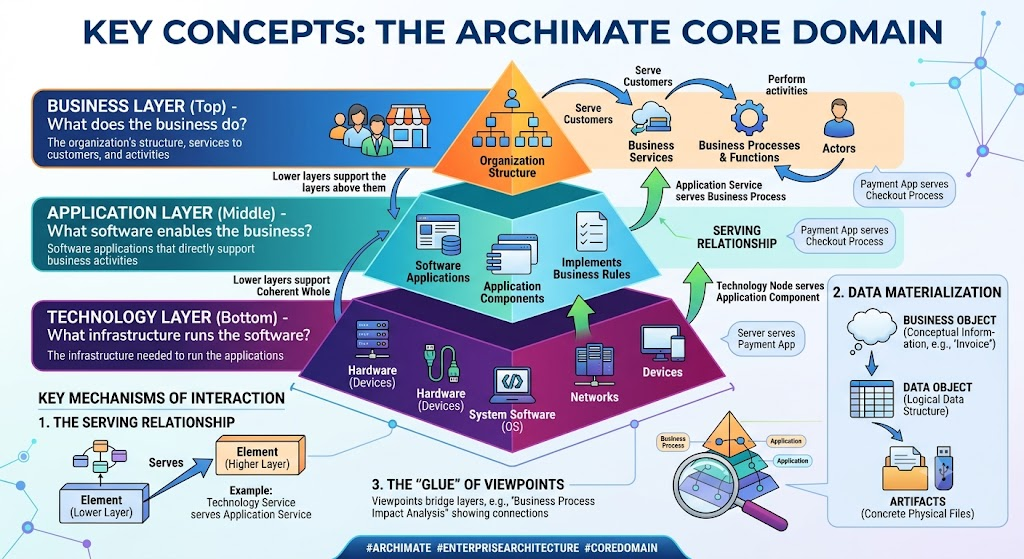
Business Layer (Top): This layer models the organization's structure, the services it provides to customers, and the activities performed by people (Business Processes, Functions, and Actors). It answers the question: What does the business do?
Application Layer (Middle): This layer consists of software applications that directly support business activities or implement business rules. It answers the question: What software enables the business?
Technology Layer (Bottom): This layer models the infrastructure—such as hardware (Devices), operating systems (System Software), and networks—needed to run the applications. It answers the question: What infrastructure runs the software?
To connect these layers, ArchiMate uses specific relationships defined in its metamodel:
The Serving Relationship: This is the primary way different layers connect. A system or service in a lower layer serves (provides functionality to) an element in a higher layer.
Example: An Application Service "serves" a Business Process, or a Technology Node "serves" an Application Component.
Data Materialization: Interactions also occur through the flow of information. Business Objects (conceptual information like an "Invoice") in the Business Layer materialize into Data Objects (logical data structures) in the Application Layer. These Data Objects are then stored or moved as Artifacts (concrete physical files) in the Technology Layer.
The "Glue" of Viewpoints: Architects use specific viewpoints to bridge layers. For instance, a "business process impact analysis" viewpoint visually shows how business processes encapsulate the main applications used to support them, creating the necessary connection between business strategy and IT execution.
Below are practical examples demonstrating how the Core Domain layers interact in real-world scenarios using PlantUML syntax.
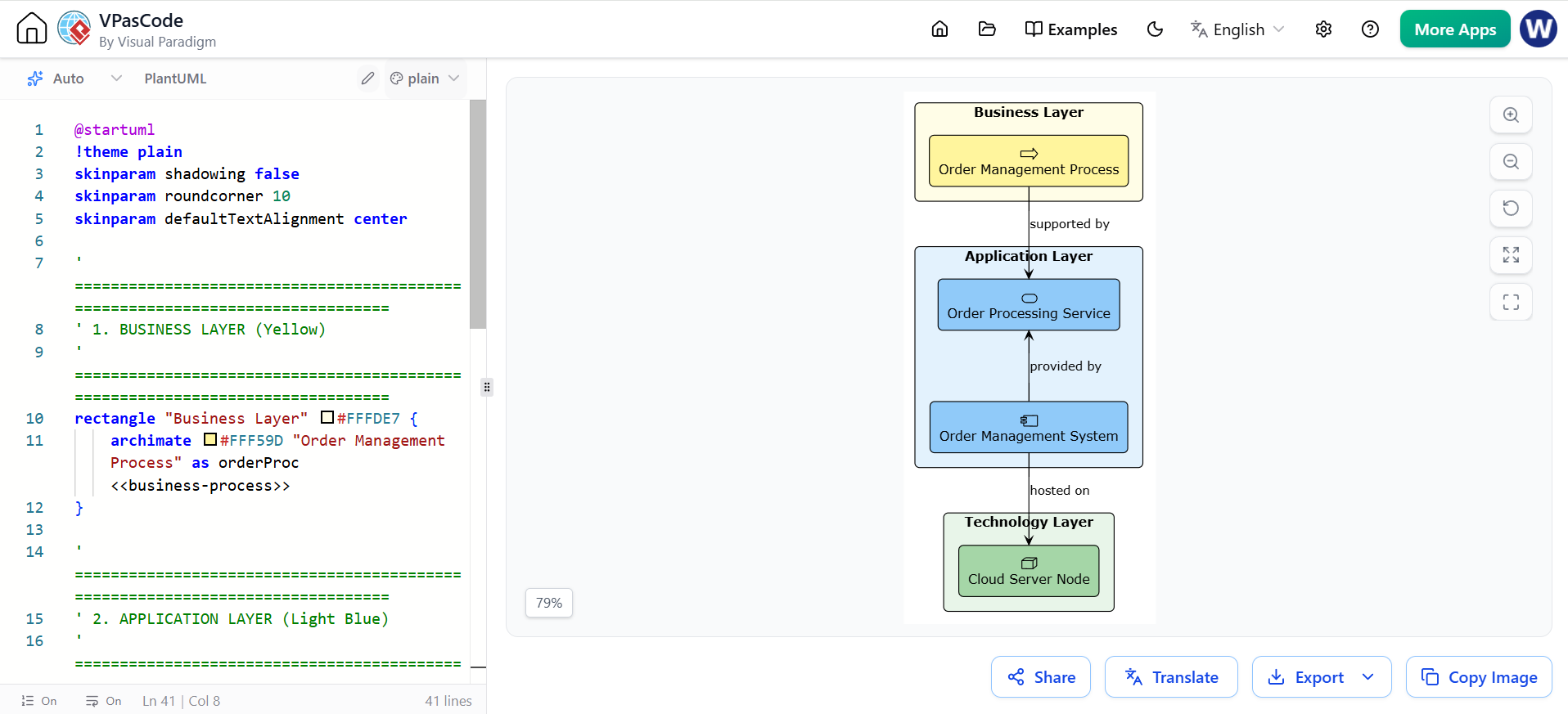
Concept Demonstrated: Hierarchical Support and Cross-Layer Serving.
This diagram illustrates the "generic backbone" journey. It shows how a Technology Node supports an Application Component, which in turn provides an Application Service that serves a core Business Process.
@startuml
!theme plain
skinparam shadowing false
skinparam roundcorner 10
skinparam defaultTextAlignment center

' ==============================================================================
' 1. BUSINESS LAYER (Yellow)
' ==============================================================================
rectangle "Business Layer" #FFFDE7 {
    archimate #FFF59D "Order Management Process" as orderProc <<business-process>>
}

' ==============================================================================
' 2. APPLICATION LAYER (Light Blue)
' ==============================================================================
rectangle "Application Layer" #E3F2FD {
    archimate #90CAF9 "Order Processing Service" as orderServ <<application-service>>
    archimate #90CAF9 "Order Management System" as orderSys <<application-component>>

    ' App Component realizes/provides the App Service
    orderServ <-- orderSys : provided by } ' ============================================================================== ' 3. TECHNOLOGY LAYER (Light Green) ' ============================================================================== rectangle "Technology Layer" #E8F5E9 { archimate #A5D6A7 "Cloud Server Node" as cloudNode <<technology-node>> } ' ============================================================================== ' CROSS-LAYER RELATIONSHIPS (Top to Bottom) ' ============================================================================== ' Business relies on Application orderProc --> orderServ : supported by

' Application relies on Technology
orderSys --> cloudNode : hosted on

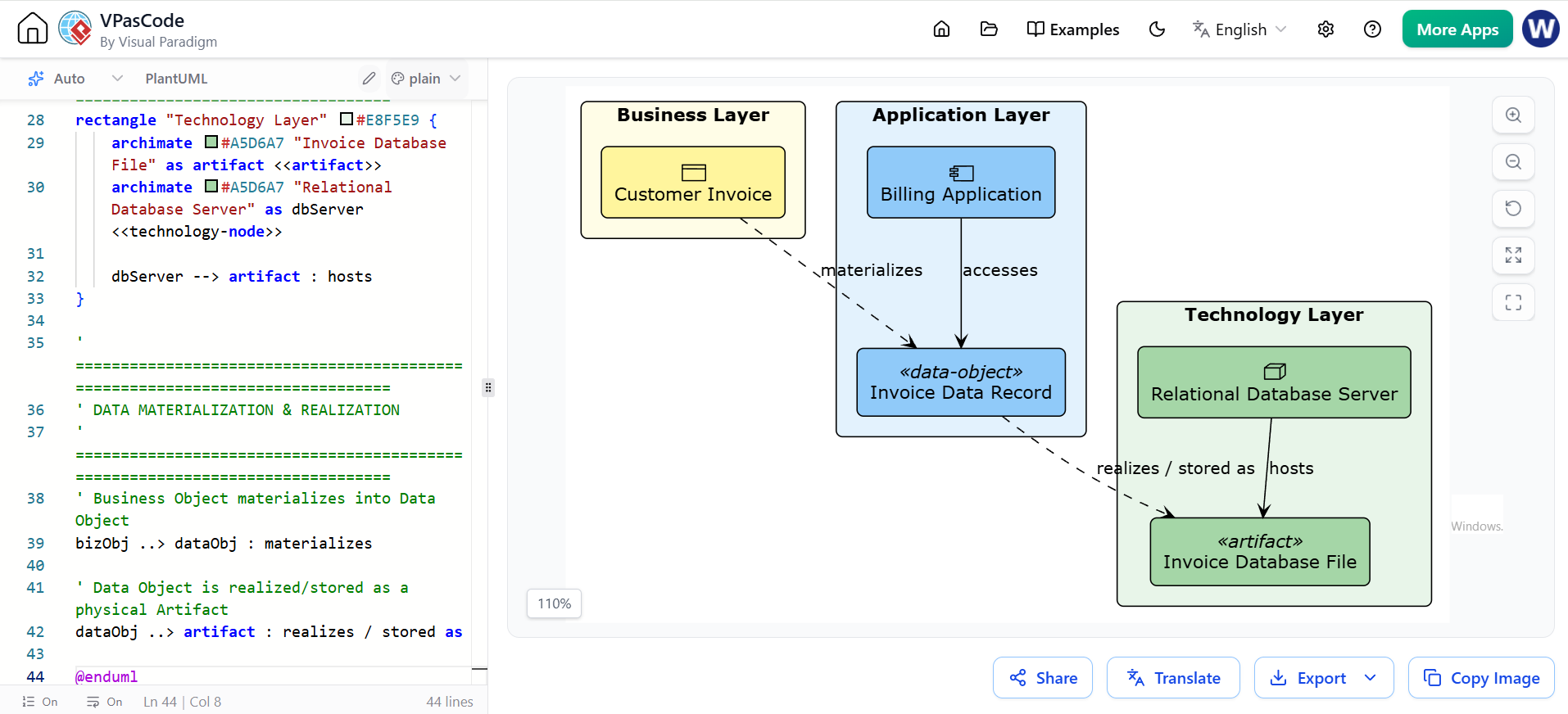
@endumlConcept Demonstrated: Data Materialization across the Core Domain.
This diagram shows how a conceptual business object transforms into a physical technology artifact. This is crucial for data governance and understanding where business data physically resides.
@startuml
!theme plain
skinparam shadowing false
skinparam roundcorner 10
skinparam defaultTextAlignment center

' ==============================================================================
' 1. BUSINESS LAYER (Yellow)
' ==============================================================================
rectangle "Business Layer" #FFFDE7 {
    archimate #FFF59D "Customer Invoice" as bizObj <<business-object>>
}

' ==============================================================================
' 2. APPLICATION LAYER (Light Blue)
' ==============================================================================
rectangle "Application Layer" #E3F2FD {
    archimate #90CAF9 "Invoice Data Record" as dataObj <<data-object>>
    archimate #90CAF9 "Billing Application" as billingApp <<application-component>>

    ' App Component accesses the Data Object
    billingApp --> dataObj : accesses
}

' ==============================================================================
' 3. TECHNOLOGY LAYER (Light Green)
' ==============================================================================
rectangle "Technology Layer" #E8F5E9 {
    archimate #A5D6A7 "Invoice Database File" as artifact <<artifact>>
    archimate #A5D6A7 "Relational Database Server" as dbServer <<technology-node>>

    dbServer --> artifact : hosts
}

' ==============================================================================
' DATA MATERIALIZATION & REALIZATION
' ==============================================================================
' Business Object materializes into Data Object
bizObj ..> dataObj : materializes

' Data Object is realized/stored as a physical Artifact
dataObj ..> artifact : realizes / stored as

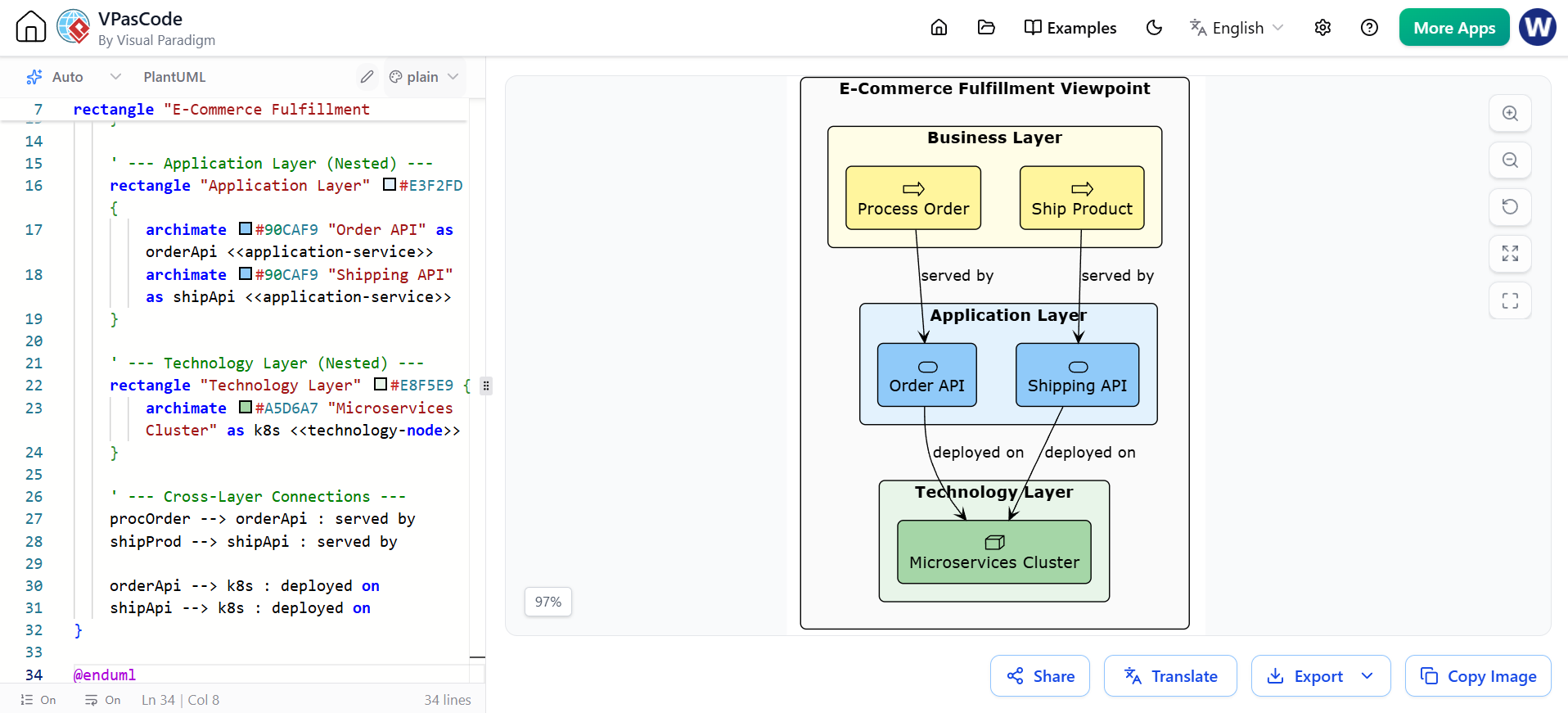
@endumlConcept Demonstrated: Viewpoints as the "Glue" bridging layers.
This diagram uses nesting (a recommended simplification technique) to show how business processes encapsulate the applications and technology that support them, providing a clear "helicopter view" for stakeholders.
@startuml
!theme plain
skinparam shadowing false
skinparam roundcorner 10
skinparam defaultTextAlignment center

rectangle "E-Commerce Fulfillment Viewpoint" #FAFAFA {

    ' --- Business Layer (Nested) ---
    rectangle "Business Layer" #FFFDE7 {
        archimate #FFF59D "Process Order" as procOrder <<business-process>>
        archimate #FFF59D "Ship Product" as shipProd <<business-process>>
    }

    ' --- Application Layer (Nested) ---
    rectangle "Application Layer" #E3F2FD {
        archimate #90CAF9 "Order API" as orderApi <<application-service>>
        archimate #90CAF9 "Shipping API" as shipApi <<application-service>>
    }

    ' --- Technology Layer (Nested) ---
    rectangle "Technology Layer" #E8F5E9 {
        archimate #A5D6A7 "Microservices Cluster" as k8s <<technology-node>>
    }

    ' --- Cross-Layer Connections ---
    procOrder --> orderApi : served by
    shipProd --> shipApi : served by

    orderApi --> k8s : deployed on
    shipApi --> k8s : deployed on
}

@enduml
Maintain the Hierarchy: Always draw your diagrams with the Business Layer at the top, Application in the middle, and Technology at the bottom. This visual hierarchy reinforces the concept of IT supporting the business.
Use Serving Relationships Correctly: Remember that the arrow for a "serving" relationship points towards the element being served (e.g., Application Service $\rightarrow$ Business Process).
Don't Skip Layers: Avoid drawing direct lines from the Technology Layer to the Business Layer. Always route the connection through the Application Layer to maintain architectural integrity.
Leverage Nesting: As shown in Example 3, nesting lower layers inside higher layers (or grouping them by domain) reduces visual clutter and makes complex diagrams easier for non-technical stakeholders to digest.
Understanding and modeling the interactions between the Business, Application, and Technology layers is the cornerstone of effective Enterprise Architecture. By utilizing ArchiMate's Core Domain, architects can map the "generic backbone" of their organization, ensuring that every piece of technology can be traced back to a specific business process and strategic goal.
However, manually managing these complex, multi-layered relationships and data materializations can quickly become overwhelming as the enterprise scales. To truly leverage the power of ArchiMate, professional tooling is essential. Visual Paradigm is a premier solution for this challenge. It provides robust, out-of-the-box support for ArchiMate modeling, allowing architects to easily drag-and-drop elements, automatically validate cross-layer relationships, and generate comprehensive matrix reports. By utilizing Visual Paradigm, Enterprise Architects can maintain the coherence and integrity of their models, ensuring that the bridge between business strategy and IT execution remains strong, clear, and actionable.

