
Enterprise Architecture (EA) is the critical discipline of aligning an organization’s business strategy with its technology landscape. But without a common, unambiguous language, architects risk producing diagrams that are confusing, inconsistent, or ignored by stakeholders.
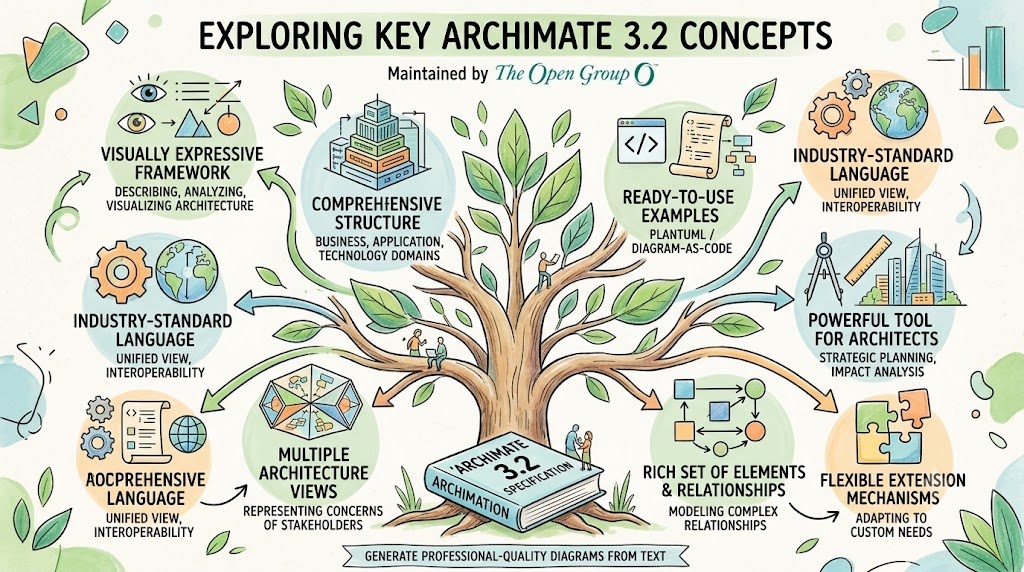
Enter ArchiMate. Maintained by The Open Group, ArchiMate is the industry-standard, open modeling language for Enterprise Architecture. The ArchiMate 3.2 Specification provides a comprehensive, visually expressive framework for describing, analyzing, and visualizing architecture across business, application, and technology domains.
This guide explores eight key concepts that make ArchiMate 3.2 a powerful tool for modern architects. Each section includes practical insights and ready-to-use PlantUML / Diagram-as-Code examples, enabling you to generate professional-quality diagrams directly from text.
Whether you are new to ArchiMate or looking to modernize your EA practice with AI and Agile workflows, this guide provides both conceptual understanding and immediately usable modeling patterns.
One of the most elegant design decisions in ArchiMate is that its Core Framework draws inspiration from the grammatical structure of natural language. Just as a sentence is composed of a subject performing a verb upon an object, every ArchiMate model can be understood through three fundamental aspect categories:
| Aspect | Grammatical Role | Description | Examples |
|---|---|---|---|
| Active Structure | Subject | The entity that exhibits behavior | Business Actor, Application Component |
| Behavior | Verb | The activity or function being performed | Business Process, Application Service |
| Passive Structure | Object | The element upon which behavior is performed | Business Object, Data Object |
This tripartite structure makes ArchiMate models inherently readable. A stakeholder unfamiliar with formal modeling can often interpret a well-constructed diagram as a set of declarative statements about the enterprise.
💡 Pro Tip: Name your elements to form coherent sentences. If you cannot read a chain of elements as a logical English sentence (e.g., "The Customer triggers the Order Process, which accesses the Order Data"), the model may need restructuring.
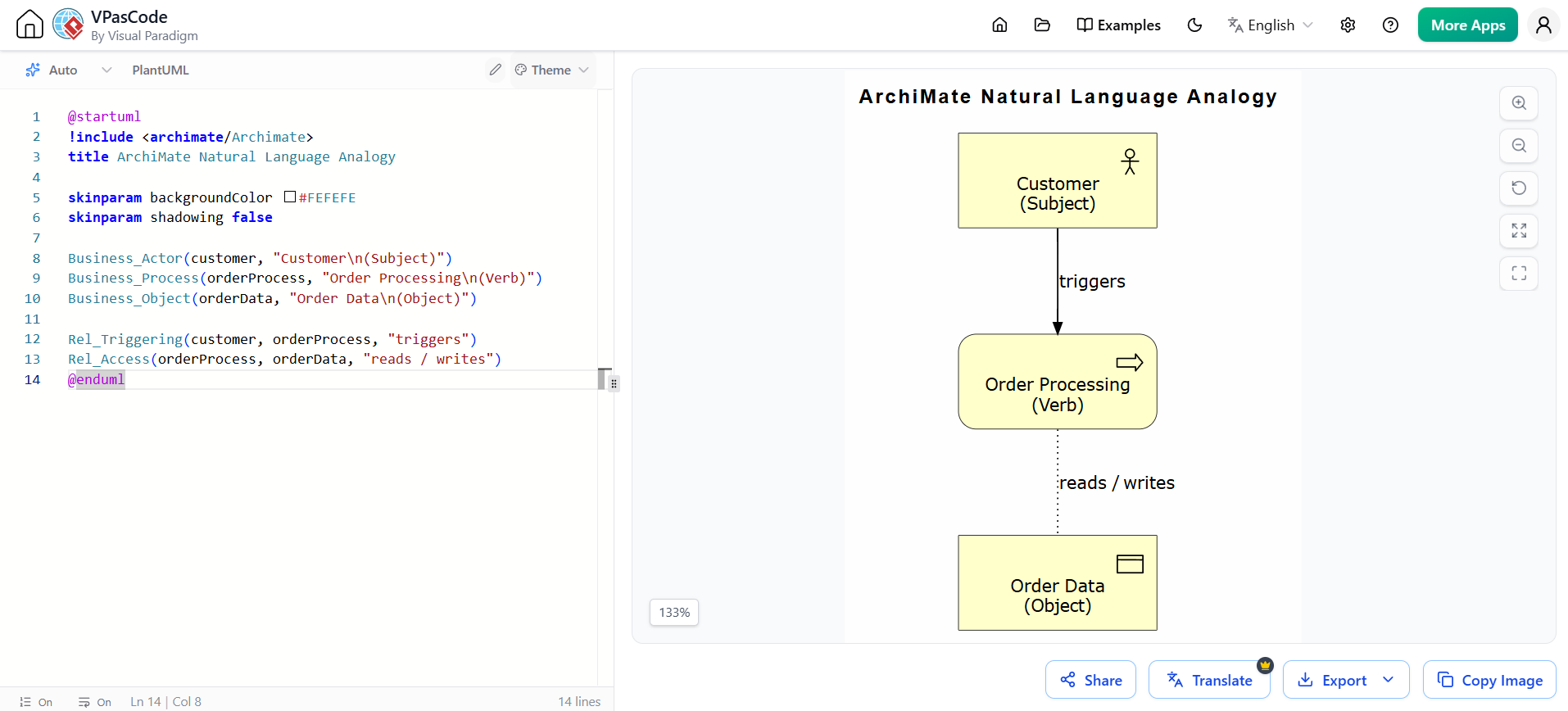
@startuml
!include <archimate/Archimate>
title ArchiMate Natural Language Analogy

skinparam backgroundColor #FEFEFE
skinparam shadowing false

Business_Actor(customer, "Customer\n(Subject)")
Business_Process(orderProcess, "Order Processing\n(Verb)")
Business_Object(orderData, "Order Data\n(Object)")

Rel_Triggering(customer, orderProcess, "triggers")
Rel_Access(orderProcess, orderData, "reads / writes")
@enduml
ArchiMate was designed with a deliberate restriction principle: the language includes only those concepts sufficient to model the "proverbial 80% of practical cases." This is not a limitation, but a strategic choice.
Why the 80% Rule Works:
For the remaining 20% of highly specialized needs, ArchiMate supports extension mechanisms, custom properties, and seamless integration with specialized languages like BPMN or UML.
Most architecture languages focus on the "what" and "how." ArchiMate 3.2 distinguishes itself by providing first-class constructs for modeling the "why" — the rationale, strategic intent, and motivational forces behind architectural decisions.
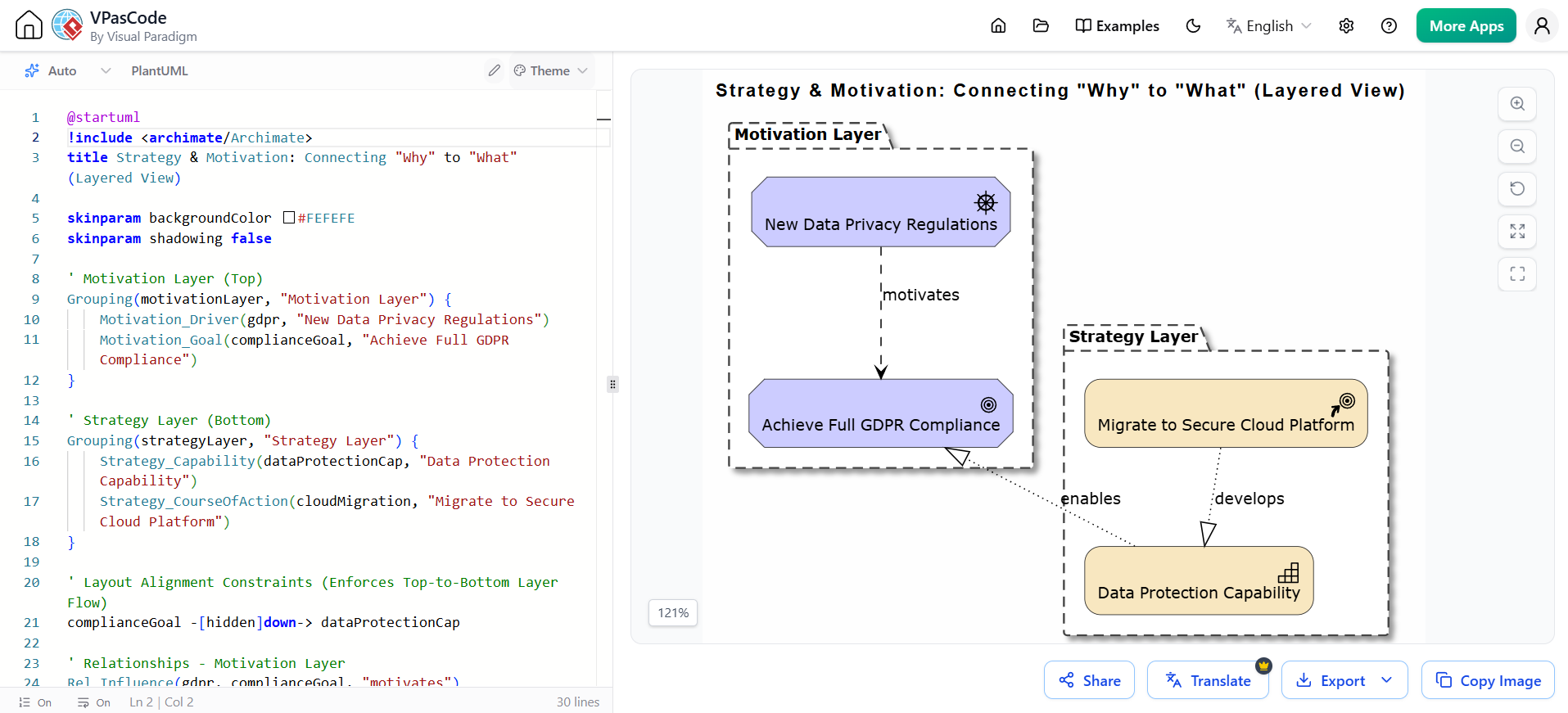
@startuml
!include <archimate/Archimate>
title Strategy & Motivation: Connecting "Why" to "What" (Layered View)

skinparam backgroundColor #FEFEFE
skinparam shadowing false

' Motivation Layer (Top)
Grouping(motivationLayer, "Motivation Layer") {
    Motivation_Driver(gdpr, "New Data Privacy Regulations")
    Motivation_Goal(complianceGoal, "Achieve Full GDPR Compliance")
}

' Strategy Layer (Bottom)
Grouping(strategyLayer, "Strategy Layer") {
    Strategy_Capability(dataProtectionCap, "Data Protection Capability")
    Strategy_CourseOfAction(cloudMigration, "Migrate to Secure Cloud Platform")
}

' Layout Alignment Constraints (Enforces Top-to-Bottom Layer Flow)
complianceGoal -[hidden]down-> dataProtectionCap

' Relationships - Motivation Layer
Rel_Influence(gdpr, complianceGoal, "motivates")

' Cross-Layer & Strategy Relationships
Rel_Realization(dataProtectionCap, complianceGoal, "enables")
Rel_Realization(cloudMigration, dataProtectionCap, "develops")

@enduml
💡 Pro Tip: Always start your architecture models with Motivation elements. Documenting the goals and drivers first creates a traceable chain of justification for every technical decision that follows.
Relationship derivation is one of ArchiMate’s most distinctive analytical features. It allows architects to compute indirect relationships between elements that are not directly connected, by analyzing the chain of intermediate relationships.
Why It Matters:
In a detailed model, a Server hosts an Application, which realizes a Service, which supports a Business Process. Through derivation rules, we can validly state that the Server directly supports the Business Process in a high-level executive view.
Modern enterprises do not exist purely in digital space. Manufacturing, logistics, healthcare, and retail all involve physical assets. ArchiMate 3.2’s Technology Layer includes a dedicated set of physical elements to model this reality:
These elements integrate seamlessly with digital constructs, enabling architects to model cyber-physical systems in a unified framework.
Architecture is not just about describing the current state or a future vision; it is about managing the journey between them. ArchiMate includes an Implementation and Migration extension specifically designed to support EA-enabled transformation.
Key Elements:
💡 Pro Tip: Use the Plateau-Gap-Work Package pattern. Define your stable states (Plateaus), identify the differences (Gaps), and assign actionable initiatives (Work Packages) to close those gaps.
Both ArchiMate and the TOGAF® Standard are maintained by The Open Group and are designed to work together seamlessly.
From establishing the Architecture Vision (Phase A) using Motivation elements, to supporting Migration Planning (Phase F) with Plateaus and Work Packages, ArchiMate provides a uniform representation for diagrams across the entire TOGAF lifecycle.
Traditional EA modeling relies on drag-and-drop graphical tools. While powerful, they are often siloed, difficult to version, and hard to integrate into modern software delivery pipelines.
The Diagram-as-Code movement flips this paradigm: architecture models are authored as plain text files, stored in Git, reviewed like source code, and rendered automatically. Combined with AI-powered generation, this approach is revolutionizing Agile Enterprise Architecture.
Visual Paradigm's VPasCode (Visual Paradigm as Code) is a text-based diagramming environment that supports the full ArchiMate 3.2 specification. When paired with integrated Large Language Models (LLMs), architects can describe their intent in natural language, and the AI generates syntactically correct, semantically meaningful ArchiMate code.
Architect's Prompt:
"Create an ArchiMate diagram showing a bank's loan approval process. A Customer submits a Loan Application. A Loan Officer reviews it using the Loan Management System. Include the motivation: the goal is to reduce approval time by 50%."
AI-Generated Output:
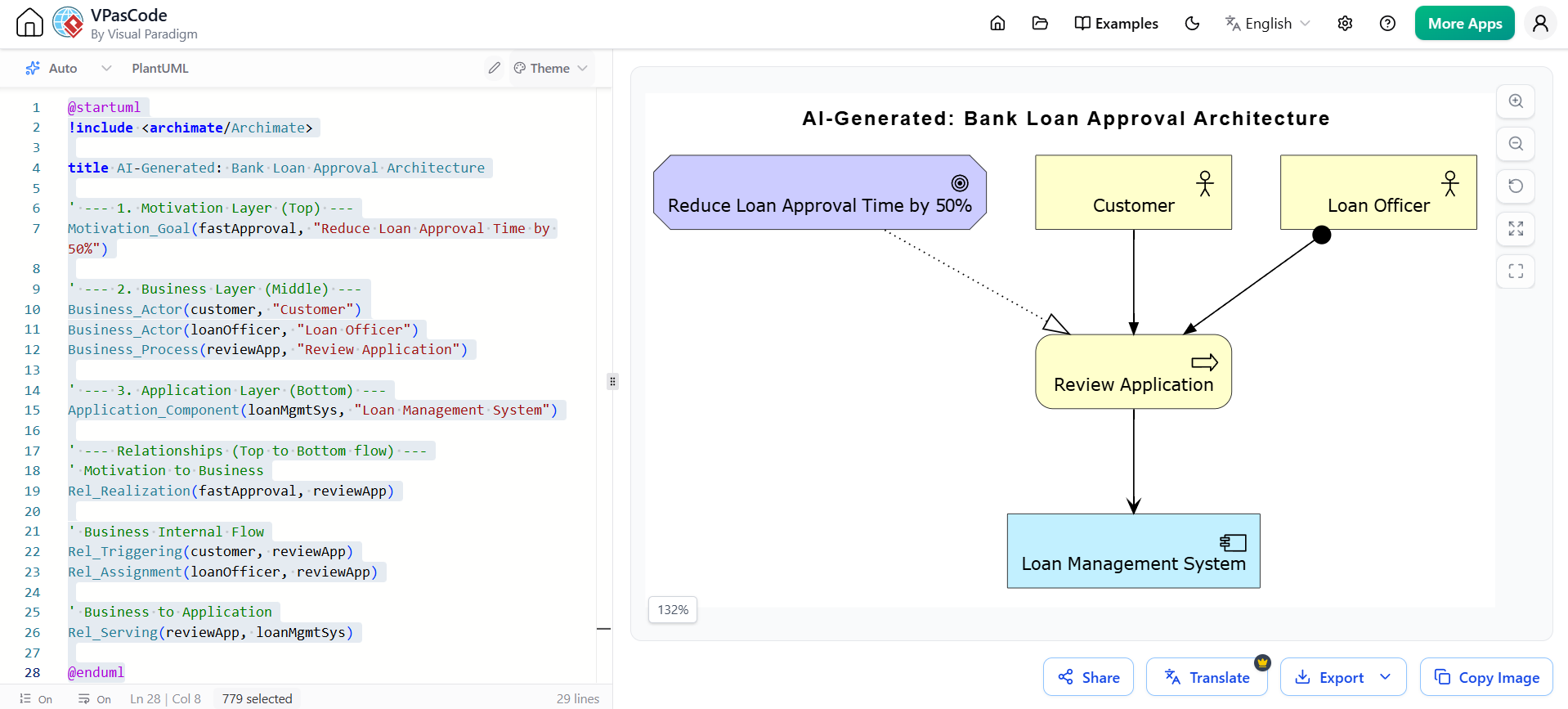
@startuml
!include <archimate/Archimate>

title AI-Generated: Bank Loan Approval Architecture

' --- 1. Motivation Layer (Top) ---
Motivation_Goal(fastApproval, "Reduce Loan Approval Time by 50%")

' --- 2. Business Layer (Middle) ---
Business_Actor(customer, "Customer")
Business_Actor(loanOfficer, "Loan Officer")
Business_Process(reviewApp, "Review Application")

' --- 3. Application Layer (Bottom) ---
Application_Component(loanMgmtSys, "Loan Management System")

' --- Relationships (Top to Bottom flow) ---
' Motivation to Business
Rel_Realization(fastApproval, reviewApp)

' Business Internal Flow
Rel_Triggering(customer, reviewApp)
Rel_Assignment(loanOfficer, reviewApp)

' Business to Application
Rel_Serving(reviewApp, loanMgmtSys)

@enduml
Looking for a powerful, free diagram-as-code tool? Effortlessly render PlantUML, Mermaid, Graphviz, and 20+ programming languages in real time—powered by instant AI error fixing and automatic format detection.
Diagram-as-Code collapses the gap between slow, heavyweight architecture and fast-moving Agile delivery teams.
.vpcl architecture changes in the same Pull Request.💡 Pro Tip: Treat Architecture Decision Records (ADRs) as code. Store your ADR markdown files and their corresponding ArchiMate
.vpcldiagrams side-by-side in the same Git repository for perfect traceability.
ArchiMate 3.2 is far more than a diagramming notation; it is a structured thinking framework for enterprise architecture. Its design makes models intuitive to read, strategically aligned, analytically powerful, and capable of bridging the gap between architectural vision and execution reality.
By combining these core ArchiMate concepts with modern Diagram-as-Code practices and AI assistance, organizations can finally close the gap between architectural intent and delivery reality. Architecture becomes living, version-controlled, and continuously integrated into the Agile delivery process—transforming Enterprise Architecture from a static documentation exercise into a true competitive advantage.
Start small: Pick one existing architecture diagram, translate it into PlantUML/VPasCode syntax, and store it in your team’s Git repository. Experience the power of version-controlled, AI-assisted architecture today.
Did you find this guide helpful? Share it with your architecture team, or leave a comment below with your favorite ArchiMate modeling tip!

