
A Comprehensive Case Study on Capturing Functional Requirements Through the Use Case View
In the complex landscape of software development, one of the most persistent challenges is bridging the gap between stakeholder expectations and technical implementation. How do we ensure that a system does what users actually need before a single line of code is written? The answer lies in requirements modeling—and specifically, in the Use Case View of the Unified Modeling Language (UML).
Use case modeling provides a powerful, user-centric framework for capturing system functionality from the perspective of external actors. Rather than diving into technical architecture or database schemas, use cases answer a fundamental question: "Who interacts with the system, and what do they want to accomplish?"
This case study explores the application of UML use case diagrams through a practical, relatable scenario: modernizing a theater box office system. We will walk through the identification of actors, the definition of functional goals, the modeling of relationships between use cases, and the application of industry best practices. Whether you are a business analyst gathering requirements, a developer designing system behavior, or a student learning UML fundamentals, this guide provides actionable insights for translating user needs into clear, testable specifications.
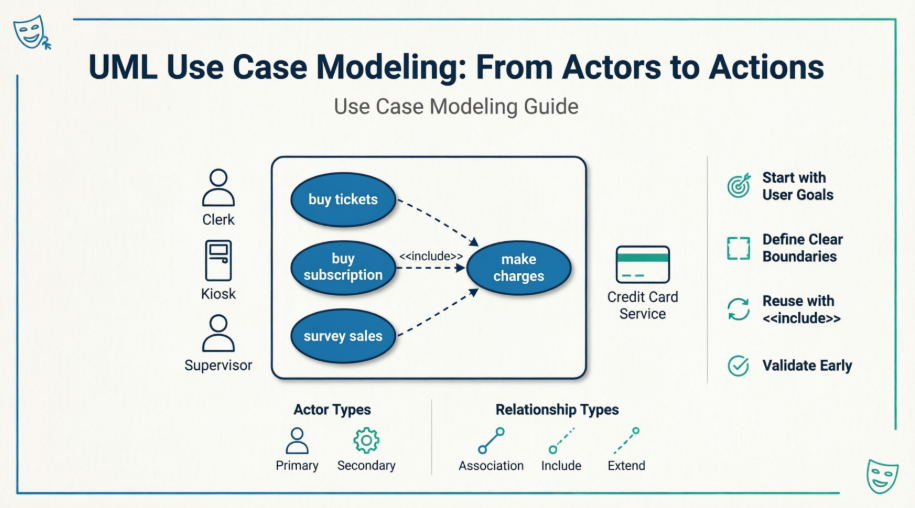
By the end of this article, you will understand not only how to create effective use case diagrams, but why this approach remains a cornerstone of user-focused system design.
Before diving into the case study, let's establish the core principles that make use case modeling effective:
A use case represents a coherent unit of functionality—a complete goal that an actor achieves by interacting with the system. It is not a single button click or database operation; it is an end-to-end transaction, such as "Buy Tickets" or "Generate Sales Report."
Actors are roles played by human users or external systems that interact with the application. Crucially:
Actors exist outside the system boundary
They initiate or participate in use cases
They are defined by responsibility, not job title (e.g., "Clerk" not "Jane Smith")
The rectangular boundary in a use case diagram defines the scope of the system under design. Everything inside is part of the solution; everything outside represents users, external services, or legacy systems.
Association: A solid line connecting an actor to a use case they participate in
<<include>>: Indicates mandatory behavior reused across multiple use cases (e.g., payment processing)
<<extend>>: Represents optional or conditional behavior that augments a base use case
These elements combine to create a visual contract between stakeholders and developers—a shared understanding of what the system must do.
A mid-sized community theater seeks to replace its manual ticketing process with a digital Box Office Management System. Key objectives include:
✅ Enable self-service ticket purchases via lobby kiosks
✅ Support staff-assisted sales at the counter
✅ Integrate secure credit card processing
✅ Provide supervisors with real-time sales analytics
✅ Maintain compatibility with existing subscription programs
Through stakeholder workshops, the team identified four key roles:
| Actor | Type | Responsibility | Direct System Access? |
|---|---|---|---|
| Customer | Primary (Human) | Selects events, purchases tickets/subscriptions | ❌ No (interacts via Kiosk or Clerk) |
| Kiosk | Primary (System) | Self-service interface for customer transactions | ✅ Yes |
| Clerk | Primary (Human) | Assists customers, processes complex sales | ✅ Yes |
| Supervisor | Primary (Human) | Monitors performance, generates reports | ✅ Yes |
| Credit Card Service | Secondary (External System) | Validates and processes payments | ✅ Yes (via API) |
💡 Key Insight: The Customer is intentionally excluded as a direct actor because they never interact with the application code—they always interface through the Kiosk or Clerk. This preserves clean separation of concerns.
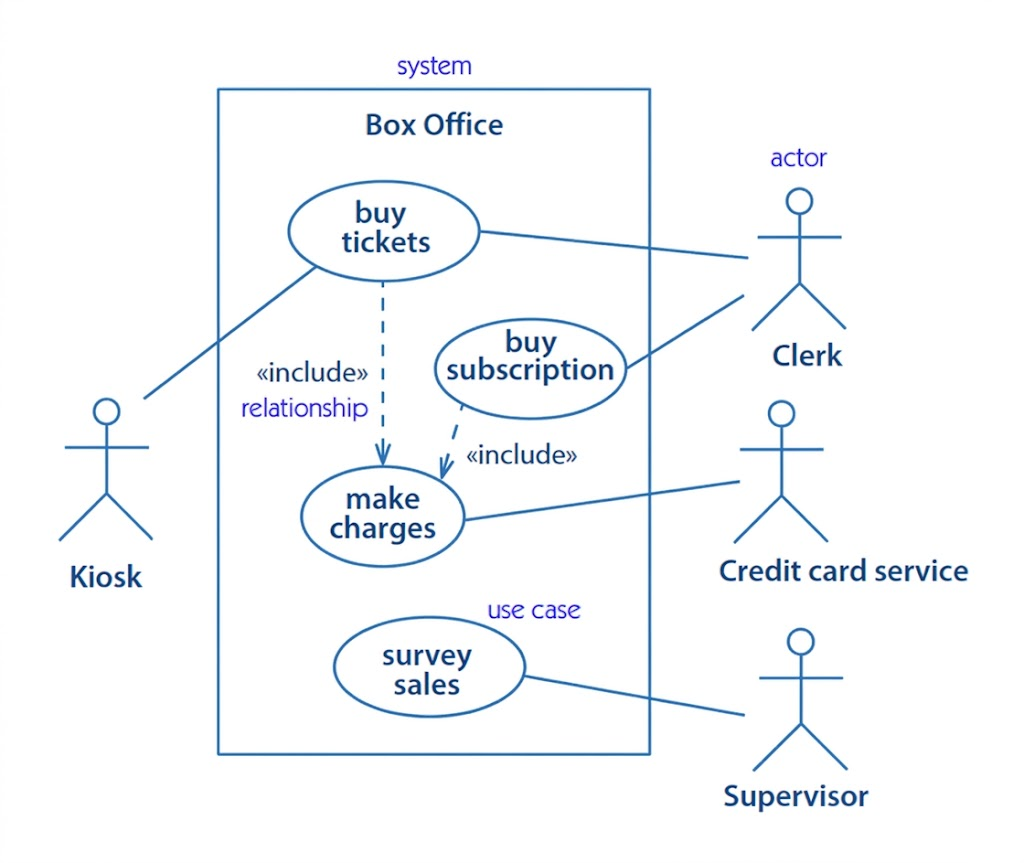
The team mapped functional requirements to discrete, goal-oriented use cases:
| Use Case | Primary Actor(s) | Description | Key Relationships |
|---|---|---|---|
| buy tickets | Kiosk, Clerk | Enables purchase of individual event tickets | <<include>> make charges |
| buy subscription | Clerk | Processes season/membership subscriptions | <<include>> make charges |
| make charges | System (internal) | Validates payment method, processes transaction via external service | Called by ticket/subscription purchases |
| survey sales | Supervisor | Generates reports on revenue, attendance, trends | Standalone administrative function |
Both buy tickets and buy subscription require payment processing. Rather than duplicating payment logic, the model uses an <<include>> relationship:
[buy tickets] ──<<include>>──> [make charges]
[buy subscription] ──<<include>>──> [make charges]
Why this matters:
✅ Ensures consistent payment handling across all sales channels
✅ Simplifies maintenance: update payment logic in one place
✅ Clarifies that payment is mandatory for transaction completion
The make charges use case communicates with the Credit Card Service, modeled as a secondary actor. This explicitly acknowledges:
The dependency on an external API
Potential failure points (network timeout, declined card)
The need for error handling and retry logic
| Element | Symbol | Purpose |
|---|---|---|
| Actor | 🧍 Stick figure | Represents a role interacting with the system |
| Use Case | ⭕ Oval with label | Defines a complete, user-visible goal |
| System Boundary | ▭ Rectangle | Encloses use cases belonging to the system |
| Association | ─── Solid line | Connects actors to use cases they participate in |
| Include | ⤳ Dashed arrow + <<include>> |
Shows mandatory reuse of behavior |
| Extend | ⤳ Dashed arrow + <<extend>> |
Shows optional/conditional behavior |
✅ Use verb-noun phrases: buy tickets, make charges, survey sales
✅ Be specific but concise: Prefer process refund over handle money stuff
❌ Avoid technical jargon: validateCreditCardToken belongs in design docs, not use cases
❌ Don't name after UI elements: click submit button is an action, not a goal
A common pitfall is over-scoping. Ask: "Is this functionality part of the system we're building?"
| Scenario | Inside Boundary? | Reason |
|---|---|---|
| Validating credit card format | ✅ Yes | Core business rule |
| Sending confirmation email | ✅ Yes | Part of purchase completion |
| Printing physical tickets | ⚠️ Context-dependent | Only if printer is managed by this system |
| Customer checking email on phone | ❌ No | External to system scope |
Instead of listing "search functionality," ask: "What does the user want to achieve?" → find available seats for an event.
| Too Granular | Just Right | Too Broad |
|---|---|---|
enter credit card number |
make charges |
manage all financial operations |
display seat map |
buy tickets |
run the entire box office |
Every use case should clarify its context:
**Use Case**: buy tickets
**Preconditions**:
- Event is published and not sold out
- System has connectivity to payment gateway
- Actor has selected at least one seat
A use case diagram is a communication tool—not an exhaustive specification. It's better to have 5 clear, well-understood use cases than 20 ambiguous ones.
Walk through the diagram with:
End users: "Does this match how you work?"
Developers: "Is this implementable with our architecture?"
Testers: "Can we write test cases from this?"
<<extend>> for Optional BehaviorExample: A apply promo code use case that extends buy tickets only when a discount is provided.
[buy tickets] <──<<extend>>── [apply promo code]
                     (extension point: "before payment")
Avoid: validate user session, log transaction to database
These belong in Sequence or Activity diagrams, not use case views.
Primary actors (initiators) → Left side
Secondary actors (supporting services) → Right side
Improves readability and reinforces interaction flow
If >3 use cases include the same behavior, consider whether that behavior should be a separate system component.
Use case modeling is collaborative. Expect to:
Draft initial diagram with core actors/goals
Review with stakeholders
Add detail (preconditions, extensions)
Validate against user stories or acceptance criteria
The Theater Box Office case study demonstrates that effective system design begins not with technology, but with understanding human goals. By adopting the Use Case View, teams gain:
🔹 Shared Language: Business stakeholders and developers align on what the system must do before debating how to build it.
🔹 Scope Control: Clear boundaries prevent feature creep and keep projects focused on delivering value.
🔹 Testability: Each use case becomes a natural unit for acceptance testing and user validation.
🔹 Flexibility: Modular use cases (via <<include>>/<<extend>>) accommodate changing requirements without redesigning the entire system.
While modern agile practices emphasize user stories and prototypes, use case diagrams remain uniquely powerful for visualizing system scope, identifying integration points, and documenting functional requirements in a format accessible to non-technical audiences.
As software systems grow increasingly complex—and user expectations increasingly demanding—the discipline of asking "Who does what, and why?" has never been more valuable. The Use Case View isn't just a diagramming technique; it's a mindset that keeps the user at the center of every design decision.
Final Thought: A well-crafted use case diagram doesn't just describe a system—it tells the story of how people will achieve their goals with it. And in the end, that story is what determines whether technology truly serves human needs.
Draft your own use case diagram for a familiar system (e.g., coffee shop ordering, library checkout)
Write a full specification for one use case using the template in this guide
Map use cases to user stories: "As a [actor], I want to [goal] so that [benefit]"
Explore complementary diagrams: Sequence diagrams for interaction flow; Activity diagrams for complex workflows
What system will you model next? 🎭✨

