
Software projects rarely fail because of bad code; they fail because of bad requirements. When stakeholders and developers speak different languages, the result is a product that doesn't solve the actual problem. Enter Use Case Modeling—the universal translator of requirements engineering.
For decades, use cases have been the gold standard for capturing functional requirements. However, the traditional approach of drawing diagrams in isolated, heavy software and writing massive text documents is outdated. Today, the landscape has shifted. By combining the visual power of Visual Paradigm, the code-friendly agility of PlantUML, and the cognitive heavy-lifting of Artificial Intelligence, beginners and professionals alike can transform ambiguous ideas into validated, automated, and version-controlled system models.
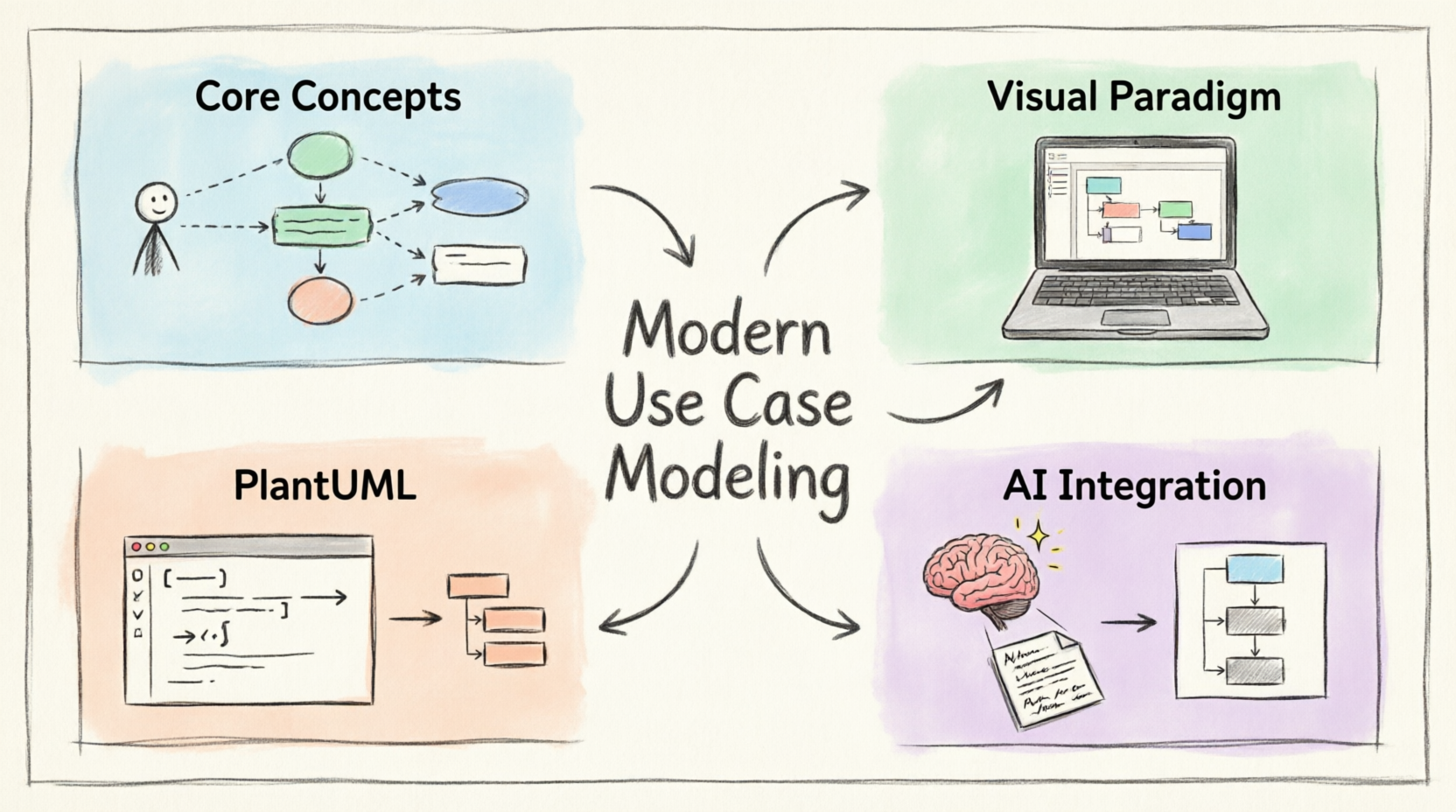
This comprehensive tutorial will guide you from the foundational concepts of use cases to building a modern, AI-supercharged requirements engineering workflow.
Before diving into tools, we must understand why we use use cases. A use case describes a sequence of actions a system performs to yield an observable result of value to an actor (a user or external system).
Traditional requirements documents (like massive PRDs) are often rigid, hard to read, and quickly become outdated. Use cases, conversely, are:
User-Centric: They focus on what the user wants to achieve, not how the system technically implements it.
Structured yet Flexible: They provide a standard template (Main Success Scenario, Alternate Flows, Exceptions) without locking you into proprietary formats.
In Agile environments, you might wonder: "Why use cases when we have User Stories?"
User Stories are excellent for high-level backlog grooming (e.g., "As a shopper, I want to pay with PayPal so that I can checkout faster").
Use Cases are necessary for detailing the complex logic, system boundaries, and edge cases that a one-sentence story cannot capture.
The Modern Approach: Use User Stories for the "What" and "Why" in your Agile board, and Use Cases for the detailed "How" and "What If" in your system architecture.
A Use Case Diagram provides a high-level visual summary of the system's functionality. Let's break down the standard UML notation.
Actors: Represented by stick figures. They can be human users (Primary/Secondary) or external systems (e.g., a Payment Gateway).
Use Cases: Represented by ovals. They describe a specific system function (always start with a verb, e.g., Process Payment).
System Boundary: A rectangle enclosing the use cases, representing the scope of the system. Actors sit outside the boundary.
Associations: Solid lines connecting an actor to a use case, indicating interaction.
<<include>> (Mandatory): Use Case A always includes Use Case B. (e.g., Checkout includes Process Payment).
<<extend>> (Optional): Use Case B sometimes extends Use Case A under specific conditions. (e.g., Checkout is extended by Apply Discount Code).
Generalization: Inheritance. An actor or use case inherits the behavior of a more general one (e.g., Premium Member generalizes Member).
💡 Beginner Tip: Don't overcomplicate your diagrams! A use case diagram should fit on a single page. If it looks like a spiderweb, you are modeling system internals, not user goals.
While you can draw UML on a whiteboard, professional requirements engineering demands robust tooling. Visual Paradigm (VP) is highly recommended for its balance of enterprise power and beginner accessibility.
Diagram Creation: VP offers a drag-and-drop canvas. You can select a "Use Case Diagram" template and simply drag actors and ovals onto the canvas. The tool automatically handles UML syntax rules, preventing beginners from making structural errors.
Requirements Management: VP isn't just for drawing. You can create a Requirements Traceability Matrix (RTM). You can link a specific use case directly to a business requirement, ensuring nothing is lost in translation.
Team Collaboration: With VP's web-based canvas and cloud features, business analysts can draw diagrams while developers review them in real-time, leaving comments directly on the use case elements.
While Visual Paradigm is perfect for visual collaboration, developers often prefer "Docs-as-Code". This is where PlantUML shines. PlantUML allows you to create UML diagrams using simple text scripts, which can be stored in Git, reviewed in Pull Requests, and rendered automatically.
@startuml and @enduml wrap your code.
actor "Name" defines an actor.
usecase "Name" defines a use case.
rectangle "System" { ... } defines the system boundary.
--> creates a solid association line.
..> creates a dashed line (used for include/extend).
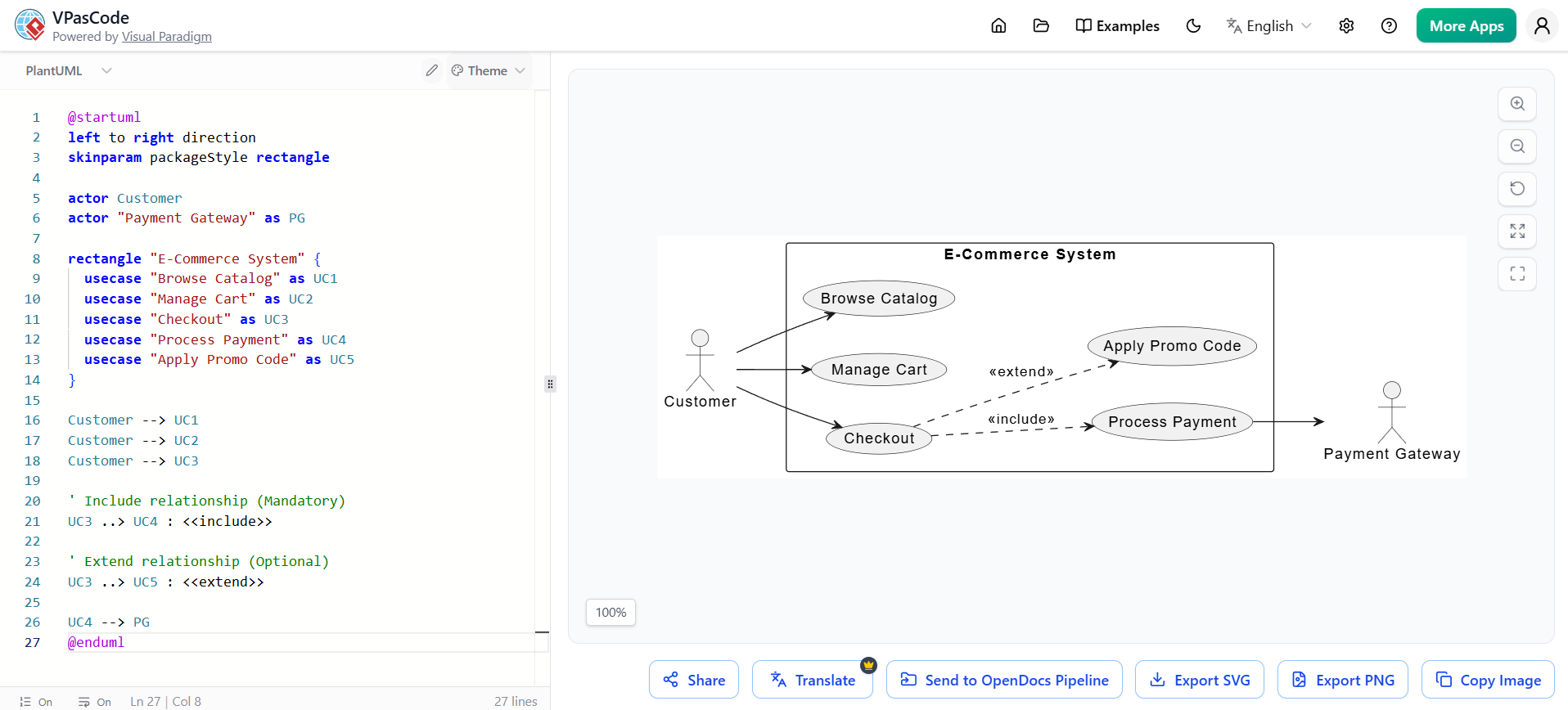
@startuml
left to right direction
skinparam packageStyle rectangle

actor Customer
actor "Payment Gateway" as PG

rectangle "E-Commerce System" {
  usecase "Browse Catalog" as UC1
  usecase "Manage Cart" as UC2
  usecase "Checkout" as UC3
  usecase "Process Payment" as UC4
  usecase "Apply Promo Code" as UC5
}

Customer --> UC1
Customer --> UC2
Customer --> UC3

' Include relationship (Mandatory)
UC3 ..> UC4 : <<include>>

' Extend relationship (Optional)
UC3 ..> UC5 : <<extend>>

UC4 --> PG
@enduml
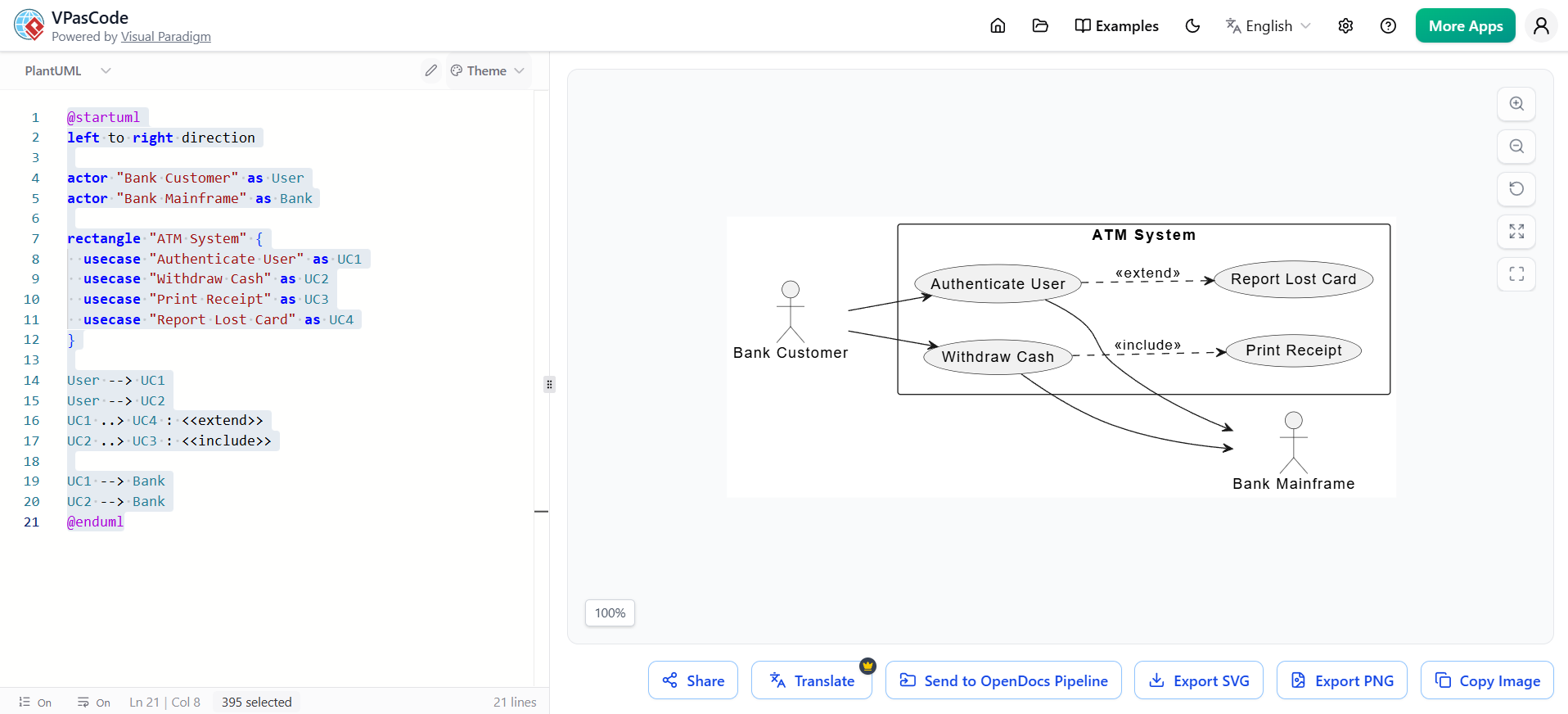
@startuml
left to right direction

actor "Bank Customer" as User
actor "Bank Mainframe" as Bank

rectangle "ATM System" {
  usecase "Authenticate User" as UC1
  usecase "Withdraw Cash" as UC2
  usecase "Print Receipt" as UC3
  usecase "Report Lost Card" as UC4
}

User --> UC1
User --> UC2
UC1 ..> UC4 : <<extend>>
UC2 ..> UC3 : <<include>>

UC1 --> Bank
UC2 --> Bank
@enduml
By 2026, AI is no longer just a buzzword; it is deeply integrated into requirements engineering. Visual Paradigm AI (VP AI) and integrated LLM tools drastically reduce the cognitive load of modeling.
AI-Assisted Actor & Use Case Identification: You can paste a messy paragraph of business requirements into VP AI. The AI will automatically extract the nouns (potential actors/systems) and verbs (potential use cases), suggesting a starter diagram.
Semantic Analysis & Gap Detection: AI can analyze your use case model and flag inconsistencies. For example, if an actor is connected to "Checkout" but not "Login", the AI will prompt: "Actor 'Customer' is missing an authentication use case."
Automated Test Case Generation: Once your use cases are detailed, AI can automatically generate BDD (Behavior-Driven Development) test cases in Gherkin syntax (Given/When/Then) based on the Main Success Scenario and Alternate Flows.
The most effective modern teams don't choose between Visual Paradigm and PlantUML; they use both in a hybrid workflow.
Visual Paradigm (The "Front Stage"): Use VP for stakeholder meetings, complex enterprise architecture, requirement traceability, and generating polished PDF reports for management. Utilize VP AI here to rapidly prototype ideas during live meetings.
PlantUML (The "Back Stage"): Use PlantUML inside your IDE (via plugins) or your Git repository. Developers use this for quick, version-controlled architectural decisions, API boundary mapping, and code-review documentation.
The Workflow: An analyst drafts the high-level model in VP using AI. The core, developer-facing use cases are then exported or rewritten as PlantUML scripts and committed to the docs/ folder of the project's Git repository.
The Scenario: A university wants a new "Smart Library App". The project sponsor gives you this single, ambiguous paragraph:
"Students need to log in to search for books and reserve them. If a book is on the waitlist, they should get an email. Librarians need to be able to add new books to the system and suspend student accounts if they have overdue fines."
We feed this text into Visual Paradigm AI.
AI Output: Identifies Actors: Student, Librarian, Email System. Identifies Use Cases: Login, Search Books, Reserve Book, Send Notification, Manage Inventory, Suspend Account.
We review the AI's suggestions. We realize "Send Notification" is an automated system actor, not a use case. We refine the model.
We write the PlantUML code for the developers:
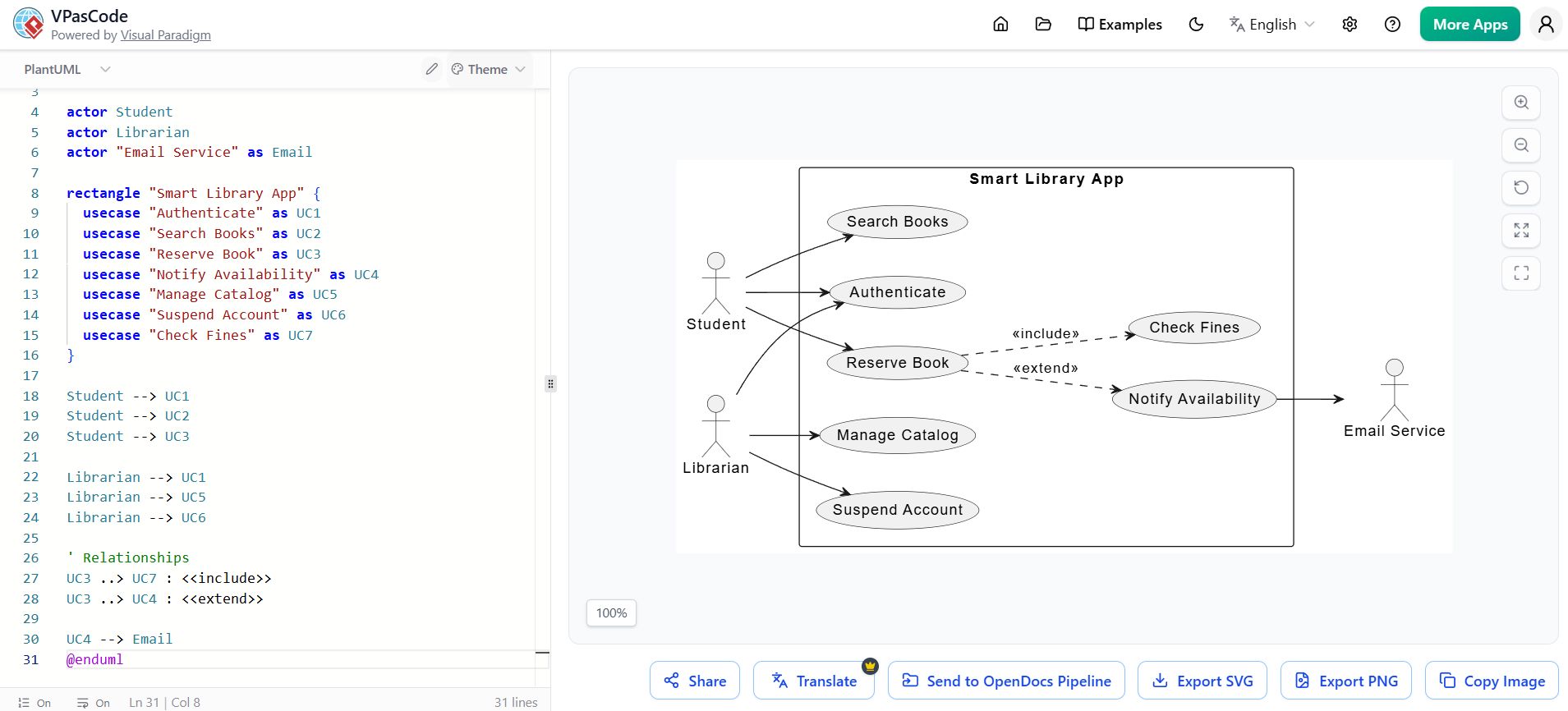
@startuml
left to right direction

actor Student
actor Librarian
actor "Email Service" as Email

rectangle "Smart Library App" {
  usecase "Authenticate" as UC1
  usecase "Search Books" as UC2
  usecase "Reserve Book" as UC3
  usecase "Notify Availability" as UC4
  usecase "Manage Catalog" as UC5
  usecase "Suspend Account" as UC6
  usecase "Check Fines" as UC7
}

Student --> UC1
Student --> UC2
Student --> UC3

Librarian --> UC1
Librarian --> UC5
Librarian --> UC6

' Relationships
UC3 ..> UC7 : <<include>>
UC3 ..> UC4 : <<extend>>

UC4 --> Email
@enduml
We run the model through VP AI's semantic checker.
AI Insight: "The 'Reserve Book' use case includes 'Check Fines', but there is no use case for a Student to Pay fines. Additionally, there is no use case for a Student to Return a book."
Resolution: We add Return Book and Pay Fine use cases, transforming an ambiguous paragraph into a robust, validated system boundary.
As we look to the future, the intersection of AI and Use Case modeling will only deepen:
Autonomous Requirements Agents: AI agents will act as "virtual stakeholders," continuously analyzing user feedback, support tickets, and app analytics to automatically suggest new use cases or deprecate unused ones.
Continuous Model Synchronization: AI will monitor code repositories and automatically update PlantUML/Visual Paradigm diagrams when the underlying codebase architecture changes, ensuring documentation never rots.
Predictive Edge-Case Generation: AI will simulate thousands of user journeys through your use case model to predict and highlight edge-case failures before a single line of code is written.
Use case modeling is not a relic of the past; it is a foundational skill that has been supercharged by modern tooling. By understanding the core principles of actors, boundaries, and relationships, you can effectively capture what a system must do.
Tools like Visual Paradigm provide the visual and collaborative horsepower needed for enterprise-grade requirements management, while PlantUML ensures your models remain agile, version-controlled, and close to the code. Finally, by embracing AI features, you can offload the tedious extraction and validation tasks, allowing you to focus on what truly matters: designing exceptional user experiences.
Your Next Step: Don't try to model your entire system today. Pick one small feature of an app you use daily. Open Visual Paradigm or your favorite text editor, write a PlantUML script, and map out just that one flow. Mastery begins with a single use case.

