
In the fast-paced world of product development, requirements gathering is often the bottleneck that delays projects and leads to costly rework. Ambiguity in stakeholder expectations, scope creep, and miscommunication between business and technical teams are common pitfalls. Use case modeling offers a powerful solution by providing a structured, visual way to capture functional requirements from the user’s perspective.
This tutorial is designed for beginners—product managers, business analysts, and junior developers—who want to accelerate their requirements gathering process. We’ll explore how to combine three powerful approaches:
Visual Paradigm: A robust GUI-based tool for comprehensive modeling and simulation.
PlantUML: A code-based diagramming approach for version control and rapid iteration.
AI Assistance: Leveraging large language models to draft, review, and refine use cases and diagrams.
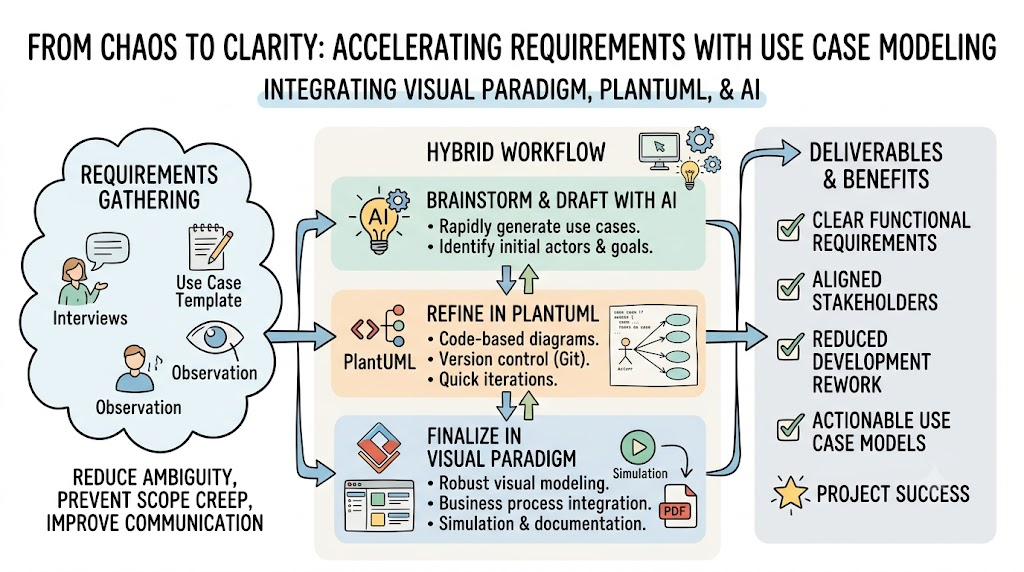
By the end of this guide, you’ll have a practical toolkit to create clear, actionable use case models that reduce ambiguity and align stakeholders early in the project lifecycle.
Use cases describe how users interact with a system to achieve specific goals. They focus on what the system should do, not how it does it. This user-centric approach helps:
Reduce Ambiguity: Clear actors, actions, and outcomes minimize misinterpretation.
Prevent Scope Creep: Defined boundaries keep features focused on user value.
Improve Communication: Visual diagrams bridge the gap between technical and non-technical stakeholders.
Actor: A user or external system interacting with the main system.
Use Case: A specific goal or task the actor wants to accomplish.
System Boundary: The scope of the system being modeled.
Relationships: Includes, extends, and generalizations that show dependencies between use cases.
Before drawing diagrams, gather raw requirements through:
Ask open-ended questions: “What tasks do you perform daily?” “What frustrates you about the current process?”
Identify actors and their goals.
Watch users perform tasks to uncover unstated needs.
Note pain points and workarounds.
Use a simple template to structure each use case:
Name: Short, action-oriented title (e.g., “Place Order”).
Actor: Who initiates the use case?
Preconditions: What must be true before starting?
Main Success Scenario: Step-by-step happy path.
Extensions/Alternatives: Error handling and edge cases.
Postconditions: State of the system after completion.
Visual Paradigm is a professional modeling tool that supports UML, BPMN, and more. Here’s how to leverage it for use case modeling:
Drag-and-Drop Interface: Quickly create actors, use cases, and relationships.
Business Process Integration: Link use cases to BPMN workflows for end-to-end process mapping.
Simulation: Test scenarios to validate logic before development.
Export Options: Generate PDFs, images, or HTML documentation for stakeholders.
Create Actors: Customer, Payment Gateway, Inventory System.
Define Use Cases: Browse Products, Add to Cart, Checkout, Process Payment.
Add Relationships:
Checkout includes Process Payment.
Checkout extends Apply Discount Code (optional).
Set System Boundary: Draw a rectangle around all use cases to define scope.
Simulate: Run a scenario where a customer checks out with a discount code to ensure flow correctness.
PlantUML allows you to create diagrams using text-based code, making it ideal for version control and collaborative editing.
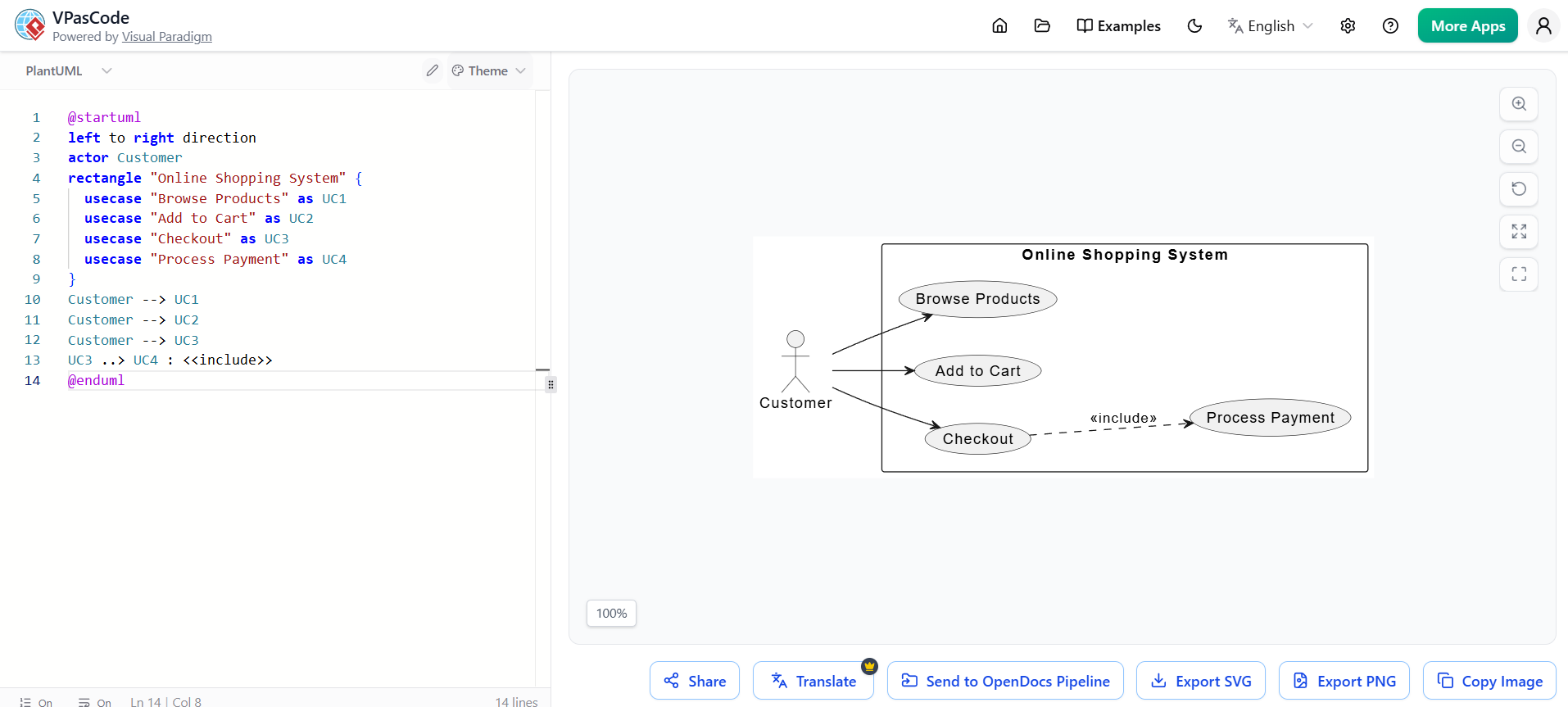
@startuml
left to right direction
actor Customer
rectangle "Online Shopping System" {
  usecase "Browse Products" as UC1
  usecase "Add to Cart" as UC2
  usecase "Checkout" as UC3
  usecase "Process Payment" as UC4
}
Customer --> UC1
Customer --> UC2
Customer --> UC3
UC3 ..> UC4 : <<include>>
@enduml
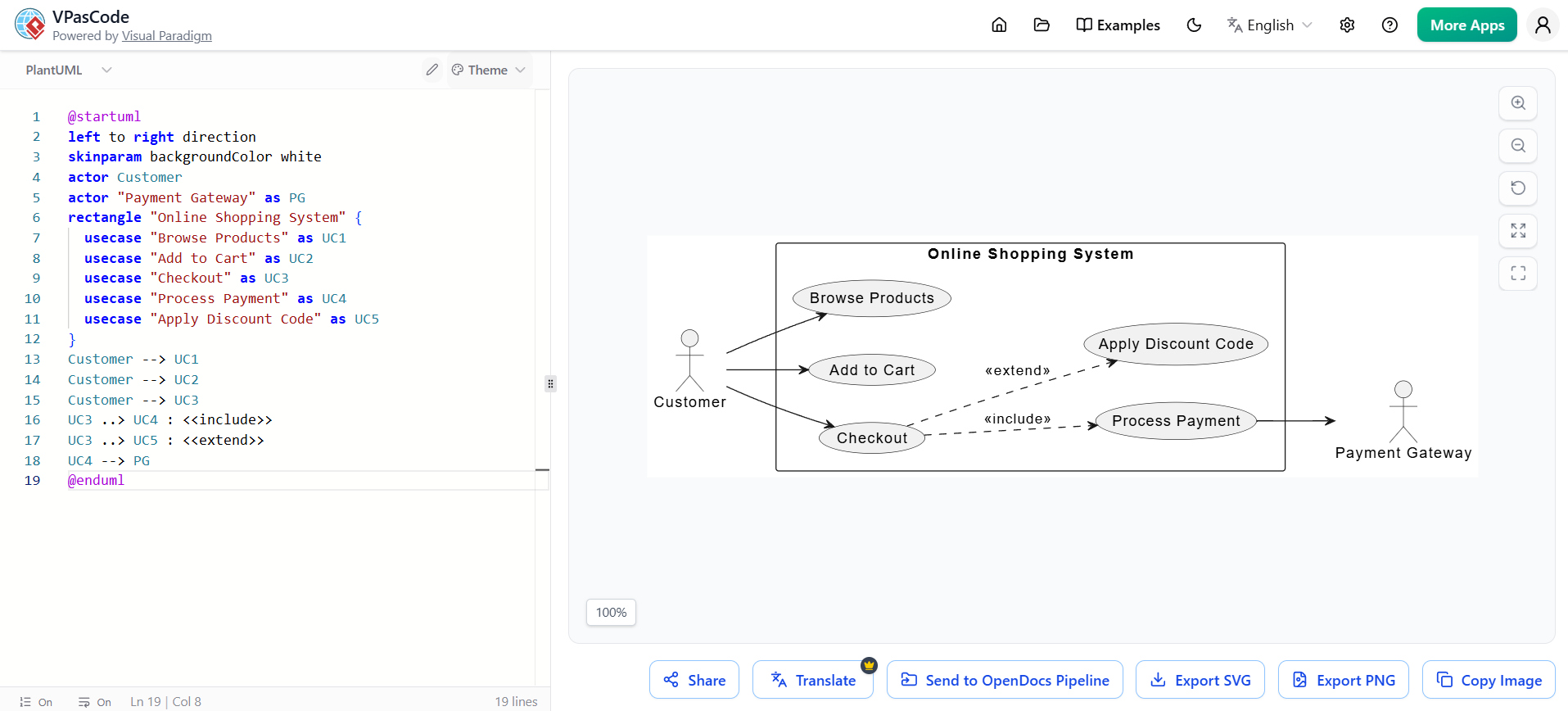
@startuml
left to right direction
skinparam backgroundColor white
actor Customer
actor "Payment Gateway" as PG
rectangle "Online Shopping System" {
  usecase "Browse Products" as UC1
  usecase "Add to Cart" as UC2
  usecase "Checkout" as UC3
  usecase "Process Payment" as UC4
  usecase "Apply Discount Code" as UC5
}
Customer --> UC1
Customer --> UC2
Customer --> UC3
UC3 ..> UC4 : <<include>>
UC3 ..> UC5 : <<extend>>
UC4 --> PG
@enduml
Store .puml files in Git for change tracking.
Use IDE plugins (VS Code, IntelliJ) for live preview.
Reuse templates for consistent styling across projects.
AI tools like ChatGPT, Claude, and GitHub Copilot can significantly speed up use case creation and refinement.
Prompt:
“Act as a senior product manager. Draft a use case for ‘Reset Password’ in a web application. Include actor, preconditions, main success scenario, extensions, and postconditions.”
Prompt:
“Review this PlantUML code for an online shopping system. Identify missing actors, incomplete relationships, or potential scope issues.”
[Paste PlantUML code]
Prompt:
“Compare these two use cases: ‘Place Order’ and ‘Cancel Order.’ Are there any conflicting steps or missing error handling?”
Prompt:
“Suggest three ways to simplify this use case diagram while maintaining clarity.”
Visual Paradigm’s AI features can:
Generate initial use case diagrams from text descriptions.
Recommend best practices for modeling.
Auto-complete relationships based on context.
| Approach | Best For | Pros | Cons |
|---|---|---|---|
| Visual Paradigm | Complex systems, stakeholder presentations | Rich UI, simulation, export options | Learning curve, license cost |
| PlantUML | Version-controlled docs, dev teams | Code-based, Git-friendly, free | Less intuitive for non-tech users |
| AI-Generated | Rapid prototyping, brainstorming | Fast, creative suggestions | May lack precision, needs review |
Brainstorm with AI: Generate initial use case drafts.
Refine in PlantUML: Create version-controlled diagrams for dev teams.
Finalize in Visual Paradigm: Polish for stakeholder reviews and simulations.
All actors are identified and named clearly.
Each use case has a single, clear goal.
Main success scenario is step-by-step and unambiguous.
Extensions cover error cases and alternatives.
System boundary is defined.
Relationships (include/extend) are correctly used.
Link use cases to user stories in Jira or Azure DevOps.
Use Visual Paradigm’s traceability matrix to track requirements to test cases.
Use case modeling is a foundational skill for anyone involved in product development. By combining Visual Paradigm’s robust GUI features, PlantUML’s code-based flexibility, and AI-assisted drafting, you can create clear, actionable requirements that reduce ambiguity and align stakeholders.
Download Visual Paradigm Community Edition for hands-on practice.
Install PlantUML Plugin in your IDE for quick diagramming.
Bookmark AI Prompts for drafting and reviewing use cases.
Use the Template provided in Section 2 to structure your first use case.
Validate with the checklist in Section 7 before sharing with stakeholders.
With these tools and techniques, you’ll transform requirements gathering from a chaotic process into a structured, efficient workflow that sets your projects up for success.

