
The way software teams create diagrams is undergoing a fundamental shift. Instead of wrestling with drag-and-drop interfaces or memorizing syntax, architects and developers are increasingly describing their systems in plain English and letting AI do the drawing.
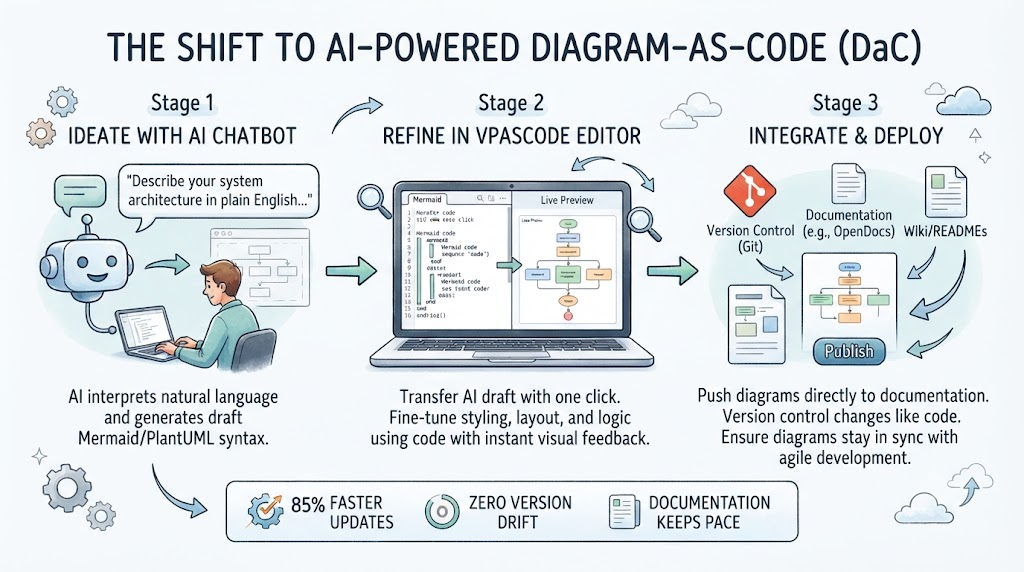
This guide explores how AI chatbots, combined with platforms like Visual Paradigm's VPasCode, are transforming Diagram-as-Code (DaC) workflows—and provides realistic Mermaid examples you can use immediately.
In today's agile environments, architecture changes as fast as the code itself. Traditional diagramming creates friction at every step:
One engineering team documented the cost of these inefficiencies: updating a payment gateway sequence diagram took 55 minutes through their manual process—exporting, emailing, and re-uploading images across tools.
The solution lies in treating diagrams as code, then supercharging that workflow with AI.
Visual Paradigm has built a two-stage workflow that bridges the gap between natural language and professional diagrams:
The AI Chatbot acts as your "architect." You describe what you want to visualize in plain language, and the AI generates the underlying diagram structure:
"Create a microservice architecture for a food delivery app with customers, delivery drivers, and restaurant managers. Show how they interact with the main application."
The Chatbot interprets your intent and produces a complete diagram with properly formatted syntax, ready for refinement.
The critical bridge is the "Open in VPasCode" button. One click transfers the AI-generated diagram to VPasCode's full editor, revealing the underlying code.
Here's where the magic happens:
This solves what industry experts call the "Last Mile Problem" of AI generation—the AI gives you a 90% complete draft, and you use the code editor to perfect the final 10%.
Let's explore practical Mermaid diagrams you can generate with AI assistance or write yourself. All syntax is verified and ready to use.
This sequence diagram shows a user logging into an application with token-based authentication. AI chatbots can generate this from a prompt like: "Show me a sequence diagram for user authentication with OAuth2".
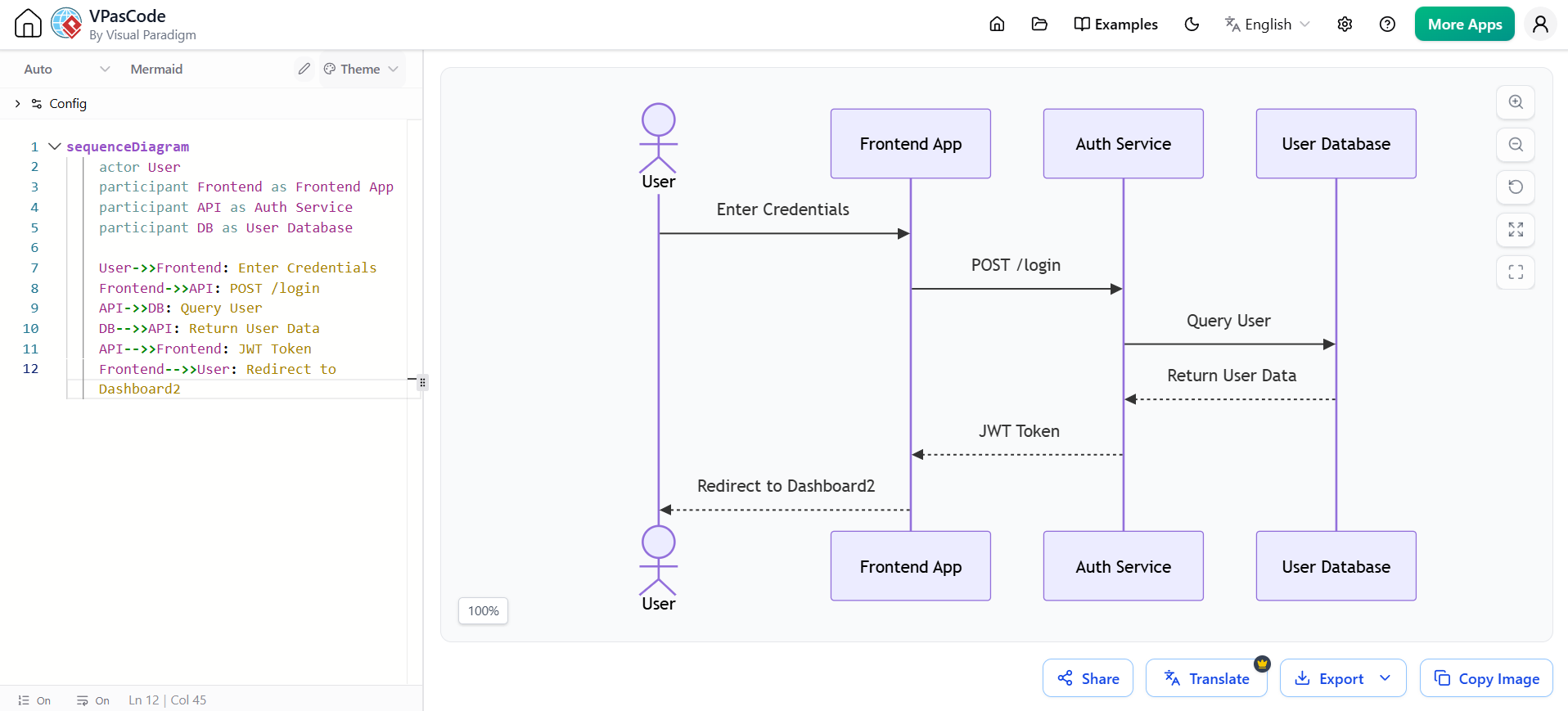
sequenceDiagram
    actor User
    participant Frontend as Frontend App
    participant API as Auth Service
    participant DB as User Database

    User->>Frontend: Enter Credentials
    Frontend->>API: POST /login
    API->>DB: Query User
    DB-->>API: Return User Data
    API-->>Frontend: JWT Token
    Frontend-->>User: Redirect to Dashboard
When to use: Documenting API flows, authentication processes, or any interaction between system components.
A high-level architecture diagram showing how components in a system interact. This could be generated from: "Create a microservice architecture showing how a web app connects to services and databases".
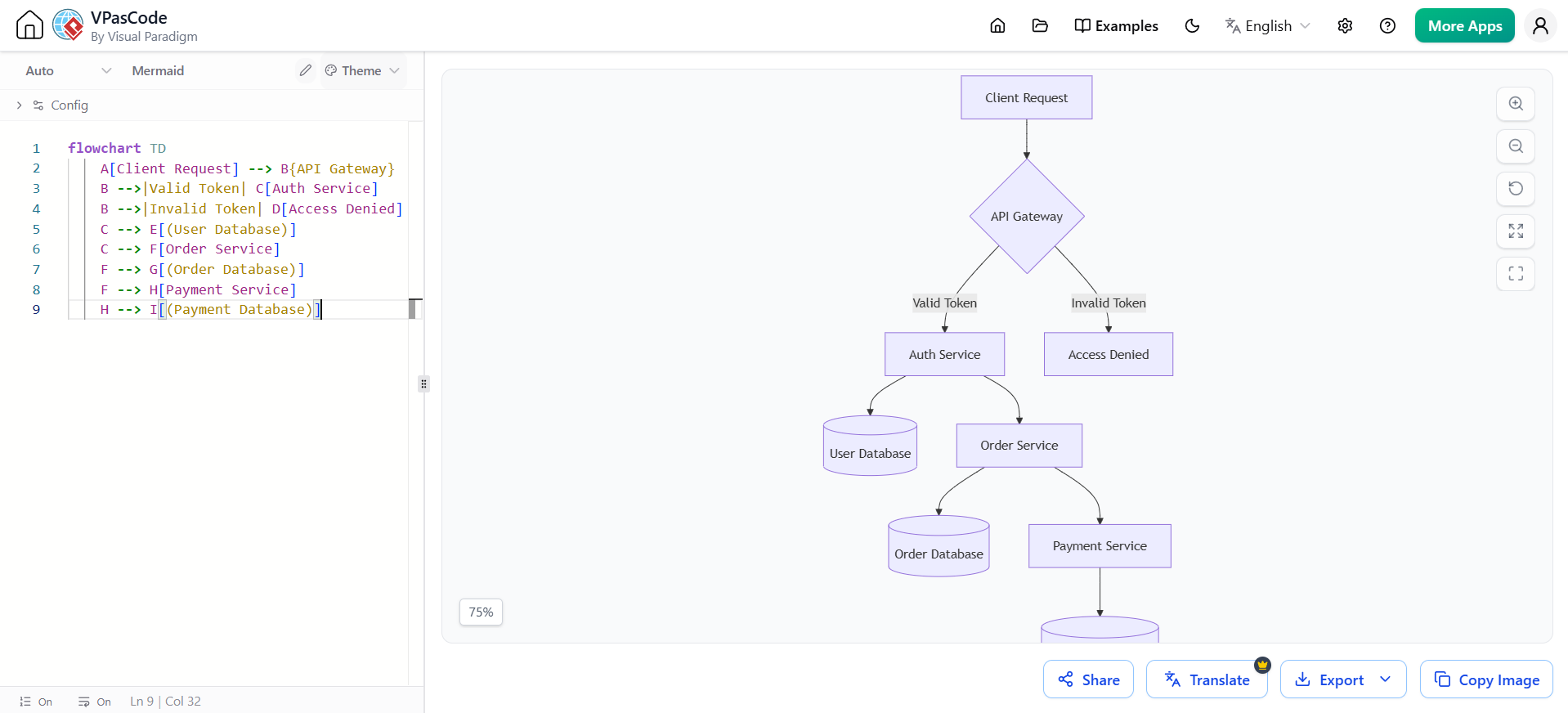
flowchart TD
    A[Client Request] --> B{API Gateway}
    B -->|Valid Token| C[Auth Service]
    B -->|Invalid Token| D[Access Denied]
    C --> E[(User Database)]
    C --> F[Order Service]
    F --> G[(Order Database)]
    F --> H[Payment Service]
    H --> I[(Payment Database)]
When to use: System architecture documentation, onboarding new team members, or architecture reviews.
This example shows a CI/CD process with decision points—a diagram AI can generate from: "Create a flowchart showing code review and deployment process".
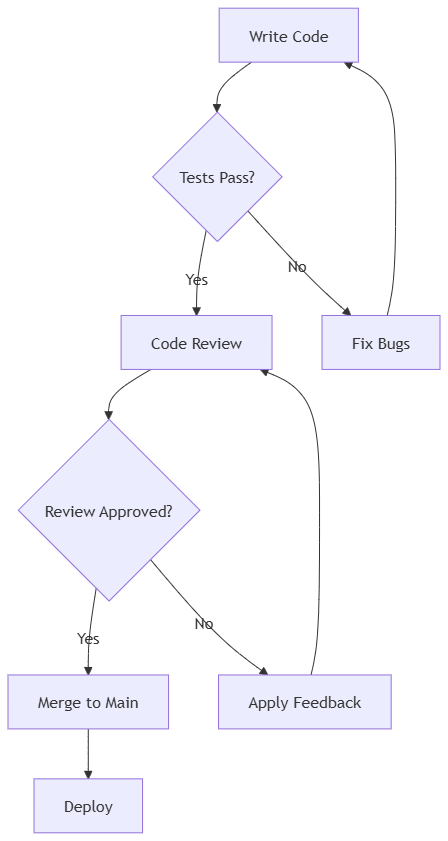
flowchart TD
    A[Write Code] --> B{Tests Pass?}
    B -->|Yes| C[Code Review]
    B -->|No| D[Fix Bugs]
    D --> A
    C --> E{Review Approved?}
    E -->|Yes| F[Merge to Main]
    E -->|No| G[Apply Feedback]
    G --> C
    F --> H[Deploy]
When to use: Documenting development processes, CI/CD pipelines, or any workflow with decision branches.
Looking for a powerful, free diagram-as-code tool? Effortlessly render PlantUML, Mermaid, Graphviz, and 20+ programming languages in real time—powered by instant AI error fixing and automatic format detection.
Database structure visualization—ideal for documentation that needs to stay in sync with schema changes.
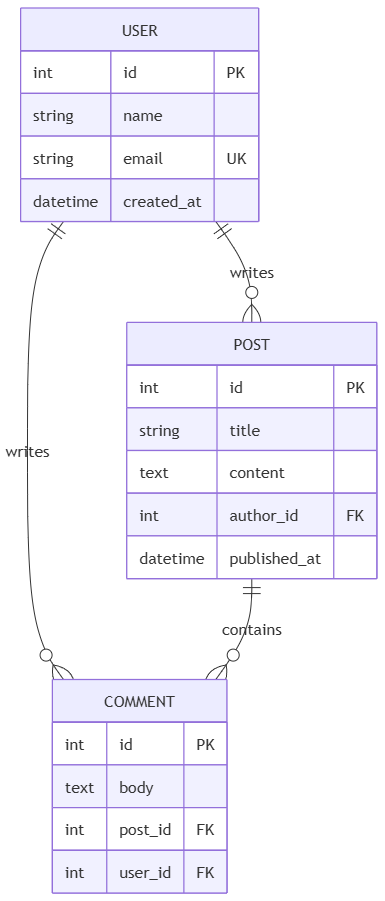
erDiagram
    USER {
        int id PK
        string name
        string email UK
        datetime created_at
    }
    POST {
        int id PK
        string title
        text content
        int author_id FK
        datetime published_at
    }
    COMMENT {
        int id PK
        text body
        int post_id FK
        int user_id FK
    }
    USER ||--o{ POST : "writes"
    USER ||--o{ COMMENT : "writes"
    POST ||--o{ COMMENT : "contains"
When to use: Database design documentation, schema reviews, or API data model specifications.
VPasCode is more than just an AI-powered editor—it's a unified platform designed for modern Diagram-as-Code workflows:
VPasCode natively supports Mermaid, PlantUML, and Graphviz in a single interface:
The editor auto-detects your syntax and switches engines automatically, eliminating setup friction.
The most transformative feature is the direct pipeline to OpenDocs, Visual Paradigm's AI-powered knowledge management platform:
One team reduced documentation update time from 55 minutes to 8 minutes using this pipeline—an 85% improvement.
Because VPasCode stores diagrams as plain text, they integrate seamlessly with Git:
Navigate to Visual Paradigm's AI Chatbot interface. The Chatbot is specifically trained on diagram syntax and architectural patterns.
Use natural language. Examples that work well:
The Chatbot renders your description instantly. Click "Open in VPasCode" to transfer the complete diagram with all syntax preserved.
Once in VPasCode:
Use the "Send to OpenDocs Pipeline" button to push your diagram directly into your documentation with context notes and metadata.
AI chatbots are transforming Diagram-as-Code from a syntax-heavy exercise into a conversational design process. The combination of AI generation with precise code refinement in VPasCode creates a workflow that's both accessible and professional.
The measurable outcomes speak for themselves: 85% faster updates, zero version drift, and documentation that finally keeps pace with development.
As one industry expert noted: "Coding diagrams using plain text notations turns a task usually regarded as artistic into a data-driven document". With AI chatbots bridging the gap between idea and implementation, that transformation is now accessible to every team member—not just those who memorize syntax.
Next Steps: Try describing your current system architecture to an AI chatbot, then refine the result in VPasCode. The real-time feedback loop will change how you think about documentation forever.

